
Cloud costs in DevOps can quickly spiral out of control due to factors like auto-scaling, idle environments, and continuous deployments. Predictive analytics tools are helping teams forecast usage, optimise resources, and reduce waste.
Key Takeaways:
- Predictive Analytics Benefits: Tools like AWS Cost Explorer and Azure Cost Management use machine learning to analyse historical data, forecast future costs, and automate cost-saving measures.
- Real-World Savings: A logistics company cut cloud costs by 31% in 2025 using AI-driven DevOps tools. A UK bank reduced AWS costs by £3.8M annually with custom ML models.
- Tool Comparisons: AWS and Azure tools are easy to integrate within their ecosystems but may lack advanced features. CloudHealth and Spot.io excel in enterprise-level forecasting and real-time autoscaling. Custom models offer unmatched accuracy but require expertise.
Quick Tip: Implement resource tagging and automate anomaly alerts to improve cost management, regardless of the tool you choose.
Predictive analytics is transforming how teams manage cloud expenses, making it easier to control budgets and avoid surprises.
Cloud Cost Estimation & Forecasting using AI with Costix
Need help optimizing your cloud costs?
Get expert advice on how to reduce your cloud expenses without sacrificing performance.
1. Hokstad Consulting
Hokstad Consulting takes a unique approach to DevOps by embedding predictive analytics directly into workflows, moving beyond generic dashboards. Their services include DevOps transformation, cloud cost engineering, strategic migration, and AI-driven development, all aimed at cutting cloud expenses while boosting performance across different hosting models.
Forecasting Accuracy
Hokstad uses AI and machine learning models trained on both historical usage data and real-time analytics to deliver precise forecasting. This hybrid approach is far more reliable than traditional trend-based methods, which often fail to account for unexpected spikes or seasonal shifts. By accurately predicting traffic peaks, their AI-driven DevOps implementations help avoid over-provisioning, leading to substantial cost savings[1]. While detailed case studies remain confidential, their methodology ensures proactive resource management, reducing waste and improving efficiency. This predictive capability also feeds directly into automated systems for seamless integration.
Integration with DevOps Pipelines
Hokstad integrates predictive analytics into DevOps pipelines through custom automation and AI agents. These tools are embedded within CI/CD workflows, deployment processes, and monitoring systems. Features include real-time anomaly detection linked to platforms like Slack and Jira, ensuring teams are immediately alerted to any spending deviations[1]. Their system is also designed to support microservices and serverless frameworks, aligning cost insights with deployment cycles. This approach fosters a continuous focus on cost-efficiency throughout the DevOps process.
Cost Optimisation Features
Hokstad offers several standout cost-saving features. These include automated scheduling that powers down idle development and test environments, predictive auto-scaling across regions, and detailed cost attribution by team or project. They also optimise the use of spot and reserved instances, cutting compute costs by as much as 80% for non-critical workloads[2]. Additionally, their right-sizing and predictive analytics strategies have delivered savings that meet industry benchmarks[3], all while maintaining deployment speed and innovation.
Implementation Complexity
Adopting Hokstad’s advanced system requires careful planning but is manageable with the right strategy. The process begins with an assessment of current spending patterns and includes training DevOps teams to adopt cost-conscious practices. AI tools are then integrated into CI/CD pipelines, and collaboration between engineering and finance teams is encouraged. Automated scheduling and anomaly detection can typically be set up within a few months, guided by tailored support[1][4]. For businesses hesitant about upfront costs, Hokstad offers a No Savings, No Fee
model, where fees are capped based on the savings achieved, reducing the financial risk of trialling their predictive cost management solutions.
2. AWS Cost Explorer with ML Forecasting
AWS Cost Explorer is an integrated tool designed to help users manage and predict cloud spending using machine learning. As of February 2026, it allows users to analyse up to 38 months of historical data (an increase from the previous six months). This extended timeframe is particularly useful for spotting long-term trends such as seasonal cost spikes or compliance cycles. Additionally, it can forecast costs up to 18 months ahead, making it a practical tool for enterprise-level budget planning needs[5].
Forecasting Accuracy
The machine learning model in AWS Cost Explorer works within an 80% prediction interval, providing a range of expected costs rather than a single, fixed estimate[6]. However, this range can become broader when historical spending patterns are inconsistent or highly variable[6]. To take advantage of the 38-month historical data, users must manually enable this setting, as it is turned off by default[5].
It's worth noting that the tool requires at least one full billing cycle to begin generating forecasts, and it won’t provide predictions if there isn’t enough data[6]. A standout feature is its Generative AI-powered explanations, which offer plain-language insights into forecast drivers. For example, it can explain whether cost increases stem from seasonal trends or architectural changes[5].
Integration with DevOps Pipelines
AWS Cost Explorer integrates seamlessly into DevOps workflows through programmatic access via the GetCostForecast and GetUsageForecast APIs, as well as the AWS CLI[8]. Recent updates now allow forecasts to start on the same day they are requested, even on the last day of the month, ensuring there are no data gaps. Teams can automate API calls using scripts and filter results by service or account to identify specific cost drivers.
For added control, the tool integrates with AWS Budgets, enabling real-time alerts through Amazon SNS, Slack, or Chime when forecasted costs exceed predefined thresholds. While this requires manual setup, it ensures that cost insights are delivered directly into DevOps pipelines without delays[8].
Cost Optimisation Features
AWS Cost Explorer includes detailed filtering options by service, linked account, region, or custom tags, helping teams quickly identify where costs are increasing[5]. Its 18-month forecasting horizon aids in long-term budget planning, while the explainable AI feature translates complex projections into simple summaries, making it easier for executives to understand[5]. Additionally, integration with Amazon Q Developer allows users to query spending forecasts conversationally, while built-in anomaly detection monitors for unexpected deviations in costs and alerts teams accordingly[5].
Implementation Complexity
Setting up AWS Cost Explorer is straightforward. It is enabled directly through the Billing and Cost Management console, as API-based activation is not available[9]. Current-month data is generally accessible within 24 hours, though it may take a few days for historical data to fully populate[9]. While the console interface is free to use, programmatic API requests cost £0.01 per request[9].
The tool’s fixed 80% prediction interval makes it user-friendly, even for teams without advanced data science expertise[7]. This simplicity ensures that DevOps teams can easily integrate it into their workflows without needing specialised knowledge.
3. Azure Cost Management Predictive Insights
Azure Cost Management offers predictive insights across all active Azure subscriptions [10]. This feature uses a WaveNet deep learning algorithm for anomaly detection, which is distinct from its regular forecasting capabilities [12]. To function effectively, the model needs 60 days of historical usage data to establish patterns and account for trends like weekly resource consumption spikes [12]. These advancements enhance how DevOps teams handle real-time cost management.
Forecasting Accuracy
Azure sets clear benchmarks for cost forecasting accuracy. For high-performing, optimised workloads, the cost-to-forecast variance should stay under 12%, while general workloads aim for a range of 12% to 20% [13]. Anomaly detection takes place 36 hours after the end of the day (UTC), ensuring that all daily cost data is processed [11][12]. Manually excluding one-off costs or adjusting for reconfigured subscriptions can further refine these forecasts [13].
Integration with DevOps Pipelines
Azure integrates anomaly detection into DevOps workflows through Azure Logic Apps, enabling automated responses to cost anomalies [11][12]. Alerts can be routed to shared communication platforms like Slack or Teams for collective action [11]. They can also trigger ticket creation in ITSM tools and integrate with Microsoft Sentinel for streamlined incident management [12]. Nawaz Dhandala from OneUptime highlights the importance of these alerts:
Cost anomaly alerts are your safety net for unexpected charges. They catch the things that budget alerts miss - sudden spikes, configuration mistakes, unauthorized deployments, and billing errors. [11]
Cost Management Features
Azure Copilot allows users to query cost changes in natural language. For instance, you can ask, Why did my cost increase this month?
and receive AI-driven breakdowns showing percentage impacts by category [14]. The Smart Views feature flags anomalies with diamond icons on daily cost charts, making them easy to spot [11][12]. Combining budget alerts (to set financial boundaries) with anomaly alerts (to detect unexpected spikes) ensures comprehensive cost oversight [11]. For improved forecasting, switching to amortised cost
instead of billed cost
is recommended when using Reserved Instances or Savings Plans [13].
Implementation Complexity
Deploying Azure Cost Management tools involves balancing automation with manual data refinement to maintain accuracy. Setting up anomaly detection is straightforward at the subscription level, with baseline configurations automated [11]. Teams can use ARM templates or Azure CLI to roll out alert rules across multiple subscriptions, treating cost monitoring as Policy as Code
[11]. However, achieving precise forecasts often requires manual data cleansing and filtering. Advanced users can leverage Automated Machine Learning (AutoML) to ease this process [13]. Consistent tagging of resources by owner or cost centre also speeds up investigations when anomalies arise [11][12].
4. CloudHealth and Spot.io Analytics
CloudHealth and Spot.io bring different strengths to the table when it comes to predictive analytics for DevOps. CloudHealth by VMware focuses heavily on financial forecasting and budget management. It uses machine learning to predict costs and generate detailed reports, as highlighted by Mikko Virtanen [17]. Its standout feature is what-if
scenario planning, which allows users to estimate costs under different conditions - like doubling deployments. This makes it a great choice for aligning cloud expenses with business goals and financial reporting needs [17].
Forecasting Accuracy
CloudHealth is designed for enterprise-level budget management, delivering precise cloud cost forecasts [17]. It integrates cost data with ITSM tools such as ServiceNow, creating a seamless optimisation process. For example, it can automatically generate tickets to highlight cost-saving opportunities [17]. On the other hand, Spot.io (NetApp) takes a more operational approach. It uses predictive autoscaling powered by AI to anticipate workload needs and optimise resources in real time, including Spot instances [15]. This is especially useful for DevOps teams that require quick infrastructure adjustments to handle dynamic workloads.
Integration with DevOps Pipelines
Both platforms keep forecasts up-to-date by integrating with live data streams [16]. Spot.io has taken a step further by adopting autonomous FinOps as of February 2026. It employs AI agents to optimise costs for advanced workloads, including platforms like Snowflake and Databricks [15]. This shift represents a new phase for FinOps, moving beyond basic cost-cutting to smarter, autonomous cost management [15].
Implementation Complexity
CloudHealth can be challenging to implement, especially for large organisations with complex multi-cloud setups [17]. It also comes with a higher price point, making it less accessible for smaller teams or startups. Premium features, such as advanced forecasting, are often only available in top-tier plans [17]. While CloudHealth excels in financial system and ITSM tool integration, Spot.io stands out with its real-time operational capabilities. Its tight integration with DevOps pipelines makes it ideal for teams that rely on automated scaling and immediate adjustments [15]. Together, these platforms highlight the growing importance of predictive analytics in managing cloud costs effectively and efficiently.
Advantages and Disadvantages
::: @figure 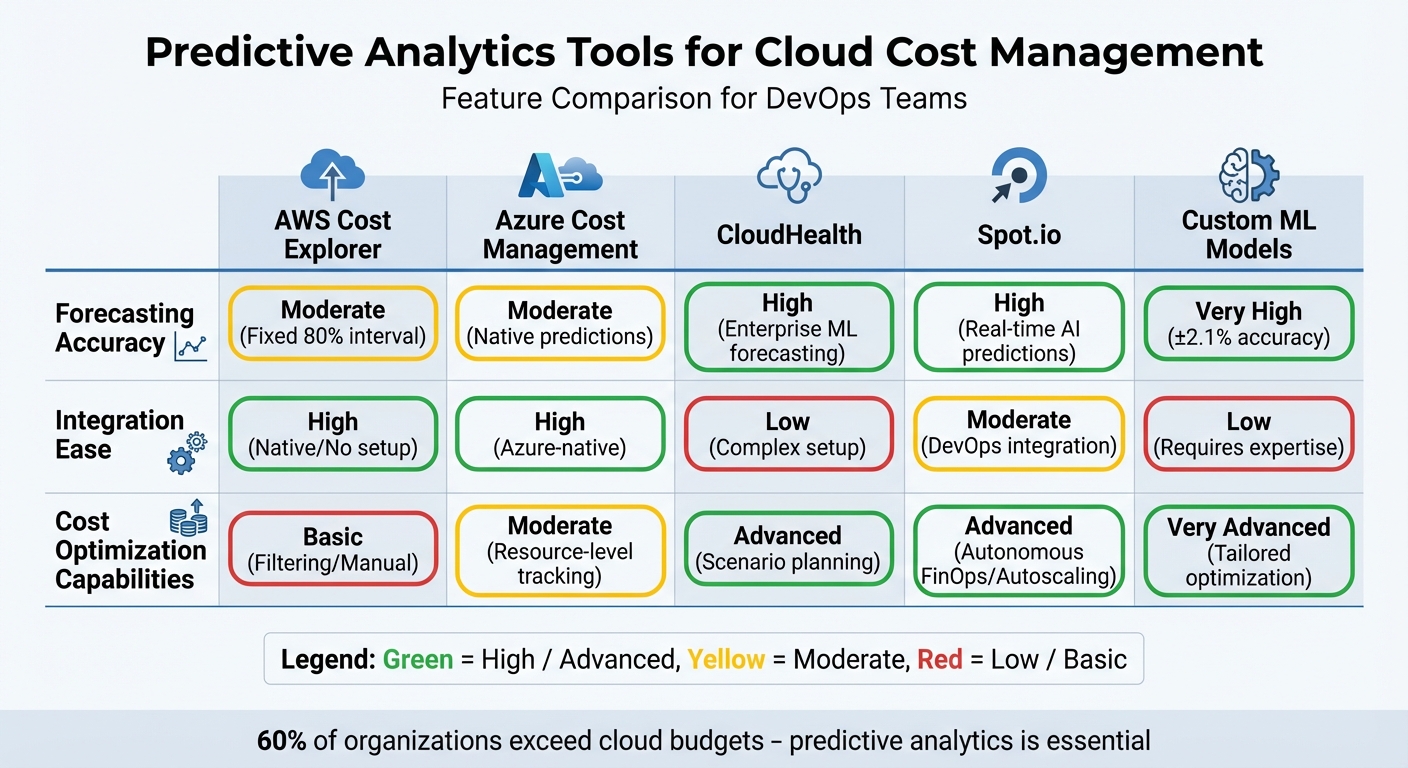 {Predictive Analytics Tools for Cloud Cost Management: Feature Comparison}
:::
{Predictive Analytics Tools for Cloud Cost Management: Feature Comparison}
:::
This section highlights the main strengths and weaknesses of various predictive analytics tools, helping DevOps teams make informed decisions for managing cloud costs in real time.
AWS Cost Explorer is seamlessly integrated into the AWS ecosystem and doesn’t require setup costs, making it a straightforward choice for teams already using AWS. However, it falls short when it comes to long-term seasonal trend analysis, as extended historical data must be manually enabled. While it’s effective for basic cost assessments, it lacks advanced automation features[7].
Azure Cost Management is a strong contender for teams heavily invested in Azure, offering the ability to monitor costs by resource groups and subscriptions. It’s free to use within the Azure platform, but it has a notable drawback: it may not catch cost overruns until after deployment. This delay often contributes to DevOps teams overspending by 20–40% on unreviewed decisions until invoices are received[18].
CloudHealth is geared towards enterprises, excelling in financial forecasting and what-if
scenario analysis. However, its complexity and higher implementation costs can be a barrier for smaller teams or organisations[17].
Spot.io shines in real-time operational optimisation, leveraging AI-powered autoscaling to manage Spot instances effectively. Its autonomous FinOps capabilities allow for hands-free cost management, making it a powerful tool for dynamic environments[15].
Meanwhile, custom ML models offer unparalleled forecasting precision. For example, in Q4 2025, a UK Tier-1 bank reduced its annual AWS expenditure from £9.4 million to £5.6 million by setting up a Cloud Trading Desk
using CloudZero, Grafana, and custom Prophet ML models. Spearheaded by Senior DevOps Engineer Meena Nukala, the team achieved an impressive forecasting accuracy of ±2.1%, far outperforming native tools. Additional savings of £1.44 million were realised through Spot and Graviton migrations[19].
The table below summarises the key features and limitations of these tools:
| Tool | Forecasting Accuracy | Integration Ease | Cost Optimisation Capabilities |
|---|---|---|---|
| AWS Cost Explorer | Moderate (Fixed 80% interval)[7] | High (Native/No setup)[7] | Basic (Filtering/Manual)[7] |
| Azure Cost Management | Moderate (Native predictions)[18] | High (Azure-native)[18] | Moderate (Resource-level tracking)[18] |
| CloudHealth | High (Enterprise ML forecasting)[17] | Low (Complex setup)[17] | Advanced (Scenario planning)[17] |
| Spot.io | High (Real-time AI predictions)[15] | Moderate (DevOps integration)[15] | Advanced (Autonomous FinOps/Autoscaling)[15] |
| Custom ML Models | Very High (±2.1% accuracy)[19] | Low (Requires expertise)[19] | Very Advanced (Tailored optimisation)[19] |
Conclusion
The best predictive analytics tool for managing cloud costs depends heavily on factors like the organisation's size, technical capabilities, and the complexity of its cloud infrastructure. For those already operating within the AWS or Azure ecosystems, AWS Cost Explorer and Azure Cost Management offer straightforward integration and cost efficiency. However, their lack of real-time updates may limit their effectiveness in fast-changing environments.
Larger enterprises often require tailored forecasting solutions capable of adapting to fluctuating workloads. These advanced tools can deliver precise predictions but typically demand a significant commitment to both expertise and ongoing management to unlock their full potential.
For high-growth start-ups and mid-sized companies, the focus should be on scalable solutions that combine automation with simplicity. These platforms strike a balance, allowing organisations to handle dynamic workloads effectively without the need for extensive DevOps resources or complicated setups.
One critical step for all organisations is to enforce rigorous tagging policies using Infrastructure-as-Code. Predictive models rely on clean, well-attributed data to generate accurate forecasts. Establishing clear tagging conventions for cost centres and resource ownership should be a priority before deploying any advanced analytics tools.
Considering that 60% of organisations exceed their cloud budgets[20], predictive analytics is no longer optional - it’s a necessity. For those needing expert help, Hokstad Consulting provides cloud cost engineering services that can cut expenses by 30–50% through DevOps transformation and strategic optimisation. This underscores the importance of integrating predictive analytics into DevOps practices for efficient, real-time cloud cost management.
FAQs
What data is needed for reliable predictive cloud cost forecasting?
For dependable cloud cost forecasting, having enough historical data is crucial. You’ll also need precise metrics for core cost areas like computing, storage, and networking, along with detailed insights into usage patterns and any anomalies. This combination allows AI models to analyse trends effectively and spot irregularities, leading to more accurate predictions.
How can we embed cost forecasts and anomaly alerts into our CI/CD pipeline?
To include cost forecasts and anomaly alerts effectively, start by using tools that offer real-time visibility and automated notifications. Set up dashboards to track expenses and automate resource scaling based on predefined rules. Leverage AI-powered forecasting models for precise budget planning, and implement mechanisms to detect unusual cost spikes. These systems can send alerts through email or messaging apps, keeping you informed instantly. Additionally, native tools provided by cloud platforms can strengthen your monitoring and alerting processes.
What tagging standards should we enforce to make cost predictions accurate?
To make cloud cost predictions more precise, it's essential to establish consistent tagging standards. Label resources with clear details such as department, project, environment, and cost centre. This helps in tracking and allocating costs effectively.
You can take it a step further by automating tagging with Infrastructure as Code (IaC) tools. Additionally, integrating tagging checks directly into your CI/CD pipelines ensures tags are applied correctly and consistently. Together, these steps help create a reliable system for managing and allocating cloud costs across your infrastructure.