
AI-driven CI/CD workflows are reshaping how software is built, tested, and deployed. By leveraging machine learning, these pipelines go beyond rigid, step-by-step processes to deliver smarter, faster, and more efficient results. Here’s what you need to know:
- What They Do: Analyse past data, predict issues, and make decisions autonomously, such as selecting relevant tests or suggesting fixes.
- Why They Matter: They save time and resources by automating repetitive tasks, improving feedback cycles, and reducing manual effort.
- Key Tools: Platforms like Harness AI, CircleCI, and GitHub Agentic CI offer features like error analysis, flaky test repairs, and natural language orchestration.
- Challenges: AI systems can introduce latency, cost overruns, or errors if not implemented carefully. Validation and human oversight are critical.
- Real-World Results: Companies like Build.com reduced manual deployment work by 85%, while GitHub Next boosted test coverage to 100% using AI agents.
Quick Tip: Start small by integrating AI into non-critical tasks, like advisory comments or predictive test selection, before scaling up to more complex processes.
AI-Driven CI: Creating Self-Healing Pipelines
AI Tools for Automating CI/CD Workflows
::: @figure 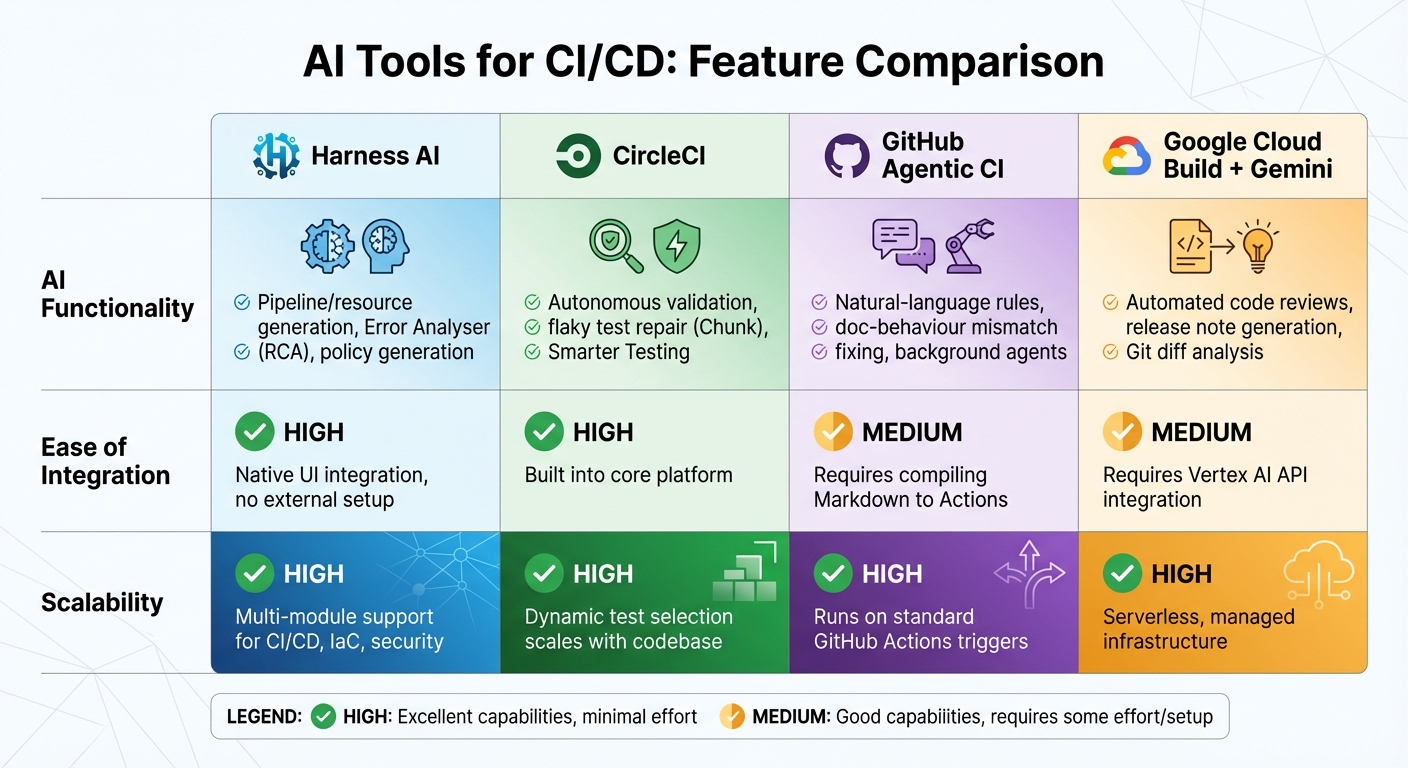 {AI-Powered CI/CD Tools Comparison: Features, Integration, and Scalability}
:::
{AI-Powered CI/CD Tools Comparison: Features, Integration, and Scalability}
:::
AI-powered CI/CD tools have moved far beyond simple automation. These modern systems now incorporate natural language orchestration and autonomous root cause analysis, fundamentally changing how software is built and deployed. For instance, Harness AI enables developers to create pipelines and infrastructure resources using natural language prompts, while CircleCI automatically detects flaky tests and fixes configurations [5][2].
The introduction of autonomous reasoning sets these tools apart from traditional rule-based CI. As Idan Gazit, Head of GitHub Next, puts it:
Any time something can't be expressed as a rule or a flow chart is a place where AI becomes incredibly helpful[6].
This capability allows AI tools to handle judgement-intensive tasks, such as ensuring documentation matches implementation, spotting semantic regressions, or identifying performance issues that deterministic rules might overlook [6]. Below is a comparison of leading AI tools for CI/CD, showcasing their unique features.
Comparison of AI Tools for CI/CD
Different platforms excel in various areas, making it essential to evaluate their strengths to find the right fit for your environment. Here's a side-by-side comparison:
| Tool | AI Functionality | Ease of Integration | Scalability |
|---|---|---|---|
| Harness AI | Pipeline/resource generation, Error Analyser (RCA), policy generation [5] | High (native UI integration, no external setup) [5] | High (multi-module support for CI/CD, IaC, security) [7] |
| CircleCI | Autonomous validation, flaky test repair (Chunk), Smarter Testing [2] | High (built into core platform) [2] | High (dynamic test selection scales with codebase) [2] |
| GitHub Agentic CI | Natural-language rules, doc-behaviour mismatch fixing, background agents [6] | Medium (requires compiling Markdown to Actions) [6] | High (runs on standard GitHub Actions triggers) [6] |
| Google Cloud Build + Gemini | Automated code reviews, release note generation, Git diff analysis [4] | Medium (requires Vertex AI API integration) [4] | High (serverless, managed infrastructure) [4] |
Harness AI shines with its Error Analyser, which performs root cause analysis by correlating recent changes, checking external dependencies, and identifying historical failure patterns through similarity scores [5]. Meanwhile, CircleCI focuses on autonomous validation, ensuring the delivery process stays on track by identifying flaky tests and fixing broken configurations [2].
Examples of AI-Driven Tools in Action
Real-world applications of these tools show their transformative potential. In February 2026, GitHub Next ran an automated test-coverage experiment. Over 45 days, an AI agent submitted small daily pull requests, adding over 1,400 new tests and boosting coverage from 5% to nearly 100%. The entire process cost just £65 in LLM tokens [6]. This approach turned test coverage into a continuous, AI-managed task rather than an occasional effort.
Similarly, United Airlines reported a 75% improvement in build times in 2025 after adopting Harness's AI-enhanced platform. The transition from monolithic applications to microservices, supported by automated governance guardrails, allowed developers to work more efficiently without compromising security [8]. On the other hand, Kajabi achieved a 50% reduction in p90 build times and halved their CI infrastructure costs by leveraging Harness CI's optimisation features [8].
However, not every implementation goes smoothly. Wiser Solutions Inc. provides a cautionary example. In September 2025, Senior Software Engineer Guruprasad Raghothama Rao integrated an AI assistant into their cloud-native pipeline. Initially, the AI caused latency cliffs
, increasing build times from 8 to 22 minutes. The team later shifted to an asynchronous workflow, where the AI posted advisory comments after the build passed. This adjustment helped catch a regression in a data transformation function without disrupting the critical path [3]. As Rao observed:
Putting AI in a CI/CD pipeline isn't about automating developers out of the loop. It's about augmentation - faster feedback, better documentation, more edge cases caught[3].
These examples underscore how AI-driven tools are refining CI/CD workflows, making them faster, smarter, and more efficient.
Designing Flexible AI-Enhanced CI/CD Pipelines
Incorporating AI into CI/CD pipelines can be transformative, but it requires thoughtful design to maintain reliability. The secret is treating AI as a modular component rather than embedding it as a single, rigid layer. This way, AI elements can be added, upgraded, or even disabled without disrupting the core build-test-deploy workflow.
Building Modular Pipelines with AI Integration
The first step to effective AI integration is breaking pipelines into independent, self-contained units. A multi-agent architecture works particularly well, assigning specific AI agents to tasks like root cause analysis, safety validation, or remediation [11]. These agents operate independently, with clear inputs and outputs, making it easy to replace or enhance components as AI technology advances. Many modern platforms even allow developers to edit pipeline steps and resources using natural language prompts [5].
That said, reliability must take priority over convenience. Experience shows that embedding AI directly in the critical path can lead to latency issues. To address this, many teams move AI analysis to an asynchronous path. In this setup, AI provides advisory comments after builds pass, identifying potential issues without holding up deployments. Importantly, any autonomous AI action requires validation before being implemented [3].
To balance speed and AI insights, consider circuit breakers that disable AI stages automatically if latency or GPU costs exceed predefined limits [3]. Additionally, label AI-generated feedback with an \[Advisory\]
tag unless it has been validated by static analysis or other reliable methods [3]. This approach reduces reviewer fatigue and ensures teams don’t blindly trust AI outputs.
These modular strategies lay the groundwork for creating pipelines that are both scalable and efficient. The next step is to ensure scalability through Infrastructure as Code.
Using Infrastructure as Code (IaC) for Scalability
Infrastructure as Code (IaC) plays a crucial role in ensuring consistent environments, which is vital for scaling AI-enhanced pipelines. Tools like Terraform enable AI to generate and manage IaC pipelines that automatically provision cloud resources [5][11]. This eliminates configuration drift, ensuring that staging environments mirror production. As a result, automated regression testing can reliably cover both code and infrastructure changes [14].
Using standardised pipeline templates further enhances consistency. A typical template might follow a Build → Unit Tests → SAST/SCA → Artifact flow [16]. These templates ensure uniform quality across projects, while AI can generate baseline configurations for services and environments to maintain consistency [5]. For added safety, Policy-as-Code guardrails can be integrated. For example, combining Open Policy Agent (OPA) with Rego allows AI to generate and enforce compliance policies, ensuring updates meet security requirements [5][10].
The initial financial investment is manageable since most leading cloud providers offer free credits for setup and testing [11].
With scalable infrastructure in place, attention can shift to optimising build processes using AI.
Using AI for Build Optimisation and Conditional Job Execution
AI can significantly improve build efficiency through predictive test selection and smarter resource allocation. Instead of running entire test suites, AI analyses code changes, dependency graphs, and historical test data to determine which tests are relevant [2]. This targeted approach shortens feedback loops by focusing only on the affected parts of the code.
AI also streamlines the build process by identifying redundant stages and suggesting parallel execution. By analysing repository history, AI can recommend split points for parallelisation and spot unnecessary steps, reducing overall build time [12]. For instance, a pilot programme using AI-driven test selection and triage achieved a 30% reduction in average CI wall-clock time for pull request validation over 12 weeks [12]. AI can also implement intelligent caching strategies, learning from previous runs to speed up builds further [12].
One effective method is the single-build strategy. In this approach, Docker images are built once on the main branch and tagged as latest. Scripts then retag the same image for rc-* (staging) or release-* (production) environments [14]. This ensures the same artifact moves through the pipeline, saving both time and resources while eliminating inconsistencies between environments.
To introduce AI-driven optimisation safely, start cautiously. For example, run autonomous AI remediation on branches in small batches before merging into the main pipeline [15]. This allows AI to suggest fixes without compromising production quality. Maintaining human oversight is critical - over 70% of developers report that they routinely rewrite or refactor AI-generated code before it’s ready for production [15].
Implementing AI for Testing, Security, and Monitoring
Once you've optimised speed, the next priority is ensuring quality and security throughout the delivery process. AI steps in here to automate repetitive tasks, spot issues earlier, and speed up their resolution.
AI-Driven Testing and Static Code Analysis
AI proves incredibly useful for improving test coverage and creating missing tests automatically. A notable example is GitHub Next's experimental implementation, where an AI agent boosted test coverage from around 5% to nearly 100% within 45 days, costing approximately £65 in LLM tokens [6]. By submitting small, daily pull requests, developers could review and merge updates incrementally, avoiding interruptions to their main workflows.
AI goes beyond traditional static analysis tools. While standard linters focus on syntax, AI can validate the semantic intent of code, ensuring it behaves as intended based on its documentation [6]. Idan Gazit, Head of GitHub Next, highlights this capability:
Any time something can't be expressed as a rule or a flow chart is a place where AI becomes incredibly helpful[6].
Automated remediation pipelines take this further, diagnosing build failures through log analysis, applying fixes, and creating pull requests for human review [9][20]. This approach not only speeds up resolution times but also maintains human oversight.
That said, AI isn't flawless. It can occasionally hallucinate
, such as mistakenly flagging imports as unused when they are essential [3]. To counter this, always validate AI-generated suggestions using linters, type checkers, or test suites. Once testing is optimised, the focus can shift to securing and monitoring these robust pipelines.
Automating Security with AI
With testing in order, security automation becomes the next critical step. AI-driven tools can address both traditional vulnerabilities - like SQL injection and buffer overflows - and newer threats specific to machine learning systems, such as prompt injection, model poisoning, and training data leakage [19]. Alarmingly, research shows that up to 50% of AI-generated code may contain security flaws [22]. Despite this, a 2023 survey found that 76% of tech workers mistakenly believed AI-generated code to be inherently safer than human-written code [22].
To address these risks, security should be implemented across multiple layers. Start with secure prompt engineering at the developer level, integrate SAST/SCA tools into the CI pipeline, enforce Policy as Code in the CD pipeline, and maintain runtime protection in production [22]. AI can also suggest fixes by generating pull requests, though critical changes should always require human approval [21][3]. Running AI security reviews asynchronously can prevent latency cliffs
that inflate pipeline runtimes from 8 to over 20 minutes due to inference delays [3].
This layered security approach strengthens AI-driven CI/CD workflows, ensuring they remain secure and efficient.
Continuous Monitoring with Predictive Analytics
Beyond testing and security, continuous monitoring powered by predictive analytics ensures the reliability of delivery pipelines. AI enables a shift from reactive troubleshooting to proactive maintenance, identifying potential failures before they disrupt operations. Predictive models can flag anomalies in build times, resource usage, and performance metrics [18]. When issues occur, AI agents can diagnose root causes, suggest fixes via pull requests, and lighten the manual debugging workload [17][9].
For safe implementation, use circuit breakers to disable AI stages automatically if they exceed latency or cost thresholds [3]. Treat AI suggestions as advisory until validated by static analysis or human review to reduce the risk of errors from hallucinations.
The Model Context Protocol (MCP) also enhances diagnostic accuracy by providing AI agents with secure, structured access to CI logs and metadata, without exposing sensitive information [17][9]. This layered monitoring strategy ensures AI enhances reliability without introducing new vulnerabilities.
Optimising Performance and Avoiding Common Pitfalls
Resource Efficiency and Cost Optimisation
AI pipelines can quickly become a financial burden if not carefully managed. One standout cost-saving approach is predictive test selection. For example, Google significantly reduced its total test execution time by 60% and improved build reliability by 20% by prioritising high-risk tests based on historical data [25]. Another effective strategy involves using spot or preemptible instances, which cost 60–90% less than on-demand capacity, making them a great choice for non-critical continuous integration (CI) tasks [26].
Right-sizing infrastructure is equally critical. Studies reveal that 63% of pipeline failures are caused by resource exhaustion [23]. Yet many teams overcompensate by running oversized runners, wasting money. To address this, track CPU and memory usage for all job types to identify underutilised instances, then reallocate resources to better-suited machines. For AI inference workloads, consider 4-bit quantised models and efficient formats like GGUF to reduce container startup times and optimise GPU memory usage [24]. Also, avoid costly NAT gateway traps
by using VPC endpoints (e.g., AWS S3 or Azure Private Endpoints) and ensuring runners, registries, and caches are in the same region - cross-region data transfers can quickly inflate costs [26].
Companies like Hokstad Consulting specialise in auditing cloud infrastructure to pinpoint inefficiencies. They often help reduce cloud expenses by 30–50% without compromising performance. Their expertise in DevOps and AI ensures cost savings align with delivery speed and reliability.
While cost management is crucial, maintaining pipeline efficiency also means steering clear of common mistakes.
Common Pitfalls and How to Avoid Them
Cost optimisation is only part of the equation. Treating AI-generated output as flawless can introduce serious risks. Research shows that over 50% of AI-generated code samples contain logical or security flaws [15]. Developers often need to intervene, highlighting the dangers of relying on AI without verification. For instance, Guruprasad Raghothama Rao at Wiser Solutions Inc. experienced a 150% increase in latency - from 8 to over 20 minutes - when AI inference was placed directly in the critical build path. This also led to confusing, hallucinated release notes [3].
AI output is untrusted input. I built cheap, layered checks to keep noise out.
- Guruprasad Raghothama Rao, Senior Software Engineer, Wiser Solutions Inc. [3]
To mitigate these risks, move AI tasks to asynchronous paths that run after the critical build and test stages. Set up circuit breakers to automatically disable AI stages if they exceed predefined latency or cost thresholds [3][27]. Lightweight validators like linters, type checkers, or static analysers can review AI suggestions before they reach human reviewers [3][15]. Additionally, implement monthly budgets per agent and project to prevent unexpected cloud costs [27], and always require human sign-off for high-impact changes, such as infrastructure updates.
These pitfalls highlight the need for a structured approach to improving CI/CD systems.
Best Practices for Continuous Improvement
Continuous improvement thrives on experimentation, but safety nets are essential. Here are some deployment strategies that can be enhanced with AI:
| Strategy | Advantages | Disadvantages | AI Enhancement Potential |
|---|---|---|---|
| Feature Flags | Allows deployment decoupled from release; provides an instant kill switch |
Adds code complexity and requires lifecycle management | AI can toggle flags automatically based on error logs or user feedback |
| Canary Releases | Limits risk by testing on a small subset of traffic | Requires advanced traffic routing and monitoring | AI can detect anomalies early, predicting the need for rollbacks [25][27] |
| Blue-Green Deployment | Enables zero downtime and fast rollbacks | Requires duplicate environments, increasing costs | AI can optimise resource allocation to reduce idle time [28] |
Adopting trust-tier frameworks can help balance automation and oversight. High-impact tasks can be gated for human approval, while low-impact ones are automated [27]. Another useful practice is the agent-as-PR author pattern, where AI operates in isolated environments and submits pull requests instead of pushing changes directly to the main branch. This maintains a clear audit trail and limits the risk of errors spreading [27].
As Alexendra Scott aptly puts it:
AI assistants can transform CI/CD from a set of scripted tasks into an intelligent delivery system... But the technology is an amplifier - it magnifies both good processes and bad[12].
Conclusion and Key Takeaways
Key Points Recap
AI-powered CI/CD workflows are reshaping how software is delivered. Take Build.com, for example - their AI tool reduced manual deployment verification by 85%, saving significant time each week [1]. By automating repetitive tasks, these workflows enhance efficiency while keeping reliability front and centre.
These AI pipelines don’t just handle routine checks; they also use historical data to predict issues like downtime or resource overuse. When anomalies occur, self-healing systems can instantly roll back changes, cutting down on disruptions [29]. For scalability, they efficiently manage large-scale cloud setups, integrating technologies like serverless frameworks and Kubernetes to handle multiple simultaneous code commits without human intervention [13][30].
But there’s a catch: success with AI demands a disciplined approach. Developers should treat AI outputs with caution, validating them through tools like linters and static analysers. To avoid risks, offload AI processes from critical workflows and set circuit breakers to control costs or delays. Jamie Motheral from Parasoft sums it up well:
It's not about AI taking over your codebase. It's about giving developers a smart agent that handles repetitive work, accelerates remediation, and keeps your pipelines moving autonomously - and responsibly[15].
With these benefits in mind, let’s look at how to implement AI-driven workflows effectively.
Next Steps for Implementation
Start by identifying bottlenecks in manual tasks like log analysis, flaky test management, or deployment verification [30]. Over the first 30 days, deploy a staging agent to generate pull requests while running basic static code analysis. By 60 days, introduce trust scores and budget controls for LLM API usage. By 90 days, enable guarded auto-merges for low-risk changes [27].
Measure your progress using both standard DORA metrics - like deployment frequency and change failure rate - and AI-specific ones, such as suggestion acceptance rates and false positive rates [12][10]. Assess whether AI integration reduces manual effort, improves handoff quality, and speeds up root-cause analysis. Remember, technical debt can consume up to 20% of IT budgets, a cost that AI-supported CI/CD workflows can help trim [29].
For expert guidance, Hokstad Consulting offers tailored solutions to transform your DevOps processes. They specialise in designing AI-driven workflows that can reduce cloud costs by 30–50% while improving deployment cycles. Their expertise in cloud cost engineering and automation ensures your pipelines are both efficient and cost-effective. Visit hokstadconsulting.com to learn more about optimising your CI/CD workflows.
FAQs
Where should AI sit in a CI/CD pipeline without slowing builds?
AI can play a valuable role in the CI/CD pipeline by improving workflows while keeping build speed intact. The key is to embed AI agents into current processes - such as testing, quality assurance, and deployment - in a way that ensures they function smoothly and efficiently. When done correctly, this integration allows AI to enhance automation and streamline operations without interfering with the pipeline's overall performance.
How do you validate AI suggestions and prevent hallucinations?
To ensure the reliability of AI suggestions and minimise errors, it's essential to integrate thorough testing into your CI/CD pipelines. This means rigorously verifying AI-generated outputs before they are deployed. Key strategies include model version pinning, which locks in specific AI model versions for consistency, and prompt control, which standardises input prompts to maintain predictable results. Additionally, traceability plays a critical role, allowing you to track and reproduce outputs.
For added security and trust, consider using cryptographic proofs, signed diffs, and audit trails. These tools not only verify changes but also make it easier to roll back to previous states if needed. By blending automated testing, robust traceability, and strict verification policies, you can create workflows that are both dependable and trustworthy when driven by AI.
Which metrics best show ROI from AI-driven CI/CD?
Key metrics that showcase ROI from AI-powered CI/CD processes include deployment reliability, automation effectiveness, and operational cost savings. On top of that, DORA metrics - like lead time, deployment frequency, change failure rate, and mean time to recovery - play a vital role. Using AI-focused evaluation frameworks, these metrics can provide a clear view of both the technical performance and the broader business impact.