
If your event setup is costing too much, I’d check four things first: event volume, fan-out, retries, and retention. Those four drivers often explain why a system that looks cheap at launch ends up adding £10,000s per month later.
Here’s the short version:
- I’d keep event payloads small and put big files in object storage instead
- I’d filter events early so low-value traffic never hits queues, functions, or workflows
- I’d cap retries and control replays, because failed events can run the same pipeline again and again
- I’d cut broad subscriptions and duplicate processing, since one event sent to 5 consumers means 5 billable deliveries
- I’d review workflow design, because long orchestrations, state tracking, and replays can cost more than teams expect
- I’d put clear tagging, team budgets, and £-based alerts in place so drift shows up before month-end
A few numbers make the point fast. SQS bills per 64 KB chunk, so a 256 KB message can count as 4 requests. Pub/Sub applies a 1 KB minimum billing unit. Batching can cut request cost by up to 90% in some queue patterns. And retry defaults can be high: EventBridge can retry up to 185 times in 24 hours, while Azure Event Grid can retry up to 30 times over 24 hours.
This means the cheapest event system is usually not the one with the fewest services. It’s the one where I send fewer, smaller, and better-routed events - with tight retry rules, short non-prod retention, and replay controls that stop surprise spend.
Step On It! Rapid Event-Based AWS Cost Control With Step Functions | Damien Jones
Quick comparison
| Cost area | What pushes cost up | What I’d do |
|---|---|---|
| Event ingress and delivery | High volume, big payloads, fan-out | Filter early, shrink payloads, batch where possible |
| Queues and buses | Per-request or per-throughput billing, retries | Keep messages small, cut retries, remove unused subscriptions |
| Workflows | State transitions, checkpoints, long-running flows | Use orchestration only where clear control or audit is needed |
| Replays and DLQs | Full reprocessing, repeated downstream calls | Limit replay scope, throttle runs, send hard failures to DLQ early |
| Non-production | Long retention, idle queues, no caps | Set 1–3 day retention, purge stale queues, track spend by team |
| Governance | Weak tagging, no alerts, unclear ownership | Tag everything, set £ budgets, assign one owner per cost lever |
If I had to sum up the article in one line, it would be this: cost control in event-driven orchestration starts with design choices, not last-minute bill reviews.
The main cost drivers in event-driven orchestration
::: @figure 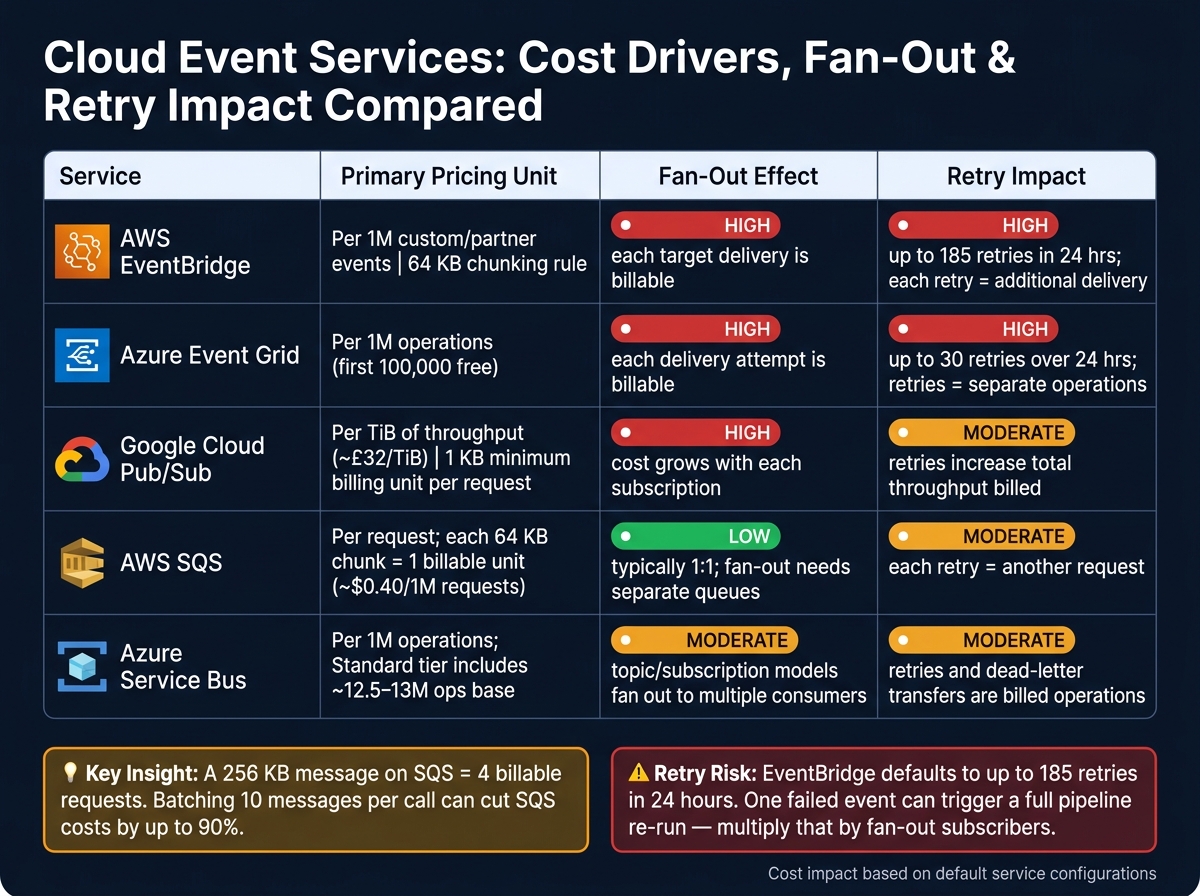 {Cloud Event Services: Cost Drivers, Fan-Out & Retry Impact Compared}
:::
{Cloud Event Services: Cost Drivers, Fan-Out & Retry Impact Compared}
:::
Event-driven spend usually lands in five buckets: ingress, delivery, execution, storage, and workflow-control overhead. In high-volume pipelines, ingress and delivery tend to take the biggest share. In multi-step workflows, execution and coordination often pull ahead. So the job is simple in theory: map those charges to your routing, queueing, and workflow choices.
Event volume, payload size and fan-out
Most cloud messaging services charge per operation or per byte. That means cost rises in step with volume. Fan-out makes that rise steeper. One OrderPlaced event sent to five downstream consumers turns into five separate billable deliveries. Then retries pile on top, so one bad event can ripple through the whole pipeline and run up the bill.
AWS SQS bills each 64 KB chunk as a separate request, so a 256 KB payload counts as four billable requests [13][15]. AWS EventBridge uses the same 64 KB chunking rule for custom and partner events [1]. Google Cloud Pub/Sub charges approximately £32 per TiB of throughput across publish, delivery, and seek operations, and applies a 1 KB minimum billing unit to each publish or pull request [19][20][21][22][23][24].
That is why large payloads can be a quiet budget leak. A better pattern is to keep bulky files out of the event stream. Put documents or media in object storage such as Amazon S3 or Azure Blob Storage, then send only a small reference in the event, like an order ID or URL.
Queue, bus and workflow pricing models
The table below shows what each service mainly charges for, and where fan-out or retries tend to push costs higher.
| Service | Primary pricing unit | Fan-out effect | Retry impact |
|---|---|---|---|
| AWS EventBridge | Per 1M custom or partner events [11] | High - each target delivery is billable | High - retries are additional deliveries |
| Azure Event Grid | Per 1M operations (first 100,000 free) [4][6] | High - each delivery attempt is billable | High - retries count as separate operations |
| Google Cloud Pub/Sub | Per TiB of throughput [19][20][21][22][24] | High - cost grows with each subscription | Moderate - retries increase total throughput billed |
| AWS SQS | Per request; each 64 KB chunk is a billable unit [13][15] | Low - typically 1:1; fan-out usually needs separate queues | Moderate - each retry is another request |
| Azure Service Bus | Per 1M operations; Standard tier includes a base fee and approximately 12.5–13 million operations [5][7][8] | Moderate - topic/subscription models fan out to multiple consumers | Moderate - retries and dead-letter transfers are billed operations |
Workflow engines add another charging layer. AWS Step Functions Standard charges per 1,000 state transitions, so a flow with branching, retries, and compensating steps can rack up cost even when the Lambda functions underneath are cheap [12][16][17][18]. Azure Durable Functions charges for function executions, plus the storage and control messages used to track durable state. That means long-running orchestrations with lots of checkpoints can push up both parts of the bill [9][10].
Retries, dead-letter queues and replays as hidden cost multipliers
Failed deliveries are almost never free. Every extra delivery attempt, and any linked function invocation, adds more cost. Azure Event Grid can retry for up to 24 hours with up to 30 attempts, while EventBridge defaults to up to 185 retries over 24 hours [2][3][14].
Replays are the other quiet multiplier. If you drain a dead-letter queue and reprocess old events, you are basically running the whole pipeline again. Each event gets re-ingested, re-delivered, and re-executed. If a team keeps messages for audit or replay, storage spend goes up as retention windows get longer. Then, during incident recovery, a replay can cause a sharp cost spike.
A few guardrails help keep that under control:
- Cap retries.
- Use exponential back-off.
- Send permanent business failures straight to the dead-letter queue (DLQ).
- Throttle replays to avoid sudden spend peaks [25].
The next savings usually come from filtering earlier and cutting fan-out before events reach the queue.
Designing lower-cost routing and orchestration
Once retries and replay costs are under control, the biggest savings usually come from stopping low-value events before they ever enter a workflow. After that, the next big win is keeping unwanted events out of orchestration in the first place.
Filter early and deliver only what is needed
Native filtering is one of the simplest ways to cut wasted invocations and transfer costs.
- Azure Event Grid supports subject prefix and suffix filtering, plus advanced filters that match top-level or nested data fields. Use advanced filters to route only high-value or regulated events.[26][29]
- AWS EventBridge checks event patterns against source, metadata and detail fields. Tight event patterns help make sure only matching events reach targets. You can also use EventBridge Pipes to filter before delivery.[27][28][30][31]
- Google Cloud Pub/Sub supports subscription filters based on message attributes. Add attributes such as
region,dataClassificationortenantso only the right consumers get the message.[19]
A sensible setup is to create premium and standard event paths. Only events that meet a business threshold - for example, orders above £500 or transactions flagged for compliance review - should enter orchestration flows with heavier validation or AI-assisted steps. Everything else can go to a cheaper sink, such as logs, or be dropped altogether.
Choose orchestration patterns with cost in mind
The pattern you choose affects how many events get created, how much state you need to manage, and how much control-plane spend you take on.
| Pattern | Event count | Workflow complexity | Operational visibility |
|---|---|---|---|
| Event notification | Low - signals only, no state in the event | Low | Moderate - consumers must query source for state |
| Event-carried state transfer | Low-moderate - larger payloads per event | Low | Moderate - state travels with the event |
| Saga orchestration | Higher - forward and compensating events | High | High when centralised; harder with choreography |
| Event sourcing | Very high - every change is an event | Very high | Excellent - full history, but replay costs can be significant |
Event notification and event-carried state transfer work well for simpler, loosely coupled flows where cost and audit needs are fairly light. Saga orchestration and event sourcing fit high-value or compliance-critical processes better, but they also bring much higher event volumes and more operational work.
Use a central workflow engine when you need long-running control, compensating steps, or a clear audit trail. Use choreography for simpler flows that do not justify the extra control-plane cost.
Even then, broad subscriptions and duplicate handling can quietly push spend up.
Reduce fan-out and duplicate processing
Start by auditing your current topics and subscriptions. Map each one to a business process and remove anything unused. Then set domain-driven boundaries: group events into bounded contexts with a small set of clearly defined topics, instead of letting overlapping subscriptions build up over time. If several microservices subscribe to one broad topic, add category-based filters - such as order.lifecycle, order.fraud, order.comms - so each service gets only what it needs.[32]
Plan for duplicates. Use a stable eventId or business key, check idempotency before processing, and make side effects safe to run twice.[32][34][35] In UK setups where external APIs such as payment gateways, credit checks, or government services charge per call in GBP, good idempotency stops duplicate charges before they happen.
Clear event contracts hold the whole thing together. When events are vague or unevenly structured, services tend to overreact, routing rules go wrong, and fan-out starts to spread. Clear schemas with fields like status, region, and data classification make filtering more accurate and cut routing mistakes.
Optimising queues, buses and scaling patterns
With noisy events already stripped out, the next place to look is your queue and bus setup. That’s where a lot of the remaining spend sits.
Batching, payload control and non-production limits
Once filtering is done, batching is often the fastest way to cut message costs.
Amazon SQS charges about $0.40 per million requests. If you send 10 million 1 KB messages one by one, that costs about $4.00. Send those same messages in batches of 10, and the cost drops to about $0.40 - a 90% cut for the same throughput.[48] Google Cloud Pub/Sub charges roughly $40 per TiB of message throughput, and it assesses at least 1 KB per request even if the message is smaller.[46][49]
Batch messages wherever the platform allows it. SQS, for example, supports up to 10 messages per SendMessageBatch call. It also helps to keep each message under 64 KB so one logical message stays within a single billed request.[44][47]
If you need to move large files, don’t push them through the queue. Store them in object storage and send only a reference in the event. That keeps costs down and fits UK GDPR data minimisation rules: send only the data the receiving service actually needs.[45]
After production traffic is under control, non-production often turns into the next easy win.
Dev, test and staging queues are often left with production-style retention settings and no throughput limits. Over time, they pile up storage charges with little to show for it. A simpler setup usually works better:
- Set retention in non-production to one to three days
- Apply message rate caps
- Run automated cleanup jobs to purge stale queues
- Track non-production spend in £ against a team budget[36][37][38]
That last point matters more than it sounds. Teams often act only when the spend is visible.
Concurrency, throttling and cold-start trade-offs
Once message volume is in decent shape, worker behaviour becomes the main cost lever.
Cap concurrent workers and throttle bursts so autoscaling doesn’t spin up a swarm of short-lived instances. The trade-off is simple: lower concurrency means lower burst cost, but it also means longer wait times when traffic jumps. So you need a clear latency budget and enough spare capacity to stay inside it. Watch queue depth and the age of the oldest message, then tune from there.
| Setting | Direct cost implication | Key trade-off |
|---|---|---|
| Batch size | Fewer API requests; up to 90% saving on request charges | Higher end-to-end latency per message |
| Payload size | Larger payloads billed as multiple requests (SQS: per 64 KB) | Smaller payloads may require downstream lookups |
| Retention period | Longer retention increases GB-month storage charges | Shorter retention limits replay options |
| Max deliveries | Higher limits keep failing messages cycling, increasing compute cost | Lower limits route to DLQ faster, reducing waste |
| DLQ reprocessing | Large replay multiplies delivery and compute charges | Controlled replay reduces cost but delays recovery |
| Concurrency cap | Prevents burst-driven scaling spikes | Backlogs can build if sustained load exceeds cap |
| Provisioned concurrency | Fixed hourly charge (~$0.015 per GB-hour for Lambda)[39][40][41][42] | Eliminates cold-start latency for critical paths |
Provisioned concurrency, or pre-warmed workers, makes sense only when the cost of delay is higher than the fixed hourly spend. If a slow path means lost payments, poorer customer experience, or SLA penalties, paying for warm capacity during peak hours can make sense. Payment flows and time-sensitive compliance checks usually fall into that bucket. Batch analytics and background enrichment jobs usually don’t. In those cases, cold starts are almost always the cheaper choice.
Retention, replay and dead-letter policies
The last big lever is replay: how long messages stay around, and what happens when they fail.
A tiered retention setup is usually the sensible path. Keep transactional events for a few days, then reserve longer retention - weeks or months - only for audit-heavy or compliance-driven streams where UK rules actually require it. Pub/Sub charges about $0.27 per GB-month for retained messages and snapshots beyond default retention.[49] In a high-volume system, that stacks up fast.
Replays can be costly in ways that aren’t obvious at first glance. Every replayed message can trigger production-scale downstream work and may call paid external services such as payment gateways, credit reference agencies, or HMRC endpoints that bill per request in GBP. Before you run a replay, scope it properly. Estimate the spend, limit the run to the exact time window or event subset you need, and schedule it for off-peak hours with a capped concurrency setting.
For dead-letter queues, set a clear max delivery count - usually three to five attempts - and use exponential back-off between retries. After that, send the message to the DLQ for structured handling: manual review, a data-fix pipeline, or controlled discard. Put those limits in your runbooks before an incident happens, not in the middle of one.[36][43]
Failure handling, governance and continuous improvement
Cost-aware failure handling and resilience
Failure controls only save money when teams use them the same way every time. Every retry, replica and archive tier needs a price tag tied to the business loss it helps avoid.
Use exponential back-off with a hard retry cap to stop retry storms. Pair that with a firm limit of three to five attempts before routing to the DLQ, and you stop invocation costs from piling up when an upstream dependency starts to struggle.[33][53]
Idempotency matters just as much. If a retried event triggers a duplicate payment or a duplicated regulatory submission, the damage goes beyond money - it becomes a compliance issue. Build deduplication keys and idempotency tokens into handlers so re-delivered events lead to the same result without side effects.
Use compensation steps only when reversing an action costs less than fixing it by hand.
Replication and archival should be priced against the workflows that can justify the extra spend. Map each workflow to a business impact level, then set acceptable recovery time and recovery point objectives before choosing replication or archival tiers. Model the monthly £ cost of replication and storage against the expected annual loss from the failure scenario you are guarding against. For most internal batch workflows, the numbers will not stack up. For regulated or business-critical workflows, they often do.
UK governance, budgeting and cost visibility
Once failure controls are in place, someone needs to own them. Otherwise, savings have a habit of slipping back into the bill.
Start with tagging. Make these tags mandatory on every queue, bus, function and workflow engine at creation:
-
cost_centre -
service_owner -
environment -
regulatory_domain
Without steady tagging, cost reports are too vague to act on, and workloads tied to FCA or NHS obligations cannot be split from optional spend.
Then move to showback before chargeback. Share monthly dashboards that show each team's event-processing costs in £ before rolling out internal billing. That gives teams time to see the pattern in their spend, and it helps build trust before chargeback arrives.
Set budget alerts by service and by team - for example, £5,000 per month for a given event-processing domain - with notices at 50%, 75% and 100% of that limit.[54][56][58] When an alert fires, the owning team should be able to act straight away: tighten retry caps, throttle non-critical workflows, or pause trial features.
Monthly cost reviews should be short and based on data, not hunches. Give one owner to each cost lever: events, retries, DLQs and execution time. The table below shows that split.
| Team | Events per month | Retries | DLQ volume | Workflow execution time |
|---|---|---|---|---|
| FinOps | Owns cost per 1,000 events and budget variance. | Defines acceptable retry cost envelope; escalates spikes. | Tracks DLQ processing cost and backlog ageing; raises alerts on stuck messages. | Monitors cost–performance trade-offs; advises on SLA vs. spend balance. |
| Platform | Owns tagging, metrics and retry controls. | Implements backoff policies and retry caps via shared libraries. | Configures DLQ retention, replay tooling and observability. | Optimises orchestration infrastructure for latency and throughput. |
| Product | Owns event design, fan-out and retriable actions. | Owns the business decision on which operations are retriable and how many attempts are justified. | Prioritises DLQ backlog by business impact; defines auto vs. manual handling rules. | Sets business SLAs; decides where longer execution time is acceptable for lower cost. |
For UK financial services firms, FinOps reporting should map straight to FCA operational resilience expectations. In plain terms, cloud spend and resilience investment should link back to critical business services and documented exit strategies.[55][57][59]
Using AI and specialist support to control costs
Feed tagged retry, DLQ and fan-out data into monitoring so cost drift shows up before the end of the month.
Manual dashboards often flag drift too late. AI-driven monitoring can spot trouble earlier - and in many cases do it on its own.
Use the tagged cost and failure data above to detect waste automatically. ML models trained on event telemetry and billing data can pick up routing waste, failure hotspots and scaling anomalies. That helps teams find unnecessary paths, retry-heavy endpoints and poor autoscaling patterns.[50][51][52]
For UK organisations, Hokstad Consulting supports AI strategy, AI agent implementation and DevOps automation for event-driven cost audits, with £ reporting and UK regulatory constraints.
The broader discipline comes down to a few practical rules: optimise at the design stage first, watch retries, DLQ volume and fan-out closely because they often signal cost drift early, match resilience spend to measured business risk instead of defaulting to high-availability settings, and treat cost optimisation as part of day-to-day operations.
FAQs
How do I find the biggest cost leak first?
Start with your raw billing data, not summary dashboards. Dashboards are handy, but they can blur the details that drive cost, like internet egress or NAT Gateway processing.
Look back over the last six months of spend. That gives you enough history to spot trends, seasonal shifts, and sudden spikes that might otherwise slip by.
Inside your cluster, run kubectl top pods to get a quick read on CPU and memory use. From there, group spend by namespace or pod so you can see which workloads are costing the most.
That kind of breakdown often points straight to the main offenders, including sidecar proxies or control plane replicas.
When is orchestration worth the extra cost?
Orchestration starts to make sense when your setup gets big enough, busy enough, or messy enough that manual work slows everything down.
Yes, there’s an upfront cost. In many cases, that sits between £2,000 and £15,000. But the trade-off is lower monthly labour spend: costs can drop from £800–£3,200 per month to around £100–£400.
That gap matters. If your team is spending hours on repeat admin, the maths can shift pretty fast.
It tends to pay off most in situations like these:
- Scaling operations where manual processes don’t keep up
- High-frequency tasks that can break even within three months
- Compliance work that needs consistency and a clear audit trail
- Faster incident response when delays cost time and money
- Dynamic resource scaling to cut over-provisioning
Put simply, orchestration is usually worth the extra spend when it removes enough repetitive manual effort to save both time and monthly running costs.
What should I cap before a replay?
Before you start any replay or scaling activity, set a maximum replica count (maxReplicaCount).
This acts as a hard cap on how far scaling can go. It’s one of the main safety checks for cost control, helping you avoid surprise spend if traffic suddenly spikes or scaling starts bouncing up and down during orchestration.