
If you want one short answer: pick the tool that fits your team’s day-to-day work, not the one with the longest feature list. In this roundup, I’d split the seven tools into clear groups: Kubecost for Kubernetes cost detail, Harness for CI/CD and IaC checks, Apptio Cloudability and Flexera One for finance-led multi-cloud reporting, CloudHealth for policy control, and Nutanix Beam for mixed private/public cloud estates.
The article’s main point is simple: most rollouts fail on setup, not on dashboards. Across AWS, Azure and GCP, the same issues keep coming up - IAM mistakes, weak tags, missing project or subscription coverage, slow data refresh, and poor GBP handling. One stat stands out: the FinOps Foundation’s State of FinOps 2024 found that reducing waste is now the top priority. That means joined-up cost data matters more than extra bells and whistles.
If I boil the article down, these are the points that matter most:
- Apptio Cloudability: best for TBM and chargeback-heavy teams
- Harness Cloud Cost Management: best for DevOps teams that want cost checks in pipelines
- IBM Cloudability: suited to business-unit reporting across AWS, Azure and GCP
- Kubecost: best for namespace, pod, label and workload-level Kubernetes cost views
- CloudHealth by VMware: strong on policy rules and cross-cloud control
- Flexera One: broad cloud coverage with finance reporting, policy controls and AI spend tracking
- Nutanix Beam: best fit if you already run Nutanix and need hybrid cloud cost views
::: @figure 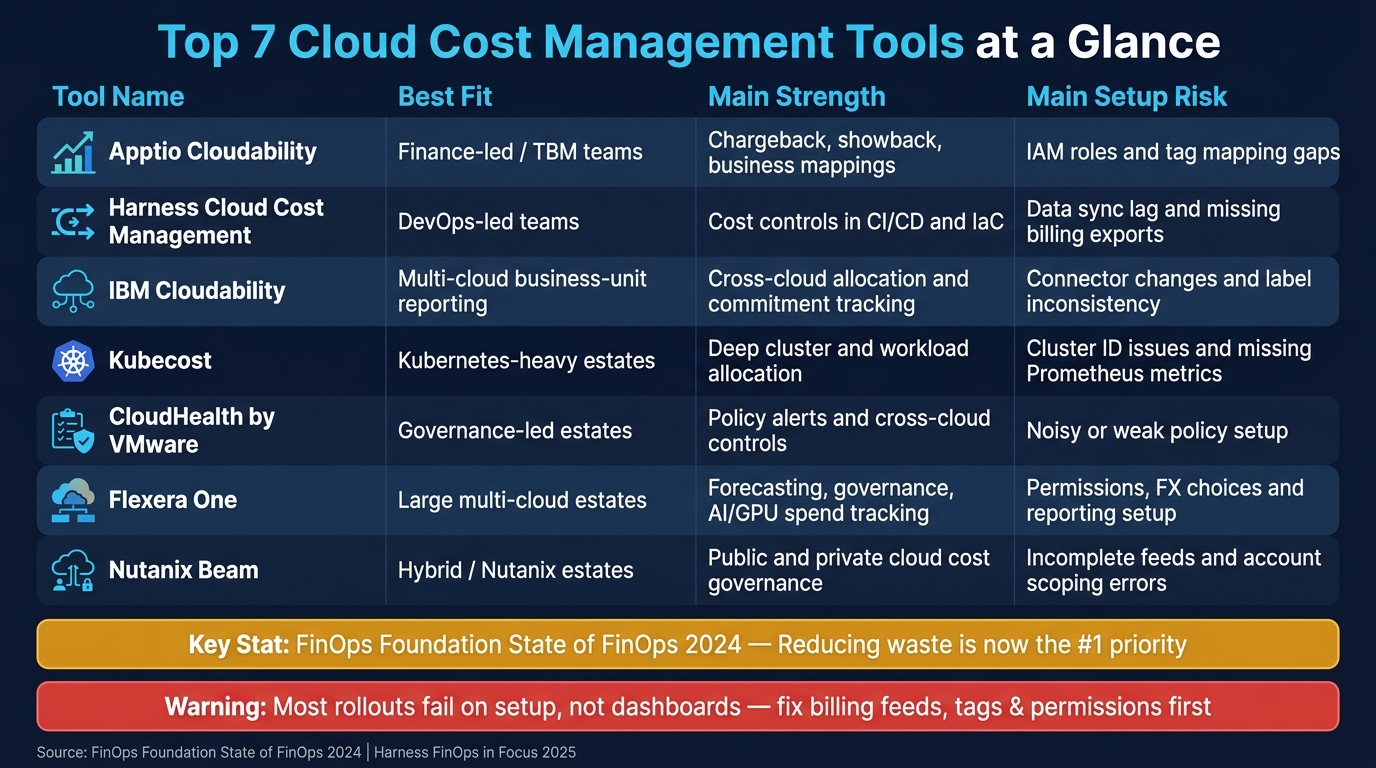 {Top 7 Cloud Cost Management Tools: Quick Comparison Guide}
:::
{Top 7 Cloud Cost Management Tools: Quick Comparison Guide}
:::
Cloud Cost Management Explained: Cut Waste, Save Budget, Optimize Everything
Quick Comparison
| Tool | Best fit | Main strength | Main setup risk |
|---|---|---|---|
| Apptio Cloudability | Finance-led / TBM teams | Chargeback, showback, business mappings | IAM roles and tag mapping gaps |
| Harness Cloud Cost Management | DevOps-led teams | Cost controls in CI/CD and IaC | Data sync lag and missing billing exports |
| IBM Cloudability | Multi-cloud business-unit reporting | Cross-cloud allocation and commitment tracking | Connector changes and label inconsistency |
| Kubecost | Kubernetes-heavy estates | Deep cluster and workload allocation | Cluster ID issues and missing Prometheus metrics |
| CloudHealth by VMware | Governance-led estates | Policy alerts and cross-cloud controls | Noisy or weak policy setup |
| Flexera One | Large multi-cloud estates | Forecasting, governance, AI/GPU spend tracking | Permissions, FX choices and reporting setup |
| Nutanix Beam | Hybrid / Nutanix estates | Public and private cloud cost governance | Incomplete feeds and account scoping errors |
Before choosing, I’d check four things first:
- Billing source support - AWS CUR, Azure exports, and GCP billing export
- Kubernetes support - if your spend sits in clusters
- GBP reporting - including FX rules and month-end handling
- Workflow links - Slack, Teams, Jira, ServiceNow, PagerDuty, APIs and webhooks
That’s the short version of the full article: the best tool is the one that fits your cloud mix, reporting model and team workflow - and the rollout will only work if your billing feeds, tags and permissions are in order from day one.
The top 7 tools for cost management integration
These seven tools differ mostly in three areas: how they pull in billing data, how deep they go on allocation, and how well they fit into day-to-day team workflows. The list starts with broad multi-cloud platforms and then moves into Kubernetes-first and governance-led options.
1. Apptio Cloudability
Apptio Cloudability pulls in billing data from AWS Cost and Usage Reports (CUR), Azure Cost Management exports, and GCP billing exports. It then sorts that data using tags, account groups, and business mappings for chargeback and showback. Its Datalink connector sends curated cost data into Apptio TBM Studio and ApptioOne for IT financial modelling. Native integrations with Jira Cloud, ServiceNow, and PagerDuty let teams send spend spikes and rightsizing opportunities straight into the tools they already use for work tracking and incident response.[16][17][24][27]
It fits best in enterprises with mature Technology Business Management (TBM) processes. One insurance and financial services provider using Cloudability reached 70% Reserved Instance coverage and cut annual cloud costs by 30% through machine-learning recommendations and better accountability.[3][27]
The biggest setup headaches tend to be IAM roles and external IDs. Getting permissions right across AWS, Azure, and GCP often means close work between cloud admins and the Apptio support team. Incomplete tag mapping is the other common snag. Until business mappings are finished, some dimensions can drop out of reports, which hurts allocation accuracy and can push back the first useful output by several sprints.[17][18][21][23][27]
2. Harness Cloud Cost Management
Harness Cloud Cost Management connects to AWS, Azure, and GCP billing exports and deploys in-cluster Kubernetes agents for near-real-time workload visibility. Where it stands apart is its CI/CD and infrastructure-as-code integration. Teams using Terraform or OpenTofu can check projected cost impact before a change set goes live, and cost policies can be enforced at deployment time instead of being spotted after the bill lands.[20][25][35]
It also includes AI-related cost tracking, covering GPU, model, and token spend inside the same FinOps workflows as standard cloud costs. That matters more and more for UK engineering teams running AI and machine learning workloads.[33]
The most common early issue is delayed syncs. Ingestion jobs run hourly or daily, so data can take up to 24 hours to refresh in full. Mis-scoped roles or missing billing exports can leave only part of the spend visible. Some features also sit behind certain plan levels or separate modules, so it helps to confirm entitlement before rollout.[22][25]
3. IBM Cloudability
IBM Cloudability is aimed at organisations that need detailed multi-cloud billing integration tied closely to financial reporting for business units. It uses the same allocation and business-mapping layer for chargeback and showback across AWS, Azure, and GCP. Epsilon's FinOps team uses it across all three major clouds to manage commitment discounts and has reached 95% coverage of committed-use discounts (CUDs). A Hyland case study also credits the platform with better cost transparency and data-driven insight that cut cloud spend and improved efficiency.[29][30][31]
The main friction during onboarding is connector setup, especially where Azure billing ingestion means moving from older connector methods to newer ingestion paths. Inconsistent tags or labels across clouds can also create allocation gaps that are hard to fix without a joined-up tagging clean-up effort.[21]
The next set of tools shifts from finance-led billing to Kubernetes-first allocation.
4. Kubecost
Kubecost is deployed through Helm charts straight into Kubernetes clusters. It pulls utilisation and allocation metrics from Prometheus and matches them with cloud billing data from AWS CUR through S3 and Athena, Azure Cost Export, and GCP BigQuery billing tables.[1][19][26] It gives granular cost allocation down to namespaces, workloads, pods, nodes, labels, and idle resources. If Kubernetes is your main platform, this is the most precise option in the group.[2][32]
Kubecost is based on the OpenCost specification, now a CNCF Sandbox project backed by AWS and other major vendors. That gives it strong support for standardised Kubernetes cost metrics. According to CNCF and FinOps Foundation surveys, 24% of respondents do not monitor Kubernetes spending at all, and 44% rely only on monthly estimates. Kubecost is built to close that gap.[32]
The most disruptive setup issue is duplicate or inconsistent cluster names, especially when more than one cluster writes to shared billing buckets. Missing Prometheus metrics, such as container_memory_working_set_bytes, can also block accurate cost modelling. Idle cost and shared resource settings need careful tuning to match internal chargeback policies. If that work is skipped, allocation figures can be misleading from day one.[19][26][28]
The focus now moves from allocation detail to policy enforcement and governance.
5. CloudHealth by VMware
CloudHealth, now branded as Aria Cost powered by CloudHealth, pulls in billing exports from AWS CUR, Azure via Service Principal or Enterprise Agreement, and GCP via BigQuery or storage buckets. Report exports can go straight to finance systems, while APIs and webhooks can trigger automation in outside tools.[4][5][36] Its policy-based governance engine is the key draw. Teams can apply financial and operational policies across all three clouds and trigger alerts when weekly spend goes above a set threshold.[4][5][36]
It suits multi-cloud estates where governance and policy enforcement matter just as much as cost visibility. Kubernetes cost allocation is also supported.[5][8][36]
The most common early problem is policy misconfiguration. Policies set too tightly create noisy alerts, while loose policies leave governance gaps. A sensible starting point is alert-only policies before adding automated guardrails. The other frequent issue is incomplete account coverage. Missing accounts create blind spots that may only show up when finance teams spot unexplained spend.[4][5][7][8][9]
6. Flexera One
Flexera One brings together allocation, forecasting, budgeting, anomaly detection, and policy governance across AWS, Azure, GCP, and OCI. Cost data is surfaced through its FinOps Bill Connect API and can be exported to finance and engineering systems.[6][12][13][15][43] It applies a library of more than 90 optimisation policies and over 200 governance policies covering rightsizing, anomaly detection, and budget enforcement.[6][12][13][15][43]
From May 2025, Kubernetes cost visibility and rightsizing recommendations powered by Spot Ocean are built into Flexera One Cloud Cost Optimisation. Flexera also supports AI-related workload cost governance, including GPU and token-based spend, through its FinOps capabilities.[37][38][39][42]
The main blocker during onboarding is connector permissions, especially Oracle Cloud IAM policies and Azure service principals, which often need security team approval before data ingestion can start. Currency and data normalisation decisions also need sorting early on, especially whether reporting should be in GBP and how FX rates should be handled. If finance and IT do not agree on that upfront, rework tends to follow later.[6][11][13][14][15]
7. Nutanix Beam
Nutanix Beam provides cost governance across public, private, and hybrid estates. It offers centralised visibility, budgeting, chargeback, showback, and reporting exports driven by tag-based allocation across business units and cost centres.[40][41]
It is best suited to organisations already invested in Nutanix infrastructure that want governance and optimisation across mixed cloud estates.[10][11]
The main setup blockers are incomplete data feeds from connected clouds, account scoping errors, and policy tuning before recommendations start to become useful. Correct billing exports, IAM or service principal permissions, and tagging structures all need to be in place if Beam is going to produce reliable reports.[10][11]
Integration patterns and troubleshooting themes across all seven tools
Core integration patterns to look for
Across the seven tools, rollout effort usually comes down to three things: billing access, allocation rules, and workflow integration.
Read-only billing access comes first. Every tool needs least-privilege billing access, full account coverage, and stable allocation rules. Check that the connector pulls in consolidated billing across all accounts, subscriptions, or folders without breaking business-unit mapping.
Kubernetes agents and exporters are the next big pattern. Kubernetes tools depend on in-cluster agents or exporters for namespace, workload, and pod-level allocation. That means stable cluster IDs and complete Prometheus metrics matter a lot. Kubecost can join those metrics to cloud invoices - including discounts from Reserved Instances, Savings Plans, and Spot usage - to show true per-namespace and per-label cost, not just raw resource usage.[34] One config detail matters more than it might seem: a stable cluster_id label in Prometheus. Without it, multi-cluster setups can lead to mismatched or duplicated cost data.[44][19]
Tag and label mapping connects raw spend to teams, products, and cost centres. In practice, that usually means a small required tag set, backed by controls in IaC and CI to stop non-compliant deployments.
The integrations that tend to help most are the ones engineers already use every day:
- Alerts in Slack or Teams
- Incident routing in PagerDuty
- Recommendations pushed into Jira or ServiceNow
That moves cost awareness out of a once-a-month finance review and into normal engineering work.
The most common setup and data quality problems
The table below sums up the setup failures that show up most often across the seven tools. These are the issues that slow almost every rollout.
| Problem | Root cause | Practical fix |
|---|---|---|
| Incorrect IAM roles or service principals | Permissions scoped too broadly or too narrowly | Work with cloud admins to define least-privilege roles before onboarding |
| Azure subscription scoping errors | Tags only exported at resource level, not inherited | Enforce tagging at resource group and resource scope; use daily tag scraping |
| GCP project coverage gaps | Connectors miss projects or billing accounts | Audit all projects against connected accounts before go-live |
Inconsistent tags (prod, PROD, production) |
No enforced tagging standard | Define a canonical tag set and block non-compliant deployments in CI |
| Cluster ID mismatches | Cluster IDs are not kept stable across rebuilds | Set stable external_labels in Prometheus config and validate after each rebuild |
| Slow refresh cycles | Default schedules were left unchanged | Confirm refresh frequency and backfill behaviour with the vendor before rollout |
| Weak business mappings | Cost centres or product mappings left incomplete | Finish mapping before publishing showback reports; incomplete mappings produce misleading unallocated spend |
Harness needs about 42 days of history before anomaly detection becomes reliable.[46] That's easy to miss during planning, especially if teams expect useful alerts straight after setup.
What UK organisations should prioritise first
Once the technical issues are sorted, the next issue is ownership: who keeps the mappings, tags, and reporting rules in shape?
Before rolling a cost management integration across a full estate, pilot it in one business unit or platform domain. That tends to surface tagging gaps and allocation errors early, while they're still cheap to fix, instead of after finance has already sent out inaccurate showback reports.
GBP-based reporting should be agreed upfront between finance and IT. That includes how exchange rates are handled and how often they're refreshed. It also helps to line reporting up with UK month-end close and reconciliation cycles.
Clear ownership between engineering and finance is the other part that can't be left vague. Cost centre mapping, chargeback policy, and tag governance all sit right on the line between those two teams. If nobody owns each part, decisions slow down and allocation gaps stick around. If internal bandwidth is tight, Hokstad Consulting can speed up tagging remediation and multi-cloud integration work.
How to choose the right tool for your environment
Best fit by architecture and team model
The main question isn’t which tool has the longest feature list. It’s which one fits the way your team actually works.
That fit usually comes down to your operating model. Are you running a Kubernetes-heavy estate? Is spend owned mainly by finance? Does DevOps lead the process? Or are you dealing with a mix of teams, platforms and reporting needs?
A simple way to narrow the shortlist is to use the integration failures mentioned above as a filter. Look at team model first, then features.
| Operating Model | Best Fit Tool(s) | Why |
|---|---|---|
| Kubernetes-heavy | Kubecost | Real-time allocation by namespace, workload and label |
| Finance-led / FinOps | Apptio Cloudability, Flexera One | TBM workflows and unified currency reporting |
| DevOps-led | Harness Cloud Cost Management | Cost enforcement inside CI/CD and IaC pipelines |
| Enterprise governance | CloudHealth by VMware, Flexera One | Policy-heavy estates needing alerting and controls |
| Hybrid / private cloud | Nutanix Beam | Single view across Nutanix private cloud and public clouds |
| AI cost tracking | Flexera One, Harness Cloud Cost Management | GPU, token and external AI provider spend alongside cloud billing |
After that, sanity-check the basics: billing coverage, currency handling and tag quality. If those are shaky, the rest won’t matter much.
Checks before committing
Before you commit to a vendor, go through these checks with both your platform and finance teams. It’s not glamorous work, but this is where deals either hold up or fall apart.
Billing coverage - Make sure the tool ingests your exact billing sources. For AWS, that means Cost and Usage Reports (CUR). For Azure, it means Cost Management exports. For GCP, it means BigQuery billing export. If there’s a gap here, there’ll be a gap in your reports too.
GBP normalisation - Check how, and how often, the tool converts currencies when cloud bills arrive in USD or EUR. Flexera One supports common bill ingest in any currency with local currency conversion options.[42][45] Plenty of tools handle this unevenly, and that starts to sting at month-end close.
Tag reliability - Check whether the tool supports other allocation methods, such as account-level or subscription-level grouping, as a fallback while tag coverage is being fixed. If tagging needs cleanup first, put that work into the rollout plan from day one.
Data refresh and latency - Ask exactly how often billing data is refreshed, and how much delay there is between a usage event and when it shows up in dashboards. In fast-moving environments with frequent deployments, a daily refresh may not be enough. For monthly governance reporting, it usually is.
Implementation effort and pricing model - Compare setup effort, which can vary a lot, against your team’s actual capacity. Harness Cloud Cost Management is listed on AWS Marketplace at US$22,500 per year for up to US$1 million of cloud spend under management.[47] Ask vendors to quote in GBP, then map any percentage-based fees to your real monthly run rate before you compare options.
If these basics are weak, allocation and showback will be off no matter how deep the feature set looks.
Conclusion: Better integration leads to better cost control
Across these seven tools, one pattern keeps showing up: pick the one that matches how your team already works. If it plugs neatly into cloud accounts, clusters and finance systems, people will use it. If it doesn't, it'll sit there gathering dust.
In day-to-day use, most failures still come back to weak basics. Harness's 2025 FinOps in Focus report found that enterprises take an average of 31 days to identify and eliminate cloud waste when automation is weak across the SDLC.[48] In plain terms, slow setup and patchy process cost teams time and money. Tagging standards, permissions and reporting links usually close that gap faster than flashy add-ons.
A sensible way to roll this out is to start with core production accounts and main clusters, then expand from there. Get that base right first, and rollout risk drops sharply. If you need implementation support in a regulated environment, Hokstad Consulting can help with tagging, permissions and cost-tool workflow integration.
Better integration turns cost control into a continuous part of how teams work. It also improves budget predictability and gives engineering and finance one reliable source of truth.
FAQs
Which tool suits my team best?
The right tool comes down to your team’s focus, setup and budget.
Finance teams often need strong budgeting and chargeback features. Engineering teams usually get more from granular resource insight and unit economics. DevOps teams should look for direct CI/CD integration.
If you’re working across a complex hybrid or multi-cloud setup, pick a tool that gives you one view across platforms. And if you want tailored, provider-neutral support, Hokstad Consulting offers cloud cost engineering for public, private and hybrid environments.
What should I fix before rollout?
Before rollout, make sure you can see detailed billing and resource-usage data. That means setting the right permissions first, then turning on any APIs or billing exports you’ll need.
It also helps to lock in a consistent tagging scheme from the start. If your teams tag things differently, reporting gets messy fast.
A few setup choices matter here:
- Report in £ where needed
- Set the time zone to Europe/London
- Pilot controls on high-spend accounts first
- Use historical data to set budgets and alerts
This gives you clean cost data, fewer reporting headaches, and budget thresholds that reflect how your accounts have actually been used.
How important is Kubernetes cost tracking?
Kubernetes cost tracking matters because standard cloud billing often doesn't give you the detail you need in containerised setups. Without that detail, organisations can find it hard to assign costs with any accuracy and may over-provision resources by 40% to 60%.
It gives teams visibility at the namespace, pod and label levels. That makes it easier to spot idle or underused capacity and use rightsizing to cut cloud spend.