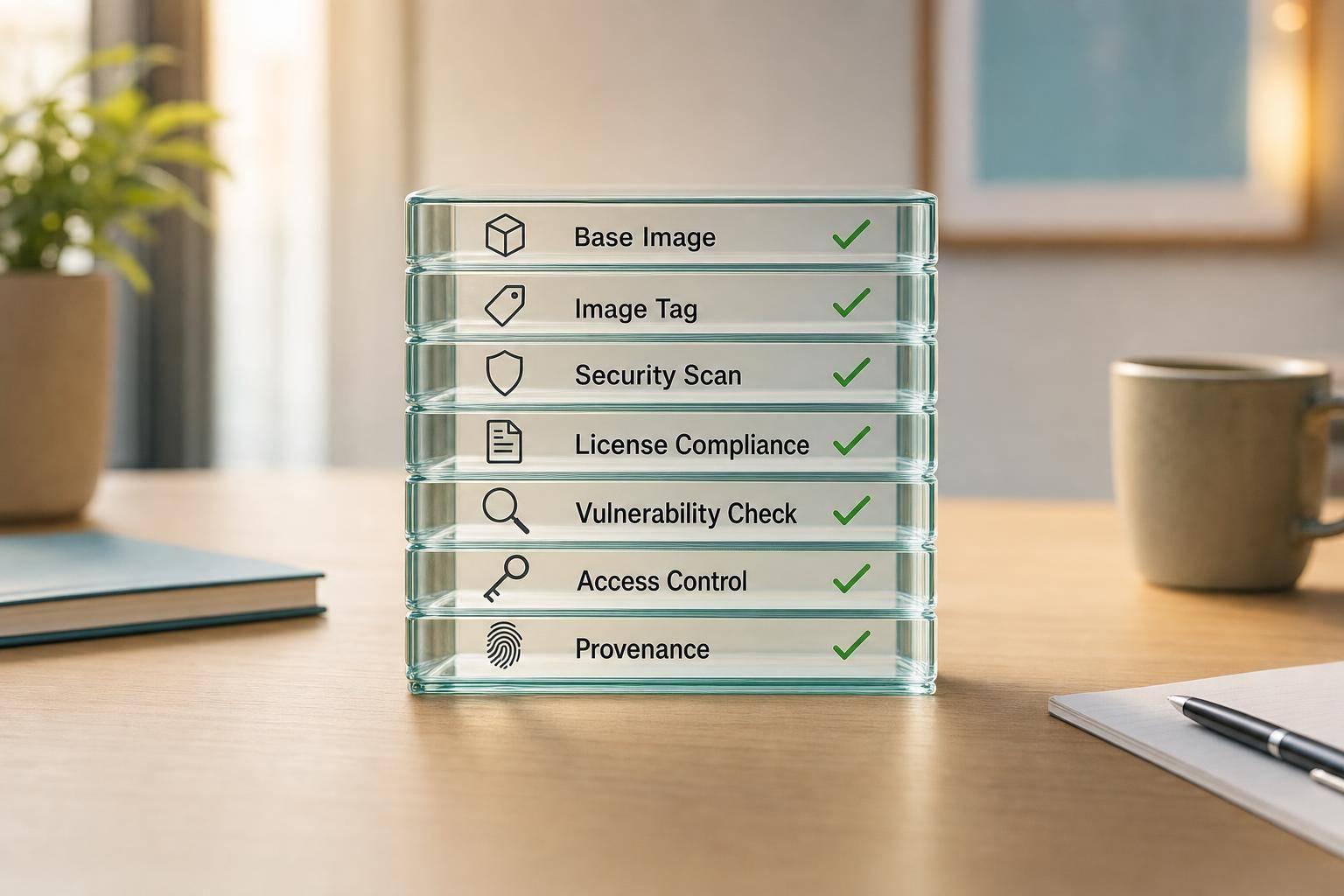
Most container images have serious security issues, so I’d treat image compliance as a build-to-production checklist, not a one-off scan. In this article, I boil it down to what you need to check: approved base images, fixed versions, image signing, secret scanning, non-root use, SBOMs, registry limits, digest-based deployment, controlled promotion, and dated audit evidence. The point is simple: if you can’t show what was built, scanned, signed, stored, and deployed, you don’t have a clean compliance story.
Here’s the short version:
- I’d allow only approved base images and registries
- I’d block mutable tags like
latestin production - I’d sign images and verify signatures before deployment
- I’d scan for CVEs and embedded secrets in CI
- I’d run containers as non-root with tight runtime settings
- I’d generate an SBOM for every build and link it to the image digest
- I’d deploy by
sha256digest, not by tag - I’d move the same image from dev to staging to production
- I’d keep review dates, approvals, logs, and reports in one place
A few figures explain why this matters. One study found 87% of container images had high or critical vulnerabilities. Another reported an average of 604 known vulnerabilities per container, with over 45% aged two to ten+ years. So if you want a plain checklist for CIS- and NIST-aligned image controls, this article gives you the main points without drifting into host, network, or Kubernetes cluster settings.
::: @figure 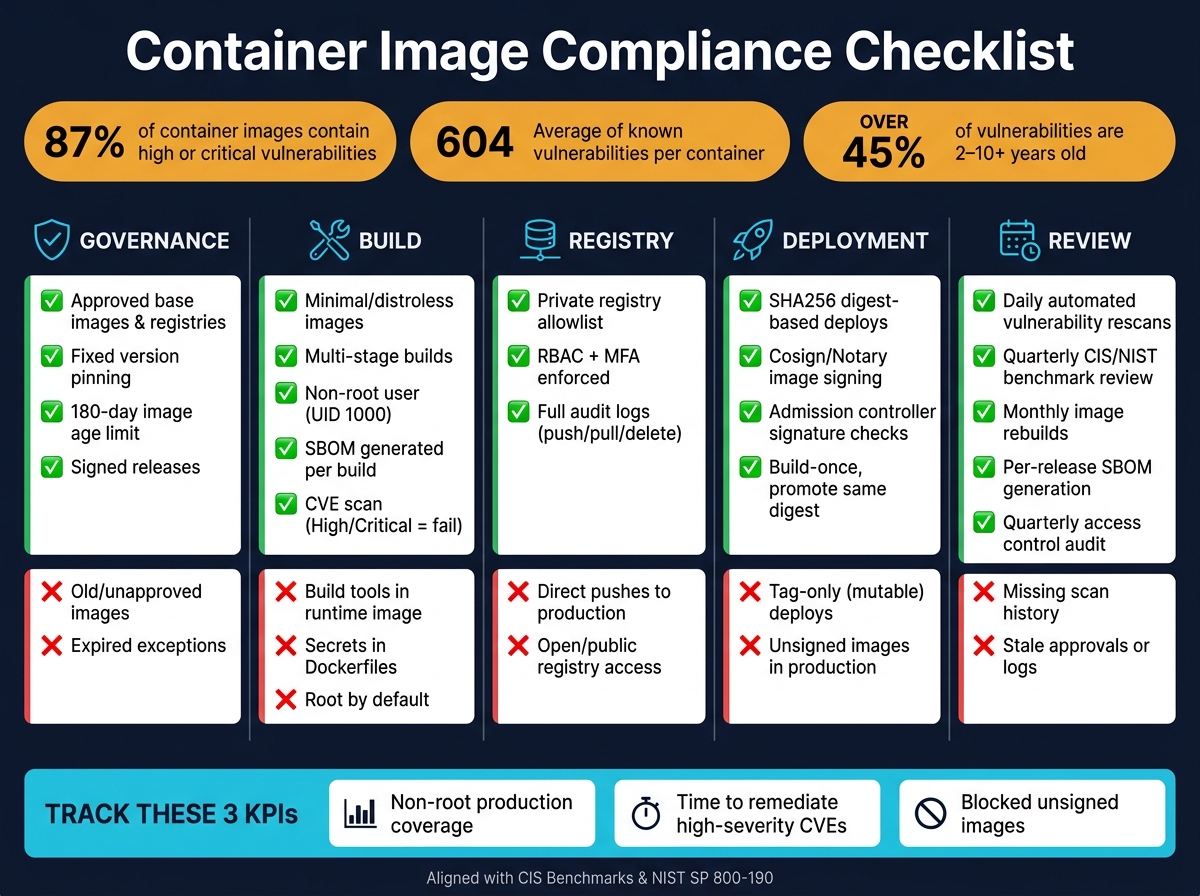 {Container Image Compliance Checklist: Key Controls at a Glance}
:::
{Container Image Compliance Checklist: Key Controls at a Glance}
:::
NIST Container Security and Compliance Frameworks Guide
Need help optimizing your cloud costs?
Get expert advice on how to reduce your cloud expenses without sacrificing performance.
Quick comparison
| Area | What I’d check | What I’d block |
|---|---|---|
| Governance | Approved images, fixed versions, age limits, signed releases | Old images, unapproved sources, expired exceptions |
| Build | Minimal images, multi-stage builds, non-root user, SBOM, CVE scan | Build tools in runtime image, secrets in Dockerfiles, root by default |
| Registry | Private registry allowlist, RBAC, MFA, audit logs | Direct pushes to production, open access |
| Deployment | Signature checks, digest-based deploys, policy gates | Tag-only deploys, unsigned images |
| Review | Daily rescans, quarterly reviews, dated evidence | Missing logs, missing scan history, stale approvals |
If you’re responsible for container image security, this is the checklist I’d use to keep policy, pipeline, and audit evidence lined up.
Governance checklist: approved images and policy controls
Governance sets the rules for which images are allowed, how they’re tagged, and who gets to publish or promote them. If that layer is weak, the technical guardrails start to slip. This is where CIS and NIST guidance turns into image policy that people can apply and systems can enforce.
Approved base images, version pinning and image age limits
Keep a sanctioned catalogue of approved base images and trusted registries.[4][2] Make the source of truth clear. Name the registry that counts as authoritative, assign an owner, ban mutable tags like latest in production, and point to images by digest instead.
Image age matters too. Set a maximum age for each image, then rebuild or re-approve it after 180 days. If an image is unapproved or past its date, the pipeline should fail.[2][6]
After source control comes integrity control.
Image signing, provenance and exception handling
Sign every image that moves beyond development into test, staging, and production.[4][2] Then back that up with Kubernetes admission controls so unsigned or untrusted images are rejected across the cluster.[4][2] Keep signing keys in an HSM or a secure key vault, and only allow signing from automated build pipelines.[6]
For each image, record the base image, build pipeline, build time, and scan results.[4][2][6] OCI labels such as org.opencontainers.image.source, org.opencontainers.image.revision, and org.opencontainers.image.created help make that trace easy to follow. Keep the related SBOM and scan reports for at least one year, so audit teams can get traceable evidence when they ask for it.[4][2][6]
There also needs to be a formal path for temporary exceptions.[4][6] Each one should include:
- a written risk assessment
- named approvers from security and platform leadership
- a fixed expiry date of no more than 30 days for production use
Track all exceptions in a central register, and block any that have expired without manual workarounds.[4][2][6]
Secret handling and access rules
Do not put passwords, API keys, SSH private keys, certificates, or encryption keys in images or Dockerfiles.[4][2][1] Secrets should be delivered at runtime from approved secret management, scoped per application, and enforced with RBAC.[4][1][5] Scan for embedded secrets before promotion, and block any hit.[2][5]
Access rules across the image lifecycle should also keep duties split between teams. One group builds, another approves, and production promotion goes through a controlled path. The table below shows a practical model:
| Role | Permissions | Typical Owner |
|---|---|---|
| Developer / CI | Build, push to development namespace | Engineers, CI service accounts |
| Security / platform | Approve, sign and promote to test/production | Security architects, platform leads |
| Release pipeline | Promote to production only through an approval gate | Automated release pipeline |
| Auditor | Read-only access to logs and metadata | Internal or external audit function |
Direct pushes to production registries should be blocked. Images should move to production only through an approval gate.[4][1]
Once policy is fixed, hardening the build is the next enforcement step.
Build and hardening checklist for compliant images
Once the policy is set, the next step is hardening the image so it meets that policy in day-to-day use. This is the point where broad rules turn into actual Dockerfile changes and CI pipeline checks.
Use minimal images and remove unnecessary components
One of the biggest wins at build time comes from picking the right base image. Distroless images - such as gcr.io/distroless/base for statically compiled binaries or gcr.io/distroless/java for JVM applications - include only what the app needs at runtime. There’s no shell and no package manager.
Use multi-stage builds so build tools never end up in the final image. Build, test, and package in a builder stage with the full toolchain, then copy only the compiled artefacts into a stripped runtime image. Keep package managers out of the final stage, and pin base image versions in the Dockerfile.[14]
Here’s the practical trade-off between the three base image options teams use most often:
| Base Image | Compliance Considerations | Strengths | Trade-offs |
|---|---|---|---|
| Distroless | Strongest compliance posture; no shell or package manager | Smallest footprint; lowest vulnerability count | Harder to debug; requires multi-stage builds |
| Alpine Linux | High; minimal OS components | Very small; fast to scan and pull | Potential musl libc compatibility issues with some language ecosystems |
| Full OS (Ubuntu/Debian) | Lower; many unused packages included | Familiar; straightforward to troubleshoot | Large attack surface; frequent patching needed |
A separate debug image can help here. Label it clearly and keep it out of production. That way, the production image stays lean, while engineers still have a safer place to troubleshoot when needed.
Run as non-root and restrict defaults
Every application container should run as a non-root user. Add a dedicated app user during the build, set file ownership, and switch to that user before the entrypoint:
RUN adduser --system --uid 1000 appuser
COPY --chown=appuser:appuser . /app
USER appuser
The USER directive is only part of the job. You also need to limit what the container can do at runtime. In Kubernetes, set runAsNonRoot: true and readOnlyRootFilesystem: true in the pod security context, drop all Linux capabilities by default, and add back only the few the app plainly needs. Stay away from NET_ADMIN, SYS_ADMIN, and other broad capabilities unless there’s a documented and approved reason.[9][14]
Don’t include SSH or other remote admin daemons in application images. Expose only the ports the application listens on. If a path needs write access, use emptyDir or a dedicated persistent volume claim, while keeping the root filesystem read-only everywhere else.[8][14]
Scan dependencies and generate an SBOM
Scan every build and fail it when unapproved High or Critical findings appear. For example, use --severity HIGH,CRITICAL --exit-code 1 in Trivy.[7][11]
Generate an SBOM for every build with a tool such as Syft, and output it in SPDX or CycloneDX format.[10][12][13] Tie the SBOM to the image digest, not a mutable tag, and store it as a build artefact alongside scan reports.
Keep those artefacts with the image record so registry and deployment checks can use them later.
Registry and deployment checklist for trusted image use
Once images are hardened at build time, the next step is making sure your registry and deployment layer doesn't let an untrusted image slip into production. A hardened image doesn't help much if a bad registry setup or a mutable tag changes what gets deployed. This is the last checkpoint before production: registry trust, signature verification, and disciplined promotion.
Restrict registries and enforce authenticated access
Only allow images from an explicit allowlist of private registries you approve. In Kubernetes, you can enforce this with a validating admission controller such as OPA Gatekeeper or Kyverno, so only approved images are admitted to the cluster.
That matters because public registries can contain malware, leaked credentials, and typosquatting traps.
For access control, use least privilege. CI/CD pipelines should have push rights only to the repositories they need, while production workloads should have pull-only access. Tie your registry into your corporate identity provider so RBAC and MFA apply to interactive logins. Log every push, pull, and delete, including the image digest, user identity, registry, action, and UK timestamp. That supports NIST 800-53 AU-2 and AU-9.[15][18]
Verify signatures and deploy by digest
Once registry access is limited to approved sources, lock deployments to the exact image that passed build checks.
Mutable tags are a weak spot. Deploy with immutable SHA256 digests in all production and staging manifests. For example: registry.internal.company.co.uk/app/backend@sha256:<digest>. Then back that up with policy that rejects tag-only references in production namespaces.[15][20][21]
Sign every image meant for non-development use with Cosign or Notary, store the signature alongside the image manifest, and enforce signature checks at deployment time through your admission controller.[3][17][19] NIST SP 800-190 requires discrete identification of each image by cryptographic signature
and validation of image signatures before image execution
.[15] Store signing keys in a hardware security module or cloud KMS, and rotate them on a regular basis.
Control image promotion from development to production
After signature and digest checks, keep promotion linear so staging and production receive the same artefact.
Build once and promote the same digest from development to staging and production.[6][15] The goal is simple: the thing you tested should be the thing you ship. Automate promotion gates so an image can move forward only if it has passed vulnerability scanning, carries a valid signature from a trusted key, has an attached SBOM, and runs as non-root.[6][15][19]
Also, block direct pushes from developer workstations to staging or production registries altogether. All promotion should go through the pipeline.[16] Prune stale, untagged images on a regular schedule.[6][15]
Record each promotion with:
- the image digest
- the approver identity
- the pipeline run reference
- the UK timestamp
This gives you a clear audit trail showing exactly which image digest reached production, when it happened, and who approved it. That maps directly to NIST 800-53 CM-14 and SA-12 during a compliance review.[18]
Review cycles, reporting and next steps
Set review frequency, ownership and evidence collection
Compliance doesn't sit still. New CVEs show up every day, so container images need a fixed review rhythm between audits. On top of that, critical CVEs, base image updates, and policy exceptions should trigger an extra review outside the normal schedule.
Once images are live in production, the day-to-day work matters just as much as the controls set earlier in the process. That means routine review, clear evidence, and prompt remediation. In plain terms: build, registry, and deployment controls only hold up if teams keep checking that they're working.
Use the schedule below to turn one-off controls into repeatable checks.
| Review Activity | Frequency | Owner | Evidence |
|---|---|---|---|
| Automated vulnerability rescans | Daily | DevSecOps Engineer | Scan reports (JSON/SARIF), remediation tickets, pipeline logs |
| CIS/NIST benchmark review | Quarterly | Security Lead | Review checklists, configuration diffs, sign-off records |
| Image rebuilds (base image updates or critical CVEs) | Monthly or on trigger | DevOps Engineer | CI job logs, new image digest in registry, change records |
| Signature and provenance verification | Per deployment or weekly | Platform/SRE | Signature verification logs, records of denied deployments |
| SBOM generation and review | Per release | Build system / DevSecOps | CycloneDX or SPDX artefacts, dependency risk analysis |
| Access control audit | Quarterly | IAM / Security Admin | RBAC logs, MFA status records |
A clear RACI helps avoid the usual finger-pointing. DevOps owns build and registry controls. Security owns policy and thresholds. Compliance owns audit evidence.
Keep scan reports, SBOMs, and signing logs in one central location. Link them to each service and date them as dd/mm/yyyy. For UK organisations working under ISO 27001, FCA, or NHS requirements, having that evidence ready to hand can save a lot of pain during internal and external audits.
Key checklist items to act on now
Don't bury the team in a giant dashboard. A small set of metrics is easier to use and harder to ignore.
Track these three KPIs:
- non-root production coverage
- time to remediate high-severity CVEs
- blocked unsigned images
How Hokstad Consulting can help
Hokstad Consulting helps UK teams turn these controls into repeatable DevSecOps policy, CI/CD automation, and audit-ready evidence.
FAQs
Why deploy by digest instead of tag?
Deploy by digest (for example, nginx@sha256:...) instead of tag so the exact, immutable image is what gets scanned, signed and run. Tags, including latest, can be overwritten or pointed somewhere else.
A digest links each deployment to a cryptographically verified image hash. That helps prevent drift and makes security gate checks and audit trails more reliable.
How often should container images be rescanned?
Container images should be rescanned daily for newly disclosed CVEs, and also at regular intervals throughout the day, such as every few hours or whenever vulnerability feeds update. That helps teams spot new threats as soon as they appear.
These rescans should run automatically on a set schedule. In practice, that usually means during nightly builds and again before deployment, including for images that are already running in production.
What evidence should we keep for audits?
Keep an immutable, tamper-evident audit trail of interactions. That trail should record timestamps, user identities, source IP addresses, actions, affected resources, and outcomes.
You should also retain records of vulnerability scans, the vulnerability register, the SBOM, security policy reviews, log review evidence, and records that show compliance with standards such as GDPR, ISO 27001, or PCI DSS.
Keep these records for three to seven years, based on what your legal, regulatory, and internal retention rules require.