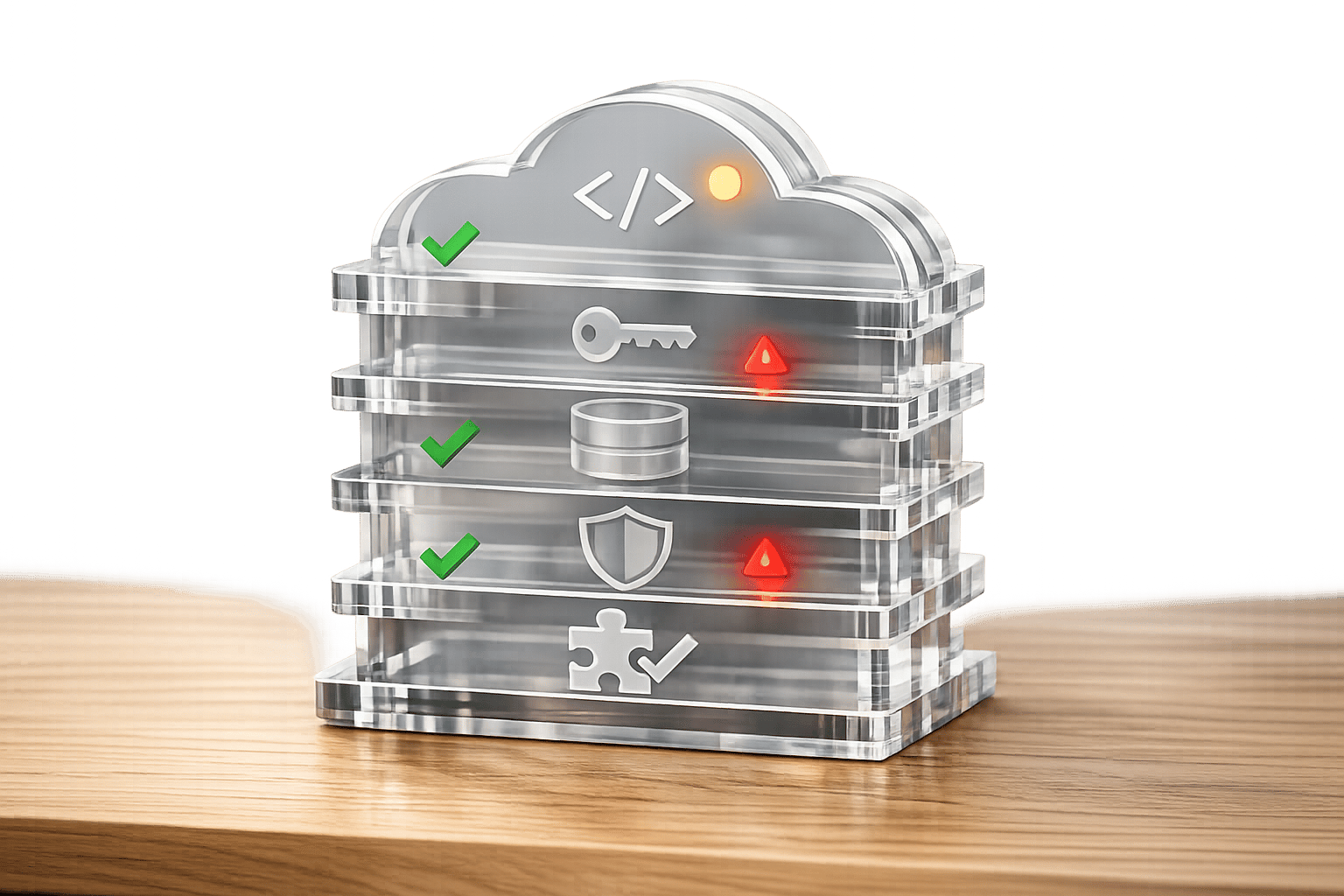
Infrastructure as Code (IaC) errors can derail deployments, cause security risks, and lead to costly delays. Most issues arise from simple mistakes like syntax errors, mismanaged state files, or hardcoded secrets. For instance, 80% of YAML-based issues stem from formatting problems, while 90% of parsing errors are due to spacing. These errors not only slow down workflows but also increase debugging time by 25%.
Key problems include:
- Hardcoded Secrets: Exposing sensitive data in code leads to security breaches.
- State File Mismanagement: Local state files risk corruption and collaboration issues.
- Syntax Errors: Typos or invalid configurations cause deployment failures.
- Security Misconfigurations: Overly permissive IAM roles or unencrypted resources invite breaches.
- Lack of Automated Testing: Manual checks miss critical issues, increasing costs and delays.
- Complex IaC Scripts: Large, unstructured scripts slow deployments and complicate audits.
Solutions:
- Use secret management tools like AWS Secrets Manager or HashiCorp Vault.
- Switch to remote backends (e.g., S3 with state locking) for state files.
- Run validation tools (
terraform validate,cfn-lint) to catch syntax issues early. - Automate testing with tools like Terratest and Checkov.
- Refactor large scripts into reusable modules.
::: @figure 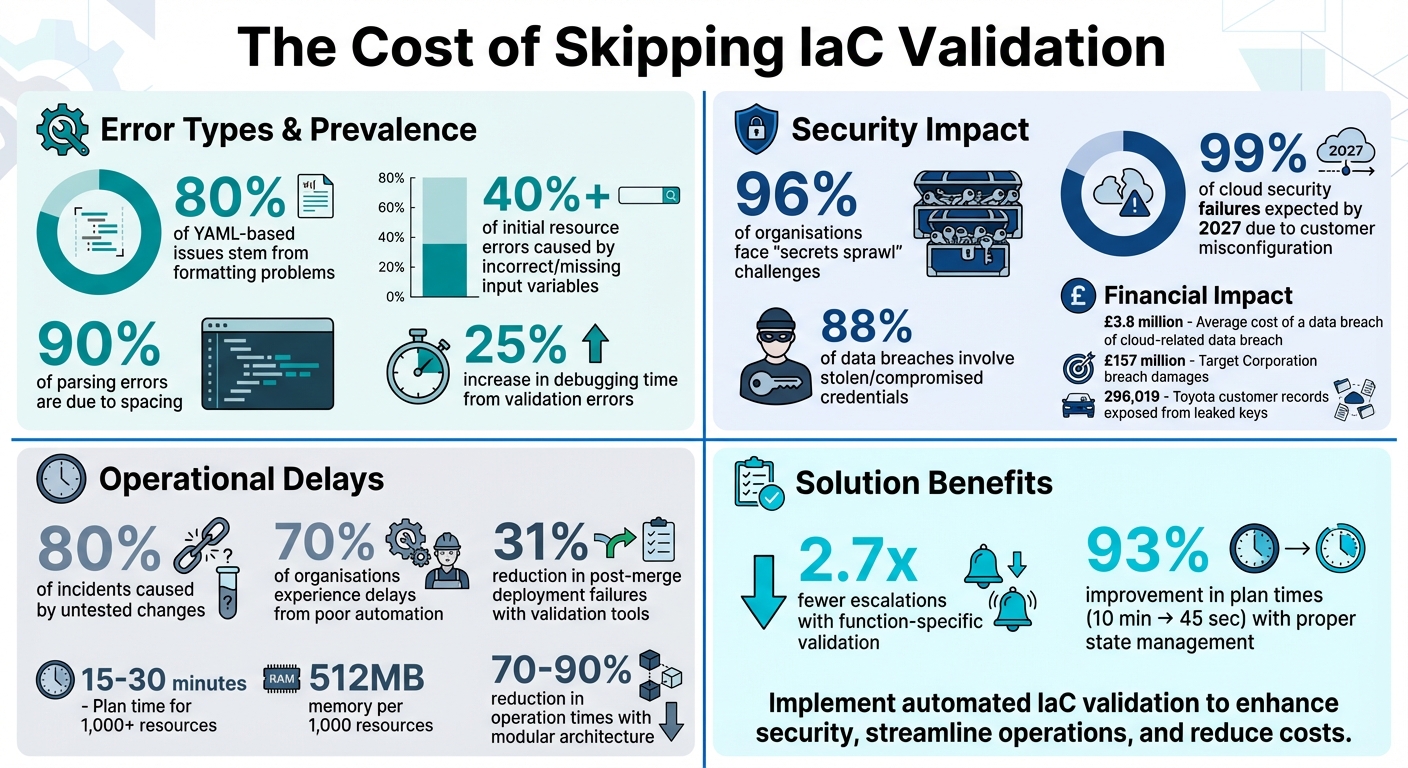 {IaC Validation Errors: Key Statistics and Impact on Deployments}
:::
{IaC Validation Errors: Key Statistics and Impact on Deployments}
:::
📍 TROUBLESHOOT TERRAFORM ERRORS 📍Invalid Expression while using EOF in TF File | IaC
Hardcoded Secrets in Configuration Files
Embedding API keys, passwords, or other credentials directly into Infrastructure as Code (IaC) scripts is a serious security misstep. Once exposed, these secrets remain in version control history even if they are later removed [6]. Attackers take full advantage of this by using automated tools to scan public repositories, with leaked credentials often being exploited within minutes of appearing on platforms like GitHub [6]. This makes careful management of sensitive information absolutely essential.
The issue is widespread. A staggering 96% of organisations face challenges with secrets sprawl
, where credentials are scattered across codebases, configuration files, and scripts [5]. This sprawl contributes to 88% of data breaches involving stolen or compromised credentials, with the average breach costing organisations £3.8 million [5]. For example, in September 2022, Toyota revealed that leaked keys in source code uploaded to GitHub had exposed 296,019 customer records, including email addresses, over several years [4]. Similarly, Target Corporation incurred £157 million in legal fees and damages after a high-profile breach involving stolen records [4].
Security Risks of Exposed Secrets
Hardcoded secrets open up multiple attack paths. Once exposed - whether in a public repository, through a compromised developer account, or via insider threats - they become accessible to bad actors. Attackers are constantly scanning platforms like GitHub for such vulnerabilities, often exploiting them before the affected teams even become aware.
The risks go beyond unauthorised access. Exposed secrets can lead to compliance violations under regulations like GDPR, potentially resulting in hefty fines. They also enable attackers to move laterally within systems, escalating privileges and gaining access to sensitive data across an organisation’s infrastructure. Often, this starts with something as simple as a developer leaving temporary
credentials in code during local testing and forgetting to remove them before committing [4][7].
How to Manage Secrets Securely
Treat secrets as critical infrastructure components and manage them accordingly. Centralised secret management tools like HashiCorp Vault, AWS Secrets Manager, and Azure Key Vault are excellent options. These tools provide a single, secure repository for secrets, eliminating the need to embed them in code. They also offer features like automated rotation, ensuring credentials are updated every 30–90 days, and maintain audit trails to support compliance.
To prevent hardcoded secrets from reaching repositories, use pre-commit hooks with tools like TruffleHog, Gitleaks, or detect-secrets [6]. For Terraform users (version 1.10+), ephemeral resources can fetch secrets at runtime, ensuring they never appear in state or plan files. Additionally, include files such as *.tfstate, *.tfstate.backup, and *.tfvars in your .gitignore file to avoid accidentally committing sensitive data.
Modern orchestration platforms like Pulumi ESC, Doppler (starting at £2.30 per user/month), and Infisical (starting at £6.20 per user/month) simplify secret management by connecting to multiple sources and providing unified access patterns without the need for manual configuration copying [5]. When using IaC, mark outputs as sensitive with sensitive = true to ensure secrets are redacted from CLI logs and UI displays, keeping them out of plain sight during deployments.
State File Management Problems
Managing state files properly is just as crucial as avoiding hardcoded secrets when it comes to effective Infrastructure as Code (IaC) validation. State files act as the bridge between your IaC code and the actual resources in the cloud. When these files are mishandled, the consequences can range from minor deployment issues to catastrophic infrastructure failures. Relying on local state files introduces risks like single points of failure, collaboration barriers, and even the potential for losing entire infrastructure setups.
Problems with Local State Files
Keeping state files on a local machine creates a host of challenges, particularly for teams. Collaboration becomes a logistical nightmare without manually sharing files, and the absence of state locking means that simultaneous terraform apply operations can overwrite and corrupt the state. Local files are also at the mercy of hardware failures or accidental deletions, and losing a state file could force Terraform to recreate resources unnecessarily.
Another major concern is security. State files often contain sensitive information like database passwords, API keys, or TLS certificates in plaintext. Storing these files locally - or worse, committing them to version control - exposes your infrastructure to potential breaches. On top of this, manual changes made directly in cloud consoles without updating the state file can lead to infrastructure drift. This drift not only causes deployment failures but also introduces security vulnerabilities.
How to Manage State Files Properly
To avoid these pitfalls, switch to remote backends as soon as possible. Services like Amazon S3, Azure Blob Storage, and Google Cloud Storage provide reliable, shared storage that makes collaboration seamless. These options are cost-effective, with monthly expenses ranging from £0.80 to £4.00 - a small price to pay compared to the risks of losing your state file. Always enable state locking (e.g., using S3 with DynamoDB or native locking in Azure and GCS) to prevent simultaneous modifications that could corrupt the state.
Enable versioning for your storage bucket to keep a full history of state changes, making it easy to recover from accidental deletions or corruption. Use server-side encryption with customer-managed keys (such as KMS or CMEK) to protect sensitive data. Additionally, schedule regular terraform plan runs in your CI/CD pipeline to detect drift early and avoid outages.
The difference between teams that ship confidently and teams that fear every apply comes down to how they handle state.- Josh Pollara, Stategraph [9]
A real-world example highlights the importance of good state management. In February 2026, a Series C fintech company managing over 200 state files across AWS and GCP revamped its approach. Before the overhaul, they faced two incidents per month due to state corruption and drift. By splitting their state files (each managing over 500 resources) and automating drift detection every four hours, they reduced average plan times from 10 minutes to just 45 seconds - a 93% improvement. Additionally, their state recovery time dropped from eight hours to under five minutes, thanks to S3 versioning rollbacks [8].
To further safeguard your state files, never commit them to version control. Add *.tfstate and *.tfstate.backup to your .gitignore file. For larger infrastructures, consider splitting state files by environment (e.g., development and production) or by component (such as networking and databases). This approach not only limits the impact of potential errors but also strengthens your overall IaC validation process, ensuring smoother and more secure deployments.
Syntax and Configuration Errors
Once hardcoded secrets and state file management have been addressed, syntax errors often become the next big hurdle in Infrastructure as Code (IaC) validation. Even minor mistakes - like a missing comma, mistyped resource name, or an invalid value - can derail deployments, leading to outages and expensive fixes. For instance, typos such as using nametag instead of name_tag, type mismatches (e.g., providing a port as a string instead of a number), or circular dependencies between resources can create significant issues during deployment [13][14].
A small typo, an invalid value, or an incorrect assumption about resource behaviour can lead to failed deployments, service outages, or costly remediation efforts.- WintelGuy.com [11]
However, there’s a silver lining: incorrect or missing input variables are responsible for over 40% of initial resource errors, making them relatively predictable and avoidable [16]. Tools like terraform validate can quickly spot reference errors, structural issues, and constraint violations - all without requiring cloud credentials. For CloudFormation users, cfn-lint identifies roughly 80% of issues in less than a second, outperforming the basic validate-template command [15]. Additionally, running terraform fmt as a pre-commit hook ensures consistent formatting, which can help prevent structural errors that might obscure deeper logic problems.
As with state and secret management, a solid approach to syntax validation is critical for dependable IaC deployments.
Finding and Fixing Syntax Errors
Start with terraform validate to catch syntax issues before they reach your cloud provider. This command helps identify problems like undeclared resources or variables, incorrect nesting, missing brackets, or values that fail to meet defined constraints [12]. For deeper troubleshooting, use terraform console to test expressions interactively and confirm that resource arguments behave as expected [10][14]. If error messages are unclear, setting TF_LOG=DEBUG or TF_LOG=TRACE can provide detailed logs of API calls for better insight [13].
Terraform validate tells you if your configuration is valid or not, without checking it against live infrastructure.- Flavius Dinu, Developer Advocate, Spacelift [12]
Breaking large configurations into smaller, focused files - such as network.tf, variables.tf, and outputs.tf - makes it easier to pinpoint and resolve syntax errors [3]. You can also use custom validation blocks within variable definitions to enforce constraints like string patterns or numerical ranges, which helps prevent invalid values from progressing to deployment [14]. For resources that take longer to provision, such as RDS or CloudFront, increasing timeout settings can avoid unnecessary timeout
errors during the apply phase [13].
While these local checks are essential, incorporating validation into CI/CD pipelines can further improve deployment reliability.
Adding Validation to CI/CD Pipelines
Embedding validation tools into CI/CD workflows ensures errors are caught before they reach production. A typical pipeline might follow this sequence: init → fmt → validate → plan → apply. Using the -json flag with validation commands allows pipelines to parse errors and trigger automated responses. Organisations that adopt function-specific validation report 2.7 times fewer escalations caused by logic defects [16].
Pre-commit hooks running terraform fmt and terraform validate can catch formatting and syntax issues early. Tools like tflint and checkov add another layer of protection by detecting undeclared variables, invalid resource types, and deprecated syntax. These measures have been shown to reduce post-merge deployment failures by an average of 31% [16]. For CloudFormation users, generating a Change Set before deployment is a must. This step previews changes and highlights runtime issues, such as resource name conflicts, that may not be flagged by linters [15].
Security and Configuration Mistakes
Security misconfigurations are a much bigger risk than simple syntax errors. In fact, by 2027, 99% of cloud security failures are expected to be caused by customers, largely due to misconfiguration [18]. Even now, 82% of enterprises report security incidents linked to cloud misconfigurations, with nearly 31% of cloud-related security issues stemming from this problem alone [17].
Some typical missteps include overly permissive IAM roles that use wildcards (*) instead of restricting access, publicly exposed resources like misconfigured storage buckets, or security groups that allow unrestricted traffic from 0.0.0.0/0. Another common issue is unencrypted storage or databases. Adding to the problem is configuration drift - manual fixes made directly in the cloud console that create discrepancies between your code and the actual runtime environment. This makes it harder to predict and manage your security posture [18]. With the global average cost of a data breach around £3.5 million and 81% of cloud breaches linked to misconfigurations [24], identifying and fixing these issues before deployment is critical. Proactive scanning and codified governance are key to addressing these risks.
Catching Misconfigurations Early
Static analysis tools can help you spot insecure configurations before they ever reach your cloud provider. Tools like Checkov provide thorough scans for Terraform, Kubernetes, and Helm, while tfsec offers quick, lightweight checks tailored specifically for Terraform [17][19]. By running these tools as pre-commit hooks, you can catch potential vulnerabilities on a developer’s machine before the code even enters your repository. This is a shift-left
strategy, aiming to tackle issues early in the development pipeline [17][18].
A layered approach works best. For example:
- Use
tflintto check syntax and naming conventions. - Rely on Checkov or tfsec for baseline security checks.
- Introduce Open Policy Agent (OPA) to enforce business logic [22][19].
When rolling out new policies, start in Advisory
mode, which allows you to monitor their impact without disrupting builds. Once you're confident, move to Hard-Mandatory
mode for essential standards like encryption [19]. This layered approach, combined with earlier syntax and state file validation, builds a strong and secure infrastructure-as-code (IaC) pipeline.
Using Policy as Code for Governance
Policy as Code (PaC) involves writing governance rules in machine-readable files that are version-controlled and automatically enforced [21][19]. Tools like OPA allow security teams to handle these rules separately from developers, providing flexibility and clarity [20][21]. For example, you can generate a Terraform plan, convert it to JSON, and evaluate it using your policy engine [20][19].
Policy as Code brings the same rigour to governance that Terraform brought to infrastructure: automated, versioned, and testable rules that run in CI/CD pipelines.- Nawaz Dhandala, Author, OneUptime [22]
Most platforms offer three levels of enforcement:
- Advisory: Issues warnings but doesn’t block deployment.
- Soft-Mandatory: Blocks deployment but allows manual overrides.
- Hard-Mandatory: Completely blocks deployment with no override [21][19].
Practical examples of PaC include:
- Blocking security groups that permit port 22 access from
0.0.0.0/0. - Limiting expensive instance types to production environments.
- Enforcing resource tags such as
Owner,CostCenter, andEnvironmentfor better billing transparency [20][22][23].
When policies fail, provide clear error messages that guide developers on how to fix the issue (e.g., Add: tags = { Environment = 'prod' }
) [22][19]. Treat policies like software by testing them thoroughly using OPA's built-in testing framework (opa test) to validate rules before deployment [20][21].
Missing Automated Testing in IaC
Relying on manual validation - like running terraform plan and checking the AWS Console - can slow down workflows, introduce subjective judgement, and increase the risk of human error. These mistakes often only become apparent after deployment, where fixing them is more expensive and time-consuming. Without automated testing, subtle resource interdependencies may go unnoticed until it’s too late. Automated tests, on the other hand, identify errors earlier in the development process, saving time and costs down the line [25]. Below, we’ll explore unit, integration, and continuous validation testing to optimise IaC deployment.
Unit and Integration Testing for IaC
Unit tests focus on verifying individual components without actually provisioning cloud resources. For example, using terraform test with command = plan, you can validate module logic, confirm variable handling, and ensure naming conventions match requirements - all without incurring cloud usage costs [45, 46]. This method is particularly useful for testing conditional logic or ensuring modules generate the correct configurations.
Integration tests, on the other hand, involve provisioning real resources to confirm functionality. Tools like Terratest, a Go-based testing framework, shine in this area. It runs complete init, apply, and destroy cycles while verifying actual behaviour, such as checking HTTP endpoint responses or database connectivity [47, 48]. By using defer statements in Go, resources are automatically torn down after tests, avoiding unnecessary cloud expenses.
Incorporating these tests into your CI/CD pipeline ensures a more reliable and streamlined process.
Continuous Validation Through CI/CD
The IaC Testing Pyramid
offers a structured approach to validation. Start with quick static analysis tools like tflint and Checkov, move on to unit tests to validate individual module logic, and reserve slower integration tests for critical components [25]. To maintain efficiency, run module tests independently and in parallel, using unique resource identifiers [47, 48].
Ephemeral environments are another key practice - these temporary setups run tests and then self-destruct, keeping costs under control [25]. Begin with native tools like terraform validate and terraform test (available starting from version 1.6) before layering in external frameworks [45, 46]. By combining this approach with earlier-discussed policy enforcement and security scanning, you can build a robust validation pipeline that catches problems early and ensures infrastructure reliability.
Breaking Down Complex IaC Scripts
Large, monolithic Infrastructure as Code (IaC) scripts can create significant hurdles, not just in terms of syntax and state validation but also in performance and team collaboration.
Problems with Large IaC Scripts
If your terraform plan output runs into hundreds of lines, it’s a sign that your script might be overly complex [26]. These monolithic configurations, often riddled with hardcoded values, can become major bottlenecks. They slow down onboarding for new team members and make audits a nightmare [27].
The performance issues are hard to ignore. For instance, configurations with more than 1,000 resources can take 15–30 minutes to plan. If you’re dealing with over 5,000 resources, you’ll likely need to rethink your architecture entirely, as these setups can consume approximately 512MB of memory for every 1,000 resources [1]. Beyond performance, state contention is another frequent issue. A slow plan process can block the entire team, and even a minor typo during an apply can corrupt the shared state [27].
The temptation is to put your foundation and your service modules in the same Terraform state to 'keep things simple.' This is how you end up with a terraform destroy that accidentally deletes your VPC.– Atif Farrukh, Founder of DevOps Unlocked [27]
The way forward? Breaking these scripts into smaller, reusable modules.
Building Reusable Modules
Refactoring large configurations into reusable modules can address these challenges effectively. Splitting state files by lifecycle is a practical starting point. For example, place rarely updated resources like VPCs and DNS in a foundation
layer, while frequently updated components such as Lambda functions belong in an application
layer. This approach can cut operation times by as much as 70–90% [1]. If a file exceeds 200–300 lines or involves repetitive resource definitions, it’s time to modularise [28].
A three-layer architecture offers a scalable structure for teams of all sizes. This setup includes:
- Foundation Layer: Handles shared networking and IAM resources.
- Service Module Layer: Provides reusable, versioned modules that ensure compliance.
- Product Configuration Layer: Contains team-specific configurations and calls [27].
To avoid overly complicated dependency chains, limit module nesting to two levels (Root → Service Module → Resources) [26]. For existing infrastructure, Terraform’s moved blocks (introduced in v1.1) allow you to shift resources into new module structures without having to destroy and recreate them [28][29]. Additionally, tools like terraform-docs can automatically generate documentation, making it easier for teams to understand inputs, outputs, and dependencies [1].
Breaking down monolithic scripts isn’t just about improving performance - it’s about creating a system that’s easier to manage and scale.
IaC Validation Do's and Don'ts
Getting Infrastructure as Code (IaC) validation right can mean the difference between a smooth deployment and a production nightmare. By sticking to established practices and avoiding common errors, teams can sidestep many headaches.
Terraform makes it deceptively easy to get started but considerably more challenging to get right. Many teams discover this only after they've accumulated significant technical debt.– Ori Yemini, CTO & Co-Founder, ControlMonkey [3]
Research highlights that 80% of incidents are caused by untested changes, and 70% of organisations experience delays due to poor automation [2]. A structured approach to validation is crucial to avoid these pitfalls and ensure stability in production environments.
Below is a table outlining key practices to follow - and mistakes to avoid - when working with IaC.
Do's and Don'ts Table
| Do's | Don'ts |
|---|---|
| Use remote backends with state locking (e.g., AWS S3 with DynamoDB) to prevent concurrent modifications [3][31] | Store state or sensitive files locally or in version control [3] |
Run terraform validate and terraform plan before every production deployment [13][30]
|
Apply untested changes directly to production environments [2] |
Explicitly pin provider versions (e.g., version = "= 3.74.0") to avoid unexpected breaking changes [3]
|
Assume Terraform will automatically handle all resource relationships [3] |
Use for_each instead of count for dynamic resources to improve stability [1]
|
Skip version control for infrastructure code [2] |
| Implement OpenID Connect (OIDC) for CI/CD authentication instead of static credentials [32][1] | Skip automated testing before deployment [2] |
| Separate environments (e.g., dev, staging, production) using distinct directories or workspaces [3] | Use a single state file for managing all environments [3] |
Add sensitive files (*.tfstate, *.tfvars, .terraform/) to .gitignore [3]
|
Commit secrets or state files into version control [3] |
Use depends_on to define hidden runtime dependencies between resources [3]
|
Ignore the -parallelism flag when dealing with AWS API rate limits [13]
|
Conclusion
Infrastructure as Code (IaC) validation plays a crucial role in ensuring reliable deployments and preventing costly incidents. Overlooking validation can result in outages and deployment delays. By strengthening secrets management, using remote state backends, enforcing syntax checks, and embedding policies as code into CI/CD pipelines, teams can catch and resolve critical issues before they reach production.
Continuous validation practices provide long-term benefits. Techniques like modular code, automated testing, and proactive drift detection create a solid foundation for scalable and cost-effective infrastructure. Validating early and frequently not only reduces the cost of fixing issues but also speeds up deployment cycles while maintaining security and compliance.
For organisations aiming to refine their IaC workflows, Hokstad Consulting offers tailored DevOps and cloud optimisation services. Their expertise spans designing automated CI/CD pipelines, implementing compliance frameworks (such as UK GDPR and ISO 27001), and managing seamless cloud migrations with minimal downtime. With a performance-based pricing model - where fees are capped at a percentage of actual savings [33] - clients see tangible results, including 30–50% cost savings, 75% faster deployments, and 95% less infrastructure-related downtime [33].
These strategies collectively lead to resilient IaC deployments. Whether dealing with configuration drift, resource over-provisioning, or manual deployment challenges, expert consulting can transform your infrastructure into a predictable and efficient asset. A balanced approach that combines automation, governance, and expert insight can turn IaC from a source of potential headaches into a competitive edge.
Validation isn’t about achieving perfection - it’s about catching mistakes early and ensuring systems can handle failures gracefully. Start small, automate step by step, and strive to make your infrastructure code as dependable as your applications.
FAQs
Which IaC validation checks should we run first?
Start by running syntax validation and linting tools to catch basic errors right away. This prevents issues from snowballing later in the process. After that, incorporate security scans and policy checks. Use static analysis to flag misconfigurations or compliance gaps early on.
Don't forget to review network security settings, access controls, and encryption protocols. Ensuring these align with best practices strengthens your infrastructure and reduces vulnerabilities. Together, these steps not only improve security but also streamline your Infrastructure as Code (IaC) deployments.
How can we prevent secrets from leaking into plans and state?
When managing sensitive information in Terraform, avoiding hardcoding secrets in configuration files is crucial. Instead, rely on secret management tools to centralise and secure these details. Additionally, encrypt state files to safeguard stored data and ensure sensitive outputs are appropriately marked to prevent accidental exposure.
To bolster security further, limit access permissions to only those who absolutely need them. Automating secret rotation is another important step to keep your infrastructure secure, and always separate secrets for different environments to minimise risk.
If you're using Terraform 1.10 or later, consider leveraging ephemeral resources. These can help ensure that secrets don't get saved unintentionally in state files. Lastly, while environment variables can be useful, handle them with care to avoid any unintended exposure of sensitive data.
When should we split Terraform state and modules?
When your Terraform configurations grow too large or complex, it's a good idea to split the state and modules. Doing this makes the setup easier to manage, speeds up plan and apply operations, and lets you handle resource lifecycles independently. Signs that it's time to split include hitting 200–300 lines of code, noticing slower performance, or requiring distinct management for specific resource groups.