
The cheapest CI/CD tool on the pricing page can still cost you the most over 12 months. From the article, I’d boil it down like this: your actual bill usually comes from user seats, build minutes, runners, storage, support, compliance add-ons, and internal engineer time. In some teams, 0.5–1 FTE of DevOps work can add £30,000–£70,000 a year, and inefficient pipelines can make up 40–60% of total CI/CD spend.
If you’re comparing options, I’d focus on four pricing models:
- Subscription: fixed monthly or annual spend, but tiers can jump
- Pay-as-you-go: low starting cost, but usage spikes can hit hard
- Enterprise licensing: higher contract cost for SSO, audit logs, SLAs and data controls
- Open source: no licence fee, but you still pay for hosting, maintenance and staff time
I’d also check six things before choosing:
- Cost predictability
- Build and deployment volume
- Team size and growth
- Self-hosting workload
- Compliance needs
- Integration effort
A simple example from the article shows how fast costs stack up. For 20 engineers, each running five pipelines a day, with 10-minute pipelines, raw compute alone can reach about £900 a month. Add £40 for storage, £600 for support, and about £2,917 for 0.5 FTE internal labour, and the monthly total lands near £4,457.
CI/CD Cost Optimization Explained | Cut Build Time & Cloud Spend
Quick comparison
| Model | Best for | Cost pattern | Main risk |
|---|---|---|---|
| Subscription | Small to mid-sized steady teams | Fixed baseline | Tier jumps when needs change |
| Pay-as-you-go | Burst usage or uneven demand | Varies by usage | Overage bills |
| Enterprise licensing | Regulated or large firms | Annual contract | Higher commitment and seat cost |
| Open source | Teams with strong platform skills | Low licence cost, high internal cost | Maintenance and compliance workload |
My short take: don’t buy on list price alone. Price the full setup in £, include support, storage, compute, security features, VAT, FX risk, and staff time, then compare best-case, expected, and peak usage before you commit.
The main CI/CD pricing models
CI/CD pricing models vary in three simple ways: what you pay for, when costs go up, and how easy the bill is to predict.
Subscription pricing
Subscription pricing means you pay a fixed monthly or annual fee, usually per user or by tier. That gives you a clear baseline for spend and makes budgeting simpler.
Some platforms include CI/CD inside tiered subscriptions, with a set allowance of build minutes and storage per user [4][5]. The catch is that costs don’t always climb bit by bit. If your team moves into a higher tier because it needs more concurrent jobs, more storage or compliance features such as SAML SSO and audit logs, the bill can jump in one go [5][11]. That’s the main downside here: predictable day to day, but less forgiving when usage shifts fast.
Usage-based pricing
Usage-based pricing links your bill to actual consumption. That can mean build minutes, runner compute, storage or pipeline executions.
A common setup is charging by runner time. Linux runner minutes often cost a fraction of a penny per minute, while macOS runners can cost ten times more [1][6][8][9]. Some tools don’t charge by straight minutes at all. They use credits instead, with different executor sizes burning through credits at different rates [2][3].
This model can look cheap at first, then sting later. A refactor, a product launch sprint or one messy test run can send costs up fast. That’s why teams often rely on a few guardrails:
- budget alerts
- usage caps
- pipeline caching
Without those controls, spend can drift before anyone spots it.
Enterprise licensing and open-source costs
When teams need tighter controls or more say over the stack, pricing gets a bit more layered.
Enterprise contracts usually add SLAs, SSO, audit logs and private networking, along with dedicated support [7]. For legal, security and procurement teams, that can be the difference between “maybe” and “approved”. But there’s a trade-off: per-user pricing is higher, and contracts are usually annual.
Open-source tools don’t come with a licence fee, but that doesn’t mean they’re free in practice [12][13]. The cost moves elsewhere - infrastructure, maintenance, security work and compliance all still need to be handled in-house. If a team doesn’t have dedicated platform engineering capability, that overhead can end up costing more than a managed subscription.
Open source tends to make sense when you have strong platform skills in-house, or when strict customisation and data-residency needs leave little room for a hosted option. In those cases, the licence may cost £0, but the hidden workload is what shapes the final bill.
Hidden cost drivers that change the real bill
Once you know the pricing model, the next step is to test the actual bill. The list price is just the starting point. At scale, extra costs from infrastructure, storage and labour often end up doing most of the damage.
Infrastructure, storage and engineer time
The biggest add-ons usually come from compute, storage and retention. Runner compute is often the first hidden cost teams feel. Whether you're using hosted runners or self-hosted agents on AWS, Azure or GCP, the charge usually comes down to vCPU-hours, GB of RAM or container runtime minutes. And those costs often land on your cloud invoice, not your CI/CD tool bill. Over-provisioned machine types make things worse. A large runner that sits idle between jobs still burns money. [15][14]
Storage tends to creep up quietly. Build artefacts, container images, dependency caches and pipeline logs stack up fast when retention settings stay on their defaults. That creates recurring charges that grow with pipeline frequency. Extra services, such as test databases and ephemeral environments, add more usage-based costs on top. [10][16]
Then there’s the human side of the bill. Maintaining runners, updating build images and troubleshooting flaky pipelines all take time - engineer time spent on maintenance and troubleshooting. Industry estimates put that at 4–20 hours per month for a mid-size CI/CD setup. [10][5] At £70 an hour, even the low end works out to £280 per month. In plenty of cases, that’s on par with - or higher than - a higher-tier hosted plan that takes much of that work off your team’s plate.
Security, compliance and support requirements
For regulated teams, security and compliance controls can change the price tier almost at once. SSO, audit logs, longer artefact retention, regional data residency and SLA-backed support are often locked behind higher-tier or enterprise plans, [17][18][19][20][21] which means the per-user cost can jump the moment procurement or security reviews the shortlist.
That’s why it helps to bring risk and compliance teams in early. If those requirements are non-negotiable, they need to be priced in from day one. [17][21]
Inefficient pipelines and cloud waste
Pipeline inefficiency is one of the easiest cost drivers to avoid, and often one of the biggest. Long-running builds, missing caches and oversized runners push up both cloud spend and developer time. In many organisations, these issues can account for 40–60% of total CI/CD spend. [10]
The practical fix is simple: audit the pipeline for waste first. Look closely at runner sizing, caching, retention and environment design.
Pricing comparison table and model selection framework
::: @figure 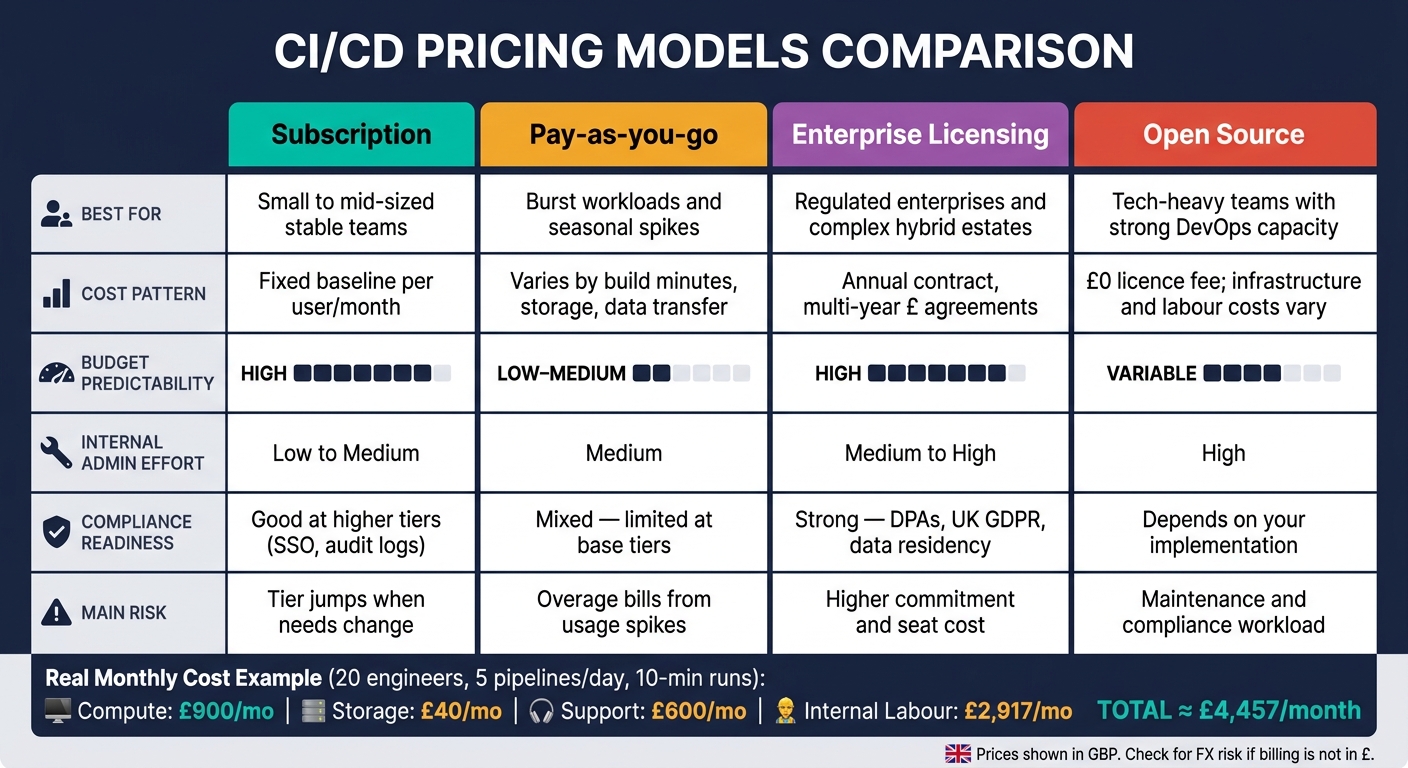 {CI/CD Pricing Models Compared: True Cost Breakdown}
:::
{CI/CD Pricing Models Compared: True Cost Breakdown}
:::
Once you've found the hidden cost drivers - including engineer time and admin effort - the next move is to put the four main models side by side. That makes it much easier to compare like for like.
Pricing comparison table
Use the table below to separate the sticker price from the day-to-day cost of running the setup.
| Dimension | Subscription | Pay-as-you-go | Enterprise licensing | Open source |
|---|---|---|---|---|
| Budget predictability | High – fixed £ per user, per month or per runner, especially on annual terms | Low to medium – varies with build minutes, storage and data transfer | High at contract level – multi-year £ agreements | £0 licence fee, but infrastructure and labour costs vary |
| Scalability | Good but stepwise – add seats or runner capacity | Excellent – scales with build volume | Strong – suited to large, multi-region or hybrid estates | Scales technically, but depends on internal capacity |
| Upfront commitment | Moderate to high – often annual commitments | Low – minimal lock-in | High – multi-year contracts and minimum spend | Low on licence, high in engineering investment |
| Internal admin effort | Low to medium – vendor-managed billing and user provisioning | Medium – you need to monitor usage and cost allocation | Medium to high – contract and charge-back management, with vendor support | High – self-hosted upgrades, security hardening and operations |
| Compliance readiness | Good at higher tiers – SSO, audit logs and security controls | Mixed – base tiers often have limited governance features | Strong – DPAs, UK GDPR, data residency and audit-ready documentation | Depends entirely on your implementation |
| Best-fit business type | Small to mid-sized stable teams | Burst workloads and seasonal spikes | Regulated enterprises and complex hybrid estates | Tech-heavy teams with strong DevOps capacity |
For UK teams, a few extra checks matter. Look at whether billing is in £, whether data can stay in UK or EU regions, and whether support hours match UK business time.
The point of the table isn't just to find the lowest headline number. It's there to help you narrow the list by predictability, admin load and compliance.
Choosing the right model for your team size and growth stage
A small, steady team of 8–15 engineers will often fit a subscription plan. It keeps spend easy to track and avoids too much admin. A fast-growing start-up may do better with a mix: subscriptions for day-to-day work, plus pay-as-you-go runners when demand spikes.
For mid-sized firms - say, a UK retail tech team growing from 50 to 80 engineers - volume-discounted subscriptions or lighter enterprise agreements can start to look more sensible. You get better support SLAs and standard tooling, but without jumping too soon into a rigid multi-year deal.
Regulated setups are a different story. A bank or insurer working under FCA and PRA guidelines will usually need enterprise licensing. The formal SLAs, data residency guarantees and audit-ready documentation can justify the higher commitment.
A manufacturer running on-premises data centres alongside an AWS UK region should look closely at enterprise licensing or a self-hosted open-source platform that can span both environments cleanly.
In practice, many teams revisit the model when they hit around 40–50 engineers as a start-up, or when a compliance audit shows clear gaps in the current tier.
How to build a realistic annual cost estimate
After you've shortlisted a model, test it against your own usage rather than the vendor's sample numbers. That's where the maths starts to tell the truth.
Start with pipeline frequency. Take the number of engineers, multiply it by their average daily pipeline runs, then turn that into a monthly total. For example, 20 engineers each triggering five runs per day gives roughly 3,000 runs per month. If the average pipeline lasts ten minutes, that works out to 30,000 compute minutes per month. At a pay-as-you-go rate of around £0.03 per minute, that's £900 per month in raw compute before you even touch storage, support or internal labour.
Then add storage. Artefacts, container images and logs pile up fast. At £0.08 per GB per month, 500 GB of artefacts adds another £40 per month. Add a premium support tier - for a mid-sized firm, that might be around £600 per month - and then include internal labour. Even 0.5 FTE of a DevOps engineer at a fully loaded annual cost of £70,000 adds roughly £2,917 per month allocated to CI/CD.
A simple way to frame it is this:
- Compute: £900 per month
- Storage: £40 per month
- Premium support: £600 per month
- Internal labour: £2,917 per month
That gives you a monthly total of about £4,457 before any extra charges.
From there, build best-case, expected and peak-usage estimates. Then annualise each one by multiplying the monthly total by 12. If billing isn't in £, add FX risk too. That part is easy to miss, and it can bite later.
The last check is the most grounded one: does the quoted model still make sense once support, compliance and engineer time are all in the picture?
Conclusion: what to check before committing to a pricing model
The lowest list price is rarely the lowest long-term cost. Storage, compute overages, support, and maintenance often make up most of the bill. CI/CD pipelines alone can account for 30–50% of infrastructure spend, yet they’re often missed during procurement[22].
After comparing the models, price the full cost, not the tier name. Focus on total cost of ownership, not just the licence fee. That means factoring in build minutes, storage, internal labour, and any paid security or compliance features. If billing isn’t in GBP, check VAT and currency conversion too.
Cost controls should cut waste, not push teams into awkward workarounds. If limits on concurrent jobs or build minutes are too tight, teams may start trimming tests or skipping pipeline steps. That chips away at CI/CD instead of helping it. The model should make frequent, reliable deployment easier.
Bring finance, security, and engineering into the decision at the same time. A tool might get through an engineering review and still fail a compliance audit. Or it may work fine for the team you have now, then become a headache as headcount grows. Where the trade-offs get messy, Hokstad Consulting can model pricing scenarios before you commit.
The right model isn’t the cheapest one on the pricing page. It’s the one that supports delivery, compliance, and growth at the same time.
FAQs
How do I estimate my true CI/CD cost?
Estimate the true cost of your CI/CD setup by working out total cost of ownership.
Start with the direct costs. That means monthly subscription fees, plus infrastructure spend for compute, storage, and network egress.
Then look at the less obvious costs. Add engineering time spent on maintenance, security patching, and configuration management. On top of that, factor in productivity lost to downtime or failed builds. Those hours add up fast, and they hit your budget even if they never appear on an invoice.
It also helps to track cloud spend for each deployment and monitor pipeline resource use. That makes it much easier to spot waste, inefficient jobs, and surprise scaling charges before they turn into a bigger bill.
When does open source become more expensive?
Open source can end up costing more when hidden operational costs eat up the money saved on licence fees.
That usually happens when an organisation doesn't have in-house DevOps know-how. On paper, the software is free. In practice, the bill can grow through setup work, security integration, maintenance, poor autoscaling, and senior developers losing time on troubleshooting or patching vulnerabilities instead of building the product.
It’s a bit like getting a free car and then finding out you still have to pay for servicing, insurance, repairs, and the mechanic. The sticker price looks great. The day-to-day running costs tell a different story.
Which pricing model suits a growing team?
For a growing team, cloud-based CI/CD platforms with pay-as-you-go or usage-based pricing tend to be the best fit. You can scale resources as your needs change, without big upfront costs or the hassle of running hardware yourself.
That also makes budgeting easier to plan for. Many platforms include free tiers, which can keep early development costs low, and they give teams room to stay flexible as usage grows.