
If you’re buying CI/CD security in 2026, start with your existing platform, test data location early, and price the whole stack in £ over three years.
I’d boil this guide down to four buying checks:
- What it scans: code, dependencies, containers, IaC, secrets, APIs, artefacts, SBOMs
- How it fits: GitHub, GitLab, Jenkins, mixed CI/CD, or registry-led release flows
- Where data sits: SaaS, single-tenant, self-managed, UK/EU region options
- What control you get: RBAC, SSO, audit logs, approval rules, exportable evidence
The article reviews 8 tools that show up on UK shortlists:
A few patterns stand out straight away:
- GitLab Ultimate and GitHub Advanced Security make the most sense when you already live in those platforms.
- Snyk and SonarQube suit teams that want added scanning without replacing their CI/CD setup.
- Checkmarx and Harness fit larger estates where central policy matters more than one native platform.
- CloudBees CI is for Jenkins control, not source-code scanning by itself.
- JFrog Xray is strongest at the artefact and release stage, rather than pull-request review.
The article also keeps one eye on buyer risk. In 2025, reported malicious open-source package detections were up 73%, and leaked developer secrets were up 12% year on year. So this is not just a tooling choice. It is a buying, audit, and risk call.
::: @figure 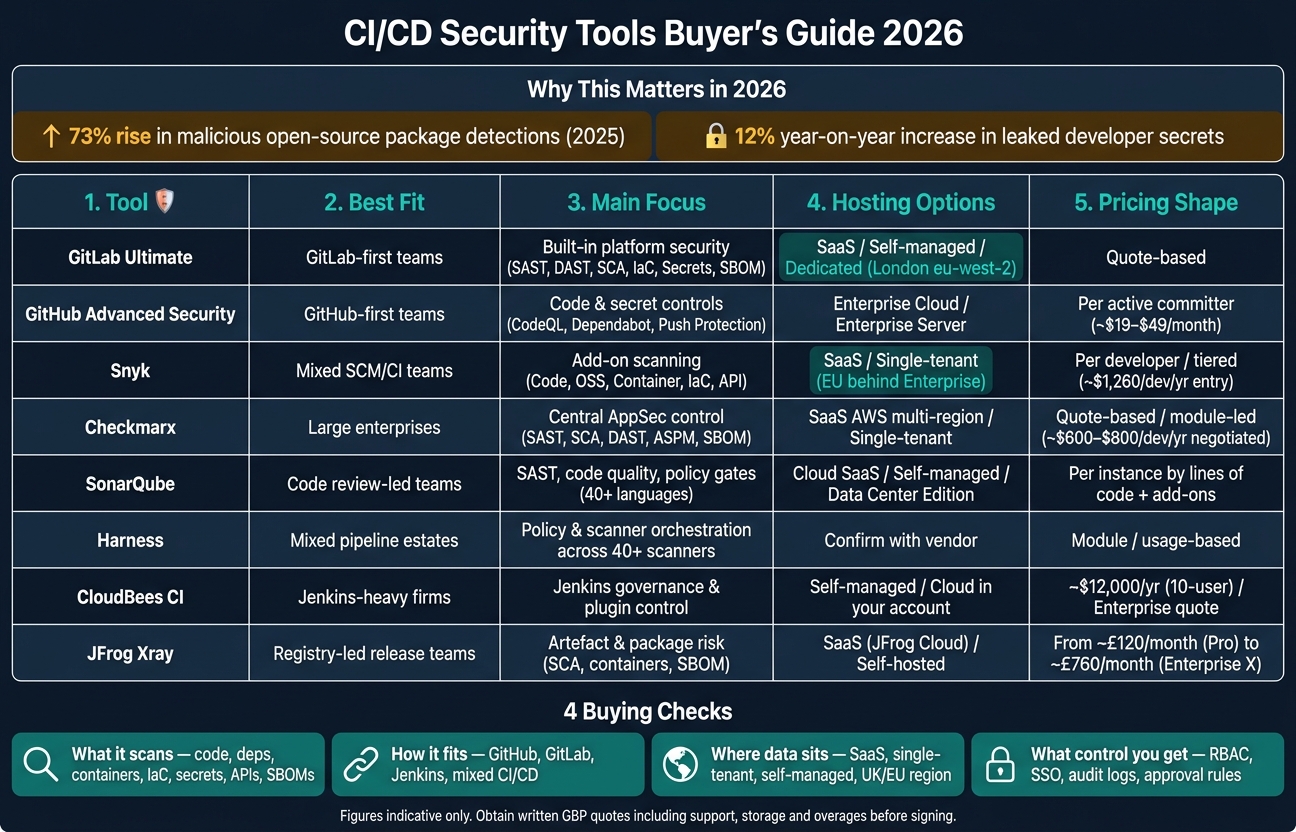 {CI/CD Security Tools Comparison 2026: 8 Tools at a Glance}
:::
{CI/CD Security Tools Comparison 2026: 8 Tools at a Glance}
:::
Quick comparison
| Tool | Best fit | Main focus | Hosting choices | Pricing shape |
|---|---|---|---|---|
| GitLab Ultimate | GitLab-first teams | Built-in platform security | SaaS, self-managed, dedicated | Quote-based |
| GitHub Advanced Security | GitHub-first teams | Code and secret controls in GitHub | Enterprise Cloud, Enterprise Server | Per active committer |
| Snyk | Mixed SCM/CI teams | Add-on scanning across dev workflows | SaaS, some single-tenant/EU options | Per developer / tiered |
| Checkmarx | Large enterprises | Central AppSec control | SaaS, some single-tenant, legacy on-prem | Quote-based / module-led |
| SonarQube | Code review-led teams | SAST, code quality, policy gates | Cloud or self-managed | Per instance / add-ons |
| Harness | Mixed pipeline estates | Policy and scanner orchestration | Check with vendor | Module / usage-based |
| CloudBees CI | Jenkins-heavy firms | Jenkins governance | Self-managed / cloud in your account | Quote-based |
| JFrog Xray | Registry-led release teams | Artefact and package risk | SaaS or self-hosted | Platform-tier pricing |
If I were building a shortlist, I’d do this first:
- Start with the platform you already use
- Check if UK/EU data location is a hard rule
- Run a proof of value on a live pipeline
- Measure alert noise, build delay, and blocking behaviour
- Get a written GBP quote with support, storage, and overages
That is the core of the guide. The rest of the article helps you work out which of these eight tools fits your stack, your governance model, and your budget.
1. GitLab Ultimate
GitLab Ultimate fits teams that already use GitLab for source control and CI/CD. The main draw is simple: security sits inside the same platform, so teams can run checks and review findings in one place. For buyers, the real issue is whether that setup cuts tool sprawl enough to justify the licence. That also makes GitLab a useful starting point for judging native security, governance, and data residency across the rest of this guide.
Security coverage
Ultimate includes SAST, DAST, dependency scanning, container scanning, secret detection, IaC scanning, API fuzzing, coverage-guided fuzzing, licence compliance, and SBOM generation. All of these plug into GitLab pipelines. SBOM output supports CycloneDX and SPDX, which gives teams an auditable record of third-party components that can be matched against GitLab advisories.[7][10][11]
Dependency scanning also flags typosquatted packages and compromised maintainers using GitLab's malicious-package advisories. Approval policies can then block merges on that basis. In 2026, GitLab added Agentic SAST Vulnerability Resolution, which generates ready-to-merge code fixes for SAST findings and cuts down manual remediation work.[9][16][8] GitLab Agent for Kubernetes pushes that scanning reach into production clusters.
Pipeline integration
Security scans run automatically on each commit and pipeline run. Security configuration profiles let teams switch on core scans across many projects without changing every pipeline file by hand. GitLab's Scanner Enablement Wizard helps spot projects with missing coverage. At the same time, organisation-wide controls can enforce scan coverage, approvals, and pipeline execution across projects.[1][11][12][14][16]
There is a practical catch here. If you switch on everything at once, alert fatigue can hit fast. A phased rollout usually works better.
Deployment and data location
GitLab Ultimate comes in three deployment options:
- multi-tenant SaaS on gitlab.com
- self-managed infrastructure
- GitLab Dedicated, a single-tenant managed service in a chosen UK or EU region
For UK firms with residency rules, GitLab Dedicated can be deployed in London (eu-west-2). That keeps code, pipeline data, vulnerability data, and audit logs in-region. Self-managed gives the most control, but it also puts patching, backups, recovery, and infrastructure security on the customer.[15][17][18][20]
Pricing and governance
GitLab no longer posts public Ultimate pricing, so buyers need to ask for a quote. Large deals may land below older list rates, but contract terms differ.[23][24][25][26][27][28][29] AI features run on GitLab Credits, and Ultimate includes a monthly credit allowance.
On the governance side, Ultimate includes audit logs, SIEM streaming, a compliance centre, custom frameworks, and more than 60 prebuilt controls, including NIST 800-53.[19][21][22] For UK buyers, the smart comparison is not just licence cost. It is whether retiring overlapping SAST, dependency scanning, DAST, and fuzzing tools offsets the per-user fee enough to lower total cost of ownership.
The next section looks at the other route: adding security around an existing GitHub workflow instead of using a platform where security is built in.
2. GitHub Advanced Security
GHAS is GitHub’s built-in option for teams weighing up security cover, workflow fit, data location, and governance. It plugs security into a GitHub-first way of working, so it tends to suit teams that live in GitHub day to day. If your estate is split across several source platforms, the picture is less strong. The first thing to pin down is simple: what does it actually cover?
Security coverage
Since 1 April 2025, GHAS has been split into two products: GitHub Secret Protection and GitHub Code Security. You can buy either one on its own.
Code Security includes CodeQL scans, AI Scan for gaps outside CodeQL coverage, Copilot Autofix, Dependabot features, and dependency review.[3][2][36] Secret Protection adds secret scanning, push protection that stops secrets before they hit the repo, AI-detected secrets, and custom patterns for organisation-specific tokens.[3][33][2] GitHub’s dependency graph can also produce SBOMs in SPDX or CycloneDX formats.[45][46]
That matters most when these checks can step in during the normal pull request and push flow, instead of sitting off to one side.
Pipeline integration
Integration mainly runs through GitHub Actions. CodeQL workflows can run on pull requests, on push to the default branch, or on a schedule, and alert results show up straight in the pull request interface.[3][39] The dependency-review-action can block a pull request if it brings in a dependency with a critical vulnerability.[39][45] Secret scanning and push protection work at the Git push stage, before secrets land in repository history.[3][33]
For teams that also use Jenkins, Azure DevOps, or other CI systems with GitHub, GHAS can still take scan results through SARIF uploads. But the closest fit comes when GitHub Actions is the main CI tool.[3][6][33]
The next buying point is where those checks run and where the data ends up.
Deployment and data location
GHAS is available on GitHub Enterprise Cloud and GitHub Enterprise Server.[5][30][31] Enterprise Cloud is a managed SaaS setup, so scan results and security metadata sit in GitHub’s infrastructure. Enterprise Server runs in your own infrastructure, which gives you tighter control over where code and scan data live. For UK organisations with strict data classification or residency rules, that can be a big factor.[30][31][33]
CodeQL CLI can run scans locally and then upload the results to GitHub.[3][33][36] Secret Protection and Code Security are both supported on GitHub Enterprise Server 3.17 and above.[37][40]
Once deployment is sorted, the next thing buyers usually look at is how the licence works and how much oversight the governance model gives them.
Pricing and governance
Pricing is based on active committers, not total developer headcount.[30][31][34] Published list prices are USD $19 per active committer per month for Secret Protection and USD $30 per active committer per month for Code Security, for a combined USD $49 per month if both are bought.[41][42][43][44] For UK buyers, it makes sense to model the spend in GBP (£) and leave some room for exchange-rate movement.
On the governance side, security overview gives owners a cross-repository view of alert status and scan coverage.[3][33][2] Delegated bypass and delegated alert dismissal let central security teams decide who can override push protection or close alerts, which helps with separation of duties for audit work.[40] Alert and configuration data can be exported through the REST API into dashboards or GRC tools.[32][35]
3. Snyk
Snyk is the add-on model in this guide. The main buying questions are simple: coverage, CI/CD fit, residency, and governance.
Security coverage
Snyk covers five core areas: Snyk Code for SAST, Snyk Open Source for SCA, Snyk Container, Snyk IaC, and Snyk API & Web. In practice, that means it checks code, dependencies, containers, and infrastructure as code before release.[48][62]
Its AI Security Platform also helps teams review AI-generated code and govern agent behaviour.[47][48][55] Secrets scanning is available through the CLI and SCM imports, and remediation agents can open pull requests to fix flagged issues automatically.[51][53]
That sounds good on paper. But the main buying question is more practical: how well do these checks fit into your current CI/CD setup?
Pipeline integration
Snyk connects with GitHub, GitLab, Bitbucket, Azure DevOps, Jenkins, CircleCI, and AWS CodePipeline, among others.[61][63][64][65] You can use the CLI for scans during build steps, then add IDE plugins or Snyk Agent Fix so developers see issues and suggested fixes right in the editor.[49][50]
A common setup is to run fast SCA and SAST checks on every pull request, then keep deeper container and IaC scans for nightly runs or release pipelines.[49][53] That split makes sense if you want quick feedback without slowing every merge to a crawl.
Deployment and data location
Snyk is mainly a SaaS product, with both multi-tenant and single-tenant options.[54][56] For enterprise data residency, it offers the EU region in Frankfurt, US regions, Australia, and a separate US government region.[58]
For UK organisations dealing with UK GDPR or client residency rules, there’s an important catch: EU and single-tenant residency sit behind Enterprise plans.[54][56] Snyk also says it meets SOC 2 Type II and ISO 27001/27017 standards, alongside GDPR alignment.[56]
Once you’ve pinned down where the data sits, the next issue is price - and whether the governance layer is worth moving up to Enterprise.
Pricing and governance
Entry-level packages such as Ignite cost about US$1,260 per contributing developer per year. That tier covers up to 50 developers and includes SCA, SAST, IaC, Container, and a limited number of DAST targets.[57]
Enterprise plans are custom-quoted. They open up the full platform, including SSO/SAML, group-level governance, service accounts, advanced support, and tighter data-residency controls.[56][57] For UK buyers, that usually means building the budget in GBP (£) while keeping an eye on exchange-rate movement, since list pricing is published in USD.
On the governance side, Enterprise tiers add:
- role-based access control
- audit logs
- group-level policies such as severity thresholds and remediation SLAs
- reporting for central security teams tracking adoption and risk across multiple squads[60][59][47][52][53]
Next comes Checkmarx, which leans more towards enterprise application-security governance.
4. Checkmarx
Checkmarx puts less emphasis on one-off scanners and more on central control across a large estate. Checkmarx One is an enterprise application security platform built for that kind of setup.
Security coverage
Checkmarx One brings together SAST, SCA, DAST, IaC scanning, container security, API security, secrets detection, repository scanning and software supply chain analysis in one platform. It also includes an Application Security Posture Management (ASPM) layer that links findings across those areas.[78][69][80]
It also covers AI supply-chain security against NIST AI RMF, the EU AI Act, ISO 42001 and the OWASP LLM Top 10.[88] Built-in SBOM generation helps with supply-chain checks and reporting.[71][72][77]
That said, large estates may need rule tuning to cut false positives.[69][71][75][76][77]
Pipeline integration
Checkmarx fits into CI/CD pipelines through native links for Jenkins, TeamCity, GitHub Actions, Azure DevOps and Maven. It also supports CLI-based use for Bitbucket Pipelines, CircleCI, GitLab CI, Bamboo and AWS CodeBuild.[67][68][70][73][74][75]
A common setup is simple:
The platform also includes IDE plugins and Checkmarx One Assist, which shows findings and suggested fixes right inside the editor.[66][69][73] That cuts the time between spotting an issue and fixing it.
Deployment and data location
For UK buyers, hosting options matter just as much as scanner range. Checkmarx One runs as SaaS on AWS, with multi-region instances in the US, EU, EU2, Australia/New Zealand, India and Singapore.[89][82] Single-tenant options are available in Germany and UAE/MEA for teams that want tighter control.[83][84][85][87] Legacy self-managed SAST is still available for on-premises or air-gapped environments.
The platform holds ISO/IEC 27001:2022 certification, completes an annual SOC 2 Type II audit, and says client data is deleted within 7 days of a formal deletion request.[81][86]
Pricing and governance
Pricing is usually quote-based and per developer, though subscriptions may also be priced by applications, lines of code or scan volume.[71][77] Public AWS Marketplace references show sample annual licence prices of about US$1,035 for CxOne Start with SAST NG and US$1,564 for CxOne Essential.[90][91]
Vendor pricing analysis suggests that mid-market teams with 50–100 developers often spend US$180,000–350,000 per year when they include key modules and support. For teams with 100–300 developers, negotiated rates can come in at about US$600–800 per developer per year after discounts.[91][92]
On the governance side, the platform includes RBAC, SSO/SAML/OIDC integration, CI/CD quality gates and central dashboards that pull together findings across all scanners.[84][79][69] For UK enterprises, that central dashboard helps with audits and board reporting across SAST, SCA, DAST, container, IaC and supply-chain findings. That governance model is a big reason large teams put it on the shortlist.
5. SonarQube
Where broader application security platforms focus on doing a bit of everything, SonarQube leans hard into fast, developer-facing code checks. Put simply, it sits in the review and merge flow, giving teams a code-verification layer right where developers work.
Security coverage
SonarQube provides SAST across 40+ languages, frameworks and IaC platforms.[111] Its taint analysis follows untrusted input through code, which helps it spot injection flaws that pattern-based scans can miss.[108][109][110] It also includes secrets detection for API keys, tokens and credentials, plus IaC scanning for cloud misconfigurations.[98][94]
Advanced Security adds SCA, SBOM import and generation, licence risk checks, and malicious package detection.[93][98][102] On top of that, its reporting maps findings to frameworks such as OWASP Top 10, CWE Top 25, PCI DSS, STIG, the EU Cyber Resilience Act, and OWASP Top 10 for LLM.[95][96][98]
That means the main buying test is simple: does it give you the right review feedback and pipeline enforcement at the point where code is shipped?
Pipeline integration
SonarQube runs on commits and pull or merge requests, returns a quality gate, and can block merges or deployments when thresholds fail.[100][101][103] It integrates with GitHub Actions, GitLab CI/CD, Azure Pipelines, Bitbucket Pipelines and Jenkins, with automatic project binding and quality gate results shown inside the pipeline UI.[100][101][103] Developers can also see security hotspots and vulnerabilities directly in pull requests and code review views.[104][105][106][107]
A common setup looks like this:
- Run SAST and secrets detection on every pull or merge request
- Fail the build on new critical findings
- Add IaC scanning before infrastructure changes go live
For supply-chain controls in regulated settings, SonarQube can also integrate with JFrog to attach signed analysis results to artefacts and support audit trails.[96]
Deployment and data location
SonarQube gives UK buyers two main options: SonarQube Server for self-managed deployment, either on-premises or in your own cloud account, and SonarQube Cloud as a SaaS service.[98][100][103] If data residency is a hard requirement, self-managed deployment in a UK or EU cloud region keeps source code and scan results under internal control.[98]
For larger organisations, the Data Center Edition supports Kubernetes-based clustered deployments with horizontal scaling and zero-downtime upgrades.[113][115][117][120] That makes it a fit for UK enterprises that need high availability and can't afford disruption during upgrades.
If you're looking at the cloud option, check the storage regions on offer and review the contract terms against UK GDPR and data transfer duties before signing.[100] It's also worth checking hosting location, UK/EU deployment limits, and whether administrator and auditor logging meet your internal standards.
For many buyers, this is the point where the trade-off becomes clear: easier SaaS operations versus more control with self-managed deployment.
Pricing and governance
SonarQube Server is priced per instance, per year, based on lines of code, across Community (free), Developer, Enterprise and Data Center editions.[112][114][116][118][120] The Advanced Security add-on, which covers SCA, SBOM and malicious package detection, is licensed separately on top of the base edition.[97][98][102] SonarQube Cloud uses project- or user-based tiers, with extra charges for Advanced Security features.[99][100]
When you're budgeting in £, don't just look at the licence line. Self-managed deployment can bring extra infrastructure spend and staff time, and those costs are easy to underestimate next to a pure SaaS subscription. Higher tiers add portfolio-level governance, centralised quality gates, and compliance reporting aligned to PCI DSS, OWASP ASVS, CWE Top 25, OWASP Top 10 and the EU Cyber Resilience Act.[113][119]
6. Harness
Harness is a security control layer for delivery pipelines you already run, not a stand-alone scanner. It fits teams that want one place to manage policy across existing scanners instead of adding yet another tool. So the main buying call is pretty simple: do you need orchestration and governance more than one more scanner?
Security coverage
Harness STO brings orchestration, deduplication, and one policy layer across SAST, SCA, secrets detection, container image scanning, and API testing.[121][127][130][132] It works with 40+ commercial and open-source scanners, removes duplicate findings, and puts issues into a single prioritised view.[126][123][140] Native SAST and SCA also add one-click setup, data-flow visualisation, and reachability analysis.[127][132]
On the software supply chain side, Harness SCS is built to link risk across repositories, CI/CD tooling, and registries. It supports SBOM generation and SLSA attestations aligned to the OWASP Top 10 CI/CD Risks and CIS benchmarks.[133][136][137] Secrets are encrypted with AES-256 at rest, masked in execution logs, and protected with TLS 1.2+ in transit.[134]
The main thing to check is how well this control layer sits on top of your current pipelines.
Pipeline integration
It plugs into Harness pipelines and can also sit over GitHub Actions, GitLab CI, and Jenkins through APIs or connectors.[123][126][139] Teams can send in results from scanners already built into those pipelines, or use custom ingestion for tools that do not exist as native steps.[122][124]
Policy enforcement uses Open Policy Agent (OPA). That lets security teams set hard gates, such as blocking a build if a high-severity vulnerability is present or if no SBOM has been generated, and then apply those rules the same way across environments.[135][133] For UK organisations, that matters when several teams and services need the same auditable enforcement.
Deployment and data location
Harness does not publish a clear hosting matrix in this section.[125][128] UK buyers should check region availability, how vulnerability data and source-code metadata are stored and processed, and whether the contract supports UK GDPR requirements.
Pricing and governance
Harness sells STO and SCS as separate modules rather than as one scanner. Public material does not list UK pricing, so buyers should check whether charges are based on users, pipelines, modules, or usage, and how that stacks up against the rest of the delivery setup.[125][128][131]
On governance, Harness supports RBAC, SSO, audit logs, policy exceptions, and Jira ticket creation.[129][122][126] It also keeps up to two years of embedded audit history, including user, timestamp, and affected resource, which can help with regulated UK audit and compliance work.[138] Teams can also use AI-generated remediation suggestions and automated pull requests to cut time-to-fix.[122][128][132]
The next section covers CloudBees CI, where security is tied more closely to build and release orchestration.
7. CloudBees CI
CloudBees CI is an enterprise-grade Jenkins distribution, not a security scanner.[149][154] In plain terms, it adds governance and security controls to the Jenkins setup you already have. It makes sense for teams that are already running Jenkins and need central control, not one more scanner bolted onto the stack. If your goal is tighter controller-level oversight without reworking existing Jenkins flows, this is where CloudBees CI fits.
Security coverage
CloudBees CI protects Jenkins infrastructure rather than application code.[147][150][154][141][144][149] Its controls cover granular RBAC, cluster-wide security enforcement across Jenkins controllers, secure plugin management, and storing credentials in an external vault such as CyberArk. Trigger restrictions also limit which upstream jobs can start sensitive builds.[154]
For application scanning, CloudBees CI leans on integrations with tools such as Checkmarx, Snyk, Sonatype, Synopsys, WhiteSource, Anchore and CyberArk. When paired with CloudBees Unify, those results can be normalised, deduplicated and prioritised in one policy-driven control plane.[150][153][143][148] The key point is simple: the scanning still comes from the integrated tools, not from CloudBees CI itself.
Pipeline integration
CloudBees CI uses an Operations Center to manage clusters of Jenkins controllers from one place.[141][154] That lets platform teams apply shared authentication, plugin baselines and pipeline standards across every controller, while developers continue using their current Jenkinsfiles and shared libraries.
CloudBees Unify builds on that model by automatically orchestrating security scans from pipeline events. For example, it can trigger binary scans when an image is published. It also shows results in Security Insights dashboards, with tracking for vulnerability severity, scan type and mean time to resolve (MTTR).[146][148][151]
Deployment and data location
CloudBees CI supports self-managed, on-premises and public-cloud deployments, with hardened Docker images and signed Helm charts.[141][142][145][149][154] Organisations can deploy it in their own cloud accounts, including AWS, Azure or GCP regions they choose. They keep control of pipeline logs, build artefacts and configuration data, which helps keep CI data closer to UK or EU residency boundaries than a shared SaaS model.[154][141][145][149]
Pricing and governance
Public pricing is limited. One AWS Marketplace listing shows a 10-user self-managed package with Gold Support at $12,000 for 12 months.[158][156] Enterprise tiers are sold through custom quotes, with cost shaped by controller count, team size, and whether CloudBees hosts the platform or the customer manages it.[152][155][157]
On governance, CloudBees CI logs scans, approvals, policy decisions and releases for audit.[148] It also includes framework-aligned templates for SOC 2, PCI and ISO 27001, which help teams map CI/CD controls to recognised standards and cut down the manual slog of pulling evidence before an audit.[143][148] The next comparison moves from CI governance to artefact-layer security.
8. JFrog Xray
JFrog Xray scans build artefacts rather than source code, and it works with JFrog Artifactory instead of operating as a stand-alone tool.[167][170] In practice, that makes it most useful when release checks and software supply-chain evidence sit high on the priority list.
Security coverage
Xray is a software composition analysis tool for open-source dependencies, transitive dependencies, container images and binary artefacts. It flags vulnerabilities, licence issues, secrets, IaC misconfigurations and risky packages. It also supports container contextual analysis, and newer releases add LLM model scanning. Impact Search helps teams find where affected package versions are used across the estate when a critical CVE lands, while a universal component graph shows shared dependencies across multiple builds and repositories.[173][175][177][176][178]
The main draw here is simple: Xray helps teams track vulnerable components, licences and risky packages across shared builds, repositories and container images.
Pipeline integration
Xray plugs into build pipelines, artefact repositories, container registries and promotion workflows. It can scan at dependency resolution, during CI builds, at artefact promotion and before deployment. Policies can fail builds or block downloads automatically, so Xray acts as a release gate, not just a scanner.[172][173][174]
That release-gate role matters, especially when teams want security checks tied directly to what gets promoted and shipped.
Deployment and data location
Xray is available as a fully managed SaaS service through JFrog Cloud or as a self-hosted deployment on premises or in your own cloud environment, including AWS, Google Cloud and Azure.[162][163][168][169] For UK buyers, the big checks are in-region hosting, data egress, and how scan data, vulnerability intelligence and build logs are kept. JFrog also supports AWS GovCloud and Azure Government deployments.[163][166]
Pricing and governance
Xray is sold through JFrog Platform tiers: Pro X, Enterprise X and Enterprise+, with pricing linked to the broader platform.[167][170][160] Public list pricing starts at about £120 per month for Pro and £760 per month for Enterprise X, while Enterprise+ uses custom, consumption-based pricing.[159][160][161]
Teams can define policies, watches and violations once, then apply them across repositories and pipelines. Audit trails, approval workflows and SBOM reporting support release control and assurance reviews. That makes Xray a strong option for organisations that want to ban certain licence types or require SBOM generation for higher-risk releases.[164][165][171]
The next section compares these tools across coverage, integration, deployment and governance.
How the tools compare on the four buying decisions that matter
No tool comes out on top in every area. The right pick depends on four practical things: where your code sits, how your pipelines run, where data is allowed to live, and what your budget actually includes. Use this section to narrow the field by fit, not by feature volume.
Treat these figures as indicative only; obtain a written GBP quote and confirm renewal terms, overages, support tiers and data-residency commitments before signing.
| Tool | Security coverage | Pipeline integration | Deployment & data location | Pricing & governance |
|---|---|---|---|---|
| GitLab Ultimate | Broadest built-in suite; best for GitLab-native teams. | Native to GitLab CI/CD; scan execution, merge-request approval and pipeline execution policies can block merges.[181][182][183] | Self-managed and dedicated deployment choices available; single-tenant option in London (eu-west-2).[180] | Enterprise quote-based pricing; indicative third-party pricing around US$99 per user/month, with GitLab Credits billed separately.[184][4] |
| GitHub Advanced Security | Strongest for GitHub-native workflows; split into Secret Protection and Code Security.[5] | Native to GitHub Actions and pull requests; requires more setup outside GitHub. | Enterprise Cloud and Enterprise Server options with regional data-residency choices.[179] | Commonly priced per active committer; public figures around US$19 or US$30 per active committer/month depending on product.[38][6] |
| Snyk | Broad add-on coverage across code, dependencies, containers and IaC. | Low-friction plugins and CLI; works across GitHub, GitLab, Azure DevOps, Jenkins and others. | Cloud SaaS, with EU and single-tenant residency behind Enterprise plans. | Per developer or per application pricing; confirm included modules and extra costs. |
| Checkmarx | Enterprise-wide application security with central policy control. | Medium integration effort; enterprise connectors cover most CI systems. | SaaS on AWS with multi-region instances; single-tenant options available. | Module-based pricing; request a three-year total-cost model including connectors and support. |
| SonarQube | Fast code-security and quality gates; narrower outside code review. | Integrates with most CI systems via scanner CLI; quality gates can be enforced on pull requests. | Self-managed (Server) or SaaS (Cloud); Data Center Edition for high-availability deployments. | Priced per instance by lines of code; Advanced Security add-on licensed separately. |
| Harness | Orchestrates multiple scanners across mixed CI/CD estates.[13] | Designed for multi-SCM, multi-CI environments; applies shared policy across heterogeneous pipelines. | Confirm deployment model, telemetry handling and data location for regulated use. | Consumption and module-based; test added cost against existing CI/CD spend. |
| CloudBees CI | Governance layer for Jenkins estates; scanning comes from integrations. | Native to Jenkins and CloudBees pipelines; plugin ecosystem determines integration breadth. | Self-managed, on-premises and public-cloud deployments; customer controls pipeline logs and build artefacts. | Platform licence plus plugin and scanner costs; include maintenance in the total. |
| JFrog Xray | Best for artefact and package policy enforcement.[185][186] | Best suited to release governance around artefacts and packages. | SaaS via JFrog Cloud or self-hosted on premises or in your own cloud environment.[162][163] | Quote-based; compare full platform cost including support and any usage or storage charges. |
Read the table as a procurement filter. The checks below show how to test each claim.
Security coverage
Start with coverage. You need to decide whether you're buying a single platform, a single scanner, or a control layer that sits across other tools.
These products do not all look at the same risk layers. GitLab Ultimate and Checkmarx try to cover the full application security stack in one place. GitHub Advanced Security is strongest inside GitHub. SonarQube is more focused on code review and quality gates. JFrog Xray is focused on what gets stored and released, not only what appears in the source manifest.[185][186]
A good test is simple. Take one application and seed it with:
- vulnerable code
- an old dependency
- a vulnerable container base image
- an IaC misconfiguration
- a test secret
- a restricted licence
- incomplete provenance
Then ask each vendor to show detection, prioritisation, blocking, and audit output. That cuts through slideware fast.
Pipeline integration
Native integration and broad integration are not the same thing. That difference matters more than many buying teams expect.
GitLab's security features are tightly tied to GitLab CI/CD. That includes scan execution, merge-request approval, and pipeline execution policies that can block a merge until security checks pass.[181][182][183] GitHub Advanced Security fits neatly into GitHub Actions and pull requests, but it takes more work once you move outside GitHub. Harness is built for mixed estates, applying shared policy across multiple SCM and CI systems and pulling findings from more than 50 scanners.[13] CloudBees CI tends to make the most sense when Jenkins is already the main delivery platform.
Ask for a POC in two live pipeline types, including one non-native platform. Track setup time, scan duration, false positives, and the exact way the tool fails, blocks, or requests approval. That's where the day-to-day friction shows up.
Deployment and data location
For UK buyers, deployment terms matter just as much as scanner breadth. A strong scanner is not much use if the hosting model or data flow does not pass internal review.
Classify each tool as SaaS, single-tenant SaaS, self-managed, or hybrid. Then verify where code, scan results, logs, SBOMs, identities, support data, telemetry, and backups are stored. Check retention, deletion, subprocessors, transfer terms, encryption, and region as well.
For UK-regulated firms, procurement should review the supplier's data-processing agreement, transfer mechanisms, incident commitments, and audit rights under UK GDPR and the Data Protection Act 2018.
Pricing and governance
Once you've worked out fit, price and control usually decide whether the product gets through procurement.
Look at three-year total cost, not the headline figure. Include licence fees, runners, storage, support, integrations, migration work, and any scanner licences that overlap with tools you already pay for. A low entry price can look very different once those items are added in.
Then compare the control model: RBAC, SSO/SCIM, policy inheritance, expiry-based approvals, ownership, immutable audit logs, and exportable reporting. This is the bit that often decides whether the tool works cleanly at scale or turns into a governance headache six months later.
Pros and cons by buyer type
No single tool fits every setup. The table below links each product to the kind of buyer it tends to suit best, along with the main compromise and a few UK-specific points worth checking during procurement.
| Tool | Best for | Main trade-off | Watch-out for UK buyers |
|---|---|---|---|
| GitLab Ultimate | GitLab-native teams wanting an integrated DevSecOps platform | Expensive if you only need one or two scanners | Request a written GBP quote; confirm whether runners, storage and support are included |
| GitHub Advanced Security | GitHub-native teams needing code, dependency and secret controls | Extra licensing on top of GitHub Enterprise; less effective outside GitHub workflows | Model licensing against your contributor population, not just permanent headcount |
| Snyk | Teams using multiple SCM or CI platforms wanting targeted developer-first scanning | Costs rise as you add modules or repositories | Confirm which modules are included in the base price and what triggers overages |
| Checkmarx | Enterprises needing broad application-security governance across many teams | More integration and administration than a native-platform option | Request a three-year total-cost model in GBP, including connectors, support and any overlapping tooling |
| SonarQube | Organisations linking secure coding to code quality and developer feedback | Narrower outside code review | Verify its gaps in dependency, container and supply-chain coverage |
| Harness | Enterprises with heterogeneous CI/CD estates needing shared policy across pipelines | Adds administration overhead | Verify data-processing agreement and subprocessors before signing; test added cost against existing CI/CD spend |
| CloudBees CI | Organisations already running Jenkins at scale needing a governance layer | Adds admin overhead | Treat self-managed or hybrid architecture as part of procurement and assess ongoing maintenance burden |
| JFrog Xray | Teams needing continuous analysis of packages, containers and artefacts in a registry | Less suited to source-code or pull request workflows | Confirm how it fits your registry and release architecture, and whether evidence can be retained and exported for audit |
Use the table to cut down the shortlist. Then use the buyer notes below to work out which control model fits your organisation.
Teams already using GitHub or GitLab
For these teams, this is mostly a pipeline integration choice, not a race to compare feature counts.
If your repositories, pull requests and day-to-day workflows already live in GitHub or GitLab, start with the security controls built into that platform. That’s usually the simplest route. A separate tool such as Snyk, Checkmarx or SonarQube starts to make sense only if clear gaps still remain after you’ve switched on the controls you already pay for.
It’s worth testing this on live repositories before buying anything else. That means monorepos, self-hosted runners and fork workflows too, not just a tidy demo repo.
Enterprises needing central governance
Here, the main issue is governance and access control.
Ask vendors to show a live demo of organisation-wide policy enforcement. Don’t settle for slides. You want to see least-privilege administration, clear separation between developers and security approvers, time-limited exception handling, and audit records that can be exported without a fuss.
GitLab Ultimate and GitHub Advanced Security can do this when the business has standardised on one platform.[1][2] If delivery is split across several CI systems, Checkmarx or Harness may be a better fit for applying the same controls across the board.
Organisations focused on software supply chain evidence
This is mostly a release-evidence and reporting call.
A good test is simple: ask each vendor to trace one release from commit through build, dependency resolution, container image, approval and production deployment. Then ask whether that evidence is kept and whether it can be exported for audit. That tends to sort the polished demo stories from the tools that can hold up under scrutiny.
JFrog Xray is the strongest fit when governance is centred on a binary repository. GitLab Ultimate and GitHub Advanced Security cover parts of the picture, but buyers should check whether extra tooling is needed for complete attestations and artefact-level evidence.[1][187][2]
SMEs wanting targeted scanning without replacing CI/CD
For smaller teams, this is mostly about price and workflow friction.
The goal is usually an add-on that works with the pipeline you already have, gives clear pull request feedback, and doesn’t turn pricing into a guessing game. Snyk and SonarQube often come up in this group.
Before buying, test a few practical points:
- Scan duration
- Alert volume
- Supported languages
- Pull request blocking behaviour
- The cost of moving from a pilot to all repositories
Usage-based pricing can look fine at ten repositories and far less comfortable at fifty. That shift catches plenty of teams out.
Regulated firms needing stronger hosting or residency control
This is mostly a deployment and data-location matter.
EU hosting is not the same thing as UK GDPR compliance. Regulated buyers should map where source code, scan results, logs, backups, support data and telemetry are stored and processed, for every subprocessor, not only the main vendor.
GitLab self-managed[1] and CloudBees CI self-managed or hybrid deployments give the most direct control over data location. GitHub Enterprise Server is another route where self-hosting is preferred to SaaS.[40] For any SaaS product, the data-processing agreement, international transfer mechanisms, encryption, key management, incident notification timelines and deletion-on-termination commitments all need contractual confirmation before sign-off.
Conclusion: how to choose the right tool for your organisation
Start with the platform you already use. Turn on its built-in security first, then look at a specialist product only if you can point to clear gaps in language coverage, remediation quality, or support across multiple platforms.
Datadog's 2025 research found that the median dependency was 215 days behind its latest major version [189]. If that feels uncomfortably familiar, put artefact controls and SBOM generation near the top of your list, especially if your setup leans heavily on software supply chains. Once you have a clear view of that supply-chain evidence, the next screen is data location.
For regulated firms, or any organisation dealing with sensitive data, deployment model and data location should matter more than feature count. The FCA's cloud-outsourcing guidance says firms need to agree a data-residency policy up front, with the jurisdictions where data may be stored, processed, and managed clearly named [188]. Get that written down before you sign anything.
A sensible buying process usually includes a few hard checks:
- Build a three-year cost model in £, covering licence, implementation, integration, admin, and any overlap with tools you already pay for.
- Test SSO, MFA, and RBAC with developer, analyst, auditor, and contractor roles.
- Check whether you can export a tamper-resistant audit trail for one live finding, from detection through to remediation.
- Run a proof of value on a pipeline that reflects normal work: production languages, monorepos, third-party dependencies, container images, and one failure case.
- Set pass/fail thresholds before testing starts, including maximum pipeline delay, rules for blocking critical findings, and approved data-processing locations.
If a tool clears those checks but the rollout looks heavy, bring in delivery support for implementation only. If the buy sits inside a broader DevOps shift or an AI-enabled workflow, an implementation partner such as Hokstad Consulting can map pipelines, cut duplicate tooling, design policy as code, connect identity and reporting, and run the proof of value. Keep product scoring, data-residency approval, and contract review with the buyer.
FAQs
How do I choose between native and add-on CI/CD security?
It depends on your team’s technical maturity, infrastructure complexity and regulatory needs. Native plugins, such as those for GitHub Actions or GitLab, are usually easier to plug in and can cut down configuration work.
Add-on or specialised tools can go further. They may include features like compliance reporting, multi-environment support and granular policy-as-code enforcement. Focus on tools that match your workflow, support frameworks such as GDPR or PCI DSS, and give clear remediation guidance.
What should I include in a three-year cost model?
Look past the initial licence fee and work out the full three-year cost. That means adding any recurring subscription or per-user charges in GBP (£), then adjusting those figures for team growth over time. If you're reviewing self-hosted tools, include infrastructure and hosting costs as well.
You’ll also want to price in the day-to-day overhead. That includes developer time spent on maintenance, configuration, and manual remediation. On the flip side, account for savings from automation too, such as lower cloud hosting costs and more efficient deployments.
How do I check UK data residency before buying?
Ask the vendor to confirm that sensitive data, logs, and build artefacts stay within the UK. If the product is cloud-hosted, check that the data centres are physically based in the UK.
If you need tighter control, self-hosted deployment gives you the most control over where data sits. Also confirm support for UK GDPR and GBP billing.