
CI/CD tools are central to modern software development, helping teams automate testing, integration, and deployment. This article compares five popular CI/CD platforms in 2025: GitHub Actions, GitLab CI/CD, CircleCI, TeamCity, and Buildkite. Each tool is evaluated for scalability, integration, security, and cost efficiency.
Key Takeaways:
- GitHub Actions: Best for teams using GitHub, with strong integrations and a developer-friendly experience.
- GitLab CI/CD: A complete DevOps platform with built-in security and scalability, ideal for enterprise use.
- CircleCI: Known for fast builds and flexibility, suitable for teams needing speed and parallelism.
- TeamCity: Favoured by enterprises for its detailed build tracking and support for complex pipelines.
- Buildkite: Offers control with hybrid infrastructure, perfect for large-scale operations but requires self-hosted agents.
Quick Comparison
| Tool | Scalability | Integration | Security | Cost Efficiency |
|---|---|---|---|---|
| GitHub Actions | Handles up to 1,000 concurrent jobs; reusable workflows | 20,000+ marketplace actions; cloud-native tools | OIDC for authentication; ephemeral runners | Free for public repos; Linux runners at £0.006/min |
| GitLab CI/CD | Scales to 50,000+ users; DAGs for faster pipelines | Built-in registries; native cloud platform support | SAST, DAST, and compliance pipelines included | Free tier; Premium plan at £22.50/user/month |
| CircleCI | Supports 80+ concurrent jobs; parallel execution | 3,500+ Orbs for reusable configurations | FedRAMP compliant; sandboxed builds | Free tier; Performance plan from £11.50/month |
| TeamCity | Multi-node architecture; auto-scaling agents | IDE integrations; Unity and Unreal support | SOC 2 compliance; encrypted secrets | Free for 3 agents; Enterprise from £1,920/year |
| Buildkite | Supports 100,000+ agents; hybrid model | AWS Secrets Manager; plugin-based system | SOC 2 compliance; self-hosted agents | Free plan available; P95 billing model for scalability |
Choosing the right tool depends on your team’s size, infrastructure, and priorities. For GitHub-based workflows, GitHub Actions is a strong choice. Enterprises may prefer GitLab CI/CD or Buildkite for their scalability and control. Teams seeking speed and ease of use might opt for CircleCI, while TeamCity suits those managing complex builds.
::: @figure 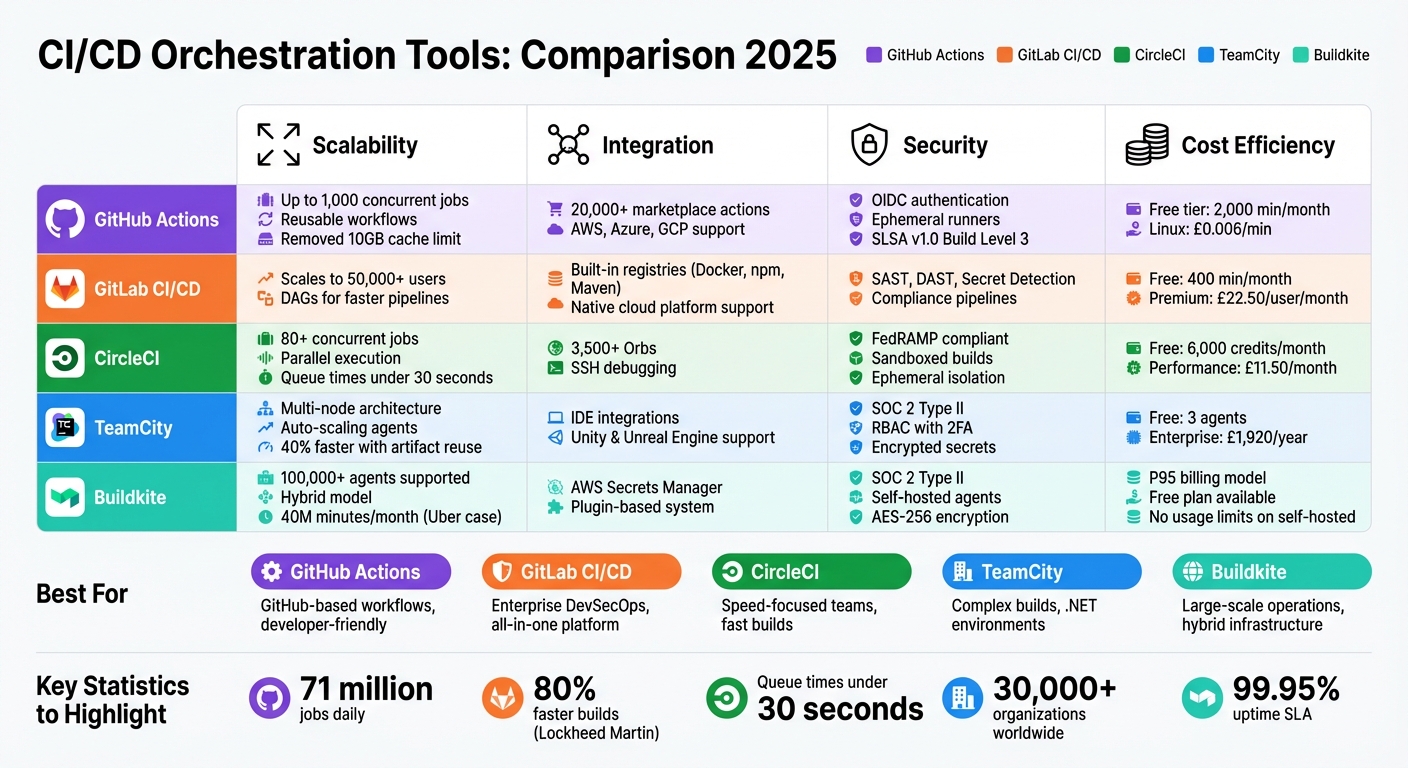 {CI/CD Tools Comparison 2025: GitHub Actions vs GitLab vs CircleCI vs TeamCity vs Buildkite}
:::
{CI/CD Tools Comparison 2025: GitHub Actions vs GitLab vs CircleCI vs TeamCity vs Buildkite}
:::
How to Choose the Right CICD Tool for Your Use Case! Top CICD Tools explained!
Need help optimizing your cloud costs?
Get expert advice on how to reduce your cloud expenses without sacrificing performance.
1. GitHub Actions
GitHub Actions has become one of the most widely used CI/CD platforms, managing an impressive 71 million jobs daily [7]. In 2025, a major overhaul of its backend architecture significantly improved its ability to handle workflows at an enterprise level. Ben De St Paer-Gotch, Director of Product at GitHub, highlighted the impact:
Since August [undefined], all GitHub Actions jobs have run on our new architecture, which handles 71 million jobs per day... Individual enterprises are able to start 7x more jobs per minute than our previous architecture could support.
Scalability
This updated architecture brought notable improvements in scalability. Reusable Workflows can now nest up to 10 levels deep, handle 50 calls per run, and accept 25 workflow dispatch inputs [7]. Additionally, GitHub removed the 10GB cache limit, a long-standing restriction, allowing large monorepos and resource-intensive dependencies to run without performance issues [7]. Enterprise plans now support up to 1,000 concurrent jobs using Larger Runners. However, independent testing revealed that the platform peaks at around 124 concurrent jobs, with median queue times of 153 seconds for standard jobs and 22 minutes for larger ones under heavy load [8][9].
Integration
GitHub Actions boasts a marketplace with over 20,000 pre-built actions and seamless integration with leading cloud providers like AWS, Azure, and Google Cloud Platform. It supports tools like Terraform through HashiCorp-maintained actions and connects with security solutions such as Snyk, SonarQube, and Checkmarx. Dependabot is also natively supported. For project management, integrations with Jira, ServiceNow, Slack, and Microsoft Teams enable automated updates and approvals. A growing adoption of OpenID Connect (OIDC) simplifies authentication with cloud providers by removing the need for static credentials [10].
Security
Security is a core focus of GitHub Actions. OIDC authentication replaces hardcoded secrets with short-lived tokens for cloud provider connections [12]. Artifact attestations ensure build provenance verification, aligning with SLSA v1.0 Build Level 3 compliance [13]. The platform also redacts secrets from logs and allows the GITHUB_TOKEN to be scoped to minimal permissions [12]. Dependabot automatically updates both actions and dependencies to address vulnerabilities, while CodeQL provides built-in code scanning for workflow files and source code [12]. For job execution, GitHub-hosted runners use clean, ephemeral virtual machines, while self-hosted runners can employ Just-In-Time (JIT) configurations to minimise risks of persistent compromise [12].
Cost Efficiency
GitHub Actions offers competitive pricing, starting with 2,000 minutes per month for private repositories on the Free tier (unlimited for public repositories). Team plans provide 3,000 minutes at £3.20 per user monthly, while Enterprise plans include 50,000 minutes at £16.80 per user monthly [9][10]. Additional compute costs are £0.006 per minute for Linux, £0.013 for Windows, and £0.064 for macOS runners [10].
Next, we’ll explore GitLab CI/CD and see how it measures up in these areas.
2. GitLab CI/CD
GitLab CI/CD is a comprehensive DevOps platform that brings together code management, issue tracking, registries, and security scanning in one place. This eliminates the need for external extensions and simplifies workflows. Below, we dive into how GitLab handles scalability, integrations, and security while keeping costs manageable.
Scalability
GitLab's scalability is powered by its runner architecture and pipeline optimisation features. Runners - agents that execute CI/CD jobs - can be hosted by GitLab or set up on physical machines, virtual instances, or Kubernetes clusters. This flexibility allows teams to expand computing resources horizontally as needed [14]. For complex pipelines, GitLab offers Parent-Child Pipelines, which divide large configurations into smaller sub-pipelines for quicker execution. Additionally, Merge Trains queue and test merge requests simultaneously, ensuring branch stability [15].
Lockheed Martin's experience highlights these benefits: by adopting GitLab, they achieved build times that were 80% faster and cut maintenance efforts by 90%. Alan Hohn, Director of Software Strategy at Lockheed Martin, shared:
By switching to GitLab and automating deployment, teams have moved from monthly or weekly deliveries to daily or multiple daily deliveries.[15]
GitLab also supports Directed Acyclic Graphs (DAGs), enabling jobs to run as soon as their specific dependencies are satisfied, skipping the wait for an entire stage to finish [10]. With Kubernetes integration and auto-scaling, GitLab can handle large-scale operations, supporting over 50,000 users for enterprise-level projects [2].
Integration
GitLab CI/CD integrates seamlessly with major cloud platforms like AWS (EC2, ECS, Lambda), Google Cloud Platform, and Microsoft Azure. This ensures compatibility with a variety of deployment scenarios, including virtual machines, Kubernetes clusters, and Function-as-a-Service platforms [15][18]. Using OIDC, GitLab enables secure, secret-less cloud connections [4].
The platform also includes built-in registries for Docker containers, NuGet, npm, and Maven, reducing reliance on third-party artifact repositories [4]. Native integrations with tools like Slack and JIRA enhance collaboration by linking code changes and pipeline runs directly to issue tickets, providing complete traceability [18]. To further streamline workflows, the CI/CD Catalog offers pre-configured, reusable pipeline components that standardise processes across teams and organisations [15].
Security
Security is deeply embedded in GitLab's pipelines. Tools like SAST, DAST, Secret Detection, Dependency Scanning, and Container Scanning are integrated directly into the CI/CD process [21]. Protected branches and runners safeguard sensitive credentials, ensuring access is limited to authorised users and code [20].
To maintain pipeline integrity, GitLab enforces SHA digest verification for Docker images and supports locked package dependencies [19]. Compliance pipelines are available for organisations that require mandatory security scans across all projects [21]. Additionally, GitLab Duo leverages AI to provide detailed vulnerability explanations and identify root causes of pipeline failures [15].
Cost Efficiency
GitLab offers a range of pricing options to suit different team sizes and needs. The Free tier includes 400 CI/CD minutes per month (£0 per user, unlimited for self-hosted setups). The Premium plan costs £22.50 per user per month, offering 10,000 minutes and advanced features, while the Ultimate plan is £77 per user per month, providing 50,000 minutes and access to comprehensive security tools [10]. For large organisations, maintaining and administering GitLab typically requires the equivalent of two full-time staff members [16]. Pipeline job startup times are efficient, averaging 15–30 seconds, thanks to effective Docker caching [17].
Next, we’ll explore CircleCI to continue this comparison.
3. CircleCI
CircleCI is a managed CI/CD platform that integrates seamlessly with GitHub, Bitbucket, and GitLab [11].
Scalability
CircleCI is built to handle demanding workloads with ease. It supports parallel job execution and allows users to define CPU and RAM requirements through Resource Classes. Impressively, the platform can manage over 80 concurrent jobs while keeping queue times under 30 seconds. This is a stark contrast to competitors, where median queue times exceed 22 minutes [8]. Another standout feature is automated test splitting, which distributes test suites across containers to speed up feedback loops. However, the single-file configuration approach may present challenges for larger projects, and self-hosted runners require Kubernetes expertise to manage effectively [11][22].
Integration
CircleCI also shines when it comes to integration. Its Orbs ecosystem includes over 3,500 reusable YAML configuration packages, simplifying third-party integrations [6]. Additionally, the platform offers SSH debugging, enabling real-time access to containers [23]. Xavier Portilla Edo, Infrastructure Team Lead at Voiceflow, shared his experience:
CircleCI was super-easy to set up; the maturity and the robustness of the tool was perfect and fits well with our needs.
Security
Security is a priority for CircleCI. All builds are executed in ephemeral sandboxes that are destroyed immediately after use, ensuring runtime isolation [24]. Features like Restricted Contexts, which securely store environment variables, and Config Policies, which enforce compliance, further strengthen the platform's security framework. CircleCI also holds the distinction of being the first CI/CD tool to achieve FedRAMP Tailored designation, meeting NIST security standards required by U.S. government agencies [24].
Cost Efficiency
CircleCI uses a credit-based pricing system. The Free tier includes 6,000 credits per month (equivalent to around 1,000 build minutes on a small instance) and supports unlimited users [10]. The Performance plan starts at £11.50 per month, offering 25,000 credits and support for five concurrent jobs. For larger teams, the Scale plan provides custom pricing tailored to enterprise needs. Credit usage varies: Linux Docker jobs consume 5–10 credits per minute, while Windows and macOS jobs can use up to 100 credits per minute, depending on resource class. Teams can control costs by allocating resources more efficiently and using advanced Docker layer caching to reduce build times [11][22].
4. TeamCity
TeamCity, developed by JetBrains, is a CI/CD platform trusted by over 30,000 organisations worldwide [25]. Its multi-node architecture and Kotlin DSL make it a favourite among enterprises managing intricate build chains. These features address the challenges of performance and cost efficiency in modern CI/CD workflows.
Scalability
TeamCity’s distributed architecture is designed to handle large-scale operations seamlessly. A central server coordinates tasks across multiple build agents, which can operate on-premises or in the cloud (AWS, Azure, GCP). These agents can auto-scale to meet fluctuating demands, making it ideal for dynamic environments. Its free multi-node setup supports everything from single projects to tens of thousands of concurrent builds.
A great example of this scalability is Playrix, a mobile game developer. They leveraged TeamCity to manage varying build volumes. Yuri Trufanov, Executive Technical Director of Technology Platform at Playrix, shared:
TeamCity allowed us to accommodate any number of builds throughout the day, whilst also providing a baseline agent count for the off-hours. So we could run whatever we wanted wherever we wanted.[25]
TeamCity also speeds up processes by reusing build artefacts, reducing build times by up to 40%, and parallelising tests across agents for quicker feedback. This scalability is further enhanced by its seamless integration capabilities.
Integration
TeamCity simplifies development workflows through its extensive integration support, ensuring efficiency and faster feedback loops - both critical in today’s CI/CD landscape.
The platform automatically detects build steps for various languages and frameworks, including Maven, Gradle, Ant, .NET, Python, and Node.js. It integrates with major version control systems like Git, Perforce, Mercurial, Subversion, and CVS, as well as services such as GitHub, GitLab, Bitbucket, and Azure DevOps for pull request builds and status reporting.
TeamCity also offers deep integration with IntelliJ Platform-based IDEs and Microsoft Visual Studio, enabling developers to perform tasks like remote (pre-tested) commits and view code inspection results directly within their environment. Additionally, tools like Jira, YouTrack, and Bugzilla are supported, ensuring real-time updates on build and test results.
For game developers, TeamCity provides native support for Unity, Unreal Engine, and Perforce Helix Core, making it a strong choice for large-scale production pipelines.
Security
Security is a key priority for TeamCity. The platform complies with SOC 2 Type II and GDPR standards, offering robust features like Role-Based Access Control (RBAC) with two-factor authentication, LDAP, NTLM, and short-lived REST API tokens. Sensitive data is protected through integrations with secret management tools like HashiCorp Vault and Azure Key Vault, ensuring data is masked in logs and encrypted at rest.
Ephemeral build agents and isolated pools add another layer of protection by preventing persistent vulnerabilities. The 2025.11 release introduced advanced encryption settings, allowing teams to re-encrypt stored secrets and rotate keys efficiently. TeamCity also integrates with tools like Qodana for static analysis and plugins for Snyk, Checkmarx, and Appdome to scan dependencies and code for vulnerabilities.
Cost Efficiency
TeamCity offers flexible pricing to suit various team sizes. The Professional version is free for commercial use, supporting up to 100 build configurations and 3 build agents. For larger teams, the Enterprise edition starts at £1,920 per year, with unlimited users, configurations, and build time. Additional build agent licences are available from £239 per year.
For teams looking for a managed solution, TeamCity Pipelines starts at £12 per month for 3 committers, including 24,000 build credits. This allows teams to scale resources as needed without overspending. For instance, Picnic, an online grocer with over 300 engineers, combined TeamCity Cloud with self-hosted agents. Ivan Babiankou, Staff Software Engineer at Picnic, explained:
TeamCity Cloud with self-hosted agents provided a tailor-made solution that our team of more than 300 engineers happily uses and that pushes our productivity to the next level.[25]
5. Buildkite
Buildkite offers a hybrid approach to CI/CD, blending control with scalability. It uses a managed SaaS control plane to coordinate workflows, while self-hosted agents handle builds on your own infrastructure - whether that's in the cloud or on-premises. This Scale-Out
model allows teams to boost build capacity without being restricted by a central controller.
Scalability
Buildkite is designed to handle massive workloads, supporting thousands - or even over 100,000 - concurrent agents. A standout example is Uber, which transitioned from Jenkins to Buildkite and now manages 40 million minutes of CI builds every month. Yohan Hartanto, a Staff Engineer at Uber, highlighted this achievement:
Migrating from Jenkins to Buildkite allowed us to scale to 40,000,000 minutes of CI builds each month.[26]
For teams working with large monorepos, Buildkite processes only the changed code, integrating seamlessly with tools like Bazel. Its Test Engine further streamlines testing by splitting tests based on historical runtimes and quarantining flaky tests automatically. With a 99.95% uptime SLA, Buildkite ensures reliability even at scale, making it a dependable choice for demanding workflows.
Integration
Buildkite's decentralised plugin system is defined directly within pipeline configurations. Plugins, often written in Bash, are loosely coupled, so a failure in one agent doesn't disrupt the entire system.
The platform integrates with AWS Secrets Manager and HashiCorp Vault to keep sensitive data secure within your infrastructure. Additional integrations with tools like Datadog, Honeycomb, OpenTelemetry, and Amazon EventBridge provide detailed insights into build performance. Agents can run on AWS, Linux, macOS, or even as fully managed Buildkite-hosted agents, offering flexibility to suit various environments.
Security
With its hybrid architecture, Buildkite ensures that your source code and secrets remain within your environment - only build statuses are sent to the dashboard. The platform meets SOC 2 Type II compliance standards, with data protected by TLS 1.2+ during transit and AES-256 encryption at rest.
Authentication is comprehensive, supporting SAML SSO through providers like Okta, Azure AD, and Google Workspace, alongside default two-factor authentication. Builds can be securely isolated using containers or virtual machines, while agents operate with token-scoped access to reduce risks. Buildkite also automatically redacts sensitive information in build logs and can integrate with external vaults for added security. These measures make it a reliable and secure option for CI/CD.
Cost Efficiency
Buildkite uses a P95 billing model, meaning you pay based on typical usage while ignoring occasional spikes, making it easier to scale without financial strain. A free plan is available for individuals and small teams, and self-hosted agents come with no usage limits. Companies like Rippling have seen significant savings - cutting infrastructure costs by 50% - by migrating to Buildkite and utilising spot instances for build agents. This flexibility helps teams optimise costs while maintaining high performance.
Advantages and Disadvantages
Here’s a concise look at the strengths and trade-offs of the tools discussed earlier.
Key Highlights of Each Tool
GitHub Actions stands out for its smooth integration with GitHub and its developer-friendly experience. However, it can face challenges with intricate multi-environment deployments and rollback processes.
GitLab CI/CD offers a robust, all-in-one DevSecOps platform. While this makes it powerful, smaller projects might find its extensive features unnecessarily complicated.
CircleCI is celebrated for its speed and adaptability, boasting over 3,500 Orbs for reusable configurations [6]. Its Docker-first design and strong parallelism make it a favourite for fast-paced teams. That said, its usage-based pricing can become costly with heavy workloads.
TeamCity provides a strong commercial solution with excellent support for .NET and detailed build history tracking. On the downside, it requires more manual setup and ongoing maintenance compared to SaaS options.
Buildkite offers unlimited scaling with its hybrid model, trusted by companies like Uber and Pinterest. However, its reliance on self-hosted agents adds to operational responsibilities.
| Tool Name | Main Advantages | Main Disadvantages |
|---|---|---|
| GitHub Actions | Smooth GitHub integration; developer-friendly experience; 20,000+ marketplace actions [28]. | Limited advanced CD capabilities; complex monorepos require creative workflows [27]. |
| GitLab CI/CD | Comprehensive DevSecOps platform; native Kubernetes support; scales to 50,000+ users [2]. | Overly complex for simple tasks; resource-heavy runners [27]. |
| CircleCI | Fast builds; 3,500+ Orbs; Docker-first design; 99.95% uptime SLA [6][27]. | Costs can rise with high workloads due to usage-based pricing. |
| TeamCity | Strong .NET support; intuitive web interface; detailed test management [5]. | Higher setup effort; requires dedicated DevOps maintenance [29]. |
| Buildkite | Unlimited scaling; effective hybrid model for enterprise use. | Needs self-hosted agents, increasing operational demands. |
Choosing the Right Tool
Your decision should reflect your team's infrastructure, scale, and operational needs. For simplicity and ease of use, GitHub Actions or CircleCI might be the best fit. On the other hand, if you require enterprise-level control and scalability, GitLab CI/CD or Buildkite are likely better options.
This comparison provides a solid foundation for selecting the tool that aligns with your goals and operational priorities.
Conclusion
Our comparison underscores that each CI/CD tool offers distinct strengths, making them suited to different team requirements.
The best CI/CD tool for 2025 will depend on factors like your team's size, infrastructure, and priorities. GitHub Actions stands out as the new standard
due to its tight integration with GitHub SCM and its extensive marketplace of reusable actions [4][27]. Meanwhile, GitLab CI/CD combines source control, container registries, and security scanning, creating a streamlined workflow [2][4]. For teams prioritising speed, CircleCI delivers with advanced Docker layer caching and automated test splitting [4][27].
When selecting a tool, consider pricing models that fit your team's usage patterns - whether that's a usage-based or flat-rate approach - to help manage costs effectively.
Current industry trends point towards standardised, secure pipelines designed to reduce developer workload [4]. Features powered by AI, such as predicting build failures and improving test suite efficiency, are becoming more common [4]. Additionally, security scanning is shifting earlier in the development process, moving into the merge request stage rather than being a post-deployment task [1][4].
For teams grappling with complex pipelines or increasing cloud costs, expert guidance can make a significant difference. Hokstad Consulting offers services to optimise DevOps practices, cut cloud expenses, and streamline CI/CD pipelines. Their expertise includes creating automated CI/CD systems, planning cloud migrations with zero downtime, and reducing cloud costs by 30–50%. They even provide a no savings, no fee
model for cost reduction services. For more information, visit Hokstad Consulting.
To refine your CI/CD strategy, use the performance and integration insights shared above. Align tools with your SCM provider to minimise context switching [6][30], and consider starting with a small-scale pilot project before committing to a full rollout [1][3]. Focus on selecting a tool that simplifies and enhances your workflow.
FAQs
Which CI/CD tool fits a monorepo best?
When choosing the best CI/CD tool for a monorepo in 2025, it ultimately depends on the specific requirements of your project.
Nx: Perfect for JavaScript and TypeScript projects, Nx excels with features like advanced caching, efficient task orchestration, and robust dependency management. It’s a strong contender for most scenarios.
Turborepo: While simpler and faster for smaller setups, Turborepo may struggle with more intricate dependency graphs. It’s a good fit for straightforward projects.
Bazel: If you’re working with a multi-language monorepo, Bazel offers excellent scalability and caching capabilities. However, it comes with a steeper learning curve and demands more expertise.
For the majority of use cases, Nx often stands out as the preferred option.
How do OIDC and ephemeral runners reduce CI/CD risk?
OpenID Connect (OIDC) and ephemeral runners help lower CI/CD security risks by cutting down on the use of static, long-lasting credentials. With OIDC, cloud providers issue short-lived, rotating tokens, eliminating the need to store sensitive secrets. Meanwhile, ephemeral runners use temporary credentials that automatically expire, reducing the risk even if they are exposed. Together, these approaches tighten security by shrinking the attack surface and streamlining credential management with dynamic, time-limited authentication methods.
How can I estimate CI/CD costs for my workload?
To get a clear picture of CI/CD costs, start by examining the pricing models of the tools you're evaluating. Cloud-based tools typically charge based on usage, like a pay-per-minute model, while self-hosted solutions come with expenses for hardware, upkeep, and maintenance.
It's also a good idea to use cost-monitoring tools. These provide real-time insights, help with scaling, and allow for automation, making it easier to manage your budget. Don’t overlook hidden costs, such as charges for storage or support services, as these can add up. A thorough review of these factors will help you build a budget that aligns with your specific workload.