
If I had to cut this down to one line, it would be this: choose the platform that fits your current apps, your security rules, your deprovisioning target, and your 3-year cost - not the one with the longest feature list.
A good choice usually comes down to four checks:
- Requirements: I’d list users, apps, compliance duties, machine identities, and a target to remove access within one hour.
- Fit: I’d check support for SAML, OIDC, OAuth 2.0, SCIM, and workload identity use cases such as CI/CD.
- Security: I’d look for strong MFA, clear policy controls, useful logs, and uptime that matches how much login downtime the business can take.
- Rollout: I’d run a PoC with at least five apps, test joiner-mover-leaver flows, and model the full cost in £, including SaaS SSO uplifts.
A few numbers make the point fast. Machine identities can outnumber human identities by 82:1. Only 34% of organisations hit same-day deprovisioning. And first-year setup costs are often about 2.5× the annual licence fee. So this is not just a login project - it’s a security, cost, and admin decision.
::: @figure 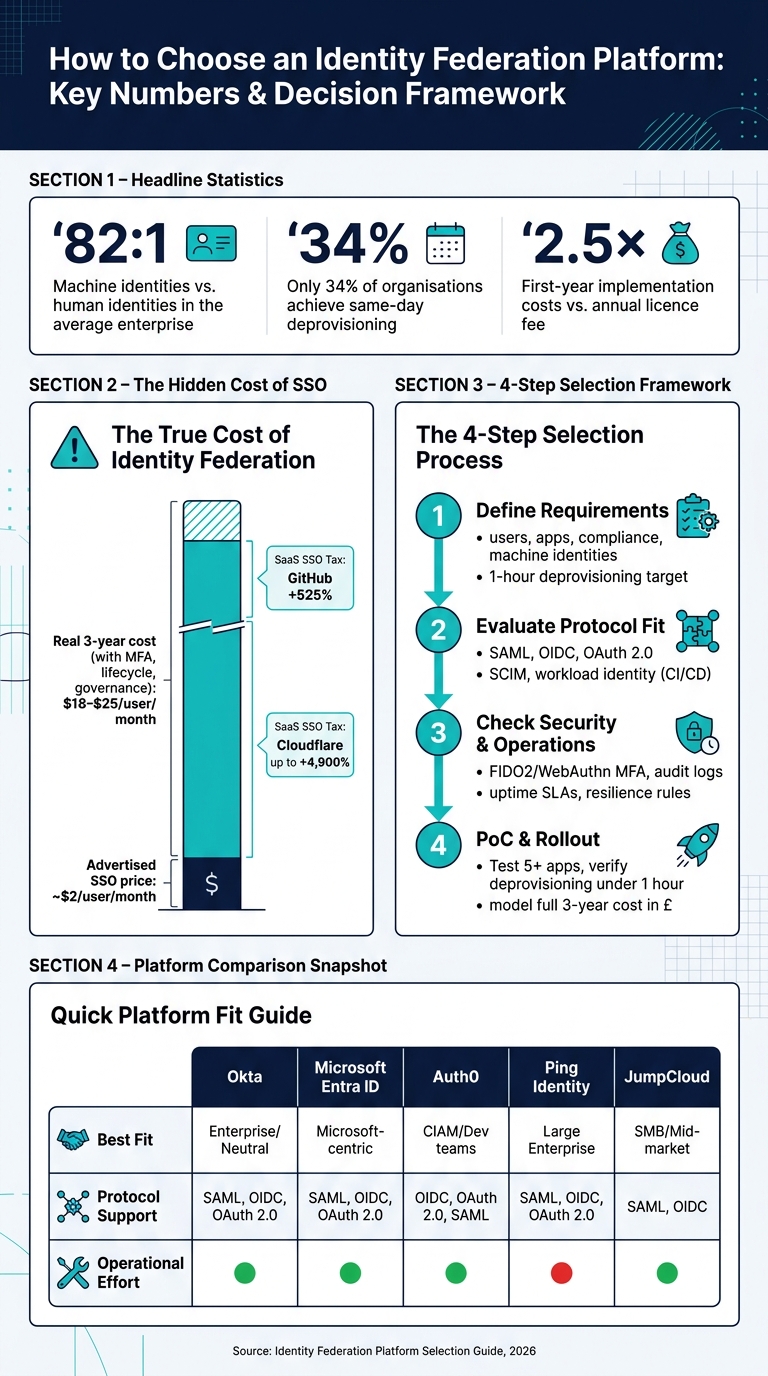 {Identity Federation Platform: Key Stats & Decision Checklist}
:::
{Identity Federation Platform: Key Stats & Decision Checklist}
:::
Which Identity Provider(IdP) Is Right for Your Business?
Quick comparison
| What I’d check | What good looks like |
|---|---|
| Protocol support | SAML, OIDC, OAuth 2.0 flows matched to my apps |
| Directory and app links | SSO plus SCIM provisioning and deprovisioning |
| Security controls | FIDO2/WebAuthn, policy rules, audit logs, admin protection |
| Resilience | Clear fail-open/fail-closed rules and strong uptime |
| Cost | Licence, add-ons, services, FTE time, and SaaS SSO tax |
| PoC success | Under-1-hour deprovisioning, hard app tested, audit report reviewed |
So if I were choosing today, on 8 July 2026, I’d start with a scored shortlist, cut vendors that do not match the estate, and only then move to PoC and commercial review.
Step 1: Define your requirements and current identity architecture
Before you look at any vendor, get clear on what you need. Write the requirements down first, then score vendors against them. That gives you a simple selection framework, helps teams move faster, and cuts down on rework.
List your business, security and compliance needs
Start with the basics: how many people need access, who is internal, and who is external. Staff, partners, and customers often need different sign-in journeys and controls. Then add your compliance duties on top.
| Regulation | What it requires | Federation implication |
|---|---|---|
| UK GDPR | Data minimisation | Use role- and attribute-based access; avoid broad roles |
| ISO 27001 | Access management | Run regular access reviews and automate provisioning |
| PCI DSS | Strong authentication | Enforce MFA for privileged accounts |
| NCSC Principles | Identity and authentication | Use a centralised IdP hosted in the UK |
These targets tell you what the platform must handle. After that, you need to map where those controls will actually sit.
Set two operational targets now.
- Define your deprovisioning target. A sensible goal is to remove a departed user's access across all connected applications within one hour [7]. Only 34% of organisations currently achieve same-day deprovisioning [7].
- Audit your SaaS stack for the
SSO Tax
. Many SaaS vendors charge a premium to switch on federation features. Moving to enterprise tiers for SSO can mean steep price jumps, such as 525% for GitHub or up to 4,900% for Cloudflare [7]. Budget for federation fees and for SaaS SSO uplifts.
Cost is another area where teams get caught out. The list price is almost never the full number. SSO may be shown at about $2 per user per month, but the 3-year cost, once you add MFA, lifecycle management, and governance, usually lands between $18 and $25 per user per month [7]. First-year implementation costs are often about 2.5 times the annual licence fee [7].
Once those needs are set, the next job is to map the systems and trust links that have to support them.
Map your directories, applications and trust boundaries
When the requirements are clear, map your current estate. Split your applications into enterprise web apps such as SaaS, HR, and ERP, then mobile apps, single-page applications, APIs and microservices, and any on-premises Windows services [3]. For each one, note which identity provider is the source of truth and whether the app supports SAML, OIDC, or OAuth 2.0.
You also need to pin down who owns each trust link. If that part is fuzzy now, it usually turns into an operational headache later.
| Stakeholder | Primary responsibility | Key governance task |
|---|---|---|
| Identity Provider (IdP) | Authenticates users and issues tokens | Maintaining metadata accuracy and certificate validity |
| Service Provider (SP) | Consumes assertions and grants access | Mapping incoming claims to internal permissions |
| Security Admin | Manages authentication policies and MFA | Reviewing audit logs and conducting access reviews |
| HR / HRIS | Source of truth for personnel data | Triggering joiner, mover, and leaver (JML) events |
| SRE / Ops Team | Monitors federation health and uptime | Defining SLIs/SLOs for token issuance and latency |
One area that often gets missed here is machine identities. In the average enterprise, machine identities such as service accounts and bots outnumber human identities by 82 to 1 [7]. So don’t just map people. Find where service accounts, bots, and other machine identities are in use, and mark the trust boundaries around them. The platform should fit your current architecture, not force you into a shape that doesn’t match how your estate works.
Use this inventory to test protocol support and integration depth in Step 2. It will also act as your first shortlist filter in Step 2.
Step 2: Evaluate protocol support, integrations and trust management
Once your requirements are mapped and your application inventory is ready, the next step is simple in theory: check whether each platform can work with what you already use.
This is where nice-looking feature lists stop mattering. What matters now is fit.
Check support for SAML, OAuth and OpenID Connect
Protocol support is your first filter. Use the inventory from Step 1 and test each platform against your actual apps, users and trust boundaries.
Start with OAuth 2.0 flows. Don’t settle for vague claims like “supports OAuth”. You need to know which flows are supported.
For browser and mobile apps, look for Authorisation Code + PKCE. For service-to-service traffic, check for Client Credentials. And for user-delegated AI agents, Token Exchange (RFC 8693) is becoming an important requirement in 2026 [2][6].
If a vendor doesn’t spell out its OAuth 2.0 flow support, treat that as incomplete.
SAML and OIDC also bring very different levels of admin effort. SAML relies on manual metadata exchange and coordinated certificate rotation every one to three years [6][3]. OIDC is lighter to run day to day because it uses self-describing discovery endpoints (/.well-known/openid-configuration) and JWKS for automated key rotation [6][3].
There’s also a size difference. OIDC ID tokens are typically 0.9–1.5 KB, while SAML assertions are usually 2–8 KB [6][5]. That may sound minor, but at scale it can add up.
| Feature | SAML 2.0 | OpenID Connect (OIDC) |
|---|---|---|
| Format | XML-based | JSON/JWT-based |
| Best use case | Legacy enterprise, government and education systems | Modern apps, APIs, mobile and AI agents |
| Trust setup | Manual metadata exchange | Automated discovery endpoint |
| Key rotation | Manual, coordinated | Automated via JWKS |
| Service-to-service support | None | Native via OAuth 2.0 flows |
| Token size | Large (2–8 KB) | Compact (0.9–1.5 KB) |
The platform you pick should handle both well, not treat one of them like an afterthought.
One more thing to check: can the platform act as an OIDC Provider, not just a consumer? That matters when partners or customers need to federate outward using your organisation’s identity system.
Review integration depth with directories, SaaS and cloud services
Protocol support tells you what a platform can speak. Integration depth tells you how much effort the setup will take.
And this is where vendors can look similar on paper but feel very different in practice.
Connector quality varies a lot. A connector that supports SSO but not SCIM provisioning still leaves your team doing user lifecycle work by hand [4]. Look for integrations that cover:
- SSO
- Automated provisioning
- Reliable deprovisioning
- Group-based access control [4]
Attribute mapping matters too. The platform should be able to map IdP attributes like givenName to what the service provider expects, such as FirstName. It should also support transformation expressions for cases where fields don’t line up cleanly.
For cloud environments, check support for Workload Identity Federation. This lets CI/CD pipelines such as GitHub Actions or Azure DevOps use short-lived OIDC tokens instead of long-lived AWS access keys or static secrets [2].
Use a weighted comparison table to shortlist platforms
After testing protocol fit and integration depth against your Step 1 inventory, score each platform in the same way. That keeps the shortlist grounded in your needs, not sales demos.
Use the table below as a starting point, then change the weighting to match your priorities.
| Vendor | Protocol support | Integration strength | Typical commercial model | Best fit |
|---|---|---|---|---|
| Okta | SAML, OIDC, OAuth 2.0, WS-Fed | 8,000+ apps; strong SCIM [4] | Per-user pricing; enterprise minimums may apply [6] | Enterprise / neutral [4] |
| Microsoft Entra ID | SAML, OIDC, OAuth 2.0, WS-Fed | Deep Microsoft 365 integration [4] | P1: £6/user/month; P2: £9/user/month; Entra Suite: £12/user/month [4] | Microsoft-centric [4] |
| JumpCloud | SAML, OIDC | Directory + IdP + MDM [4] | Contact for pricing | SMB / mid-market [4] |
| Auth0 | OIDC, OAuth 2.0, SAML | Developer-first; extensible [1] | B2B Essentials from £150/month for 3 connections, plus £100 for each additional connection [6] | CIAM / product teams [2] |
| Ping Identity | SAML, OIDC, OAuth 2.0 | Complex hybrid/on-prem [1] | Enterprise; contact for pricing | Large enterprise / finance [4] |
Shortlist two or three platforms, then move on to security, governance and day-to-day operations in Step 3.
Step 3: Check security, governance and day-to-day operations
Now put each shortlisted platform under a simple test: is it safe to run, and can your team manage it without pain?
Assess logging, MFA, policy controls and auditability
Once you’ve got your shortlist, look at how each platform holds up from a security and audit point of view.
If logs aren’t immutable, you’ll struggle to defend the platform during audits or incident reviews. The logs should record authentication context, device signals, geolocation and full federation payloads, then send that data to your SIEM or SOAR through an API [1][4]. During the proof of concept, check that the logs include sub and aud claims so you can confirm the trust boundary is set correctly [5].
For MFA, go with phishing-resistant options where you can. That means FIDO2/WebAuthn, passkeys and hardware keys for admin accounts. Push notifications with number matching or adaptive step-up authentication are a better fit than SMS codes [1][5][4].
The policy engine should check device posture, location and behavioural risk scores before it issues an assertion [5][4]. You’ll also want to review session duration, token lifetime, idle timeouts and single-session revocation as separate settings, not lump them together [1][2].
IdP admin accounts need special care. They’re the sharp end of the risk, because every connected service inherits IdP exposure. Check that the platform supports Just-In-Time (JIT) access and Privileged Identity Management, so admins don’t keep standing permissions they don’t need [5].
Check scalability, resilience and support model
After the authentication controls, test what happens when things go wrong.
At 99.9% uptime, you’re looking at about 8.7 hours of possible downtime each year. At 99.99%, that falls to about 52 minutes [2]. For an authentication platform sitting in front of every app your staff and customers use, that difference isn’t small.
Test outage behaviour in the proof of concept and set fail-open versus fail-closed rules for critical applications [1].
There’s also the day-to-day operating model to think about. SaaS platforms cut maintenance work. Self-hosted options put that work back on your team. In most cases, self-hosted operation needs about 0.25 to 1.0 FTE [8].
Compare security and operations trade-offs across shortlisted platforms
Use the table below to score operational fit, not just feature count.
| Platform | Logging & Audit Depth | Data residency and audit fit | Operational Effort |
|---|---|---|---|
| Okta | High (AI-driven threat protection) | Strong (multi-region contracts) | Low (SaaS managed) |
| Microsoft Entra ID | High (Conditional Access logs) | Strong (EU Data Boundary) | Low (bundled with M365) |
| Ping Identity | Very High (complex federation) | Flexible (hybrid/on-prem) | High (requires expertise) |
| Keycloak | Moderate (customisable) | Full control (self-hosted) | Very High (maintenance heavy) |
| OneLogin | Moderate | Good (region selection) | Low (mid-market focus) |
Use these findings to get your proof of concept and rollout checklist ready for Step 4.
Step 4: Make the final selection and plan your rollout
At this stage, the shortlist needs to move from paper to practice. That means turning it into a PoC and a rollout plan that reflects how your business actually works. The PoC should show that the shortlist can handle joiner-mover-leaver flows and day-to-day admin tasks without falling apart under pressure.
Run a proof of concept with clear success criteria
Your PoC should test at least five production-representative applications, including the hardest integration in your stack. Don’t dodge the ugly one. Put the app with the weakest SCIM support or the messiest legacy integration right in the test set [7].
Set pass/fail criteria before the PoC starts. Not halfway through. Not once people get nervous about the result. The non-negotiables should include:
- Deprovisioning: Time live termination from HRIS to access cut-off across all connected apps; target under one hour [7].
- Migration: Confirm support for password-hash import or lazy migration [2].
- MFA: Require FIDO2/WebAuthn or hardware tokens [1][7].
- Workload identities and agents: Verify OAuth 2.0 Token Exchange support for CI/CD pipelines and AI agents [2].
Bring your compliance lead into the PoC and hand them an access-certification report while the test is still live. If that report wouldn’t get through a real SOC 2 or ISO 27001 audit, call it a fail before anyone signs a contract [7][1].
Build a rollout checklist and decision summary
Once the platform gets through the PoC, turn the findings into a one-page decision summary. Keep it tight, but make it useful. It should cover risk, the chosen platform, three-year total cost, and expected FTE savings. This is the document people will use for approval, cost sign-off, and rollout ownership [7].
Cost modelling needs a hard look. Don’t stop at the sticker price. Include the base licence, MFA and governance add-ons, implementation services, admin FTEs, and the SSO tax across your SaaS stack. First-year implementation costs usually land at roughly 2.5× the annual licence fee, and professional services for a mid-market deployment range from £15,000 to £75,000 [7].
For the rollout checklist, list only the controls that can trip you up at go-live. Those are the ones that matter when the clock is ticking and people are trying to log in.
| Category | Critical items to verify |
|---|---|
| Migration | Password hash import or lazy migration confirmed; no forced resets [2] |
| Compliance | Log retention ≥ 12 months; SOC 2 Type II report reviewed; DPA signed [7][1] |
| Resilience | Fail-open/fail-closed rules defined per application; rollback steps documented [1][7] |
| Ownership | Named owner for federation, access reviews and rollback |
FAQs
How do I know which protocol my apps need?
It depends on your application architecture and how the app is used.
SAML 2.0 is a good fit for enterprise web single sign-on and older applications. OIDC is usually the better choice for modern web, mobile, and API-driven applications. If the main goal is API access delegation, use OAuth 2.0.
It’s worth checking with application owners first. They can confirm which protocols the app supports, which claims are needed, and how sign-in is meant to work, whether that’s browser-based sign-in or backend service-to-service communication.
What should I test in a federation platform PoC?
Go beyond basic login demos and test the things that matter day to day and under pressure.
That means looking at:
- Lifecycle automation
- Integration depth for your most critical applications
- Migration without manual password resets
- Audit logs and access-review reporting
- Advanced protocols such as OIDC, PKCE and Token Exchange
- Risk-based MFA and phishing-resistant methods such as FIDO2/WebAuthn
A polished demo can look great. The real test is whether the platform can handle your security and operational needs without extra admin work or awkward workarounds.
During the trial, ask for concrete evidence. Don’t settle for sales talk. Ask the vendor to show working setups, admin workflows, reporting screens, protocol support, and migration paths in a live setting.
How can I estimate the real 3-year cost?
Look past the subscription fee and work out the full 3-year total cost of ownership. That means adding implementation, customisation, staff training, day-to-day operations, and compliance work such as audit readiness and data retention.
It also helps to think about productivity over time. If engineers struggle during the proof of concept, that drag can build up over three years and cost far more than it seems at first.
Hokstad Consulting can help assess these cloud-related costs.