
Most teams do not need the tool with the longest feature list. They need the one that fits their stack, hosting, risk level, team size, and monthly budget.
If I were choosing a CI/CD tool today, I’d keep the process simple:
- List hard limits first: stack, cloud or on-prem, UK data location rules, release pace, and budget in £
- Turn those limits into a short scorecard
- Cut the list to 2–4 tools
- Test one live service end to end before rollout
That means looking at things such as:
- GitHub, GitLab, or Microsoft repo fit
- SaaS runners vs self-hosted runners
- RBAC, SSO, audit logs, approval gates, and secrets handling
- Build speed, setup time, failure rate, and monthly cost
- Whether you also need Argo CD or Flux for Kubernetes GitOps
A few clear patterns stand out:
- GitHub Actions often suits GitHub-based teams that want low setup friction
- GitLab CI/CD often suits teams that want code, pipelines, and governance in one place
- Azure DevOps Pipelines often suits Microsoft and Azure-heavy estates
- CircleCI often suits teams focused on pipeline throughput and parallel jobs
- Jenkins still fits custom or on-prem setups, but it adds more upkeep
- Argo CD / Flux fit Kubernetes delivery when Git-based cluster sync matters
::: @figure 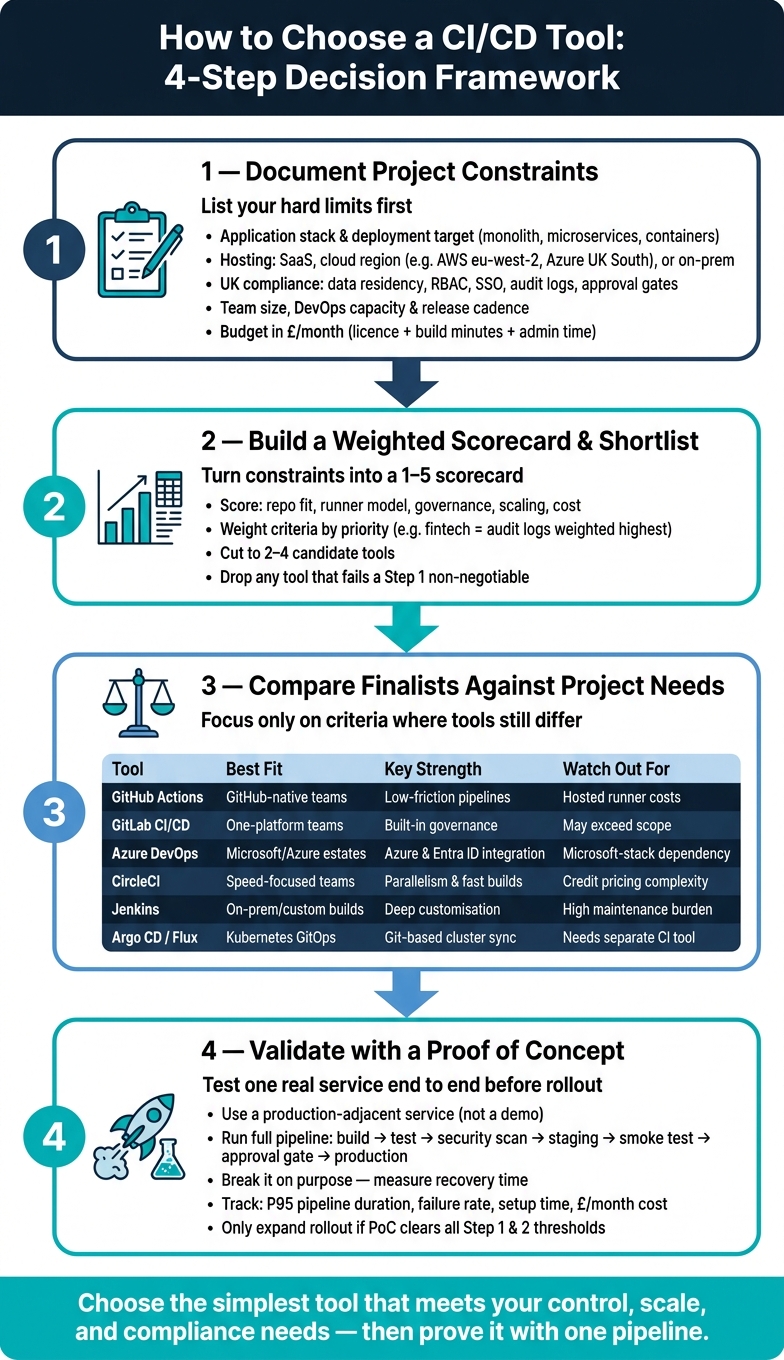 {How to Choose a CI/CD Tool: 4-Step Decision Framework}
:::
{How to Choose a CI/CD Tool: 4-Step Decision Framework}
:::
Top 5 CI/CD Platforms for Beginners: GitHub Actions, GitLab, Jenkins & More!
Quick comparison
| Tool | Best fit | Main plus | Main concern |
|---|---|---|---|
| GitHub Actions | GitHub-native teams | Pipelines live next to code | Hosted runner spend can climb |
| GitLab CI/CD | Teams wanting one platform | Strong built-in controls | May be more than some teams need |
| Azure DevOps Pipelines | Microsoft/Azure estates | Tight Azure and Entra ID fit | Best when you already use Microsoft tools |
| CircleCI | Teams chasing short pipeline times | Parallel jobs and elastic build capacity | Credit pricing needs close tracking |
| Jenkins | Custom and on-prem builds | Deep control | Plugin and server upkeep |
| Argo CD / Flux | Kubernetes GitOps delivery | Git-based cluster sync | CI still needs a separate tool |
The short version: I’d choose the simplest tool that meets security, audit, hosting, and cost needs - then prove it with one service, one pipeline, and clear pass/fail measures such as P95 pipeline time, failure rate, recovery time, and £/month.
Step 1: Document the project constraints that will shape tool choice
Write down your project constraints first. Then use that list to cut the shortlist fast.
Define your application, stack and deployment target
Start with a short deployment profile. It should show your application architecture, packaging model, and where the workload runs in practice. Note the app shape, packaging model, and runtime target: monolith, modular monolith or microservices; containers or binaries; Kubernetes, PaaS, VMs or hybrid estates.
These details narrow the field straight away. A UK SaaS product built on Node.js microservices running on Kubernetes will usually fit a CI/CD platform with strong Docker and Helm support. Older Windows estates often need solid Windows agent support and compatibility with ageing toolchains. Getting this on paper early stops you picking a tool that can't even reach your deployment targets. That's your first filter for tool fit.
Map hosting, security and UK compliance requirements
Next, document where your environments live and what data moves through your pipelines. Record whether production runs in AWS eu-west-2, Azure UK South, a private cloud, or an on-premises estate. Also note how those networks are segmented. Then record whether runners can be SaaS-based or must run inside your own infrastructure.
Spell out any rules around UK data residency, approval gates, RBAC, directory integration and immutable audit logs. Treat these as hard requirements that every shortlisted tool must meet.
| Constraint | Managed runners | Self-hosted runners |
|---|---|---|
| Data residency | Vendor regions acceptable | Must stay in UK/on-prem infrastructure |
| Network access | Public-facing workloads only | Requires access to internal APIs or databases |
| Compliance posture | Standard GDPR, lower-sensitivity data | FCA, NHS, public sector, or strict internal policy |
| Maintenance appetite | Low - prefer vendor-managed | Acceptable - team can harden and patch agents |
These are the non-negotiables that rule out poor-fit tools.
Assess team size, skills, release pace and budget
Team capacity affects how much CI/CD complexity you can own without pain. Small teams with no dedicated DevOps support should lean towards low-maintenance, opinionated tooling. A larger organisation with a platform engineering team may get more from a self-managed stack with deeper configurability and tighter links to the rest of the estate.
Release cadence matters as well. A UK digital agency shipping many times a day needs elastic runner capacity, fast feedback loops, and maybe canary or progressive delivery support. A manufacturer or public-sector body deploying monthly during planned maintenance windows will care far more about approval workflows and change-management integration than raw pipeline throughput.
For budget, look past the licence fee. With SaaS CI/CD, estimate users × monthly platform spend, plus build charges. Include per-minute build charges, especially for compute-heavy or macOS workloads. [1][3] For self-managed platforms, add underlying compute, storage, and some allowance for administrator time, priced in £ per month. A cheaper tool that eats up engineer time can end up costing more than a pricier managed service that lets your team stay focused on product work.
Use these constraints to build your selection criteria in Step 2. Step 2 turns this inventory into a shortlist.
Step 2: Turn constraints into selection criteria and a shortlist
Turn your constraints into a weighted 1–5 scorecard. Put the inputs from Step 1 at the top so the logic stays easy to follow: stack, hosting, compliance, team capacity, and budget. Then weight the criteria that matter most for your setup. A UK fintech team, for example, may score audit logging and self-hosted runners much higher than UI ease. A small team may care more about speed and low admin effort.
Score repository fit, workflow flexibility and runner model
Start with the repository host you already use. That cuts down integration work and keeps the setup simpler. If your team uses GitHub, GitHub Actions is often the first pick because it cuts authentication friction and lets you review pipeline changes alongside app code. GitLab CI/CD plays the same role for GitLab repositories. Azure DevOps Pipelines tends to suit teams already deep in the Microsoft stack.
Then look past repository fit. Check whether the tool supports pipelines defined as code in version control. That matters for audit trails, because pipeline changes should pass through the same pull request review flow as application code.
After that, assess the runner model. If your workloads need private network access, sensitive environments, or specialist hardware, treat self-hosted or hybrid runners as a must-have.
Check governance, scaling and operational overhead
For regulated projects, governance controls are not optional. You should require:
- RBAC
- SSO/SAML
- audit logging
- secrets management
- approval gates
If those controls rely on awkward third-party add-ons instead of being built into the platform, that's a warning sign. It can turn into a compliance headache later.
You also need to be honest about scaling and day-to-day overhead. Compare the work involved in plugin management, agent or runner upkeep, version upgrades, secret rotation, and troubleshooting. Self-managed platforms can give you more flexibility, but they also add admin work. Managed platforms usually cut that burden, though you may get less control over infrastructure or network access. Either way, don't just look at the licence or subscription cost. Count the hidden cost of keeping the tool secure and up to date as well.
Build a shortlist with concrete tool examples
Use the scorecard to narrow the field to two to four candidates. For many UK teams, that shortlist will come from GitHub Actions, GitLab CI/CD, Azure DevOps Pipelines, and CircleCI for standard delivery patterns. Jenkins still has a place for highly customised or on-premises setups, even with its higher maintenance load.
If your main issue is Kubernetes-native deployment rather than pipeline orchestration, add Argo CD or Flux on purpose. They are built for GitOps-style delivery and work differently from general CI/CD platforms.
| Tool | Best starting point | Key strength | Watch out for |
|---|---|---|---|
| GitHub Actions | GitHub-hosted repositories | Tight GitHub integration and low-friction workflows for GitHub-native teams | Hosted runner costs vary by runner type |
| GitLab CI/CD | GitLab repositories | Built-in security and compliance features | Can be broader than a narrowly scoped CI-only project needs |
| Azure DevOps Pipelines | Microsoft/Azure stack | Deep Azure integration and enterprise RBAC | Best fit when your team is already in the Microsoft ecosystem |
| CircleCI | Speed-focused teams | Parallelism and ephemeral sandboxes | Credit-based pricing needs careful estimation |
| Jenkins | On-premises, custom builds | Maximum customisation | High maintenance burden and plugin management |
| Argo CD / Flux | Kubernetes-native delivery | GitOps model and declarative state management | CI orchestration needs a separate tool |
Drop any tool that fails a Step 1 non-negotiable. Step 3 should only compare the finalists.
Step 3: Compare shortlisted CI/CD tools against project needs
Use your scorecard to look at only the points that still separate the finalists. By now, there’s no need to compare everything again. Just focus on the criteria where the tools still differ.
Compare core CI/CD platforms for common UK business cases
The biggest split usually comes down to this: Microsoft-centric organisations versus GitHub-native SaaS teams.
A Microsoft-centric UK organisation running Azure, Active Directory, and .NET workloads will often find Azure DevOps Pipelines the strongest fit. It plugs straight into Azure Repos, Azure Key Vault, and Azure RBAC. One published comparison study found that Azure DevOps delivered stronger pipeline metrics, stage-level failure reporting, and policy-based approvals than GitHub Actions in the case studied.[6] That matters when release governance is mandatory.
A GitHub-native UK SaaS business will often get the best fit from GitHub Actions. Workflows live alongside the application code, so pipeline changes go through the same pull request review process as code changes. The same comparison study found the two platforms were functionally equivalent in the cases studied, with GitHub Actions finishing deployments faster because of simpler YAML workflows and container caching.[5][6]
GitLab CI/CD is a good fit for teams that want governance built in, without bolting on extra tools. That can matter a lot for UK financial services firms or public-sector teams that need a self-hosted setup for data residency reasons.
If Kubernetes sits inside your delivery model, compare the CI/CD platform and the cluster reconciliation layer as separate choices.
Compare Kubernetes and GitOps delivery options where relevant
If you already ship through Kubernetes, the next decision is whether to add a dedicated GitOps tool alongside your CI/CD platform. That tends to make sense when cluster count, microservice volume, or audit demands make direct deployments fragile.
For one cluster and a small number of services, your main CI/CD platform can usually push manifests or Helm charts straight to the cluster with kubectl. That keeps the setup simple, which is often the right move for smaller UK teams or early-stage products.
Argo CD keeps checking the live cluster state against Git and corrects drift back to the declared state. In day-to-day use, the CI pipeline handles build and test work, then updates a configuration repository, while Argo CD takes care of cluster reconciliation.
Flux follows much the same model and often suits teams that want a lighter, more Git-centred approach.
In regulated settings, this model gives you a clear upside: every cluster change stays reviewable in Git before it reaches production.
Comparison tables: hosting, governance, scale and cost
Check each finalist against the Step 1 non-negotiables: hosting, governance, scale, and cost. If a tool looks weak in a column you marked as non-negotiable, drop it before moving to the proof of concept.
| Tool | Hosting model | Self-hosted runner support | Governance & approvals | Typical team fit | Pricing model |
|---|---|---|---|---|---|
| GitHub Actions | GitHub-hosted or self-hosted runners | Yes | Environments, required reviewers and org-level audit logs | Small to large | Free for public repositories and self-hosted runners; hosted runners billed per minute |
| GitLab CI/CD | SaaS or self-managed | Yes - GitLab Runners | Protected environments, deployment approvals and compliance pipelines | Small to large enterprise | Free tier available; per-user subscriptions for higher tiers |
| Azure DevOps Pipelines | Microsoft-managed or self-hosted agents | Yes | Azure RBAC, policy-based approvals and detailed pipeline metrics | Medium to large enterprise | Per user plus parallel job cost |
| Jenkins | Self-hosted only | Yes - flexible agents | Plugin-dependent and usually manually configured | Mid to large with dedicated DevOps capacity | Open source; costs depend on hosting and admin effort |
| Argo CD | In-cluster controller (Kubernetes) | N/A - cluster-native | Desired-state control and drift visibility | Teams running Kubernetes at scale | Open source; operational cost applies |
| Flux | In-cluster controllers (Kubernetes) | N/A - cluster-native | Drift correction and Git-based reconciliation | Teams preferring lightweight GitOps | Open source; operational cost applies |
GitHub’s published rates show that pricing can vary quite a bit by OS and core count: Linux runners are the lowest-cost option, Windows runners cost more, and macOS runners cost the most.[4][2][7] If your builds depend heavily on Windows or macOS, work that into your monthly estimate before you commit.
The last check is a proof of concept on one real service.
Step 4: Validate the decision with a proof of concept and rollout plan
Once you've cut the shortlist down, test the winner on one real service before you roll anything out more broadly.
Run a focused proof of concept with one real service
Use one real service for the test. Not a demo. Not a disposable script. Pick a production-adjacent service with live traffic, the same stack, and a rollback path that you trust.
Then run the whole route end to end:
- build
- tests
- security scan
- staging deploy
- smoke tests
- approval gate
- production release
It also helps to break it on purpose. Push a bad release and record how long recovery takes. That tells you far more than a clean run ever will.
Track:
- average and P95 duration
- failure rate
- setup time
- monthly cost in £
Judge the outcome against the same thresholds you set in Steps 1 and 2: delivery speed, recovery time, auditability and monthly cost. Compare the PoC with your baseline, and reject any tool that misses those thresholds.
If the PoC clears the bar, set operating ownership before you expand.
Plan integration, cost control and operating ownership
Before rollout, make ownership clear. A central DevOps or platform team should own standards, templates, runner images and security baselines. Product teams should own their service pipelines.
Spell that split out plainly. If you don't, problems show up fast around runner patching, secret handling and cost reporting.
At rollout, cost control usually comes down to three levers: caching, runner right-sizing and trigger hygiene. Tag runner resources by team, environment and project from day one, so spend is visible and easy to trace.
Define pipeline triggers, IaC validation, ITSM hooks and log retention before rollout. In regulated organisations, check that log retention periods and access control granularity match your own compliance requirements.
Conclusion: Choose the simplest tool that meets your control, scale and compliance needs
Start by documenting constraints. Then score the tools, compare the finalists, and validate the choice with a PoC. Pick the simplest tool that meets your control, scale and compliance needs with the lowest day-to-day overhead.
If your organisation needs support at any stage - whether that's designing a PoC aligned to your regulatory environment, cutting runner costs, integrating CI/CD with hybrid hosting, or building AI-enabled delivery workflows - Hokstad Consulting works with UK organisations on DevOps transformation, cloud cost engineering and CI/CD design across public, private and managed hosting environments.
FAQs
How do I choose between SaaS and self-hosted runners?
Choose based on your needs for control, compliance and day-to-day capacity.
SaaS runners are faster to get up and running. They usually come with predictable usage-based pricing and far less maintenance, which makes them a good fit for teams that care most about developer speed and lower operational overhead.
Self-hosted runners give you full control over data residency and infrastructure. That can matter a lot for regulated UK organisations or older legacy systems. They can help you avoid recurring subscription fees, but they also come with upfront investment, manual scaling, and ongoing maintenance, security patching, and monitoring.
When do I need Argo CD or Flux as well as a CI/CD tool?
You need Argo CD or Flux when your project runs on Kubernetes and you want to follow GitOps.
A standard CI/CD tool usually covers builds, testing, and the first packaging step. Argo CD and Flux take care of continuous deployment by syncing the live state of your cluster with the config stored in Git.
That means your environments stay in step, instead of slowly drifting apart over time. It also helps with compliance needs in the United Kingdom, because the source of truth sits in Git and changes are easier to track.
What should I measure in a CI/CD proof of concept?
Measure how well the tool fits your existing tech stack and SCM provider, how much it cuts down context switching, and how well its automation works.
You should also look at ease of use, scalability, performance, and resource usage. Then test it yourself to spot any usability or integration issues that don’t show up in the docs.