
I build conditional AI agent flows around shared state, ordered checks and 3 clear exits: SUCCESS, RETRY or ESCALATE. Check restrictions and human-review needs first, then input quality and confidence, before choosing a specialist.
Here’s the approach I use:
- Keep state intact: protect the original request and retain IDs, results and error details.
- Separate routing from action: choosing a branch must not run tools or approve actions.
- Validate before success: check specialist results and save state at every exit.
- Pause without looping:
RETRYends the run; a reply starts another run with retained context and an attempt limit. - Test and monitor: check every route, set time and spend caps, and redact sensitive logs. Track completion, escalation, processing time and cost per completion in £.
My rule: every run needs a clear exit - and enough saved state to take the next step without repeating completed actions.
::: @figure 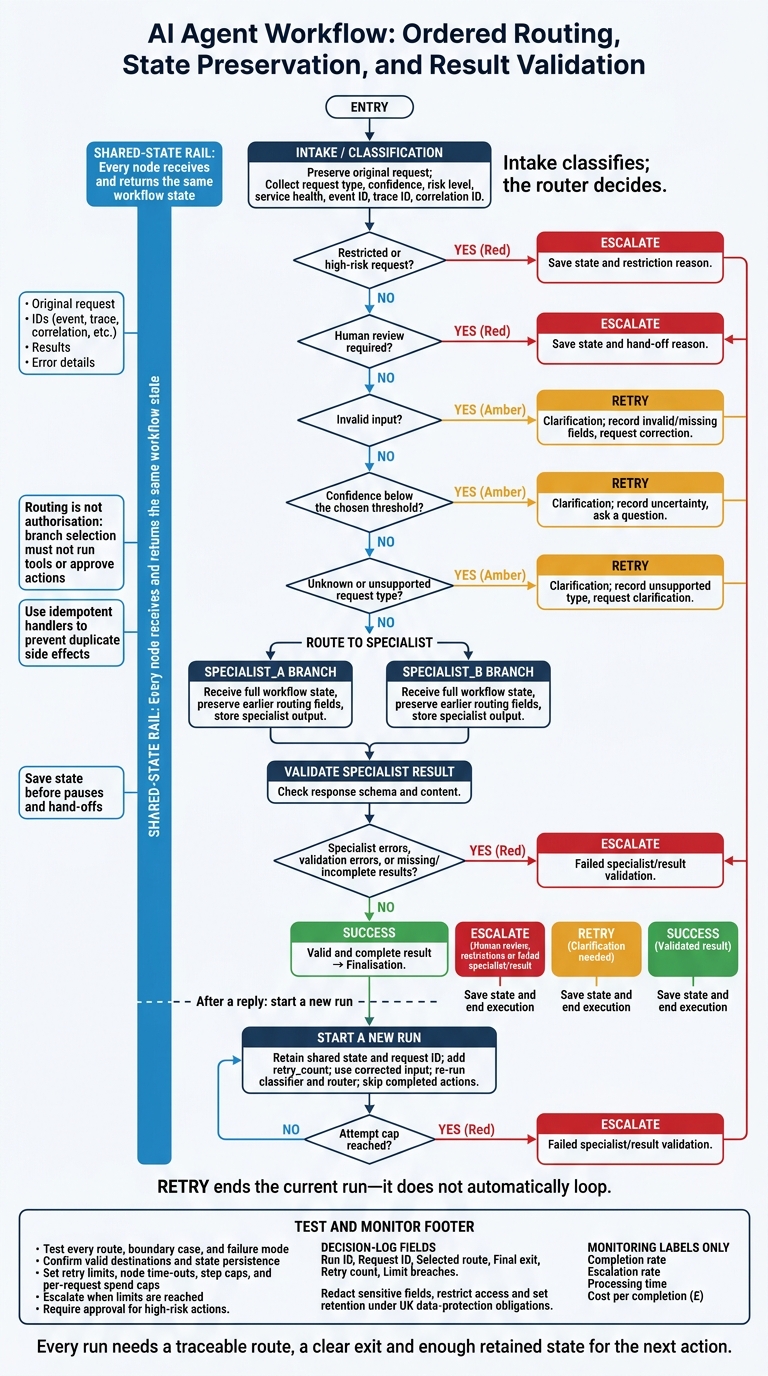 {AI Agent Conditional Routing: State, Checks and Exits}
:::
{AI Agent Conditional Routing: State, Checks and Exits}
:::
Step 1: Define Routing Rules
Set the Order of Checks
Turn the outcomes above into routing rules with a fixed order. Intake classifies; the router decides. Intake collects routing signals in shared state: event type, risk level, service health, event ID, trace ID and correlation ID. The router reads that state and selects a route.
Check safety and human-review conditions first. Next, check confidence and input quality. Only then send the request to a specialist branch. Choose and document a confidence threshold so low-confidence results receive consistent treatment.
Keep routing separate from authorisation. Choosing a route must not trigger side effects.
Pass State Between Branches
Connect entry → intake → route and pass the updated state forward. Keep the original event, trace and correlation IDs intact.
Use idempotent handlers so repeated events do not duplicate side effects. Save state before any pause or hand-off.
The next step gives each route an explicit exit.
Document Routes and Exits
Record the exact check order and exit for each condition. Keep that order the same in code and documentation.
| Condition | Destination | Expected state update | Exit path |
|---|---|---|---|
| Restricted or high-risk request | escalation |
Save state and restriction reason | ESCALATE |
| Human review required | escalation |
Save state and hand-off reason | ESCALATE |
| Invalid input | clarification |
Record invalid or missing fields; request correction | RETRY |
| Confidence below the chosen threshold | clarification |
Record uncertainty and ask a question | RETRY |
| Unknown or unsupported request type | clarification |
Record unsupported type; request clarification | RETRY |
| Known request type | specialist branch |
Store specialist output and continue | Continue |
if restricted or human_review_required:
    return "ESCALATE"
if invalid_input or confidence < threshold or unknown_type:
    return "RETRY"
return specialist_branch
Step 2: Build the Conditional Flow
Implement Classification and Routing
Use the routing rules from Step 1 to connect classification, branch selection and exits.
Every node receives and returns the same workflow state, keeping routing deterministic and state intact across branches. The pseudocode below follows the routing order from Step 1. Flow, storage, classification and policy helpers are interfaces you’ll need to implement.
from typing import TypedDict, Literal

Destination = Literal["specialist_a", "specialist_b", "clarification", "escalation"]
Exit = Literal["SUCCESS", "RETRY", "ESCALATE"]

class WorkflowState(TypedDict):
    text: str
    request_type: str
    confidence: float
    needs_human: bool
    reason: str
    error: str
    result: dict | None
    exit: Exit | None

def initial_state(event) -> WorkflowState:
    return {
        "text": event.get("text") or "",
        "request_type": "unknown",
        "confidence": 0.0,
        "needs_human": False,
        "reason": "",
        "error": "",
        "result": None,
        "exit": None,
    }

def classification(s):
    try:
        # Keep guardrails separate from model output.
        flags = check_policy(s)
        s = {**s, **flags}
    except Exception as exc:
        return {
            **s,
            "needs_human": True,
            "reason": "Policy checks unavailable",
            "error": str(exc),
        }

    if s["needs_human"]:
        return s

    if not s["text"].strip():
        return {**s, "reason": "Missing request text"}

    try:
        label = validate_classification(classify(s["text"]))
        return {
            **s,
            "request_type": label["request_type"],
            "confidence": label["confidence"],
        }
    except Exception as exc:
        return {
            **s,
            "request_type": "unknown",
            "confidence": 0.0,
            "reason": "Classification failed",
            "error": str(exc),
        }

# CONFIDENCE_THRESHOLD comes from workflow config
def route(s) -> Destination:
    if s["needs_human"]:
        return "escalation"
    if not s["text"].strip() or s["error"]:
        return "clarification"
    if s["confidence"] < CONFIDENCE_THRESHOLD:
        return "clarification"
    if s["request_type"] in ("specialist_a", "specialist_b"):
        return s["request_type"]
    return "clarification"
Add Specialists and Validate Results
Pass the full workflow state to each specialist. Each one should return updated state without dropping earlier routing fields. Validation then checks the result before the flow can reach success.
def run_specialist(s, handler):
    try:
        return {**s, "result": handler(s)}
    except Exception as exc:
        return {
            **s,
            "result": None,
            "reason": "Specialist failed",
            "error": str(exc),
        }

def specialist_a(s):
    return run_specialist(s, draft_specialist_a_response)

def specialist_b(s):
    return run_specialist(s, draft_specialist_b_response)

def validation(s):
    if s["error"]:
        return {**s, "reason": s["reason"] or "Specialist failed"}

    try:
        complete = validate_response_schema_and_content(s["result"])
    except Exception as exc:
        return {
            **s,
            "reason": "Result validation failed",
            "error": str(exc),
        }

    return {
        **s,
        "reason": "" if complete else "Missing or incomplete result",
    }

def after_validation(s) -> Literal["finalisation", "escalation"]:
    return "escalation" if s["error"] or s["reason"] else "finalisation"

def clarification(s):
    return {
        **s,
        "exit": "RETRY",
        "reason": s["reason"] or "Uncertain or unsupported request",
        "result": {"question": "Can you clarify your request?"},
    }

def escalation(s):
    return {
        **s,
        "exit": "ESCALATE",
        "reason": s["reason"] or "Human review required",
    }

def finalisation(s):
    return {**s, "exit": "SUCCESS"}
When validation passes, send the same state to a terminal exit. Keep the earlier branch decisions unchanged.
Connect Nodes to Terminal Exits
Register each terminal exit explicitly. In this example, persist_and_stop saves the final state and ends execution. Match it to your orchestration API.
RETRY ends the current run - it doesn’t automatically loop back to classification.
flow = Flow(state_type=WorkflowState)

for name, handler in {
    "classification": classification,
    "specialist_a": specialist_a,
    "specialist_b": specialist_b,
    "validation": validation,
    "clarification": clarification,
    "escalation": escalation,
    "finalisation": finalisation,
}.items():
    flow.add_node(name, handler)

for exit_name in ("SUCCESS", "RETRY", "ESCALATE"):
    flow.add_terminal(exit_name, persist_and_stop)

flow.connect("START", "classification")
flow.connect_conditional("classification", route, {
    "specialist_a": "specialist_a",
    "specialist_b": "specialist_b",
    "clarification": "clarification",
    "escalation": "escalation",
})

flow.connect("specialist_a", "validation")
flow.connect("specialist_b", "validation")
flow.connect_conditional("validation", after_validation, {
    "finalisation": "finalisation",
    "escalation": "escalation",
})

flow.connect("clarification", "RETRY")
flow.connect("escalation", "ESCALATE")
flow.connect("finalisation", "SUCCESS")

workflow = flow.compile()
workflow.run(initial_state(event))
Requests below the confidence threshold end as RETRY. Cases needing human review end as ESCALATE, while specialist results that pass validation end as SUCCESS.
Step 3: Test and Monitor the Workflow
Test Routes and Failure Cases
Once the routes and exits are wired, test how state moves through every route, boundary case and failure mode. Confirm that state persists and each path reaches the correct terminal exit.
Check missing input, unknown request types and validation failures. Every router output must lead to a valid destination in the compiled flow. Only intended state fields should change; request text and error details must stay intact.
Log Decisions and Set Limits
Use the run data from testing to audit routing decisions and enforce limits. Safely log the relevant shared-state fields: run ID, request ID, selected route, final exit, retry count and limit breaches.
Do not log sensitive data by default. Redact sensitive fields, restrict access and set a retention period that meets your UK data-protection obligations.
Set retry limits, node time-outs, step caps and per-request spend caps. Define a clear escalation path for when any limit is reached, and require approval for high-risk actions. Over one reporting period, track completion rate, escalation rate, processing time and cost per completion in £.
Resume After Clarification
Clarification should let the workflow resume without repeating completed work. Because RETRY is a terminal exit, retain shared state between runs.
Add retry_count and request IDs to shared state. After clarification, start a new run with the corrected input. Keep the request ID to link it to the original case, re-run the classifier and router, and skip completed actions. Stop at the attempt cap and route the case to escalation.
Agentic AI Course: Stage 17 - Lesson 6: Create Conditional Edges
Conclusion: Keep State, Routes and Exits Clear
Treat state, routing rules and terminal exits as one contract. Keep the context, validate outputs, then return SUCCESS, RETRY or ESCALATE.
Before release, check that route tests, limits and decision logs uphold that contract. Every run must have a traceable route, a clear exit and enough retained state to support the next action.
FAQs
How do I choose a reliable confidence threshold?
Set thresholds by risk tier, then test that they work. Use low thresholds only for low-impact auditing after an action. For medium-risk decisions, use thresholds to gate actions and track performance metrics. High-risk and critical actions need human sign-off.
Hokstad Consulting’s agent orchestration guidance uses thresholds around 0.80–0.85 for bounded autonomy, with escalation when scores fall below a set threshold - often around 0.85. Start with advisory-only paths, then adjust thresholds using historical outcomes and objective tests to minimise false positives.
How do I prevent duplicate actions after clarification?
Make your handlers idempotent: an operation should produce the same result whether it runs once or several times. That way, retries and repeated messages won’t cause unwanted side effects or leave your system in an inconsistent state.
Your workflow should detect duplicate events and skip model calls or side effects it has already completed. Test duplicate events before production to check that your handlers deal with them correctly.
When should a failed request retry rather than escalate?
Retry only when a failure is likely to be temporary and recovery won’t repeat side effects. Use exponential back-off with jitter, a firm limit on attempts and idempotency to prevent duplicate model calls or actions.
When retries run out, send the message to a dead-letter queue for review instead of escalating straight away or retrying forever. Circuit breakers can halt further retries or calls when a downstream service is struggling. [1][2]