
If I had to sum it up in one line: AWS gives me the most control, Azure gives me the smoothest fit for Microsoft estates, and GCP gives me the cleanest path for Kubernetes-heavy teams.
If you’re choosing between these three, I’d focus on six things first:
- CI/CD
- Infrastructure as code
- Monitoring and logs
- Security and policy
- Cost tracking in £
- Kubernetes and Git-based workflows
For most UK teams, the choice is usually simple:
- AWS suits teams with multi-account setups, tight IAM control, and heavy governance needs.
- Azure suits firms already deep in Microsoft, with Entra ID, GitHub, Windows Server, or Microsoft 365.
- GCP suits teams centred on containers, GKE, and GitOps.
A few points stand out straight away:
- AWS CodeCommit is closed to new customers, so many AWS teams now use GitHub or GitLab instead.
- Azure Policy can not only flag rule breaks but also fix some of them with
DeployIfNotExists. - GCP Admin Audit Logs can be kept for up to 400 days, while AWS and Azure often start from 90-day defaults.
- All three support billing in pounds sterling (£).
- GCP sustained-use discounts can reach 30% for long-running workloads.
- Azure Hybrid Benefit can cut licence costs for Microsoft-heavy estates.
::: @figure 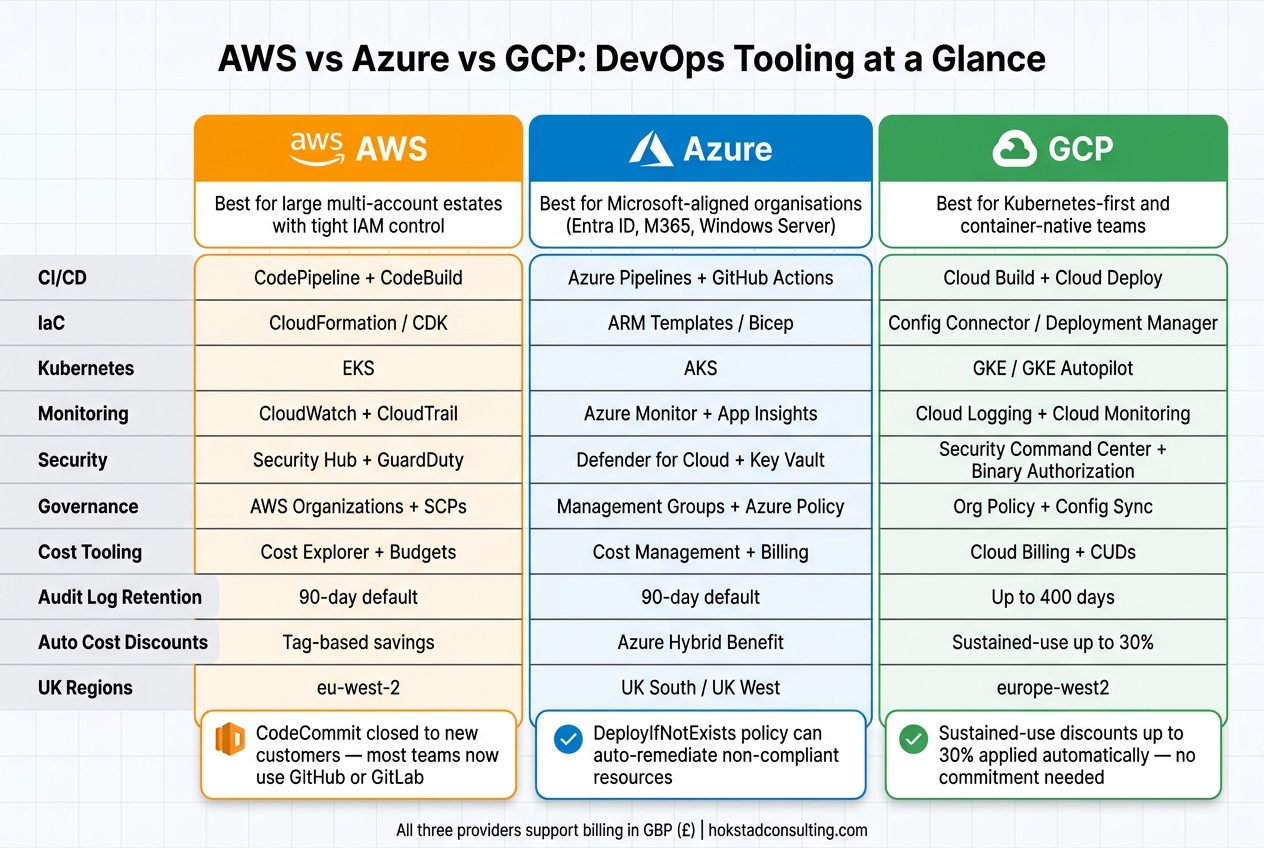 {AWS vs Azure vs GCP DevOps Tools: Side-by-Side Comparison}
:::
{AWS vs Azure vs GCP DevOps Tools: Side-by-Side Comparison}
:::
AWS vs GCP vs Azure: Which Cloud Should You Choose in 2026?
Quick comparison
| Area | AWS | Azure | GCP |
|---|---|---|---|
| Best fit | Large multi-account estates | Microsoft-led organisations | Kubernetes-first teams |
| CI/CD | CodePipeline, CodeBuild, CodeDeploy | Azure Pipelines, GitHub Actions | Cloud Build, Cloud Deploy |
| IaC | CloudFormation, CDK | Bicep, ARM | Config Connector, Deployment Manager |
| Monitoring | CloudWatch, CloudTrail, Config | Azure Monitor, App Insights, Activity Log | Cloud Monitoring, Cloud Logging, Audit Logs |
| Security | Security Hub, GuardDuty, Inspector | Defender for Cloud, Key Vault, Managed Identities | Security Command Center, Binary Authorization |
| Governance | AWS Organizations, SCPs, Config | Management Groups, Azure Policy | Org Policy, Asset Inventory, Config Sync |
| Cost control | Cost Explorer, Budgets | Cost Management + Billing | Cloud Billing, CUDs, sustained-use discounts |
| Kubernetes | EKS | AKS | GKE |
My take: if you want choice and tight account-level control, I’d look at AWS. If you want delivery, identity, and policy under one roof, I’d look at Azure. If your platform is built around containers, I’d look at GCP first.
The rest of the article breaks down where each stack fits best without getting lost in feature lists.
AWS DevOps tooling ecosystem
AWS gives you a set of DevOps services that you can mix and match. That works well for large, complex estates with multiple AWS accounts, where teams want tight control over delivery, policy and account layout. The trade-off is simple: you get more control, but you also have more design work to do.
CI/CD and infrastructure automation in AWS
At the centre of AWS CI/CD are CodeBuild, CodePipeline and CodeDeploy. CodeBuild gives you managed build environments and charges by the build minute. CodePipeline handles the flow from source to deployment. CodeDeploy pushes releases to EC2, Lambda, ECS and on-premises targets, with support for blue/green deployments, in-place deployments and automatic rollback.
One thing has changed in the source control layer. CodeCommit is no longer available to new customers, so many teams now use GitHub, GitLab or Bitbucket as the source stage inside CodePipeline.[2][3]
For infrastructure automation, most teams look at CloudFormation and the AWS CDK. CloudFormation uses declarative YAML or JSON templates. It also supports StackSets, which let teams roll out the same baseline setup - such as networking, logging and security tooling - across dozens or even hundreds of accounts at the same time. CDK takes a different route. Engineers define infrastructure in TypeScript, Python or Java, and CDK then turns that into CloudFormation behind the scenes. In practice, platform teams often use CDK to create standard templates that app teams can reuse, so they don't have to build security or tagging rules from scratch every time.[1][4]
A common cross-account pipeline pattern in UK enterprises uses a central tooling account for CodePipeline and CodeBuild. From there, pipelines deploy into separate development, test and production accounts by using cross-account IAM roles and KMS-encrypted artefacts stored in S3. Teams often add manual approval steps before anything moves into production, with IAM scoping used to limit approvals to named roles such as release managers.[4][5]
Observability, security and cost controls in AWS
CloudWatch, CloudTrail and AWS Config make up the day-to-day operational core. CloudWatch deals with metrics, logs, dashboards and alarms. CloudTrail records API calls and account activity, including who changed what, where they did it from and when it happened. AWS Config keeps a running record of resource configuration states and checks them against rules, flagging non-compliance in central dashboards across accounts.[1]
Put together, these services give teams a governance layer that ties delivery activity to audit evidence. In regulated sectors like financial services, healthcare and the public sector, that's often not a nice-to-have. It's part of the job.
On the security side, Security Hub pulls findings from GuardDuty and Inspector into one place. GuardDuty handles threat detection across accounts, logs and network traffic. Inspector runs automated vulnerability scans for EC2, ECR images and Lambda functions. Those findings aren't just for reporting either. Inspector results can stop CodePipeline promotions, and GuardDuty alerts can kick off Systems Manager Automation to isolate compromised instances.[1]
Cost visibility sits with Cost Explorer and Budgets, both showing costs in GBP (£). Teams usually get the best results when they apply tags in a consistent way, using fields like Environment, CostCentre, Application and Owner. Those can be enforced through AWS Config rules and AWS Organizations SCPs. Once that's in place, spend becomes much easier to break down by product line, environment or business unit, and teams can set budget alerts per account or per tag before costs start getting out of hand.[1][4]
These differences stand out more when AWS is set beside Azure and GCP, which take a more joined-up approach.
| AWS Tool | Primary Purpose |
|---|---|
| CodePipeline + CodeBuild | CI/CD orchestration and build/test |
| CodeDeploy | Automated deployment to EC2, Lambda, ECS |
| CloudFormation / CDK | Infrastructure as code and provisioning |
| CloudWatch | Metrics, logs, dashboards and alarms |
| CloudTrail | API audit trail and forensic logging |
| AWS Config | Configuration compliance and drift detection |
| Security Hub / GuardDuty / Inspector | Threat detection and vulnerability management |
| Cost Explorer / Budgets | Spend analysis and budget alerts in GBP |
Azure follows with a more integrated, opinionated stack, which changes the balance between flexibility and standardisation.
Need help optimizing your cloud costs?
Get expert advice on how to reduce your cloud expenses without sacrificing performance.
Azure DevOps tooling ecosystem
Azure DevOps brings Boards, Repos, Pipelines, Test Plans and Artifacts under one identity and permissions model. For organisations already using Microsoft 365, Active Directory or Entra ID, that cuts down setup friction early on.[7][10] It’s where Azure tends to shine: delivery, identity and governance all sit in the same place.
Azure DevOps, GitHub Actions and infrastructure as code
Azure Boards covers sprint planning, backlogs and Kanban views. It also links work items to code changes and pipeline runs. Azure Repos adds branch policies and pull request checks, so teams can require reviews and successful builds before anything is merged.[7][9][10]
Azure Pipelines supports multi-stage YAML pipelines, with deployment gates and manual approvals between environments. Azure Test Plans adds manual, exploratory and UAT testing tied back to work items, which gives teams traceable test evidence for audits.[7][11][6][8][13]
Azure Artifacts handles package management for NuGet, npm, Maven, Python and universal packages. That means dependencies and build outputs can be controlled and traced across teams.[7][12]
A lot of UK teams use a mixed setup: GitHub Actions for pull request CI, then Azure Pipelines for environment-specific deployments, compliance gates and release approvals.[7][10]
For infrastructure, Bicep has largely taken over from ARM templates on new projects. It’s easier to read, more modular and simpler to look after, while still compiling to ARM JSON at deployment time.[7][14] Teams can keep Bicep modules in Azure Repos and deploy them through Pipelines. On top of that, Azure Policy can enforce standards at subscription or management group level. That might mean blocking deployments outside uksouth and ukwest, or requiring encryption on storage accounts.[7][10]
The DeployIfNotExists policy effect goes one step further. Instead of just flagging non-compliant resources, it can remediate them automatically.[7][10]
The same policy-led approach also runs through monitoring, security and cost control.
Monitoring, security and cost management in Azure
Azure Monitor and Application Insights give teams one view of infrastructure metrics, application traces and logs.[7][10] Application Insights can link user-experience data to a specific pipeline deployment, which makes post-release regressions easier to spot. Alert rules can match UK on-call rotas, and critical alerts can create work items in Azure Boards automatically.[7][10]
On the security side, Defender for Cloud tracks security posture and flags misconfigurations across Azure resources.[7][10] Azure Key Vault stores secrets, certificates and encryption keys in one place. Managed Identities then let pipelines and applications sign in to Key Vault without embedded credentials, which cuts the risk of secrets ending up in repositories or config files.[7][10]
Azure Cost Management + Billing reports spend in GBP (£) by subscription, resource group or tag. Budget alerts can be routed through Azure Monitor into Boards.[7][10][13] Azure Policy makes those reports more useful by enforcing consistent tagging through Azure Policy and ARM/Bicep templates.[7][10]
| Azure Tool | Primary Purpose |
|---|---|
| Azure Boards | Sprint planning, backlogs and task tracking |
| Azure Repos | Git hosting with branch policies and code review |
| Azure Pipelines | Multi-stage CI/CD with deployment gates and approvals |
| Azure Test Plans | Manual, exploratory and UAT testing with traceability |
| Azure Artifacts | Package management for NuGet, npm, Maven, Python and universal packages |
| GitHub Actions | CI automation and workflow triggers in GitHub |
| ARM / Bicep | Infrastructure as code and resource provisioning |
| Azure Policy | Governance, compliance enforcement and auto-remediation |
| Azure Monitor / Application Insights | Metrics, logs, traces and application performance monitoring |
| Defender for Cloud | Security posture management and threat protection |
| Azure Key Vault + Managed Identities | Secret management and credential-free authentication |
| Azure Cost Management + Billing | Spend analysis, budgets and cost reporting in GBP |
GCP DevOps tooling ecosystem
GCP takes the most Kubernetes-native approach of the three. Its main DevOps strength is GKE, especially for containerised, data-heavy, and AI/ML workloads. That pushes the rest of the stack towards GKE, Cloud Build, and GitOps.
Cloud Build, Cloud Deploy and GCP infrastructure tooling
GCP draws a clear line between build and release. Cloud Build handles build and test work through a cloudbuild.yaml file, and it supports parallel builds. Cloud Deploy then manages release promotion, moving verified artefacts across environments.[15]
For infrastructure, GCP first offered Deployment Manager as its native templating service. Now it leans more towards Config Connector. This lets teams manage GCP resources with Kubernetes-style YAML and kubectl, right alongside app manifests. When you pair that with Google Config Sync, clusters can reconcile their state against a central Git repository on their own. That cuts down manual release work and helps limit configuration drift.[15]
GKE Autopilot takes node management off the table entirely. Teams pay for the resources their pods request, instead of provisioning nodes and paying for unused capacity. For container-first teams, that can make day-to-day ops much simpler.[15]
Operations, security and cost governance in GCP
That container-first design also shows up in operations and governance.
GCP’s observability suite, once called Stackdriver, brings Cloud Logging, Cloud Monitoring, and tracing into one place.[15] For Kubernetes estates, GKE ties in closely with Cloud Logging and Cloud Monitoring. Google Cloud Asset Inventory adds another layer by tracking resource changes and metadata across the estate, which helps with audit trails and drift detection.
On the security side, Binary Authorization enforces signed images for GKE and Cloud Run. Security Command Center pulls posture management and threat detection into one central view across GCP resources.[15] For cost control, GCP Billing reports spend and supports Committed Use Discounts (CUDs) for one- or three-year commitments on predictable workloads.[15]
| GCP Tool | Primary Purpose |
|---|---|
| Cloud Build | CI pipeline with cloudbuild.yaml and parallel builds |
| Cloud Deploy | Managed release and environment promotion |
| GKE / GKE Autopilot | Kubernetes cluster management with no node management |
| Config Connector | Manage GCP resources as Kubernetes objects |
| Google Config Sync | GitOps-based cluster state reconciliation |
| Cloud Logging / Cloud Monitoring | Unified observability for infrastructure and applications |
| Security Command Center | Centralised posture management and threat detection |
| Binary Authorization | Container image signing and deployment enforcement |
| GCP Billing + CUDs | Cost reporting and committed use discounts |
AWS vs Azure vs GCP: side-by-side comparison and how to choose
This section turns the main differences into a practical decision guide. The tables below boil those trade-offs down to the criteria most teams look at when picking a default stack.
CI/CD, IaC and platform engineering: comparison tables
Start with delivery and infrastructure, then look at governance and cost.
| Area | AWS | Azure | GCP |
|---|---|---|---|
| Primary CI/CD | CodePipeline / CodeBuild | Azure Pipelines / GitHub Actions | Cloud Build / Cloud Deploy |
| Native IaC | CloudFormation / CDK | ARM Templates / Bicep | Deployment Manager / Config Connector |
| K8s-native IaC | AWS Controllers for K8s (ACK) | Azure Service Operator | Config Connector |
| Internal developer platform | AWS Proton | Azure Dev Center | Service Catalog |
| K8s management | EKS | AKS | GKE |
| Audit logging | CloudTrail | Activity Logs | Admin Audit Logs |
| Cost tooling | Cost Explorer / AWS Budgets | Microsoft Cost Management | Cloud Billing / Recommender |
AWS CDK is a strong code-first choice if you're all-in on AWS. Bicep is often the most practical route for Azure-only estates. If your team works across more than one cloud, Terraform is still the most common neutral option.[17]
Observability, security, governance and cost: comparison tables
Operational fit matters just as much as feature depth.
| Area | AWS | Azure | GCP |
|---|---|---|---|
| Core monitoring | CloudWatch | Azure Monitor | Google Cloud Operations Suite |
| Distributed tracing | AWS X-Ray | Application Insights | Cloud Trace |
| Security centre | AWS Security Hub / GuardDuty | Microsoft Defender for Cloud | Security Command Center |
| Multi-account governance | AWS Organizations / Control Tower | Management Groups / Azure Policy | Resource Manager / Org Policy |
Observability costs can climb fast at scale, especially in log-heavy systems. GCP's Operations Suite is often a good match for Kubernetes-heavy estates. Azure Monitor also ties in closely with Application Insights for .NET application tracing, which is a common setup in UK enterprises.
All three providers support billing in pounds sterling (£), which matters for UK finance teams managing departmental budgets.[16] GCP applies sustained-use discounts of up to 30% automatically for long-running workloads, with no upfront commitment. That can make a big difference for smaller teams or workloads that change month to month.[16] Azure's Hybrid Benefit lets organisations reuse existing Windows Server and SQL Server licences, cutting TCO for Microsoft-heavy estates. AWS, by contrast, tends to reward teams that are strict about tagging, because cost data is only useful if it's well organised.
For UK organisations with compliance duties - financial services, NHS, and the public sector - all three providers offer dedicated UK-region infrastructure, including AWS eu-west-2, Azure UK South/UK West, and GCP europe-west2, and align with NCSC Cloud Security Principles. GCP stands out on audit log retention, with up to 400 days for Admin Audit Logs, compared with 90-day defaults on AWS and Azure.[18]
Conclusion: which DevOps tooling ecosystem fits your business
The best choice usually depends less on headline features and more on your current stack and team habits. AWS fits organisations that want breadth, mature governance for complex multi-account estates, and a huge catalogue of linked services. Azure is the natural choice for Microsoft-aligned organisations. If your team already runs on Active Directory, Windows Server, and Office 365, the way GitHub Actions, Azure Pipelines, and Azure Monitor work together can remove a lot of friction. GCP is strongest for Kubernetes-first teams, where GKE, Cloud Build, Cloud Deploy, and Config Connector come together as a container-native platform.
If your estate spans more than one provider, or you want to avoid deep lock-in, Terraform for IaC and GitHub Actions for CI/CD remain the most common neutral picks. Then you can bring in cloud-native tooling where it makes sense for governance and integration. Hokstad Consulting helps UK teams reduce cloud spend and sharpen DevOps delivery.
FAQs
Which cloud is best for a small DevOps team?
For a small DevOps team, Azure DevOps is often the best fit. It stays vendor-neutral and brings project management, testing, and package management together in one place.
The basic tier is free for up to five users, which makes it a low-cost starting point. And for small, non-production Kubernetes clusters, AKS can help keep spend down too, thanks to its free control plane.
When should I choose Terraform over native IaC tools?
Choose Terraform when you need one way to manage infrastructure across more than one cloud provider at the same time.
It helps teams keep configurations consistent across AWS, Azure and Google Cloud. That cuts down the mess that often comes with multi-cloud setups and makes standardised deployments easier. You also get less configuration drift, plus one place to apply security or compliance policies.
How hard is it to avoid cloud lock-in?
Avoiding cloud lock-in can be hard, especially if you depend heavily on services built for one provider.
To cut that risk, Hokstad Consulting recommends a portability-focused multi-cloud or hybrid setup. That means using IaC tools such as Terraform or OpenTofu, applying PaC to keep governance consistent, and leaning towards cross-platform CI/CD instead of tying your workflow too closely to proprietary services.