Managing TLS certificates manually is no longer practical for modern DevOps environments. Shorter certificate lifetimes, increasing machine identities, and dynamic infrastructures demand automation to prevent outages, ensure security, and maintain compliance.
Key takeaways:
- Manual TLS management risks: Expired certificates cause outages; spreadsheets and reminders are unreliable.
- Shorter certificate lifetimes: Public TLS certificates now last 200 days (as of March 2026), dropping to 100 days by March 2027.
- Automation solutions: Tools like ACME, cert-manager, and Terraform streamline certificate issuance, renewal, and deployment.
- TLS in Kubernetes: cert-manager simplifies certificate management for containerised workloads.
- Monitoring and policies: Automated alerts and centralised certificate authorities reduce risks and strengthen security.
Automation eliminates human error, reduces downtime, and aligns with Zero Trust principles by ensuring encrypted communication across all systems. For DevOps teams, integrating TLS management into CI/CD pipelines and treating certificates as code is the way forward.
Automating SSL/TLS Certificate Management with Let's Encrypt and HashiCorp Vault
Need help optimizing your cloud costs?
Get expert advice on how to reduce your cloud expenses without sacrificing performance.
Common Problems with TLS Certificate Management in DevOps
::: @figure 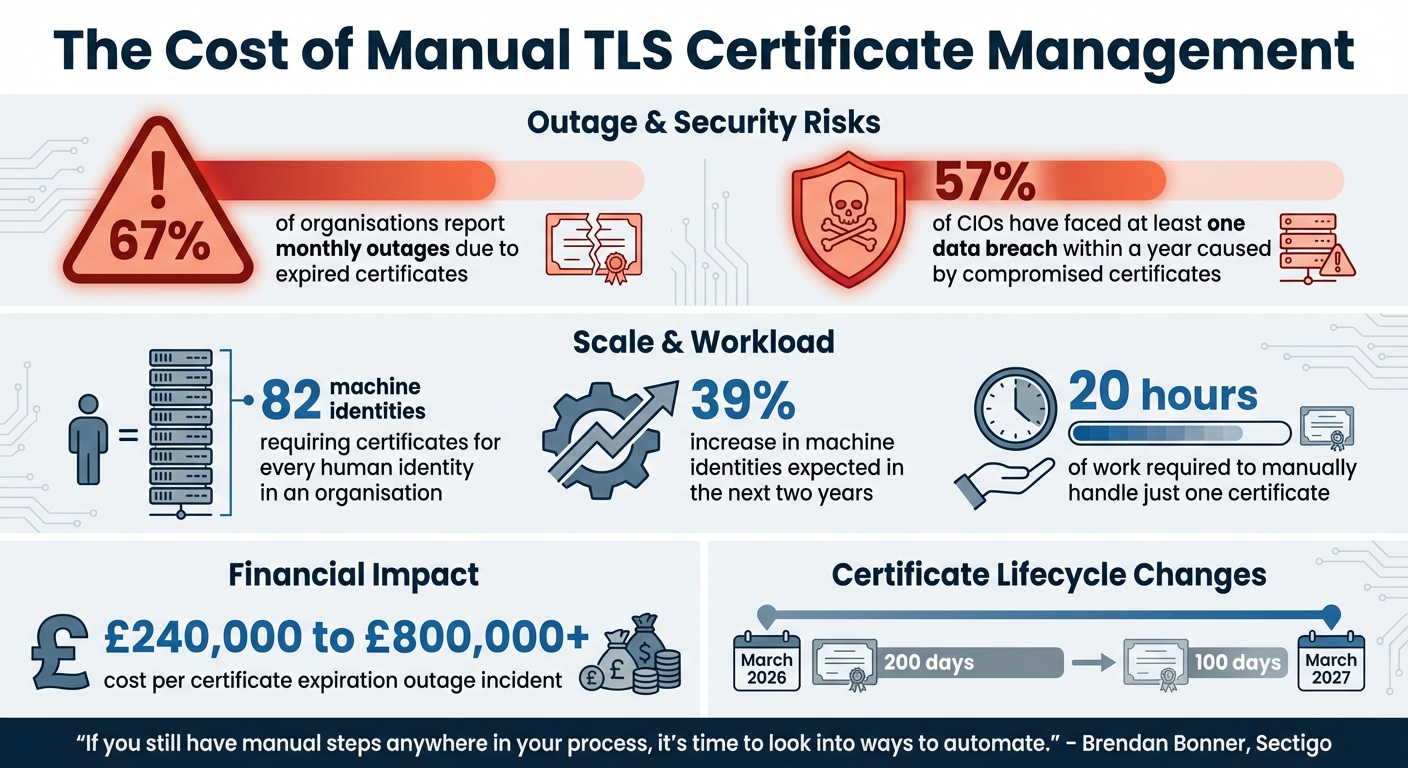 {TLS Certificate Management: Key Statistics and Risks of Manual Processes}
:::
{TLS Certificate Management: Key Statistics and Risks of Manual Processes}
:::
Managing TLS certificates manually isn't just a hassle - it’s a breeding ground for operational and security headaches. As systems scale, the risks tied to manual processes grow exponentially. Take this: 67% of organisations report monthly outages due to expired certificates [5]. Even worse, 57% of CIOs have faced at least one data breach within a year caused by compromised certificates [5]. These aren’t isolated incidents - they’re systemic issues caused by outdated methods like spreadsheets, email reminders, and human oversight in environments that demand speed and precision.
The sheer volume of certificates adds to the chaos. For every human identity in an organisation, there are around 82 machine identities needing certificates [5]. And this number is expected to rise by 39% in the next two years [5]. Now, imagine manually handling just one certificate - it can take up to 20 hours of work [5]. Multiply that by thousands, and you’ve got a process that’s completely unmanageable.
If you still have manual steps anywhere in your process, it's time to look into ways to automate. If you do not have automation, you do have risk.– Brendan Bonner, Global Director Sales Engineering, Sectigo [4]
Wildcard certificates might seem like a quick fix, but they’re a double-edged sword. If a wildcard certificate expires or gets compromised, it doesn’t just affect one service - it can bring down every service linked to it. While they might save money upfront, the fallout from a single wildcard certificate failure can lead to widespread outages and breaches [4].
What Can Go Wrong with Manual TLS Management
One of the most obvious pitfalls of manual TLS management is service outages caused by expired certificates. Many teams rely on spreadsheets or calendar alerts to track renewal dates, but these systems are far from foolproof. A missed reminder or an absent team member can lead to a 3 a.m. scramble to restore services [4][5].
But the headaches don’t stop at renewals. Installing a certificate might take just a few minutes in a controlled lab environment, but real-world scenarios are far more complex. Pre-validation checks and trust anchor issues can stretch this process to hours, especially when dealing with numerous endpoints [4]. Multiply that by hundreds - or even thousands - of certificates, and the time sink becomes enormous, pulling engineers away from more impactful work.
Security risks are another major concern. Relying on public Certificate Authorities (CAs) for internal services can inadvertently expose sensitive infrastructure details. These details often end up in public Certificate Transparency logs, giving potential attackers a map of your internal systems before they even attempt an intrusion [1].
Wildcard certificates add yet another layer of risk. If one gets compromised, it’s not just a single service at risk - it’s every service that depends on it. This creates a massive blast radius
across your infrastructure. As the NIST SP 1800-16 guidance points out: The consequence \[of manual management\] is continuing susceptibility to security incidents. Put simply, the increased reliance on TLS keys and certificates has rendered manual certificate management impractical
[2].
TLS Challenges in Dynamic Infrastructure
Modern infrastructure, especially in containerised and microservices-based environments, introduces complexities that manual certificate management just can’t handle. Containers, by nature, are ephemeral - they spin up and down in seconds to meet shifting demands. Trying to manually issue certificates in such a fast-moving environment is like trying to catch smoke with your hands.
The shift to microservices has also exploded the number of endpoints requiring encryption. Internal communication between services now demands the same level of security as external APIs. Yet, many organisations still terminate TLS at reverse proxies, leaving internal traffic unencrypted - an approach that directly contradicts Zero Trust security principles, which mandate encryption and authentication at every layer [1].
Managed environments like AWS ECS or Azure Container Instances add even more complexity. These platforms often restrict host access or shared volume mounts, making centralised certificate management a challenge. On top of that, many containerised services need a specific signal (like SIGHUP) or a full restart to recognise a renewed certificate, adding another layer of orchestration difficulty.
The faster renewal cycles in dynamic environments only compound the problem. Managing certificates manually across various regions, availability zones, and hybrid-cloud setups has become a logistical nightmare.
And then there’s the issue of format paralysis. Teams often get stuck worrying about certificate formats - PFX, PEM, PKCS#12 - even though modern Certificate Lifecycle Management tools can handle these conversions seamlessly [4]. The real challenge isn’t the format; it’s building automation that covers the entire lifecycle - from issuance to deployment to renewal - without manual intervention.
All of this makes one thing clear: automating TLS certificate management isn’t just a convenience - it’s a necessity for keeping up with the demands of modern DevOps.
How to Automate TLS in Your DevOps Pipeline
Automating TLS is essential for dynamic, scalable environments. It helps prevent outages and adapts seamlessly to infrastructure changes, allowing teams to manage certificates without manual effort. Today’s tools make full automation straightforward, whether you’re working with traditional VMs, containerised workloads, or a combination of both.
Frequent certificate renewals, driven by shorter lifetimes, make automation a necessity. Axelspire once pointed out, If your renewal process involves a human touching anything, you have less than a year to fix it
[7]. Manual methods that worked with 90-day certificates are no longer practical.
The starting point for automation is the ACME protocol (RFC 8555), which handles certificate lifecycles, from account registration to domain validation and issuance [8]. For traditional setups, tools like Certbot and acme.sh are widely used. In Kubernetes, cert-manager has become the go-to solution, treating certificates as native resources [15, 19].
For simpler setups, HTTP-01 challenges work well. However, if you need wildcard certificates or are dealing with firewalls, DNS-01 challenges are better, even if they come with longer propagation times. It’s also important to be aware of rate limits. For instance, Let’s Encrypt allows 50 certificates per domain per week and limits failed validation attempts to 5 per hour [14, 15]. Testing in Let’s Encrypt’s staging environment can help avoid hitting these limits during setup.
Using ACME Protocols for Automated Certificates
In environments with 50+ servers, centralising certificate issuance on a bastion host or CI server is more efficient than running an ACME client on every node [7]. This approach reduces credential exposure and simplifies troubleshooting. Tools like Certbot also support renewal hooks, which are scripts that automate tasks such as reloading services or distributing new certificates.
For example, a Certbot workflow might include specifying the domain, webroot path, and a deploy hook to reload the web server immediately after renewal. DNS-01 challenges are particularly useful for wildcard certificates or infrastructure behind firewalls. Many modern solutions use Workload Identity (GCP) or IAM Roles for Service Accounts (AWS IRSA) to minimise credential risks.
Adding a layer of security, you can configure Certificate Authority Authorisation (CAA) DNS records to specify which CAs can issue certificates for your domain. Monitoring Certificate Transparency logs with tools like crt.sh can help detect unauthorised certificate issuance.
Here’s a quick comparison of challenge types:
| Challenge Type | Mechanism | Wildcard Support | Best For |
|---|---|---|---|
| HTTP-01 | Token file at /.well-known/acme-challenge/
|
No | Single servers, simple setups |
| DNS-01 | TXT record at _acme-challenge.{domain}
|
Yes | Wildcards; firewalled/internal servers |
| TLS-ALPN-01 | TLS negotiation on port 443 | No | When port 80 is unavailable |
Once automated certificate issuance is in place, the next step is integrating these processes into your CI/CD pipelines.
Adding TLS Automation to CI/CD Tools
Bringing TLS automation into CI/CD pipelines ensures certificates are provisioned alongside your infrastructure, not as an afterthought. For example, Azure DevOps can use PowerShell modules like Posh-ACME to request certificates and store them in Azure Key Vault [9]. By treating certificates as code - storing configurations like domain names, challenge types, and renewal hooks in version control - you simplify environment replication, rollbacks, and audits. Tools like Terraform can even integrate certificate requests into infrastructure provisioning, so new load balancers or API gateways are pre-configured with valid TLS certificates [11].
Security is critical. Private keys and certificates should only remain on local filesystems temporarily before being moved to secure vaults like HashiCorp Vault, AWS Secrets Manager, or Azure Key Vault [14, 21]. Application hosts can then pull these certificates using short-lived access tokens. In CI/CD pipelines - whether GitHub Actions, Jenkins, or GitLab CI - certificate renewal can be triggered during deployments and validated in staging environments before going live, reducing the risk of configuration errors.
These steps lay the groundwork for Kubernetes-specific automation, ensuring a consistent and reliable approach across all environments.
Automating TLS in Kubernetes
Kubernetes environments require a slightly different strategy. Building on CI/CD integration, cert-manager is the leading tool for managing certificate lifecycles in Kubernetes [26, 28]. It introduces Custom Resource Definitions (CRDs) like Issuer (namespace-specific), ClusterIssuer (cluster-wide), Certificate (defining desired state), and CertificateRequest (tracking requests) [26–29].
To automate certificates, you can simply add an annotation to your Ingress resource, such as:
cert-manager.io/cluster-issuer: "letsencrypt-prod"
Cert-manager’s ingress-shim monitors these annotations and creates the necessary Certificate resource automatically. For HTTP-01 challenges, cert-manager deploys a temporary AcmeSolver pod and Ingress to handle validation tokens. DNS-01 challenges, on the other hand, rely on your DNS provider’s API to create the required TXT record.
Cert-Manager can be seen as a microservice that is deployed in a Kubernetes cluster. Once deployed and configured it will take care of requesting, issuing and automatically renewing certificates for you.– alex, headworq [12]
For large clusters or multi-tenant setups, ClusterIssuers simplify management by providing a shared certificate authority configuration across namespaces. For internal services that can’t be exposed to the public internet, DNS-01 is the best option as it doesn’t require external IP access.
A typical cert-manager installation includes three components: the core controller, a webhook for resource validation, and a cainjector for CA bundle injection. The cmctl CLI is a handy tool for checking API readiness, manually triggering renewals, and diagnosing certificate issues (e.g., cmctl status certificate <name>).
For GKE Ingress users, pre-creating an empty TLS secret before configuring the Ingress is recommended to avoid synchronisation issues between Google Cloud Load Balancer and cert-manager. Always use Let’s Encrypt’s staging environment (https://acme-staging-v02.api.letsencrypt.org/directory) during testing to avoid production rate limits.
For tailored guidance on integrating TLS automation into your DevOps workflows, Hokstad Consulting offers expert solutions to optimise your infrastructure. Visit Hokstad Consulting for more information.
Monitoring Certificates and Enforcing TLS Policies
Once you've automated TLS certificates, it's essential to keep a close eye on them to avoid unexpected failures. Without proper monitoring, issues like certificate expiration can slip through unnoticed, potentially causing costly outages. In fact, certificate expiration outages can cost organisations anywhere from £240,000 to £800,000+ per incident [20]. Monitoring helps prevent these financial losses while strengthening the bridge between automated issuance and secure operations.
Set up monitoring thresholds to flag certificates nearing expiry: 30 days for a warning and 5 days for critical alerts [13]. For script-based monitoring, tools like OpenSSL (openssl s_client) can extract the enddate of a certificate and compare it to the current date. These scripts integrate seamlessly with monitoring platforms like Nagios or Icinga by using exit codes (0 for OK, 1 for Warning, 2 for Critical) [13]. Alternatively, PowerShell scripts can validate URLs and even send Slack alerts when certificates are within 90 days of expiry [13].
Setting Up Alerts for Certificate Expiry
In Kubernetes environments, services like Dapr's Sentry generate hourly logs starting 30 days before the expiry of mTLS root certificates [14]. These logs can be captured by your observability tools and routed to on-call teams for action. If you're using Grafana, you can define alert rules, contact points (email, Slack, etc.), and notification policies directly in code using Terraform. This ensures consistent alerting across all stages of your application lifecycle - development, testing, and production.
But why stop at alerts? Automate responses where possible. For instance, HashiCorp Vault Agent can handle automatic certificate rotation, and applications like Spring Boot (with hot reload enabled) can update certificates without requiring a restart [15].
Creating and Enforcing TLS Policies
Uniform TLS policies are just as crucial as monitoring. Together, they form a strong defence for your infrastructure. A centralised Certificate Authority (CA) service, such as HashiCorp Vault's PKI secrets engine or Dapr's Sentry, can manage the lifecycle of X.509 certificates across your systems [14][16]. A hierarchical CA structure - where a root CA issues certificates only to intermediate CAs, and intermediate CAs handle daily operations - further secures the root CA. Enforcing short Time-To-Live (TTL) durations for workload certificates (e.g., 24 hours or less) limits the risk window in case of a key compromise. Identity-based issuance methods, like AppRole or Kubernetes-bound service accounts, ensure that only authenticated services can request certificates [14][16].
For example, Dapr's Sentry service generates self-signed root and issuer certificates valid for one year if custom certificates aren't provided. These certificates are stored securely in Kubernetes secrets, accessible only to system pods [14]. Similarly, Azure Front Door users can sync TLS certificates directly from Azure Key Vault by selecting the latest version
option, ensuring automatic upgrades whenever a new certificate version is issued [17].
Managing Certificates as Code with Terraform
Terraform simplifies TLS infrastructure management by using HashiCorp Configuration Language (HCL) to define the desired state. This approach reduces manual errors and supports GitOps workflows [18]. Its provider-driven model allows you to manage certificates across platforms like AWS, Azure, and GCP by converting configurations into API calls. Terraform's state file keeps track of the relationship between your configuration and deployed certificates, making it easy to compute changes and plan updates [18].
A great example comes from Spotify, where ACME-based certificate management reduced manual work by 95% and eliminated outages caused by certificate issues [20]. Similarly, Nexus implemented automated scanning and discovered they were managing over 5,000 certificates, far exceeding their initial estimate of 500. This led to the decommissioning of 40% of unused or abandoned certificates, streamlining their operations [20].
Certificate lifecycle management is operational risk management - investment in automation prevents expensive preventable outages.– Axelspire Vault [20]
Key steps for implementing certificate management with Terraform include:
- Configuring your cloud provider or secret manager
- Defining resources for domain verification (e.g., using
google_certificate_manager_dns_authorization) - Automatically adding DNS validation records
- Declaring the managed certificate resource
- Linking the certificate to a load balancer or target proxy with a certificate map [19]
To avoid concurrency issues during updates, store Terraform state in a remote backend with locking, such as S3 with DynamoDB [18].
For expert help with integrating certificate monitoring and policy enforcement into your DevOps workflows, check out Hokstad Consulting. They offer tailored solutions to optimise your infrastructure.
Conclusion
Automated TLS has become essential for securing modern cloud environments, especially for DevOps teams. Manual processes simply can't keep up with the complexity of 90-day certificate lifecycles or the sheer scale of microservices architectures [3]. By using tools like cert-manager and the ACME protocol, organisations can eliminate human errors that often lead to security vulnerabilities, while also avoiding downtime caused by expired certificates [3][10].
The advantages extend far beyond convenience. Automated TLS supports zero-trust security models by enabling mutual TLS (mTLS) across all internal services - not just at the network edge [6][24]. With short-lived certificates, which may expire in as little as 72 hours or even five minutes, the risk is significantly reduced if a private key is compromised [15][22]. This approach is a natural fit for dynamic infrastructures, where managing thousands of machine identities manually would be nearly impossible [21].
Industry experts highlight the shift:
Certificate management is part of the service. Now that the Automated Certificate Management Environment (ACME) protocol... has gained widespread adoption, it's easier than ever to build an ACME client into a service.
– Carl Tashian, Offroad Engineer, Smallstep [6]
To fully integrate certificates into your infrastructure, they should be treated as native resources. Use DNS-01 challenges for internal services, incorporate certificate management into CI/CD pipelines, and secure private keys in vaults. Centralised monitoring, combined with strong policies, ensures compliance with standards like PCI DSS and GDPR while maintaining visibility across your entire certificate inventory [10][21][23][3][24].
For organisations looking to secure their DevOps pipelines with automated TLS, Hokstad Consulting offers expert assistance to ensure a smooth implementation.
FAQs
Which TLS automation approach fits my setup (VMs, Kubernetes, or hybrid)?
The best approach for automating TLS depends on your specific infrastructure:
- For Virtual Machines (VMs): Tools such as Let's Encrypt or HashiCorp Vault are excellent choices for managing certificates automatically.
- For Kubernetes: Implement cert-manager alongside external DNS and ingress controllers to simplify automation processes.
- For Hybrid Environments: Use cert-manager for Kubernetes clusters, while pairing it with tools like Vault or Let's Encrypt for VMs. This ensures a consistent and unified certificate management strategy across platforms.
How can I automate certificate renewals without restarting services?
To keep certificates up-to-date without restarting services, tools like cert-manager in Kubernetes can manage renewals and update secrets dynamically. This approach ensures certificates are replaced smoothly, avoiding any downtime. For cloud-native environments, integrating these renewal processes into CI/CD pipelines can enable automatic configuration reloads, keeping services running without disruption. By combining automated tools with zero-downtime techniques, you can ensure seamless certificate updates and uninterrupted service availability.
How should we store and rotate private keys securely in CI/CD?
To keep private keys secure in your CI/CD pipelines, it's smart to rely on dedicated secrets management tools. These tools allow you to securely store sensitive information and automate the rotation of keys. Instead of hardcoding secrets, inject them dynamically at runtime. This approach not only reduces the risk of exposure but also makes updates far simpler.
You can integrate solutions like Vault or cloud-native services to handle the automation of key rotation. Additionally, using short-lived credentials adds another layer of security, limiting the window of potential misuse. Combine this with strict access controls and audit trails to keep a close eye on who accesses what, ensuring your pipeline remains as secure as possible.