In a DevOps world where speed and efficiency are critical, security can no longer be an afterthought. Automating security within CI/CD pipelines ensures vulnerabilities are caught early, sensitive data is protected, and deployments remain consistent. Manual processes are prone to errors and slow down development, making automation essential for modern software delivery.
Key Takeaways:
- Shift-Left Security: Integrate security checks early in the development cycle to reduce risks and costs.
- Automated Scanning: Use tools like SAST, DAST, and IaC scanning to detect vulnerabilities at every pipeline stage.
- Secrets Management: Centralise credentials with tools like HashiCorp Vault and automate their rotation.
- Policy as Code: Enforce security standards with automated checks in IaC and CI/CD pipelines.
- Continuous Monitoring: Real-time alerts and audit trails ensure quick responses to security issues.
How to Create a DevSecOps CI/CD Pipeline
Integrating Security Early in Development
In today’s fast-paced software development world, integrating security from the outset is a game-changer. By adopting the shift-left approach, security measures are embedded into the earliest stages of the development lifecycle. This proactive strategy helps developers spot and fix vulnerabilities before they spiral into larger issues [8].
Early detection doesn’t just save time - it saves money too. Tackling security flaws during the design or coding phases is far cheaper than addressing them after deployment. As Microsoft points out:
Addressing security issues at the design stage dramatically reduces remediation costs and prevents architectural flaws from becoming embedded in production systems. [9]
Beyond cost savings, the shift-left model strengthens collaboration between development, operations, and security teams. Tactics like appointing Security Champions and utilising threat modelling tools, such as STRIDE, ensure secure design becomes a core part of the process [9].
Benefits of Early Security Integration
Bringing security into the fold early offers multiple advantages: reduced costs, faster feedback, and improved teamwork. Automated tools like Static Application Security Testing (SAST) and secret scanning, when integrated into CI/CD pipelines, provide developers with near-instant feedback. This allows them to fix issues while their code is still fresh in their minds [8].
This approach also fosters a shared responsibility for security. By breaking down traditional silos, developers gain hands-on experience with defensive coding practices. This ensures that security keeps up with the rapid pace of modern development cycles, aligning with the principles of DevSecOps.
Challenges in Early Security Integration
Despite its advantages, shifting security left isn’t without hurdles. Developers often see additional security steps as roadblocks, particularly if tools slow down build times or generate numerous false positives. These frustrations can disrupt workflows and diminish enthusiasm for security measures [2].
Skill gaps are another obstacle. Many development teams lack adequate training in secure coding practices, making it difficult to interpret scan results or fully grasp potential risks. As the National Cyber Security Centre (NCSC) warns:
Complexity is the enemy of security. [5]
Tool integration can also be tricky. While many DevOps tools come with built-in security features, they don’t always work seamlessly together. This can lead to fragmented secrets management and unmonitored vulnerabilities [2]. Additionally, without strong technical controls, developers may bypass or alter security rules when they find them inconvenient [3].
Overcoming these challenges requires both technical solutions and cultural shifts. Implementing Security as Code can help standardise policies, reducing the risk of manual errors [2]. Tools designed to integrate smoothly into developers’ existing environments - sometimes referred to as ergonomic security - ensure that security insights are accessible without disrupting workflows [10]. Most importantly, organisations need to cultivate a culture where identifying and addressing vulnerabilities is celebrated, making security a collective responsibility rather than the domain of a specialised team [5]. These steps lay the foundation for automating security checks within CI/CD pipelines.
Automating Security Scans in CI/CD Pipelines
::: @figure 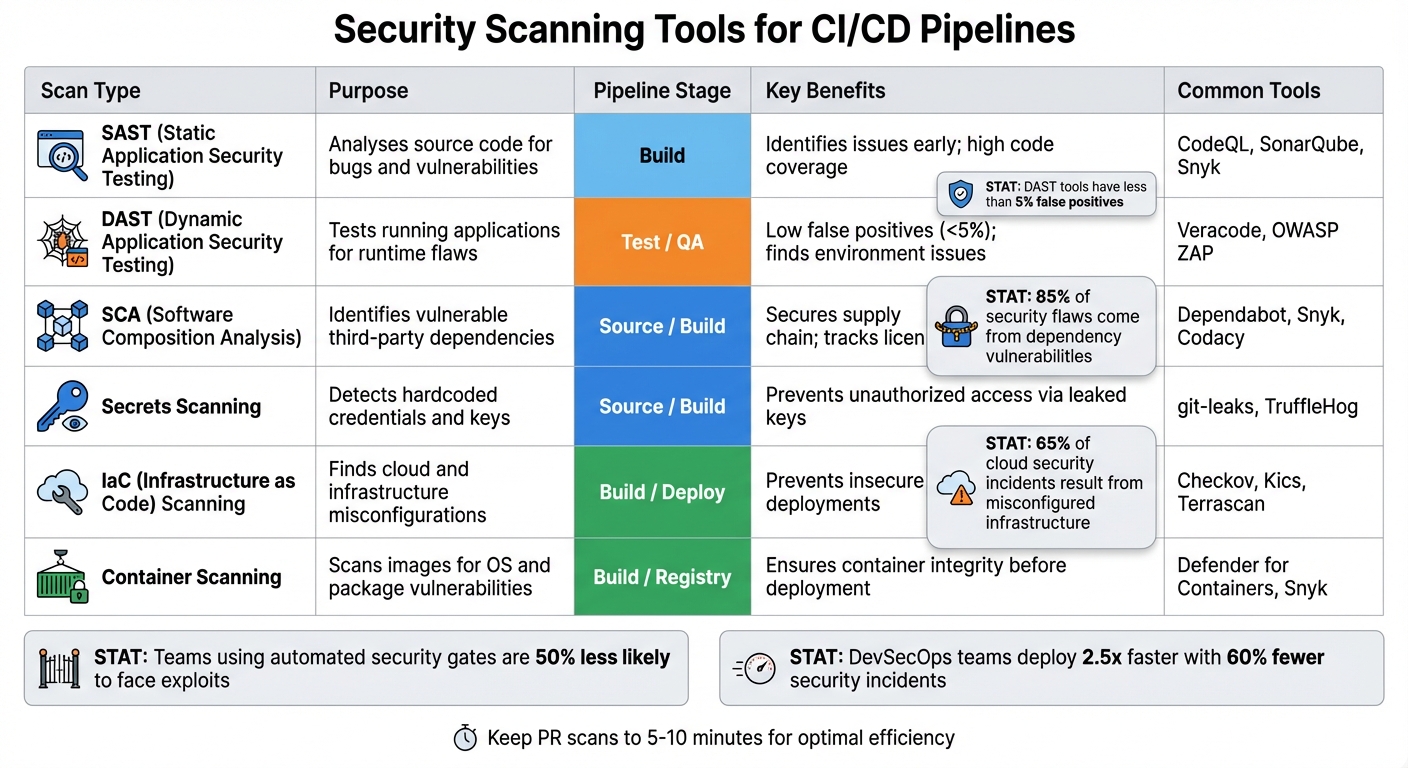 {DevOps Security Scanning Tools Comparison: SAST, DAST, SCA, and IaC}
:::
{DevOps Security Scanning Tools Comparison: SAST, DAST, SCA, and IaC}
:::
Once security becomes a core part of your development process, the next logical step is integrating automated scans directly into your CI/CD pipelines. Building on the earlier shift-left strategy, these scans embed security checks throughout the pipeline, ensuring vulnerabilities are caught early. Below are the key types of scans and where they fit best within your pipeline.
Static Application Security Testing (SAST) examines source code, byte code, or binaries without running the programme. This typically happens during the build stage, where it identifies issues like SQL injection or cross-site scripting. Software Composition Analysis (SCA), on the other hand, focuses on third-party libraries and open-source dependencies, flagging known vulnerabilities and licence compliance problems. With dependency vulnerabilities accounting for 85% of security flaws in modern apps [16], running SCA during both the source and build stages is crucial to catch issues before they’re embedded into the application.
Dynamic Application Security Testing (DAST) takes a different approach by testing the application while it’s running. By simulating real-world attacks, it uncovers runtime vulnerabilities. DAST tools are highly reliable, with less than 5% false positives [12], making them ideal for the test or QA stages.
Container scanning ensures container images are free from vulnerabilities in the operating system and installed packages. This scan is typically performed during the build stage or when images are pushed to a registry. Similarly, Infrastructure as Code (IaC) scanning checks configuration templates, like Terraform or Kubernetes manifests, for misconfigurations. Considering that misconfigured infrastructure accounts for 65% of cloud security incidents [16], IaC scanning is a critical step to secure deployments.
Types of Security Scans
Each type of scan serves a unique purpose within the pipeline. For instance, secrets scanning detects hardcoded credentials in your code, commits, and configuration files. By running this at the source stage - often with pre-commit hooks - it prevents sensitive data from entering your repository. A stark example of what’s at stake is the 2017 Equifax breach, which exposed the personal data of 147 million people due to a misconfigured build environment in Apache Struts [14].
Interactive Application Security Testing (IAST) combines the strengths of SAST and DAST. By running inside the application server, it evaluates code during dynamic execution, offering deeper insights into vulnerabilities. This is particularly effective during the test and QA stages, where understanding how vulnerabilities behave in real-time is critical. Teams that use automated security gates are 50% less likely to face exploits, and DevSecOps teams deploy 2.5 times faster while experiencing 60% fewer security incidents compared to traditional approaches [17].
Security Scanning Tools Comparison
| Scan Type | Purpose | Pipeline Stage | Key Benefits | Common Tools |
|---|---|---|---|---|
| SAST | Analyses source code for bugs and vulnerabilities | Build | Identifies issues early; high code coverage | CodeQL, SonarQube, Snyk |
| DAST | Tests running applications for runtime flaws | Test / QA | Low false positives; finds environment issues | Veracode, OWASP ZAP |
| SCA | Identifies vulnerable third-party dependencies | Source / Build | Secures supply chain; tracks licences | Dependabot, Snyk, Codacy |
| Secrets Scanning | Detects hardcoded credentials and keys | Source / Build | Prevents unauthorised access via leaked keys | git-leaks, TruffleHog |
| IaC Scanning | Finds cloud and infrastructure misconfigurations | Build / Deploy | Prevents insecure deployments (e.g., open ports) | Checkov, Kics, Terrascan |
| Container Scanning | Scans images for OS and package vulnerabilities | Build / Registry | Ensures container integrity before deployment | Defender for Containers, Snyk |
To maintain a secure and efficient pipeline, configure your CI/CD tools to halt the process when high-severity vulnerabilities are detected. This fail fast
method stops flawed code from moving further [1]. To avoid slowing down development, keep pull request scans to 5–10 minutes [15], and use incremental scanning to focus only on changed code rather than the entire codebase [15]. When implemented correctly, these scans strengthen your pipeline without compromising speed. As AWS puts it:
Security must be applied to every component of the infrastructure, including CI/CD pipelines, from the moment a single line of code is written to the stages where it's deployed [11].
Infrastructure as Code for Secure Automation
Infrastructure as Code (IaC) is transforming the way cloud infrastructure is managed, especially when it comes to security. Instead of manually configuring servers and networks, IaC relies on code to define infrastructure. This code can be version-controlled, reviewed, and automated, ensuring consistent security controls across all environments - from development to production. By doing so, it eliminates the classic it works on my machine
challenge and lays the groundwork for automating security measures more effectively.
The advantages of IaC go beyond just consistency. As AWS points out, Using templates to define your standard security controls allows you to track and compare changes over time using a version control system
[6]. Another key concept is immutable infrastructure, which ensures that instead of patching existing systems, new environments are always provisioned to match exact specifications. OWASP explains this approach: The idea behind immutable infrastructure is to build the infrastructure components to an exact set of specifications. No deviation, no changes
[18].
IaC also enables teams to adopt a shift-left security approach, where security is integrated early in the development cycle. Static analysis tools like Checkov, TFLint, and Terrascan can be used to scan infrastructure templates during the build phase. These tools help catch issues such as unencrypted storage or overly permissive firewall rules before deployment. Microsoft highlights the importance of this proactive strategy: Securing infrastructure early in the development stage reduces the risks of misconfigured infrastructure that exposes points for attack after deployment
[19]. Early detection of vulnerabilities is crucial for maintaining secure systems.
In addition to early security checks, automated drift detection can ensure that live environments remain aligned with IaC templates, flagging any manual changes. Teams can further enhance security by applying the principle of least privilege, programmatically defining minimal permissions for resources. Policy as Code frameworks can then be used to block non-compliant deployments automatically. These practices extend the automation of security processes, keeping development and operations in sync and ensuring a strong security posture.
IaC Tools Comparison for Security
| Tool | Security Features | Automation Capabilities | Compliance Checks | Pipeline Compatibility |
|---|---|---|---|---|
| Terraform | Static analysis via Checkov, TFLint; policy enforcement with HashiCorp Sentinel or OPA | High; declarative approach with state management for cloud-native orchestration | Policy as Code via Sentinel; state file encryption | Excellent; integrates with GitHub Actions, Jenkins, GitLab |
| Ansible | Vault for encrypted variables; security playbooks for system hardening | High; procedural/task-based automation; agentless architecture | Ansible Lint and custom security playbooks | High; agentless design simplifies CI/CD integration |
| Puppet | Model-based enforcement with automated drift correction to secure state | High; agent-based continuous state management | Built-in compliance reporting and automated remediation | Good; requires agent installation on target nodes |
| Chef | InSpec for automated security and compliance testing (Compliance as Code) |
High; recipe-based automation for complex configurations | Strong integration with Chef InSpec for continuous compliance | Good; works with most CI/CD platforms via Chef Workstation |
For expert advice on securely automating your DevOps pipelines and optimising cloud deployments, visit Hokstad Consulting.
Secrets Management and Access Controls in Automation
After implementing automated security scans and Infrastructure as Code (IaC) practices, the next critical step for a secure DevOps pipeline is effective secrets management. Secrets - like API keys, database passwords, SSH keys, and authentication tokens - are essential for pipeline operations but also pose significant security risks. Storing these credentials in code, environment variables, or CI/CD settings is risky and insufficient. The solution? Centralised secrets management paired with automated access controls to minimise human error and reduce the risk of credential compromise.
HashiCorp underscores the importance of centralisation:
There's no way to build solid governance, auditing, and security around organisational access to secrets if you don't centralise your management through one control plane [21].
Tools such as HashiCorp Vault and AWS Secrets Manager are designed to prevent secret sprawl across systems. They offer features like encryption (both at rest and in transit), fine-grained access controls, and detailed audit logs. It's worth noting that Kubernetes Secrets alone aren't suitable for production environments - they're only base64 encoded and stored as plaintext in the etcd key-value store [21].
Automating Secrets Management
The AWS Well-Architected Framework highlights an important principle: the safest credential is one that isn’t stored at all [24]. Following the Remove, Replace, Rotate
strategy can significantly enhance security. This involves eliminating unnecessary secrets, using temporary cloud-native roles or OpenID Connect (OIDC) tokens, and automating the rotation of any remaining long-lived credentials with serverless functions [23][24].
Dynamic secrets offer a modern alternative to static credentials. Instead of storing passwords indefinitely, systems like Vault generate temporary credentials on-demand that expire automatically - often within seconds. This approach drastically reduces the risk of exposure, even if the credentials are compromised [21][22]. For legacy systems that still rely on static credentials, frequent automated rotation is essential, and audit logs should be retained for at least 90 days [28].
When integrating secrets management into CI/CD pipelines, machine-centric authentication is key. For instance, Vault's AppRole authentication uses a two-part system: a Role ID embedded in the machine image and a Secret ID provided by an orchestrator at runtime. This eliminates the need for storing master passwords in repositories [22]. Similarly, GitHub Actions can use OIDC for direct authentication to Vault or AWS, bypassing the need for long-lived credentials [26][27].
Precise access controls further strengthen these practices, ensuring credentials are used only where necessary.
Implementing Role-Based Access Control
Role-Based Access Control (RBAC) is a cornerstone of secure automation, ensuring that applications and users only access the secrets they need, adhering to the principle of least privilege. A great example comes from DigitalOcean, which implemented a credentials-free RBAC system for GitHub Action workflows using Vault and OIDC. By leveraging JWT claims like job_workflow_ref and repository, they created fine-grained access controls. For instance, pull request workflows could only access non-production secrets, while only pushes to the main branch could access production credentials. This setup eliminated static Secret Zero
credentials and even resulted in an open-sourced Terraform module [26].
Short-lived credentials are another key element. DigitalOcean discovered that a 60-second Time-to-Live (TTL) for Vault tokens sufficed for 80% of secret retrieval needs. For more complex workflows, extending the TTL to five minutes covered nearly all scenarios, with a maximum cap of 30 minutes for rare edge cases [26]. This approach significantly reduces risk if a workflow is compromised.
Environment-specific roles also play a crucial role in preventing accidental cross-environment credential usage. Separate roles should be created for staging and production environments, with access tied to protected branches using claims like sub (subject) and environment [25][26]. For tasks like terraform plan, read-only pipeline roles should be employed, and audit trails must be maintained to track access and changes [27][20].
For more expert advice on securing DevOps pipelines and streamlining cloud deployments, visit Hokstad Consulting.
Policy as Code for Enforcing Security Standards
Once you've automated secrets management and access controls, the next step is ensuring consistent security standards are applied across all deployments. This is where Policy as Code (PaC) comes into play. By defining security, compliance, and operational policies as code, PaC enables automated enforcement of these policies throughout the CI/CD pipeline.
Liran Tal from Snyk highlights its value:
Policy as code (PaC) automates this decision-making process by codifying and enforcing policies. It can be used to automate validation procedures to control and manage infrastructure [29].
PaC tools rely on three key inputs - policy, data, and a query - to enforce security rules. This setup makes it possible to address security issues early in the development cycle, often referred to as shift-left security.
For example, misconfigurations in Infrastructure as Code (IaC) templates can be identified and corrected before cloud resources are even provisioned. This step not only extends earlier automation efforts but also strengthens the overall security pipeline.
By storing policies as version-controlled text files, teams can take advantage of pull request reviews, automated testing, and straightforward rollbacks. AWS emphasises the importance of this approach:
Automation mechanisms provide consistent and reliable methods to build and deploy code and their related environments without human intervention [30].
This kind of consistency is vital, especially when managing hundreds of applications across multi-cloud environments. Manual checks simply can't keep up with the complexity and scale.
Several tools have been developed to implement PaC effectively. Open Policy Agent (OPA), for instance, uses the Rego language to define policies for JSON and YAML data. Conftest is another option, focusing on validating configuration files like Terraform HCL and Kubernetes manifests. Organisations using HashiCorp tools can utilise Sentinel, which integrates directly with Terraform, Vault, and Nomad for enterprise-grade policy enforcement. For AWS users, CloudFormation Guard and CloudFormation Hooks offer proactive template validation. Meanwhile, Pulumi CrossGuard enables policies to be written in familiar programming languages like Python, TypeScript, or Go.
To get started, focus on high-risk areas with simple policies. For instance, you could begin by preventing public S3 buckets or enforcing encryption at rest. Initially, configure these policies in advisory mode so they issue warnings rather than blocking deployments. This gives teams time to adjust without disrupting workflows. Integrate policy checks at various stages, such as pre-commit hooks for local validation, pull request gates for thorough reviews, and deployment gates for environment-specific checks. Make sure error messages are clear and informative, explaining both the issue and how to fix it. This turns policy enforcement into an opportunity for teams to learn and improve.
Continuous Monitoring and Audit Alerts in Pipelines
Automation is only as effective as your ability to spot breaches or misconfigurations quickly. That’s where continuous monitoring comes in, providing real-time insights into your pipeline's behaviour. Pair this with automated audit alerts, and you’ve got a system that ensures your team can react swiftly to security incidents. Together, they create a final, critical layer of defence in a secure DevOps pipeline.
The UK's National Cyber Security Centre highlights this importance:
The security of [the deployment] process is critical if you need to protect the integrity of your code and the systems it builds [3].
Tools like AWS Config are great for logging resource changes, supporting compliance and change management efforts [7]. This aligns with the shift-left and extend-right approach: integrating security testing early in development while deploying automated tools to catch and address threats later in the pipeline [31]. This constant vigilance naturally leads to the adoption of powerful real-time monitoring solutions.
Real-Time Monitoring Tools
Once you’ve established continuous audit trails, the next step is real-time monitoring. This isn’t about occasional snapshots; modern tools like Prometheus, Grafana, and Datadog provide continuous metrics, logs, and event tracking. These platforms unify data across all clusters into centralised dashboards, offering full visibility from code commit to production.
- Prometheus gathers time-series metrics from your infrastructure and applications.
- Grafana transforms this data into custom dashboards, helping teams monitor CPU usage, memory, and network latency for build agents or Kubernetes nodes. This proactive tracking can prevent resource bottlenecks that might otherwise cause pod failures.
- For deeper application performance insights, Datadog and New Relic add features like distributed tracing and root cause analysis.
When setting up these tools, focus on creating performance baselines using historical data. Monitor build times and success rates to identify regressions automatically. Track key security metrics with zero tolerance - failed scans or unauthorised access should trigger immediate alerts [1]. To ensure rapid response, integrate notifications with platforms like Slack or Teams.
Setting Up Automated Audit Alerts
Continuous monitoring works hand-in-hand with automated audit alerts to keep your security posture proactive. Start by using fail-fast mechanisms that halt pipeline execution the moment severe vulnerabilities or hard-coded secrets are detected [6][1]. Tools like Snyk and SonarQube can stop compromised code from ever reaching production.
Centralise all pipeline activity logs by exporting them to a SIEM platform in a format like JSON [13]. This enables automated threat detection while maintaining comprehensive audit trails. OWASP highlights the risks of overlooked identities:
The 'forgotten' identity can be the vector an attacker uses to compromise a CI/CD system [13].
Set alerts based on the STRIDE model - Spoofing, Tampering, Repudiation, Information disclosure, Denial of service, and Elevation of privilege [31]. Automate checks to verify that Role-Based Access Controls are functioning correctly, ensuring that unauthorised users can’t access sensitive pipeline resources [1]. For Infrastructure as Code, tools like AWS CloudFormation Guard can flag misconfigurations before deployment [6].
You can go a step further by enabling automated remediation workflows. These workflows can trigger rollbacks, adjust scaling, or initiate incident responses without requiring manual input. This not only speeds up response times but also reduces the window of exposure when security issues arise.
Conclusion
Integrating security automation into DevOps pipelines has become a cornerstone of modern software delivery. In this article, we’ve delved into the importance of shifting security left to catch vulnerabilities early, while continuous monitoring helps identify threats during production [11]. The core idea is to treat security as an integral part of the development lifecycle - version-controlled, rigorously tested, and automated.
To put these strategies into action, focus on practical steps that bolster security without disrupting workflows. Use Infrastructure as Code (IaC) templates to standardise security controls across all environments [6]. As Jamie H from the NCSC aptly notes:
Your build pipeline is one of the foundations of your system security, so give it the attention it needs [4].
Small, incremental improvements can make a big difference. Run quick tests on every code change and implement tiered testing for major releases to maintain the pipeline’s efficiency [3]. Offer development teams self-service catalogues with pre-approved templates to streamline processes and minimise delays [6]. Use technical controls to enforce peer reviews, ensuring no code bypasses this essential quality check [3][13]. Continuously refine these practices to achieve better security outcomes over time.
Finally, balance compliance requirements with operational flexibility. For UK-based organisations, ensure that pipeline artefacts and logs remain within approved jurisdictions. Hokstad Consulting provides expertise in embedding security throughout the development lifecycle without introducing bottlenecks. Their services include custom integrations for secrets management, automated compliance checks, and zero-trust architecture tailored to your infrastructure. Additionally, they can help reduce cloud costs by 30–50%. Learn more at hokstadconsulting.com.
FAQs
How does shift-left security help reduce costs and improve teamwork?
Shift-left security is all about tackling vulnerabilities early in the development process. Why? Because fixing issues during development is far less expensive than addressing them after a product is released. Plus, it helps minimise the risk of costly security breaches by weaving proactive measures right into the development pipeline.
By integrating security checks directly into developers' CI/CD workflows, shift-left security encourages smoother collaboration between development and security teams. Both groups benefit from real-time feedback, making it easier to share the responsibility of maintaining strong security controls. The result? A more streamlined and effective workflow.
What are the main challenges of embedding security early in DevOps pipelines?
Embedding security into DevOps pipelines early on comes with its fair share of hurdles. One major challenge is keeping pace with the ever-changing landscape of vulnerabilities, which demands constant vigilance and regular updates. On top of that, weaving security tools into existing CI/CD workflows can be a tricky and time-intensive task, especially when trying to maintain a balance between development speed and strong security measures.
There’s also the issue of managing over-privileged access and reducing the chances of exposing sensitive secrets. To complicate matters further, gaps in culture and communication between development, operations, and security teams can create friction, making it harder to prioritise security without delaying delivery timelines. Overcoming these obstacles calls for a well-thought-out, collaborative strategy to make security a seamless part of the DevOps process.
How does Policy as Code improve security and compliance in CI/CD pipelines?
Policy as Code embeds compliance rules directly into your CI/CD pipelines, making sure that every change is automatically verified against regulations like GDPR or PCI-DSS. This approach catches potential violations early, minimising manual oversight and ensuring rules are applied consistently.
Automating these checks doesn’t just save time - it also creates a transparent, auditable record of compliance. This helps teams uphold security standards while keeping development processes fast and efficient.