
Automating risk-based vulnerability remediation focuses on fixing security issues that genuinely threaten your organisation, rather than addressing every vulnerability detected. This approach uses factors like exploitability, business criticality, and runtime context to prioritise risks effectively.
Key takeaways:
- Risk-based focus: Prioritises vulnerabilities based on actual risk, not static severity scores like CVSS.
- Automation benefits: Reduces manual effort, speeds up remediation, and prevents alert fatigue.
- Success stories: Barclays cut critical vulnerability resolution times from 14 days to 5; PurpleSec reduced vulnerabilities by 86% in six months.
- Core elements:
- Accurate asset inventory
- Integrated scanners and risk scoring models
- Automated workflows for prioritisation, ticketing, and remediation
- Validation and monitoring: Automated retesting ensures fixes are effective, while dashboards track metrics like MTTR and SLA compliance.
Automation transforms vulnerability management by improving efficiency and reducing security risks. Tools like ServiceNow, AWS Security Hub, and Qualys streamline processes, saving time and costs while enhancing security outcomes.
::: @figure 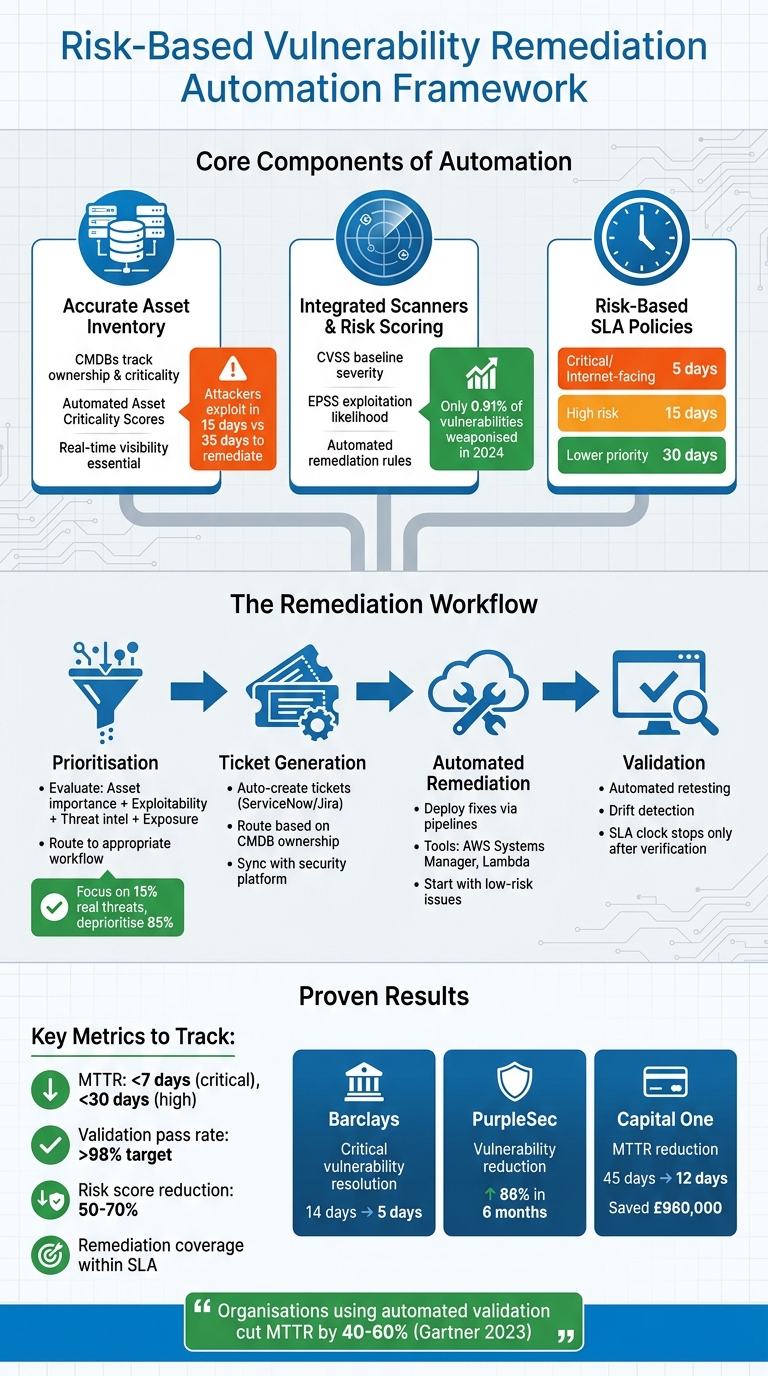 {Risk-Based Vulnerability Remediation Automation Framework}
:::
{Risk-Based Vulnerability Remediation Automation Framework}
:::
How to Automate and Streamline Vulnerability Management Processes
Need help optimizing your cloud costs?
Get expert advice on how to reduce your cloud expenses without sacrificing performance.
Core Components of Risk-Based Automation
Creating an effective automated remediation system requires three key elements working together. Without these, your automation process might struggle to distinguish genuine threats from irrelevant noise.
Building and Maintaining an Accurate Asset Inventory
Asset discovery tools and Configuration Management Databases (CMDBs) are critical for risk-based remediation. While vulnerability scans identify issues, they don’t prioritise which assets are most critical to your business. CMDBs fill this gap by providing essential information, such as asset ownership, business purpose, and maintenance responsibilities [3].
Keeping your asset inventory up to date is essential, especially since attackers exploit vulnerabilities within just 15 days, while remediation often takes 35 days [4]. This tight timeline makes real-time visibility a necessity. Nestlé addressed this by using the Brinqa platform to coordinate risk-based remediation across over 2,000 business units. By consolidating findings and automating ticket routing, they enhanced global risk visibility and sped up the resolution of critical vulnerabilities [2][4].
The secret lies in automating asset criticality calculations. By integrating your asset inventory with risk scoring models, you can automatically calculate Asset Criticality Scores. This ensures that high-value assets - like customer-facing production servers - are prioritised over less critical environments, such as internal test servers [3]. An accurate inventory is the cornerstone for applying precise risk scoring to your automation efforts.
Integrating Vulnerability Scanners and Risk Scoring Models
Once you’ve established asset context, the next step is to integrate vulnerability scanners with risk scoring models. Tools like Nessus or Qualys can detect thousands of vulnerabilities, but not all of them pose a serious threat. Combining multiple scoring models helps sift through the noise to identify real risks. CVSS provides baseline severity ratings, while EPSS (Exploit Prediction Scoring System) predicts the likelihood of exploitation.
The real advantage comes from automating remediation rules. For example, you could set up rules that enforce a 5-day SLA for exploitable vulnerabilities on production assets [5]. This policy-driven approach ensures consistent, real-time enforcement across your infrastructure. Research shows that only 0.91% of vulnerabilities were weaponised (with known exploits or active malware use) in early 2024 [6], meaning many organisations waste resources addressing threats that are unlikely to materialise.
Defining Risk Levels and SLA Policies
Risk-based SLAs prioritise threats based on context, not just static severity scores. For instance, a critical vulnerability on an internet-facing production server might require a 5-day resolution, while the same issue on an internal test machine could allow for 30 days [5].
Start with three SLA tiers - 5, 15, and 30 days - aligned with risk levels [5]. Your criteria should include factors like asset criticality (business importance), threat intelligence (active exploitation), exploitability (EPSS), and exposure (internet-facing or internal) [6][5][1]. Automate these rules to ensure consistent enforcement, and include exception workflows with expiration dates and justifications to avoid overlooked risks [5].
Lastly, automate verification processes. The SLA clock should only stop after an automated rescan confirms the vulnerability is resolved - not just when a ticket is marked as closed [5][2]. Set up escalation paths that trigger automatic notifications to management if an SLA is within 48 hours of breaching [5]. These automated risk levels and SLAs feed directly into the broader automated remediation workflow.
Automating the Vulnerability Remediation Workflow
Streamlining remediation processes can transform outdated, reactive methods into efficient, real-time operations guided by clear policies.
Prioritisation and Workflow Automation
Effective automation begins with prioritisation. This involves evaluating factors like asset importance, exploitability scores, threat intelligence, and exposure levels. By doing so, critical findings can be routed into faster workflows. For instance, orchestration tools like Amazon EventBridge or AWS Step Functions can channel findings from sources such as AWS Security Hub directly into specific remediation playbooks.
Here’s an example: if a vulnerability is found on a critical asset with a known exploit, it could instantly trigger a high-priority workflow with a shortened SLA. On the other hand, a less impactful internal vulnerability with no known exploit might follow a standard 30-day remediation timeline [6][7]. This logic-based approach ensures that your team’s focus remains on the 15% of vulnerabilities that pose real threats, while deprioritising the 85% that are unlikely to be exploited [7].
Automated Ticket Generation and Assignment
Once prioritisation is in place, integrating ITSM systems can simplify task allocation. Tools like ServiceNow's Application Vulnerability Response module and Jira can automatically create tickets when vulnerabilities are detected. These systems maintain synchronisation with your security platform, ensuring ticket statuses are always up to date [10].
To make this process seamless, link your ticketing system to the CMDB. This allows tasks to be routed automatically based on asset ownership and business unit [10]. For example, Mustache syntax or regex-based automation rules in Jira can map attributes like asset type, location, or vulnerability name into structured fields [8]. This metadata improves filtering and reporting, ensuring tickets reach the right engineering teams without requiring manual effort.
Deploying Automated Remediation Pipelines
With prioritisation and ticketing automated, the next step is executing and validating remediation. Automated pipelines can use tools such as scanners (Amazon Inspector, Snyk), aggregators (AWS Security Hub), orchestration tools (Amazon EventBridge), and executors (AWS Systems Manager, Lambda) to apply fixes and immediately re-scan for validation [9].
Start small by addressing low-risk, frequent issues like missing resource tags or publicly accessible S3 buckets. This approach builds confidence before tackling more sensitive, mission-critical systems [4]. To maintain flexibility, include manual override options. These allow security teams to pause or adjust actions during unusual operational scenarios, ensuring control is never compromised.
Monitoring, Validation, and Reporting
Patching is just the beginning - ensuring vulnerabilities are fully resolved and detecting configuration drift requires automated validation. Effective monitoring and reporting ensure that fixes are verified, tracked, and communicated clearly to stakeholders.
Automated Retesting and Validation
Automated retesting is crucial to confirm that vulnerabilities are genuinely fixed. By integrating tools like Nessus, Qualys, or OpenVAS into CI/CD pipelines through platforms such as Jenkins or GitHub Actions, rescans can be triggered immediately after remediation. For example, after patching a CVSS 9.0 vulnerability, you can initiate a rescan within 24 hours using APIs to compare pre- and post-remediation results. This approach simplifies and speeds up the validation process [11][12].
In early 2024, Capital One implemented automated retesting with Qualys and ServiceNow, slashing Mean Time to Remediate (MTTR) from 45 days to just 12 days across over 5,000 vulnerabilities. Under the leadership of CISO Kevin McCarthy, the team’s API-driven scans post-patching achieved a 98% validation rate and saved £960,000 [13]. Similarly, in 2023, Netflix used Spinnaker pipelines for validation, reducing false closures by 70% across 10,000 weekly scans. Engineering lead Marcus Smith also integrated Chaos Monkey for resilience testing, achieving 99.9% remediation confidence [13].
To prevent vulnerabilities from reappearing, drift detection can be deployed using tools like AWS Config or Terraform Drift Detection, along with agent-based monitoring solutions such as Datadog or Splunk. Webhook integrations can notify scanners for immediate retests when configuration drift is detected. If a vulnerability resurfaces, alerts can escalate through platforms like Slack or PagerDuty, ensuring compliance with frameworks like NIST 800-53 [11].
Once fixes are validated, maintaining visibility through clear metrics and dashboards becomes essential, as outlined below.
Tracking Metrics and Reporting
Accurate reporting depends on tracking the right metrics. Key benchmarks include Mean Time to Remediate (MTTR) - aiming for under seven days for critical vulnerabilities and under 30 days for high-risk issues. Other essential metrics are remediation coverage (percentage of vulnerabilities addressed within SLA), validation pass rate (percentage of retests confirming fixes, with a target above 98%), and risk score reduction (the percentage drop in average risk scores post-remediation, typically ranging from 50% to 70%) [12].
By integrating observability platforms like Grafana or Kibana with vulnerability data from tools such as Tenable.io, organisations can create real-time dashboards. These dashboards should highlight open critical vulnerabilities, SLA compliance rates, and trends over time. Using RACI frameworks helps assign accountability. For example, a weekly dashboard might reveal a 30% drop in MTTR following automation, with asset-specific drill-downs for further insight [11][12].
Automating report generation with tools like Power BI or Tableau simplifies the process. Weekly PDF exports or dashboard summaries can highlight critical metrics such as MTTR, risk reduction, and SLA adherence. Tailor executive summaries with visuals for different stakeholders. While technical reports focus on raw data (e.g., vulnerability IDs and patch versions via JSON exports from tools like DefectDojo), executive summaries should present high-level KPIs, such as a reduction in high-risk assets from 25% to 5%, using clear visuals [11]. Reports should adhere to UK conventions, including DD/MM/YYYY date formats and 1,234.56 number formatting.
In late 2024, Salesforce leveraged Sysdig for monitoring, reducing high-risk MTTR from 21 days to four. VP Security Operations Elena Rodriguez oversaw automated reporting, which improved audit speeds by 40% and eliminated priority-one escapes [15]. According to a Gartner 2023 report, organisations using automated validation typically cut MTTR by 40–60%, with 75% achieving remediation within 30 days. Given that 68% of breaches involve vulnerabilities older than 90 days, automated retesting reduces this window by half [13][14].
Conclusion and Next Steps
Summary
The strategies we've explored highlight how automation reshapes security management. By automating risk-based vulnerability remediation, organisations can go beyond just smoother workflows to achieve a more proactive and efficient approach to tackling security threats. With accurate asset inventories, risk scoring, and automated workflows in place, businesses can significantly reduce Mean Time to Remediate (MTTR) and address critical vulnerabilities more effectively. Case studies consistently show faster remediation times and substantial cost savings annually.
Focusing on vulnerabilities that genuinely impact the business is key. Automated retesting ensures fixes remain robust, while real-time dashboards provide stakeholders with up-to-date insights. The results make it clear: automating risk-based remediation isn’t just practical - it’s transformative.
How Hokstad Consulting Can Help
To harness these benefits, expert guidance is often essential. Automated, risk-based vulnerability remediation requires deep knowledge of DevOps processes, cloud optimisation, and tailored automation solutions. Hokstad Consulting brings this expertise to the table, offering services like building automated CI/CD pipelines, integrating security tools, and crafting custom workflows to align with your risk and compliance requirements.
Whether you're aiming to cut cloud costs by 30–50%, execute seamless zero-downtime migrations, or develop automation for quicker deployment cycles, Hokstad Consulting provides flexible options. They offer both project-based consulting and ongoing retainer support. Their No Savings, No Fee
model for cost optimisation ensures you only pay for measurable results. Visit hokstadconsulting.com to explore how automated vulnerability remediation can fortify your security measures while reducing operational complexity.
FAQs
How do I calculate risk beyond CVSS?
To assess risk more effectively than relying solely on CVSS scores, it's crucial to include context-aware factors such as the importance of assets, the likelihood of exploitation, and the potential business impact. This means going beyond severity scores to evaluate vulnerabilities based on how exploitable they are in practical terms and within the specific environment they exist.
Using risk-based frameworks that factor in business context, asset value, and threat intelligence offers a clearer understanding of the real risks. This approach allows for prioritisation that aligns more closely with the actual threat landscape.
What’s the minimum setup to automate remediation?
The minimum setup requires continuous scanning, risk-based prioritisation, and automated fixes to maintain security effectively. Here's how to get started:
- Real-time monitoring: Implement tools that can instantly detect vulnerabilities whenever changes occur.
- Prioritisation: Focus on vulnerabilities based on their severity, the importance of affected assets, and the likelihood of exploitation.
- Automation: Streamline remediation tasks like patching or updating configurations to save time and reduce errors.
- Verification and metrics: Re-scan systems to confirm issues are resolved and monitor key metrics, such as Mean Time to Remediate (MTTR), to improve your approach over time.
By following these steps, you can create a dynamic and responsive security framework.
How do I prove a fix is really resolved?
To ensure a vulnerability fix has been successfully implemented, conduct a re-scan of the affected assets after applying the fix. Check that the vulnerability no longer appears in the scan results. It's also important to track metrics such as Mean Time to Remediate (MTTR) and review relevant dashboards to confirm the issue has been fully resolved. This approach offers clear proof that the specific vulnerability has been eliminated from the environment.