
Using an artefact repository can speed up deployments, improve reliability, and reduce costs. It acts as a central hub for storing, versioning, and distributing software artefacts like packages, binaries, containers, and AI/ML models. For UK organisations, this approach aligns with regulatory requirements (e.g., GDPR) while lowering risks tied to external disruptions.
Key takeaways include:
- Centralised storage ensures consistency and traceability.
- Automation speeds up processes and reduces errors.
- Security measures like MFA, RBAC, and vulnerability scans protect sensitive data.
- Versioning and retention policies prevent clutter and ensure reproducibility.
- CI/CD integration simplifies build, test, and deployment workflows.
- Cost control strategies, like lifecycle policies and storage tiering, help manage expenses.
::: @figure 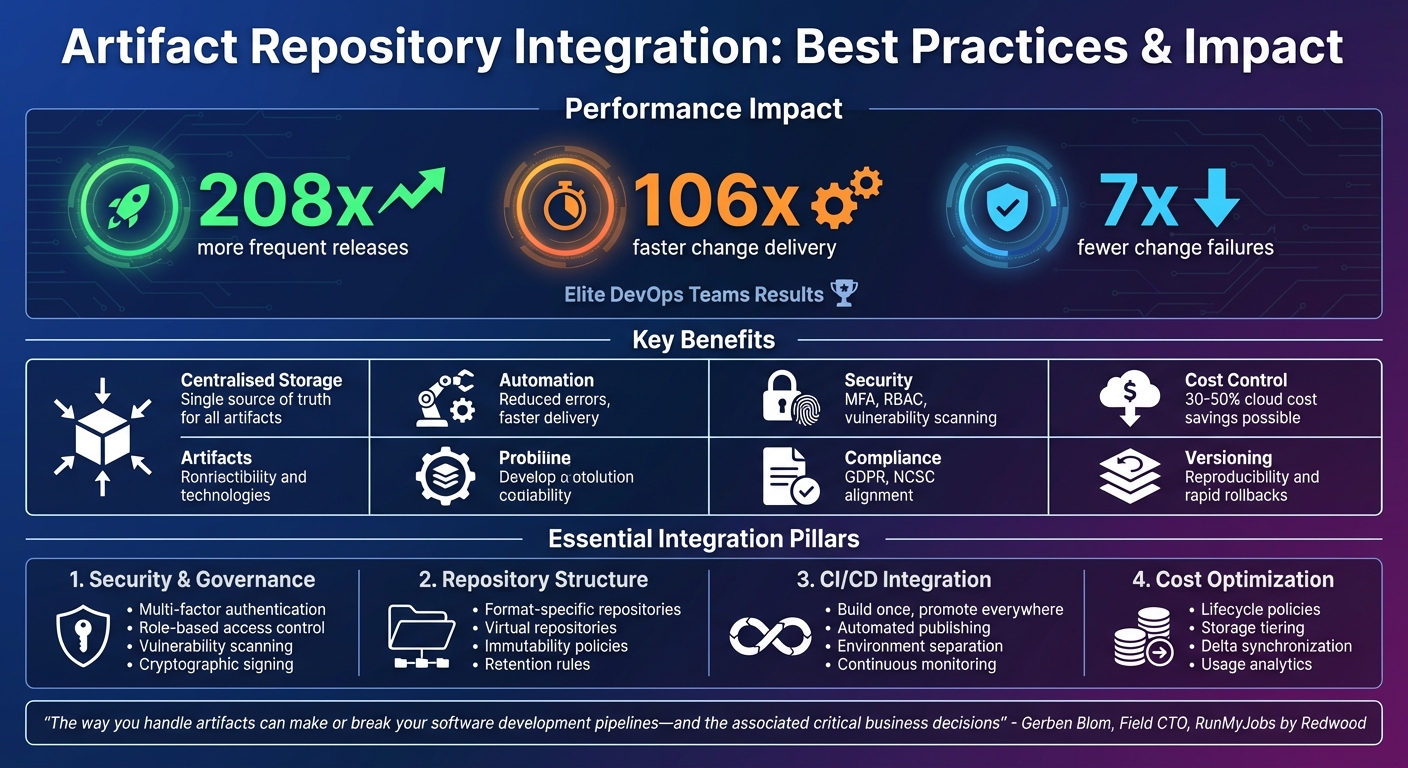 {Artifact Repository Integration Benefits and Best Practices Overview}
:::
{Artifact Repository Integration Benefits and Best Practices Overview}
:::
Core Integration Principles
Centralised Storage and Automation
Creating a central repository for all software artefacts - such as packages, binaries, libraries, configuration files, dependencies, and AI/ML models - streamlines access and eliminates unnecessary duplication. This shared repository serves as a single source of truth, making it easier for development and operations teams to collaborate. By automating processes across build, test, and deployment stages, you can minimise errors and speed up delivery.
Go further with automation by incorporating versioning to differentiate releases and facilitate rapid rollbacks. Set up retention policies to automatically remove obsolete package versions, keeping storage costs under control while ensuring only relevant artefacts are retained. For instance, you can configure your feed to publish newly created packages directly to the @local view, ensuring the latest versions are always accessible. Standardising naming conventions for artefacts is equally important - this allows for quick identification of versions and dependencies, and these conventions should be enforced during build phases through automation.
Finally, prioritise implementing strong security and compliance measures to protect and manage these artefacts effectively.
Security and Compliance Requirements
To safeguard critical packages, require multi-factor authentication (MFA) for all maintainers. Use methods like TOTP or WebAuthn to enhance security. For third-party clients, adopt Workload Identity Federation to assign roles via OIDC token exchange, which eliminates the need for long-lived service account keys.
Role-based access control (RBAC) is essential for managing permissions and restricting package publishing. Always follow the principle of least privilege, assigning roles at the project or repository level based on specific needs. Compliance with regulations such as GDPR and the NCSC Cloud Security Principles should remain a priority. Integrate automated vulnerability scanning and malware detection into your pipeline to catch security issues early. To further protect your artefacts, cryptographically sign them after every build and before they are published to production, ensuring their integrity and authenticity.
Selecting Repository Formats
Choosing the right repository format is crucial for smooth CI/CD integration. The repository must support the specific artefact types your development ecosystem relies on - whether that’s containers, language packages like Maven or npm, or OS packages such as Apt or Yum. It should also integrate seamlessly with your existing CI/CD tools, such as Jenkins, GitHub Actions, or Kubernetes.
Set up separate repositories for each technology (e.g., NuGet, Maven, npm, PyPI, Docker) and create virtual repositories for each packaging format or team. Virtual repositories provide a single access point, simplifying client configuration and improving resolution times. When configuring remote repositories, it’s important to explicitly define the artefact format and repository location - whether regional or multi-regional - since these settings cannot be changed later. Additionally, use priority settings in virtual repositories to control upstream source selection, reducing the risk of security threats like dependency confusion attacks.
Artifact Management With JFrog Artifactory

Repository Structure and Lifecycle Management
For organisations aiming to streamline their DevOps workflows, keeping an organised artefact repository is crucial.
Layout and Naming Conventions
A well-structured repository layout and consistent naming system make artefact management much smoother. Start by creating separate repositories for each packaging format, such as Maven, npm, NuGet, or PyPI. This ensures build requests are routed accurately and avoids any mix-ups. Within these repositories, set up virtual repositories for specific teams or builds. These should include only the necessary upstream repositories, which helps reduce resolution times and simplifies client configurations [5][4].
When it comes to naming, include key details like the organisation name, product identifier, environment, and version. This makes it easier for both automated systems and users to find artefacts quickly [14]. Additionally, prioritise internal or trusted repositories over public remote proxies in your virtual repositories. This approach minimises the risk of dependency confusion attacks [4].
Versioning and Immutability
Ensuring artefacts are immutable after they’re published is vital for reproducibility and debugging. Once an artefact is uploaded, it should remain unchanged - this guarantees that the same version will always produce identical results in deployments [12][6][13]. Use secure hashes to identify artefacts and verify their integrity, and enforce immutability policies to prevent any post-upload modifications [6].
Adopt semantic versioning where applicable, and maintain consistent tagging across all artefacts. A strong dependency management strategy should account for both direct and transitive dependencies, with regular scans for vulnerabilities and updates as required [12]. This not only supports quick rollbacks but also makes it easier to trace issues back to specific builds.
Retention Policies and Cleanup
Without proper cleanup practices, storage costs can quickly spiral out of control. Define clear policies to automatically remove outdated artefacts while keeping those that are still relevant [3]. For example, you can:
- Set up conditional delete rules to remove artefacts based on specific criteria.
- Use conditional keep rules to preserve important artefacts.
- Retain a fixed number of recent releases for each package [3].
Always test these cleanup configurations in a staging environment to avoid accidental deletions [3]. Regular maintenance ensures your repository stays efficient and free of clutter, preventing old and unnecessary packages from piling up.
Security and Governance Integration
Protecting your artefact repository is essential for safeguarding your supply chain, securing sensitive code, and meeting compliance standards. A well-structured repository, paired with a solid security and governance framework, helps maintain integrity while supporting earlier integration strategies. This ensures strong control throughout the artefact lifecycle.
Access Control and Authentication
To manage access effectively, integrate your artefact repository with corporate identity systems. This allows for consistent DevOps access management. Use Identity and Access Management (IAM) permissions and roles to determine who can create, view, edit, or delete data within the repository [11]. Instead of assigning permissions directly, assign roles to principals - such as users, service accounts, or groups - that bundle relevant permissions together [11].
Make use of predefined roles like Artefact Registry Reader, Writer, and Repository Administrator. Avoid overly permissive IAM roles in production environments to minimise the risk of unauthorised access. This least-privilege approach ensures better security while maintaining operational efficiency [11][10].
Vulnerability Scanning and Build Provenance
Access controls form the foundation, but continuous scanning and build provenance take security a step further. Regular vulnerability scans help identify risks before they reach production. As part of your CI/CD pipelines, generate Software Bill of Materials (SBOMs) for every build [15][16][17]. These SBOMs can then be analysed using platforms like OWASP Dependency-Track, which cross-references components against multiple vulnerability intelligence sources [15][16].
Build provenance adds another layer of security by creating a verifiable record of where and how software was built. This is achieved through artefact attestations, which enhance supply chain security [18][7]. For instance, GitHub Enterprise Cloud provides artefact attestations that help organisations meet SLSA v1.0 Build Level 3 by detailing the entire build process [18]. Storing metadata - such as SBOMs, scan results, and build provenance - alongside your artefacts ensures a complete audit trail [7].
Encryption and Audit Logging
To protect sensitive artefacts, encrypt repository content both in transit and at rest [19]. Organisations with stringent security requirements can use customer-managed encryption keys (CMEK) via services like Cloud Key Management Service for added control [3]. For a robust baseline, Google-managed encryption keys are also available [3].
Audit logs play a critical role in tracking repository actions performed by users or systems [9][19]. In February 2024, the OpenSSF Securing Software Repositories Working Group highlighted the importance of publishing event transparency logs to detect unusual behaviours - replicate.npmjs.com being a prime example [10]. These logs should comply with regulatory frameworks such as UK GDPR, DPA 2018, Caldicott Principles, DSPT, DTAC, DCB0129, and DCB0160 [19]. Regular security reviews of your repository infrastructure are essential to maintain compliance and uncover vulnerabilities before they escalate into major issues [10].
Need help optimizing your cloud costs?
Get expert advice on how to reduce your cloud expenses without sacrificing performance.
CI/CD Pipeline Integration
After establishing secure repository practices, the next step is to integrate these processes into your CI/CD pipeline. By connecting your artefact repository to the pipeline, you can simplify the build, test, and deployment stages. This approach eliminates manual intervention and avoids unnecessary rebuilds, making your development workflow more efficient.
Build and Test Stage Management
During the build and test phases, ensure artefacts are published to the repository only after successful compilation. Configure your CI tools to authenticate using service accounts with the least-privilege IAM roles (e.g., Artefact Registry Writer). To enhance reliability, cache dependencies locally. This protects builds from potential upstream outages and ensures tests use precise version references, which is key for reproducibility. These steps help create artefacts that are dependable for subsequent stages, including promotion and deployment.
Promotion and Deployment Workflows
Adopt a build once, promote everywhere
approach. This means the same artefact should be promoted through all environments without being rebuilt. Rebuilding artefacts at different stages can introduce subtle inconsistencies, leading to production failures or untested code slipping through [20]. To maintain separation of concerns, use external ConfigMaps or environment variables for environment-specific configurations, keeping them distinct from the core artefacts [20].
Virtual repositories can simplify access to artefacts across various environments. These repositories prioritise internal sources, reducing the risk of dependency confusion attacks [4][21]. For deployment, techniques like rolling updates or blue-green deployments can help you manage changes with minimal downtime [20]. Maintain separate environments for development, pre-production, and production, and ensure the pre-production environment mirrors production as closely as possible. This setup allows you to identify and address issues before they reach end-users [20].
Monitoring and Observability
Once artefacts are promoted across environments, it’s crucial to continuously monitor both the repository and pipeline performance. Track key metrics such as publish/download latency, API request rates, response times, storage usage, and network latency to detect and address bottlenecks [22][23]. Tools like Prometheus can collect these metrics, while Grafana can visualise them. Additionally, set up alerting rules to notify you of high error rates or resource exhaustion [22][23].
Automate vulnerability scanning to maintain security standards. As Kostis Kapelonis from Octopus Deploy explains:
Configure Artifactory's vulnerability scanning to auto-fail builds or flag artefacts that exceed a set threshold of vulnerabilities. This automated alerting can be configured to send notifications or open issues in tracking systems, maintaining security without manual intervention[23].
For tailored advice on refining your CI/CD pipeline and enhancing your DevOps processes, Hokstad Consulting offers specialised expertise to align with your business goals.
Performance, Scalability, and Cost Control
After establishing secure integration and reliable CI/CD processes, the next step is ensuring effective performance and cost management for your artefact repository. It’s all about finding the right balance between performance, scalability, and cost-efficiency by making smart choices about storage, network usage, and resilience planning.
Performance and Scalability Optimisation
To manage large-scale workloads, consider strategies like regional mirrors and edge caching to speed up artefact retrieval for distributed teams [24]. For larger artefacts, such as container images, enabling parallel downloads can significantly cut down transfer times [14].
High availability is key. Deploy highly available clusters to handle increased demand without compromising performance. Tools like JFrog Artifactory’s Federation and Replication features can enhance build speed and resilience by enabling multisite replication [24]. However, while optimising for performance, it’s equally important to keep an eye on costs.
Storage and Data Transfer Costs
Storage and data transfer costs are often the largest expense in maintaining an artefact repository. These costs are driven by factors like storage volume, network transfers, and operational overhead [14]. To keep them under control:
- Use lifecycle management policies to automatically delete outdated artefacts based on age or usage patterns [14].
- Implement storage tiering: store older or less frequently accessed artefacts on lower-cost tiers while keeping recent builds on high-performance storage [14].
- Compress large artefacts and use delta synchronisation to minimise transfer times and costs [14].
- Define include/exclude patterns for remote repositories to cut down on unnecessary network traffic [5].
Stefan Kraus, a Software Engineer at Workiva, highlighted the operational advantages of optimised repository management:
Since moving to Artifactory, our team has been able to cut down our maintenance burden significantly…we're able to move on and be a more in depth DevOps organisation[2].
To maintain cost visibility, align storage and transfer expenses with GBP budgets and leverage usage analytics to identify areas for improvement and guide capacity planning [14].
Resilience and Disaster Recovery
For resilience, multisite replication ensures artefacts are locally available across different regions, protecting against single-region failures [24]. Google Artifact Registry, for example, supports regional and multi-regional deployments to enhance availability [3].
Using immutable manifest digests instead of mutable tags ensures that deployments always retrieve the exact, tested version - critical for consistent results and disaster recovery [8]. Virtual repositories can also simplify configurations by acting as a single access point to multiple upstream repositories, while enabling priority-based artefact resolution [4].
Set clear Recovery Point Objective (RPO) and Recovery Time Objective (RTO) targets, then design backup and failover strategies to meet those goals. Adopting GitOps practices can further streamline disaster recovery by managing repository configurations declaratively in version-controlled repositories, making recovery through snapshots more straightforward [20].
If you’re looking for tailored advice on how to optimise your artefact repository while keeping costs in check, Hokstad Consulting offers expertise in cloud cost engineering and DevOps transformation to align with your organisation’s needs.
Conclusion and Key Takeaways
Incorporating artefact repositories into your DevOps pipeline can turn it into a powerful tool for efficiency and growth. By following best practices - like centralised storage, automation, strong security measures, and optimised cost management - you can speed up releases, lower security risks, and take greater control over cloud expenses.
The numbers speak for themselves: elite DevOps teams release software 208 times more frequently, deliver changes 106 times faster, and experience seven times fewer change failures[25]. A key factor in achieving these results is effective artefact management, seamlessly woven into development workflows. These statistics highlight just how crucial integrated artefact management is for driving DevOps success.
By adopting a well-rounded approach that includes centralised storage, enhanced security, and cost-conscious strategies, you can strengthen every aspect of your pipeline. This integration not only boosts deployment speed and security but also helps cut down on cloud waste and inefficiencies, keeping costs under control.
As Gerben Blom, Field CTO for RunMyJobs by Redwood, aptly puts it:
The way you handle artefacts can make or break your software development pipelines - and the associated critical business decisions[1].
If you're looking to optimise your artefact repository and manage cloud costs more effectively, Hokstad Consulting offers specialised services in DevOps transformation and cloud cost engineering. Their strategic expertise can help businesses save 30–50% on cloud expenses through automated CI/CD pipelines, thoughtful planning, and continuous infrastructure improvements.
FAQs
How does using centralised storage benefit software development?
Centralised storage acts as a single source of truth for binaries, Docker images, and other artefacts. This ensures consistency across teams and projects, making it easier to manage version control, perform quick rollbacks, and minimise duplication - saving both time and storage space.
It also simplifies CI/CD pipelines, speeding up development cycles and improving efficiency. By making artefacts easily accessible to all team members, centralised storage enhances collaboration, promotes smoother workflows, and helps reduce the likelihood of errors.
What are the key security practices for safeguarding artefact repositories?
To safeguard your artefact repositories, start with robust identity and access management. Ensure all users and automation agents use multi-factor authentication, and stick to the principle of least privilege - grant only the permissions absolutely necessary for each role. Regularly review and audit access policies, paying extra attention to privileged accounts. Encryption is crucial too - make sure data is encrypted both in transit (using TLS) and at rest to block unauthorised access or tampering.
To maintain the integrity and authenticity of your artefacts, require cryptographic signing and enable automated signature verification whenever artefacts are retrieved. Build continuous scanning into your CI/CD pipeline to catch vulnerabilities, malicious code, or supply chain threats before they become an issue. Lastly, set up detailed audit logs and real-time alerts to track repository activity and act swiftly if any unusual behaviour is detected.
What are the best ways to manage storage costs in an artefact repository?
Managing storage costs in an artefact repository doesn't have to be a headache. Start by setting up automated cleanup policies to routinely delete outdated or unused artefacts. This keeps your storage lean and focused on what's truly needed. You can also use include/exclude rules to ensure only essential files are retained, cutting down on unnecessary data clutter.
Another smart move is leveraging remote repositories. These can cache packages as needed, so you’re not stuck permanently storing everything. Lastly, consolidating your artefacts into virtual repositories is a great way to reduce duplication. This approach streamlines your storage setup and helps keep costs in check.