
Check an AI partner’s support record before signing - not just its launch promises. Speak to at least two clients with systems live for six months or more, then check their accounts against redacted tickets, monitoring records and invoices from the past 6–12 months.
The review should establish:
- Support terms and costs: named owners, UK cover hours, separate response and resolution targets, and extra charges in £.
- Incident handling: how failures were contained, service restored and repeat faults prevented.
- Update controls: testing, approval, version records and rollback arrangements.
- Team independence: whether internal developers can deploy changes and recover service using the supplied documentation and access.
- Exit terms: rights to code and other materials, handover support, data return and deletion.
Mark findings as verified, partially verified, unverified or contradicted. Put unresolved gaps, deadlines and acceptance tests into the contract. Strong results elsewhere should not cancel out a critical gap in recovery, update control or independent handover.
::: @figure 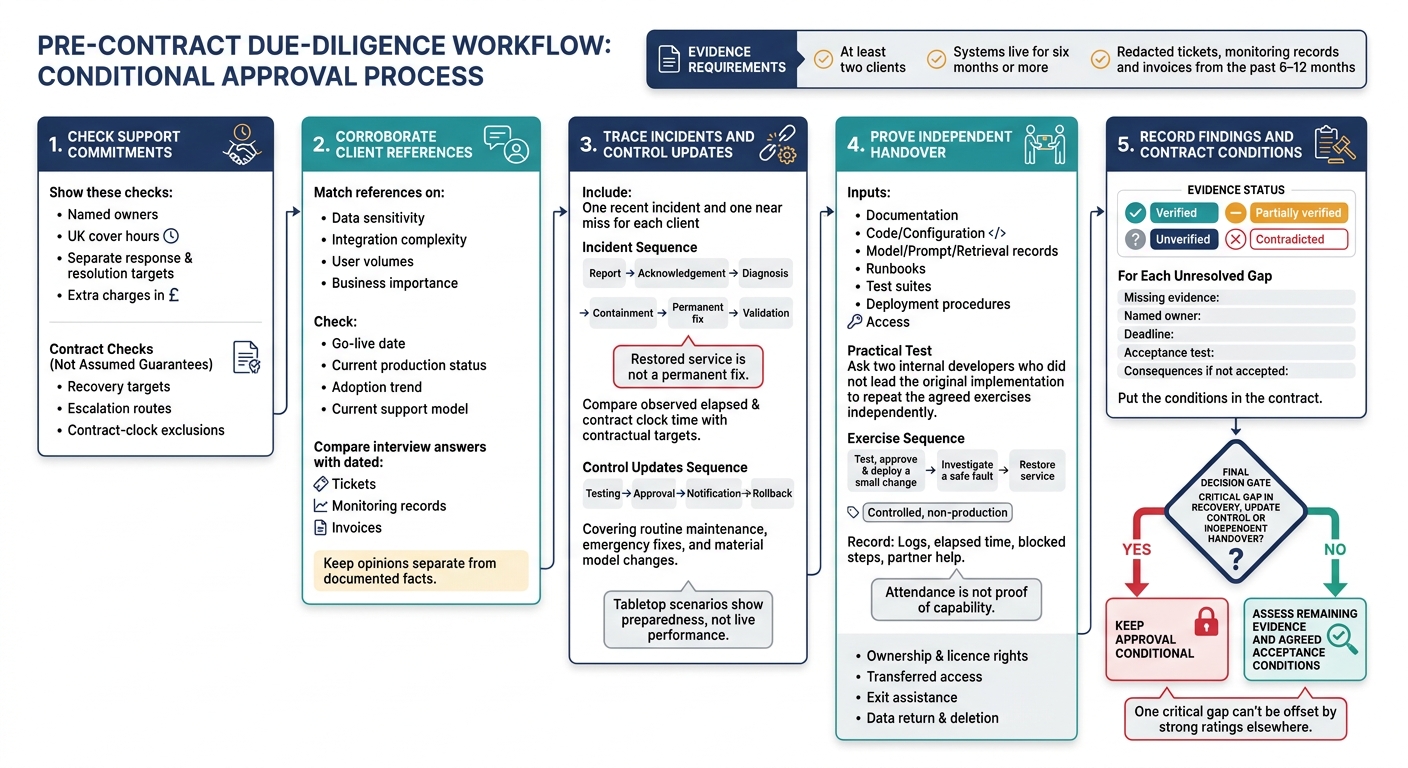 {How to Verify an AI Partner’s Post-Launch Support}
:::
Evaluating AI Vendors: The Red Flags, Questions, and Evidence You Need
2. Choose Client References and Plan Interviews
Use the written support commitments from Section 1 to check how the partner performs in live use.
Choose Clients with Similar Live Systems
Request at least two references whose systems have been live for six months or more. Match them on data sensitivity, integration complexity, user volumes and business importance - not brand recognition. Check each system’s go-live date, current production status, adoption trend and current support model. Confirm that the same team supports the live system.
Ask the partner to arrange permission for a direct conversation. Send an interview note explaining the purpose, duration, topics, recording plans, storage and access. Offer an unrecorded interview, and request only redacted or aggregate records. Get permission before recording or attributing quotations.
Use these conversations to check whether the promised support model works in production.
Ask About Support Requests, Failures and Changes
Follow the same sequence in every interview. Start with the most recent routine request and urgent incident. Record when each was reported, who responded, what they did and how long recovery took. Cover degraded outputs, integration failures and changing requirements.
Treat acknowledgement, restored service and permanent resolution as separate milestones. Ask whether the client had to chase updates, whether the first fix worked and whether the fault returned. Request the relevant ticket and root-cause report.
For the latest model or prompt change, ask what changed, how it was tested, who approved it and whether rollback was available. Check whether the documentation was updated too. Find out when internal developers last resolved an issue without help and which instructions they followed.
Finish by asking whether the client would choose the partner again for support, why, and what they would change in the support terms. Use the scorecard to compare each answer with dated evidence.
Record Interview Answers in a Scorecard
Create one scorecard per reference using the rows below. Record the speaker’s role and mark claims as verified, partially verified, unverified or contradicted. Keep opinions separate from documented facts.
Check conflicting dates or accounts with both parties rather than hiding them in an average score. Give every outstanding check an owner and a deadline.
| Assessment area | Reference identifier | Answer | Dated evidence | Approved quotation | Verification status | Follow-up action |
|---|---|---|---|---|---|---|
| Production status | Client code | Go-live date; live now? | Production or service report | Permission and approved wording | Record status | Verify current operation |
| Live usage | Client code | Usage, trend and workarounds | Dated usage report | Permission and approved wording | Record status | Explain declining use |
| Response quality | Client code | Urgent and routine request handling | Ticket timestamps | Permission and approved wording | Record status | Check unexplained delays |
| Technical skill | Client code | Diagnosis and lasting fix | Root-cause report; change record | Permission and approved wording | Record status | Investigate repeat faults |
| Transparency | Client code | Disclosure of impact and limitations | Incident communications | Permission and approved wording | Record status | Resolve conflicting accounts |
| Handover | Client code | Tasks developers perform unaided | Runbook; internal recovery record | Permission and approved wording | Record status | Verify independent operation |
3. Check Incident Response and Model Updates
Build a Recent Incident Timeline
Use the references gathered in Section 2 to trace one recent incident and one near miss for each client, from report to closure. Track acknowledgement, diagnosis, containment, restoration, permanent fix, validation and closure.
Assess post-launch support using live incident records. Record dates and times, noting whether timestamps use UTC or UK local time. Where records exist, cover outages, unsafe outputs, failed integrations, data-quality changes and performance degradation. Label tabletop scenarios separately: they show preparedness, not live performance.
Review the post-incident report for impact, root cause, contributing factors, missed alerts and corrective actions. Each action should have an owner and deadline. Check whether completed actions led to regression tests or monitoring rules. Repeated faults with the same cause should lower the score, even if every ticket was closed promptly.[4]
Compare Response and Resolution Times with Targets
Complete the table using anonymised records, rather than recollection alone. Compare observed times with the contractual targets set in Section 1. Record both total elapsed time and contract clock time, identifying exclusions for evenings, weekends, bank holidays, third-party dependencies and time awaiting client action.
Restored service is not a permanent fix. A fallback can make the system usable while the underlying fault remains.
| Incident type | Milestone | Target | Observed elapsed / contract clock time | Impact | Evidence | Verification status |
|---|---|---|---|---|---|---|
| Availability outage | Acknowledgement | Contract target | Time to acknowledgement | Users affected; downtime | Ticket; monitoring logs | Pending evidence |
| Unsafe or incorrect output | Containment | Contract target | Time to containment | Exposure; manual review needed | Incident report; disablement log | Pending evidence |
| Integration failure | Service restoration | Contract target | Time to restoration | Queued or failed transactions | Integration logs; recovery record | Pending evidence |
| Performance degradation | Permanent fix | Contract target | Time to permanent fix | Delays; staff rework | Change record; validation results | Pending evidence |
Check whether later releases were tested, approved and rolled back in line with the written support terms.
Check Update Testing, Approval and Rollback
Compare the latest completed release in each category below. Link version IDs to tests, approvals and release notes. Check who can reject or defer deployment, and whether release notes and notices reached the agreed recipients.
| Change type | Testing | Approval | Notification | Rollback | Evidence |
|---|---|---|---|---|---|
| Routine maintenance | Regression, security and integration checks | Named technical authority | Maintenance window | Previous package or configuration | Test results; approval; release note |
| Emergency fix | Focused safety, security and smoke tests | Emergency authority; retrospective review | Immediate incident update | Tested bypass or last known-good release | Emergency record; logs; review |
| Material model change | Quality, safety, robustness, latency and cost against baseline | Business, risk and technical owners | Advance impact and migration notice | Previous version where available; fallback or disablement | Evaluation report; version record; monitoring results |
Ask for the last rollback record. Check its duration, data-loss risk and whether it restored compatible prompts, retrieval indexes, configuration and schemas - not just application code.
Review upstream notice periods, the version retirement policy and approval limits. Record unavailable controls as residual risks. Require post-release monitoring with named owners and rollback triggers. Use the NIST AI RMF and its Generative AI Profile as voluntary references for monitoring, recovery and change control.[1][6]
4. Test Documentation and Developer Handover
After testing incident response and rollback, check whether internal teams can use the handover materials to run, recover and change the system without the partner’s help.
Review Handover Materials
Ask reference clients to show what their developers can do with the handover pack - not how many documents it contains. Check that versioned, searchable records cover purpose, permitted and prohibited uses, assumptions, limits, validation results, versions, datasets, metrics, thresholds and trade-offs. Compare the documented accuracy, latency, cost and failure rates with the last three months of monitoring and evaluation records.[3][8]
Use the table below to record a named owner, evidence-backed status and remaining dependency for each item. Start every status as Unverified and update it as you check the evidence. Accept an artefact only when it passes its test; written confirmation alone does not establish acceptance.
| Artefact | Owner | Current status | Acceptance test | Remaining dependency |
|---|---|---|---|---|
| Architecture and data flows | Technical lead | Unverified | Trace a request through retrieval, model invocation, logging and downstream action; explain limits and failure points | Undocumented processing or failure points |
| Source code, configuration and infrastructure definitions | Engineering lead | Unverified | Build a working test environment from the supplied files | Supplier-only scripts or accounts |
| Model, prompt, retrieval and evaluation records | AI lead | Unverified | Reproduce a recorded evaluation using the documented versions and dataset | Missing versions or restricted datasets |
| APIs and third-party dependencies | Integration owner | Unverified | Locate interface specifications, versions and failure-handling instructions | Inaccessible subscriptions or connectors |
| Monitoring and incident runbooks | Service owner | Unverified | Diagnose a controlled fault and restore service from the runbook | Supplier-only dashboards or tacit know-how |
| Security, access and retention controls | Security lead | Unverified | Verify permissions, credential rotation and retention settings | Shared credentials or inaccessible controls |
| Test suites | Test lead | Unverified | Run documented tests and interpret failures | Missing fixtures or test data |
| Deployment and rollback procedures | Release owner | Unverified | Deploy and reverse a change in a test environment using only transferred materials | Missing packages or permissions |
| Ownership and licence rights | Commercial owner | Unverified | Obtain written confirmation of rights to use, modify and maintain transferred materials | Restricted components or unclear rights |
| Unresolved issues | Service owner | Unverified | Check each issue has impact, severity, owner, workaround and target resolution date | Untreated risks or overdue actions |
Next, test whether internal staff can use those materials without help.
Test Internal Ownership and Exit Support
Ask whether the client’s developers can deploy a change, investigate an incident and restore service using only the handover materials. Request dated agendas or notes, attendance lists, exercises, training materials, open questions and acceptance sign-off. Attendance is not proof of capability. Ask two internal developers who did not lead the original implementation to repeat the agreed exercises independently.[5]
Run the exercises in a controlled, non-production environment. Put a small change through testing, approval and deployment, then introduce a safe fault for investigation and recovery.
Examples include updating a prompt or API configuration.
Record pull requests, test output, logs, elapsed time, blocked steps and any partner help. Compare detection, diagnosis and recovery times with the contractual target.[1]
Check that the organisation - not just the supplier - has administrator or suitably privileged access to the repository, deployment environment, accounts, monitoring tools, data stores and support portal. Test access in a controlled environment using named internal users, least-privilege roles and multi-factor authentication.
Confirm in writing who owns the bespoke code, prompts, datasets, documentation, infrastructure, test suites, dashboards and configuration. Check the relevant licences and use rights, including any restrictions that prevent independent operation after exit. Ask whether the client receives repository history, build scripts and the right to appoint another support provider.
Set out the delivered materials, access-transfer deadlines, knowledge-transfer sessions, transition response times, maximum assisted-support period and extra-work rates. Also specify data return and deletion, cooperation with a replacement supplier and final acceptance tests.[2][7]
Include a controlled exit rehearsal: the internal team or replacement provider must deploy a change, investigate a simulated incident and restore service using the transferred materials. Assign every remaining dependency an owner, workaround and target resolution date. Mark claims as verified, partially verified or unverified, and accept them only when the evidence supports doing so.
5. Conclusion: Record Findings and Contract Conditions
Rate Each Area by Verification Status
Turn the evidence from Sections 1–4 into a final contract decision. Mark each area verified, partially verified or unverified. These ratings cover only the records examined - not future performance. For every finding, record the source, date and any limits.
Base ratings on interview notes, tickets, incident logs and handover tests. Supplier claims alone aren't enough.
| Assessment area | Status | Evidence note to complete | Specific pre-contract action |
|---|---|---|---|
| Support commitments | Unverified | Signed service levels, escalation routes, support hours and exclusions | Add response, restoration and resolution targets. |
| Response performance | Unverified | Client ticket logs showing acknowledgement and action times | Review anonymised tickets from the past 6–12 months and compare times with targets. |
| Update control | Unverified | Change records, test results, approvals and rollback plans | Require material updates to be tested, approved and reversible. |
| Fault resolution | Unverified | Incident timeline, root-cause analysis and corrective actions | Specify severity-based recovery and reporting obligations. |
| Documentation | Unverified | Current architecture, runbooks, model information and data-flow records | Set contractual documentation acceptance criteria. |
| Handover independence | Unverified | Internal team completing routine tasks without supplier intervention | Make independent handover testing an acceptance condition. |
| Reference reliability | Unverified | Comparable production clients and corroborated answers | Check references from comparable production clients and corroborate their answers. |
One critical gap can't be offset by strong ratings elsewhere. If recovery targets, update controls or the internal team's ability to work without supplier help remain unsupported, keep approval conditional.
Agree Acceptance Conditions Before Signing
Use unresolved items from the scorecard and evidence review to set the conditions for signing. For each gap, record the missing evidence, a named owner, a deadline and what happens if the item isn't accepted. Attach this action register to the decision record.
State which gaps block signature and which need an explicit stage gate, a deadline for fixes or a withheld payment milestone. Put support targets, records access, update approval, documentation acceptance and exit assistance in the contract, not just in meeting notes.
Apply the same checks to every shortlisted provider, including Hokstad Consulting for AI strategy, implementation or custom agent work. This article does not verify its support record. Base approval on documented commitments, tested handover and production-client evidence, rather than broad support promises.
FAQs
What if client support records are confidential?
Redact personal or sensitive information before review, replacing it with consistent placeholders or hashes. Use correlation IDs to trace workflows, triggers and outcomes without keeping sensitive inputs or payloads.
Store logs in tamper-resistant, append-only systems. Apply strict role-based access controls so only authorised evaluators can access them. Encrypt sensitive records at rest, and clearly document data retention and anonymisation policies to meet UK GDPR requirements.
How do I set realistic AI recovery targets?
Measure current handling time, error rates and rework costs. Use RTO, RPO and RTA to spot gaps and set targets based on business risk, operational requirements and representative historical data - not arbitrary thresholds.
Define clear success metrics, assign owners and review the evidence regularly. Track both infrastructure health and the effect on the full workflow. Adjust targets after model changes or serious incidents.
How often should I retest developer handover?
Retest developer handovers and related controls after material changes to models, prompts, infrastructure, embeddings, memory schemas, regulation, policy or priorities. Check handover processes before launch, then monitor performance through regular governance reviews.
After a failure or breach, retest immediately to confirm that corrective actions work before resuming standard operations. Use controlled, consistent test settings and record the results to keep evidence ready for audit.