
AI-generated code is not automatically free to use - or subject to open-source licence duties. Before release, check its source, the terms that apply and what must accompany the shipped code.
These 5 checks guide the review:
- Check source matches. Compare possible matches with the source; a match alone does not prove infringement.
- Identify licences and terms. Verify the exact code version, dependencies and conditions for the planned use.
- Confirm attribution. Use verified copyright lines and credits, not AI-written guesses.
- Preserve required notices. Check that licence text and notices reach the shipped package.
- Keep release records. Link findings, decisions and reviewer approval to the code and release.
Review tool contracts and ownership separately from third-party licences. No match does not prove originality, and approval does not settle rights questions. Unresolved source, licence or rights issues should block release until resolved or the affected code is replaced.
::: @figure 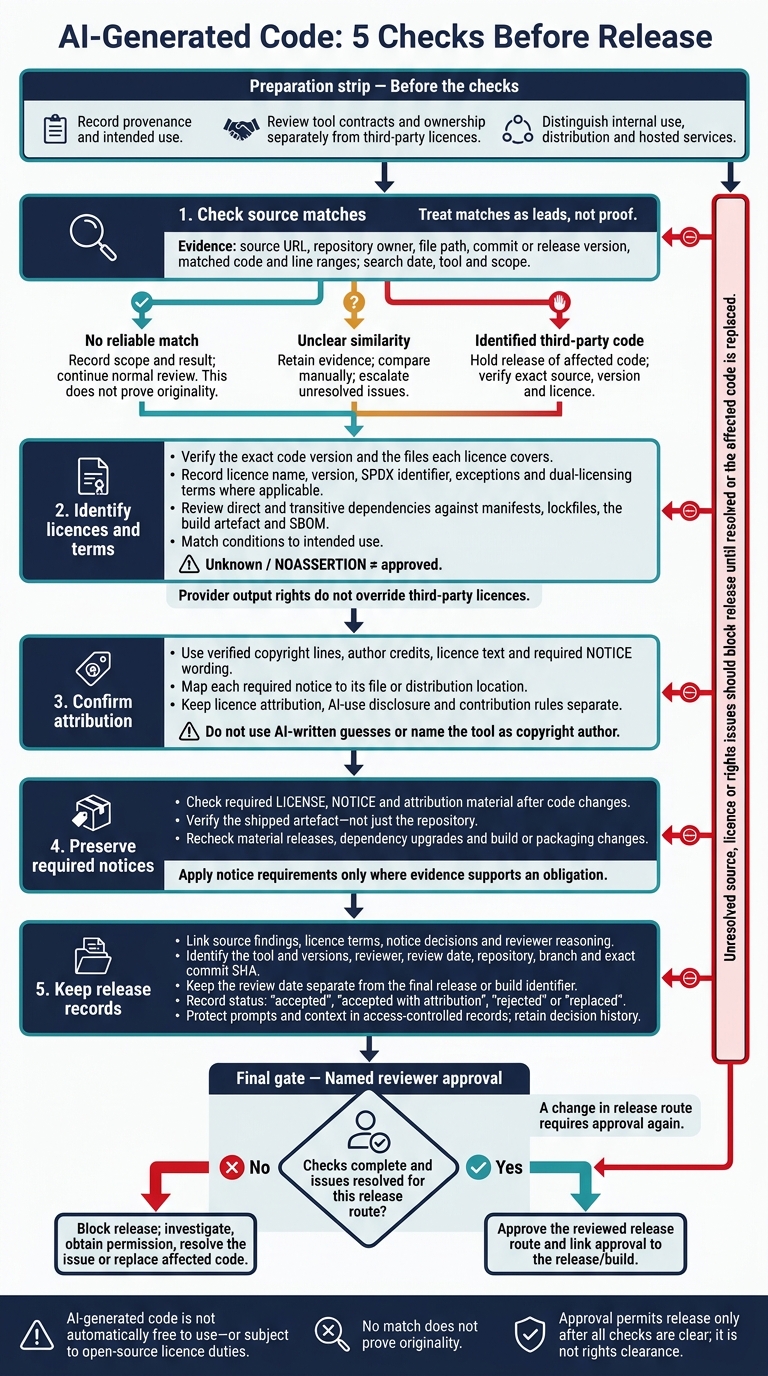 {AI-Generated Code: 5 Checks Before Release}
:::
Who Owns the Code Your AI Wrote? | AI simplified
Clarify Code Provenance, Ownership and Terms
Provenance, ownership, attribution and licence compliance need separate checks. A source match alone cannot settle all four. Make that distinction before checking source matches and licence terms.
Review tool terms separately from third-party code licences. Permission to use AI output does not necessarily cover everything within it. Check output rights, commercial use, redistribution, confidentiality and retention terms, and save the version or date reviewed. Record prompts, repository context, output and later edits.
Drawing on Linux Foundation and Apache Software Foundation guidance, compare contractual restrictions with project licensing, intellectual-property policies and the receiving repository’s contribution policy. Check both the right to submit the output and the licences covering any third-party material.
Track human edits, but don’t assume they remove upstream obligations. Record selection, arrangement, adaptation, debugging, testing, comments and substantial rewriting. Red Hat’s guidance warns against automatically adding a copyright notice to wholly AI-generated material. Assess protection and ownership under UK law, including employee and contractor arrangements.
Define the intended use before approving release. Internal use, distribution and hosted services can carry different obligations. Distribution may trigger duties to provide notices or source code; some licences also place conditions on hosted services. If rights remain unresolved, obtain permission, replace the affected code or seek UK legal advice. Next, check whether any source matches require licence review.
1. Check for Source Matches
Once provenance is recorded, check each output against known sources. Review code matches against the repositories, packages and internal codebases named by the tool. Treat matches as leads, not proof of origin, until you confirm the source and licence details. The first result may not identify the original source.[4]
For each possible match, save the source URL, repository owner, file path, commit or release version, matched source and line ranges. Record the search date, tool, search scope, similarity result and any copyright or licence details shown.
Compare the surrounding function line by line, rather than checking only the matched snippet. Look at comments, constants, naming and control flow - not just matching tokens. A common error-handling pattern offers weaker evidence than a longer sequence with unusual implementation choices. Refer unresolved similarities to a technical reviewer.
Use the findings to decide whether to continue review, seek further review or stop release.
| Matching result | Review action |
|---|---|
| No reliable match | Record the search scope and result, then continue normal review. This does not prove originality. |
| Unclear similarity | Keep the evidence, compare the code manually and refer unresolved issues for further review. Replace the code if permission cannot be established. |
| Identified third-party code | Hold release of the affected code. Verify its exact source, version and licence before checking attribution, notices and compatibility. |
Private, unindexed or heavily changed code may escape detection, so even a clean search cannot prove originality. Use matching to find where licence checks are needed; do not assume every AI output carries open-source obligations.[3][4] If you identify a source, verify its licence and any attached terms next.
2. Identify Licences and Applicable Terms
Once you identify a source match, check the exact licence attached to that version. Review the LICENSE or COPYING file, file headers, repository notices and package metadata. Record the licence name, version, SPDX identifier, and any exceptions or dual-licensing terms.
Map each licence to the files it covers. A repository-level licence file may not apply to every component.[6][7]
Next, check whether the build includes transitive dependencies with different terms. Compare dependency manifests, lockfiles and the build artefact, then review the software bill of materials (SBOM) for direct and transitive dependencies. Investigate entries marked “unknown” or “NOASSERTION” - neither means approved.[8]
Match the licences to your intended use: internal deployment, SaaS, binary redistribution or source distribution. Check attribution, notice retention, patent terms and any source-disclosure requirements. Open-source status alone does not guarantee compatibility with your product or licence stack.[6]
A provider’s output-rights statement does not override third-party code licences.[5]
Refer conflicting headers or unclear exceptions to legal or an open-source reviewer. Mark missing or conflicting evidence as licence unknown, and hold the code until you verify the terms, secure permission or replace it.
3. Confirm Required Attribution
Once you’ve identified the licence, link each required notice to the file or artefact that will carry it.
Base attribution on verified source material, not AI use. List the exact copyright lines, author credits, licence text and required NOTICE wording for the incorporated code. Check upstream files for the prescribed wording rather than relying on AI-generated attribution text.[9][10]
| Verified obligation | Required notice location |
|---|---|
| Copyright or author notices | Source-file headers or required distribution materials |
| Licence text must accompany distribution | Distributed LICENSE file or package distribution directory |
Relevant Apache 2.0 NOTICE material |
Distributed NOTICE file, source code, documentation or another permitted notice location[13]
|
Apache License 2.0 requires distributors of derivative works to retain the relevant copyright, patent, trademark and attribution notices.[13] Keep the notices the licence requires; don’t copy the full upstream credits list.
Treat licence attribution, AI-use disclosure and contribution rules separately. AI disclosure may be voluntary or required by policy or contract. A project may also require a contributor declaration, pull-request disclosure or commit trailer. None of these replaces licence-required notices.[11][12]
Record the attribution decision in comments, pull-request notes or commit trailers, and add any provenance or AI-assistance trailer the project requires. Don’t replace the upstream copyright holder with the AI tool’s name or name the tool as the copyright author.[11][12] This record supports the release notice and review trail.
4. Preserve Required Notices
Once attribution is recorded, check that required notices remain intact through refactoring, packaging and release. Make notice preservation a repository release check. Fail the check if a required LICENSE, NOTICE or attribution file is missing, or mandatory header text has changed. Compare refactored, reformatted and AI-regenerated files with the last approved version.
Then check the shipped artefact - not just the repository. Compilation, minification and packaging can strip comments or leave out text files. Check archives, binaries, installers and container images against the notice inventory. Put the required wording in a location allowed by the licence, and verify that it appears in the shipped artefact.[14]
Repeat this check for each material release, dependency upgrade, build-system change or packaging-format change. Use the SBOM to match components to notices, but not as a substitute for notice review or legal approval.
If a notice is missing because a match was rejected or code was removed, retain the reviewer’s details, date, comparison evidence and removal commit or pull request. Record the reason rather than deleting the inventory entry. Apply this control only where evidence supports an obligation - not to every AI output.
5. Keep Release Review Records
After checking the evidence, create a release-linked record for the approver to review. Add it to the pull request or a linked register. Include the provider, tool, model and extension versions; the review date in day–month–year format; the reviewer; and the repository, branch and exact commit SHA. Keep the review date separate from the final release or build identifier.[15][16]
Link to the evidence for source matches, licence terms and required notices. Record the reviewer’s decision and reasoning. If no material match was found, state that result and the checks performed. Don’t claim that the code is guaranteed free of third-party rights.[17]
Store prompts and generation context in access-controlled records, not open tickets. Remove credentials, personal data and confidential customer details. If you cannot retain the full context, keep a redacted version or secure reference. Explain what was withheld and why.[18]
Match the level of detail to the risk: use brief entries for routine output and more detailed evidence for security-sensitive code or possible third-party matches. Mark output as accepted, accepted with attribution, rejected or replaced. Link accepted code to its approval, rejected code to the reason for rejection, and replaced code to both the original review and the replacement commit.
Add the final release or build identifier. Link dependencies to inventory entries and the SBOM so the reviewed commit can be traced to what shipped. Store the record in an access-controlled, tamper-evident location with version history and a defined retention period. Keep superseded decisions rather than overwriting them.[19][20] Use this record as the basis for the final approval step.
Require Reviewer Approval Before Release
Use the evidence pack in the review record to decide whether the code can be released. Make approval a release gate: require a named reviewer’s approval before production use. Choose someone with enough technical and licensing knowledge, and enforce approval through mandatory pull-request reviews and branch protection.
The reviewer must check more than whether the code works. Their review must cover ownership assumptions, third-party material, applicable licences, tool contract restrictions, dependencies, generated files and copied snippets. Confirm that source-match, attribution and notice checks are complete and traceable in the review record.
Approve the actual release route. An internal deployment, public repository, downloadable binary and customer-facing embedded component can each carry different obligations. Check whether the planned release requires licence copies, notices or source disclosure. Any change in release route needs approval again.
Withhold sign-off until every issue is resolved. Send source questions for technical review and licensing questions to legal or an open-source programme office. If investigating the code would take more effort than its value warrants, require its removal or replacement with independently written code. Unresolved source, licence or rights issues must block approval and release.
Approval permits release only after all checks are clear; it is not rights clearance.
Conclusion: Record Evidence and Resolve Obligations
Once the review is complete, the record provides evidence for release approval and later audits. Checks covering source matches, licences, attribution, notices and release records build a proportionate evidence trail. They help identify third-party rights and obligations; they do not prove originality, ownership or legal clearance.
Where evidence is incomplete, record the gap rather than assume clearance: “no obligation identified” is not the same as “missing evidence”. AI-generated code is not automatically open source or free from restrictions. Its obligations depend on the source, terms and use.
Record the evidence, resolve the obligations, and block release until both are clear.
FAQs
How much source matching is enough before release?
Before release, use source matching to check third-party dependencies, licences and attribution requirements [1]. Record commercial-use limits and notice-retention requirements in an ownership matrix. Keep timestamped audit logs, model versions and source retrieval data [1].
Do not assume outputs come without obligations. Release only when distribution rights are clear, approvals are documented, upstream obligations are accounted for and contractual promises match your service [2][1].
Does modifying AI-generated code change its licence or attribution duties?
Editing AI-generated code may bring attribution duties if upstream licence terms apply. Making changes does not give you new ownership or remove those duties [1]. Licences such as Apache 2.0 require you to include the original licence, keep upstream notices and clearly mark modified files [1].
Keep a record of your changes and an attribution register so you can check compliance before distributing the code [1].
How can I link shipped notices to release records?
Build attribution management into your CI/CD pipeline. Keep an attribution register with the exact notice text, required placement and source references. Store immutable copies of approved notices alongside each release package - not just live links.
Link each commit, build ID, package digest and deployment timestamp to the notice files and screenshots. For customer-facing releases, check that the download or interface includes the required notices, in line with the upstream licence.