
Turning off AI training does not stop feedback from sharing a conversation. Before submitting a rating, bug report or support request, check whether it includes prompts, replies, files or logs - not just the message entered.
This comparison covers seven product groups across OpenAI, Anthropic and Google. It separates ordinary use from feedback, explains retention and deletion rules, and identifies user and administrator controls. Some feedback records may remain for 18 months, three years or five years, depending on the service.
Quick Comparison
| Product group | Ordinary-use training rule | Feedback rule to check |
|---|---|---|
| OpenAI consumer ChatGPT | Can be switched off | Ratings may make the whole conversation eligible for training despite an opt-out. |
| OpenAI business services and API | Off by default | Optional sharing can include conversations, evaluations and API data. |
| Anthropic consumer Claude | Controlled through user settings | Ratings can share the related conversation; feedback may remain for up to five years. |
| Anthropic commercial products and API | Off by default | Permissions and attached data depend on the submission route. |
| Google Gemini Apps | Depends on activity settings and chat mode | Feedback can include recent chats; reviewed feedback may remain for up to three years. |
| Google AI Studio and Gemini API | UK ordinary use receives Paid Services data-use protections, including on free tiers | Preference votes may share reviewed conversations and uploads for improvement. |
| Google Workspace Gemini | No supporting-model training without prior permission or instruction | Feedback is not used for that training, but may remain for up to 18 months. |
Deleting the original chat may not delete its feedback record. As at 24 November 2026, the safest approach is to check the account, submission route, attached data and retention terms - and use a small, redacted example wherever possible.
1. OpenAI consumer ChatGPT
Consumer chat is the broadest feedback channel in this comparison.
Ordinary chats and training
On Free, Plus and Pro, OpenAI may use ordinary conversations to improve models. To exclude future ordinary conversations, turn off Settings > Data controls > Improve the model for everyone or submit a “Do not train on my content” request through OpenAI’s Privacy Portal.[8][9][13]
Opting out does not delete existing chats. It also does not stop processing needed to deliver the service, maintain safety, prevent abuse, provide support or meet legal duties.[8][9][13]
Feedback channels and data
Ratings and support are separate channels, with their own rules.[8][9][10]
| Channel | Training and sharing rule | Retention rule |
|---|---|---|
| Normal chat | When improvement is on, prompts and outputs may be used to improve models. Turning it off excludes future ordinary conversations, but processing needed to run the service continues.[8][9] | Saved chats remain until you delete them, whatever your improvement setting.[13][14] |
| Thumbs-up or thumbs-down | Rating an answer may make the entire conversation eligible for training, even if you have opted out - not just the answer you rated.[8][10] | Avoid rating chats that contain sensitive material. |
| OpenAI Support | When improvement is on, support conversations may be used to improve services, including models. Support staff may still access content as needed after you opt out.[8][12] | Keep support requests separate from chat feedback and include as little sensitive content as possible. |
| Temporary Chat | While temporary, the chat is excluded from model improvement, does not appear in your history and does not create memories.[9][11] | OpenAI may keep a copy for up to 30 days for safety. Saving it makes it a regular chat, governed by your normal settings.[11] |
Retention and Deletion
Deleting a saved chat removes it from your account view immediately and schedules permanent deletion within 30 days. Exceptions apply for security or legal reasons, and for content already de-identified and disassociated from your account.[14]
User and Administrator Controls
On these individual plans, turn off improvement before entering sensitive content. Use Temporary Chat where appropriate, avoid rating confidential conversations and remove unnecessary sensitive details from support requests.[8][9][11]
Business and API channels apply tighter limits to feedback and retention.
2. OpenAI business services and API
Normal Use and Training
ChatGPT Business, Enterprise and Edu inputs and outputs are excluded from model training by default. The API has followed the same default since 1 March 2023, unless the customer explicitly opts in.[3][4][7]
Ordinary business and API use stays out of training by default. Explicit feedback, however, can still share prompts and outputs.
Data Shared Through Feedback
OpenAI’s API controls cover feedback on model responses, evaluation data, fine-tuning data, and API inputs and outputs, including Playground conversations. Shared material may help OpenAI analyse usage, assess model quality, and guide evaluation or training. Feedback can include the whole conversation, not just the rating. Support requests and bug reports can also share any prompts, outputs or logs included in the submission.[1][3]
Deliberate sharing is the exception to the default.
| Channel | Default training position | Can prompts or outputs be included? | Who controls sharing? | Control scope | Retention considerations |
|---|---|---|---|---|---|
| Normal business chats | Excluded by default[3][7] | Processed to provide the service | Business administrators | Admin or project setting | Workspace admin and contract terms apply. |
| Normal API traffic | Excluded by default[4] | Processed to provide the service | Organisation owner[1][4] | Admin or project setting | Abuse-monitoring logs generally remain for up to 30 days; endpoint exceptions apply.[4] |
| Optional feedback or Playground submission | Sharing off by default; submissions may support training[1][3][5] | May include the associated conversation and outputs | Organisation owner enables the setting; user submits feedback | Admin or project setting | Treat as explicit sharing. |
| Evaluation or fine-tuning data | Training sharing requires opt-in[1][5] | Yes, where included in the dataset | Organisation owner | Admin or project setting | Check retention and deletion rules.[4] |
| Support requests and bug reports | Depends on the support channel | Yes, if included in the request | Person submitting the request | Support channel and terms | Minimise sensitive content; check support terms. |
Retention and Deletion
Training is off by default, but that does not mean data is never retained. OpenAI may retain API inputs and outputs for up to 30 days to provide the service and monitor abuse, subject to endpoint-specific exceptions and legal requirements. Check store settings and delete persistent objects where required.
Qualifying organisations may obtain Zero Data Retention or Modified Abuse Monitoring, but both require OpenAI approval. Deleting a ChatGPT account does not activate either option.[4][17] Workspace deletion and retention also depend on the plan and administrator policies.[13][16] This distinction also applies to the services covered next.
User and Administrator Controls
Keep sharing off unless there is a clear use case. An organisation owner, not an ordinary member, must enable API sharing. The owner can switch the setting on or off, while individual users decide whether to submit feedback.[1][5][15]
Before enabling sharing, confirm contractual authority, privacy approval and permission to share the data. Check eligibility, especially if special retention arrangements apply. Limit sharing to approved projects, remove confidential information, notify users and set a date to switch sharing off.[1][5][15]
OpenAI’s business data privacy materials cover its business tiers. Its API data-controls documentation explains API retention, while its Help Centre guidance covers feedback, evaluation and fine-tuning sharing.[1][4][7] Re-check these materials before enabling sharing.
3. Anthropic consumer Claude
Claude treats normal chats, feedback and support requests separately. How you share information affects what is shared, kept and reviewed.
Normal Use and Training
Claude Free, Pro and Max let users control model-improvement settings. Anthropic may use ordinary prompts and replies to train and improve its models unless you opt out. Safety exceptions still apply.[24][25]
Check the current consumer terms and privacy policy, as both can change.[18][20]
Data Shared Through Feedback
A thumbs-up or thumbs-down can share the entire related conversation, including earlier prompts and replies - not just the answer you rated.[25]
Bug reports and support requests share only what you submit. They do not automatically include the whole conversation.[26][27]
| Consumer Claude channel | Data shared and applicable rules |
|---|---|
| Normal chat | Prompts and replies, covered by the model-improvement setting above.[24][25] |
| Thumbs-up or thumbs-down | Your rating and the related conversation. These can be used for improvement even after you opt out, subject to the stated retention rule.[19][25] |
| Bug, accuracy or safety report | Reported content and supporting details. These may trigger a safety review or investigation even when model improvement is switched off.[20][22] |
| Support request | Only the text, attachments and account details you include.[20][27] |
Retention and Deletion
Data permitted for model training and feedback may be kept for up to five years. Deleting a conversation stops it being used for future model training, but feedback, safety and legal exceptions may still apply.[19][25]
User Controls
You can switch off model improvement in Claude’s account settings. Check the setting before starting or returning to sensitive work.[19][20]
For work-related reports, redact confidential details from the steps used to reproduce an issue. Keep confidential material out of ratings and support attachments. Deleting a chat, opting out of improvement and requesting deletion are separate actions.[20][25]
These consumer controls differ from the commercial terms covered next.
4. Anthropic commercial products and API
Normal Use and Training
Claude for Work, Government, Education and the API do not use Customer Content for model training by default. Feedback channels need separate checks. The Commercial Terms, dated 17 June 2025, allow customers to give explicit permission for specified material to be used.[21][29]
Data Shared Through Feedback
The rules for commercial feedback depend on how you submit it. Anthropic’s terms allow feedback use, but this section does not establish whether a rating, bug report or support request sends only the fields you fill in - or also includes related conversations, files or metadata.[21][29]
Check what travels with your submission, not just what you type into the form.
| Channel | Data and training position | Action |
|---|---|---|
| Commercial Claude chat | Normal use includes prompts, replies and uploaded files; no default training. | Check workspace retention rules. |
| Anthropic API | API requests and responses; no default training. | Check contractual retention and any zero-data-retention coverage. |
| Commercial chat ratings | A rating and any comment may be linked to the rated interaction; feedback may be used for training. | Check whether linked prompts, replies or files are sent. |
| Support request | Includes the text, attachments and account details you provide; do not assume the full chat is included. | Review submitted material and applicable support terms. |
Claude Code /feedback
|
May include linked content beyond the feedback text. | Check exactly what it sends: prompt, output, transcript, code, tool calls, files or metadata, and which retention rule applies. |
Claude Code /bug
|
May include diagnostics or conversation context. | Check separately what is sent and retained. |
Claude Code /share
|
Deliberate sharing, not the same as feedback or bug reporting. | Check the exact session, transcript, files and recipient permissions. |
Anthropic’s consumer five-year retention rule for training consent and feedback does not govern Claude for Work, Government, Education or API use.[19]
Retention and Deletion
No training does not mean no storage. Claude for Work normally keeps customer data until the customer deletes it. After deletion, Anthropic may retain it for up to 30 days.[28][29]
The Data Processing Addendum requires deletion within 30 days after termination or expiry, with exceptions for legal matters and dispute resolution. The trust FAQ says prompts or responses that violate the Acceptable Use Policy may be kept longer. Deleting a chat therefore should not be taken to mean that a separately submitted feedback or bug-report record is erased immediately.[28][29]
User and Administrator Controls
Administrators should set rules for submitting source code, customer data and logs, along with approval procedures for support requests and bug reports.
Users should check their account, inspect any submission preview and send only a small, redacted example that reproduces the issue. Remove credentials, personal data and confidential code before submitting.
5. Google Gemini Apps
Google’s consumer app treats ordinary chats and feedback separately. Ratings and bug reports can still include the related conversation. Support requests can also share any prompts or outputs you supply, so check their submission terms separately.
Normal Use and Training
In consumer Gemini Apps, ordinary chat settings and feedback handling are separate.[30][33][37]
Data Shared Through Feedback
Even with Keep Activity off, feedback may include up to the last 24 hours of chats.[33][34][35]
| Channel | What is submitted | Extra chat content attached | How it is used | How long it may persist |
|---|---|---|---|---|
| Keep Activity on | Ordinary prompts, attachments and replies | Not a separate feedback submission | Chats may be stored in Gemini Apps Activity and used to improve Google services and train generative AI models.[30][37] | Account activity is subject to deletion controls.[31][32] |
| Keep Activity off | Ordinary chats | Feedback may include recent chat context | Service, safety and feedback processing continue.[33][37] | Temporary retention applies; see below.[38] |
| Temporary Chat | Temporary prompts and replies | Check any feedback submission for included context | Not used to train Google’s AI models.[30][33][36] | Temporary retention applies, with no activity or recent-chat entry.[30][36] |
| Rating or bug report | Rating, comment or report | May include related prompts, Gemini replies, attachments, connected-app content and related data | Feedback may be reviewed to improve Google products and services. | Reviewed feedback may be kept for up to three years, detached from the account.[35] |
| Support request | Request text and any material you supply | Check whether the support process attaches conversation content or diagnostics | Check the support terms; do not assume ordinary chat settings apply. | Check the support channel’s retention terms. |
Retention and Deletion
A chat disappearing from view does not mean its feedback record has been deleted. Feedback may preserve the conversation separately.
Google’s help material gives two temporary-retention windows for chats with Keep Activity off or in Temporary Chat: about 72 hours in some material and about two months in others.[30][31][34][37][38]
User and Administrator Controls
Before sending feedback, remove sensitive content from the associated conversation - not just the report. Use synthetic data to reproduce the issue. Set Keep Activity or choose Temporary Chat before starting, then check what the feedback submission includes.
Deleting Gemini Apps Activity removes account activity and linked chat content, including linked Canvas items where specified. It does not override separate feedback retention.[31][32][33][35]
Workspace administrator controls apply only to managed accounts. Do not assume they cover personal Gemini use.[39]
6. Google AI Studio and Gemini API
Developer tools follow different rules from consumer chat. In AI Studio and the Gemini API, ordinary prompts and responses, feedback submissions and project logs each have their own data-use and retention rules.
Normal Use and Training
Google classifies AI Studio and unpaid Gemini API use as Unpaid Services. In the UK, however, the Paid Services data-use rules apply to these free tiers. Ordinary prompts and responses are not used to improve Google’s products, although Google may still log them for abuse prevention, security, debugging and legal or regulatory compliance.[43][45] Check the terms for your account before relying on this distinction.
Data Shared Through Feedback
A preference vote can share more than your choice. Inline Preference Voting can record prompts, responses and uploaded content from the reviewed conversation, along with your preferred answer, to improve Google products and models. Keep sensitive, confidential or personal information out of these submissions.[47]
Bug reports and support requests are separate submissions. They can contain prompts, outputs, attachments or logs that you include. Check whether the submission process also attaches diagnostics or conversation context.
| Channel | Content and training position | Separate note |
|---|---|---|
| Ordinary AI Studio and Gemini API use | UK free-tier and paid Gemini API prompts and responses are not used to improve Google’s products. Unpaid use outside the regional qualification may be used to improve Google products and machine-learning technologies.[43][45] | This restriction on improvement use does not rule out logging for abuse prevention, security, debugging or legal compliance.[43][45] |
| Feedback submissions | Preference votes may record the reviewed conversation, uploaded content and preferred answer for improvement.[47] | Feedback, direct communications, account, billing and usage data can be processed separately from ordinary prompts and responses.[46] |
| API project logs | Logs can include requests, responses, parameters, metadata, feedback and usage details.[41][44] | Project logs default to a maximum of 55 days, with 7-, 14-, 28- or 55-day settings. Saved datasets have no set expiry.[44][48] |
Abuse-monitoring content may be retained for 55 days without being used to train or fine-tune models.[49] Project logs and saved datasets follow the separate retention rules above. Deleting a log does not delete a separate feedback record. Zero-data-retention agreements also allow feature exceptions, including 30-day retention for Search grounding.[40]
User and Administrator Controls
Use synthetic data where possible, limit access to logs and datasets, and choose the shortest suitable retention period. Before deployment, document billing status, regional eligibility, grounding and dataset use. UK organisations should also check their data-processing arrangements: UK use does not mean UK-only storage. Gemini API rules are separate from Workspace Gemini and Vertex AI terms.[42][43][45][48]
Workspace Gemini has its own admin controls and retention rules.
7. Google Workspace Gemini
Workspace uses customer and administrator controls, so its rules differ from those for consumer Gemini and developer API use.
Normal Use and Training
For eligible Workspace services, customer data is not used to train the supporting models without prior permission or instruction. This covers prompts, responses and relevant Workspace content. It still allows the processing needed to run, secure or support the service.[2][54]
The rules depend on the product and account you use. If you copy Workspace content into consumer Gemini Apps, Search or personal-intelligence features, separate consumer policies apply.[53]
Data Shared Through Feedback
Feedback may include comments, prompts, responses or other context, depending on how you submit it. Workspace feedback can help with product analysis and bug fixes, but it is not used to train the models supporting Workspace services.[2][55]
| Channel | Potentially shared data | Training and improvement position | Retention and controls |
|---|---|---|---|
| Normal use in eligible Workspace services | Prompts, responses and relevant Workspace content | No training of supporting models without prior permission or instruction. | Prompts and responses: 90 days to indefinite, depending on administrator settings.[2][55] |
| In-product rating or written feedback | Comments, prompts, responses and other attached context | Product analysis and bug fixes; no training of supporting models.[2][55] | Feedback may be retained for up to 18 months.[2][55] |
| Bug report | Description, diagnostics and supplied attachments or excerpts | Separate troubleshooting or contractual terms apply. | Check the channel’s retention rules; supply only the evidence needed. |
| Support ticket | Case details, attachments and supplied conversation excerpts | Separate support and data-processing terms apply. | Follow the relevant case-handling and organisational retention rules. |
Retention and Deletion
Deleting a conversation does not remove every related record. Content saved into Workspace applications follows the relevant Workspace retention and deletion framework. That includes Google Vault obligations where configured.
Check the product, administrator settings and any legal holds. The periods in the table do not apply in every case.[2][52][55]
User and Administrator Controls
Before rollout, configure organisational-unit access, retention and deletion permissions. Review Vault holds and test deletion with a non-production account.[2][50][51]
When submitting feedback or support requests, redact personal data, credentials and confidential material. Record the channel, date and case reference.
Before relying on eligibility, check the current, dated Privacy Hub and service-specific terms for your exact Workspace edition and region.[2][55]
Use these Workspace rules as the reference point for the cross-service comparison below.
Training, Data Sharing, Retention and Controls Compared
No training does not mean no access, retention or disclosure. This table separates the risks across ordinary use, feedback, bug reports and support requests.
It reflects the documentation as at 24 November 2026. Where deletion rights are unclear, do not assume that deleting the original conversation also deletes the submitted record.
Check the submission type, not just the product name.
| Provider and product surface | Rating or preference feedback | Bug reports | Support requests | What feedback may include | Retention / deletion rule | Default training rule | Required user or administrator action |
|---|---|---|---|---|---|---|---|
| OpenAI consumer ChatGPT | Ratings may make the whole conversation eligible for training, even after an opt-out.[13][60] | Reports may include diagnostics or attachments. | Submitted conversations may be used for model improvement when enabled.[60] | More than the rated answer. | Temporary Chat’s 30-day safety window is not a general limit for chats or feedback.[6] | Training on ordinary use can be switched off.[8][9] | Turn off Improve the model for everyone if needed; avoid rating sensitive chats. |
| OpenAI business services and API | API feedback sharing, when enabled, may include the associated conversation.[1][5] | Submitted prompts, outputs or logs. | Submitted excerpts, attachments and logs. | Conversations, evaluations, fine-tuning data or API inputs and outputs, depending on which controls are enabled.[5] | No single retention period is stated; check the contract and support terms. | No training by default; optional sharing is separate.[5] | Review organisation and project sharing settings. |
| Anthropic consumer Claude | Ratings can attach the whole related conversation.[25] | Submitted transcripts and supporting details - not automatically the whole chat.[26][27] | Submitted text, attachments and account details.[27] | The related conversation for ratings; submitted material for reports. | Feedback may be kept for up to five years.[57][59] | The model-improvement choice governs ordinary use; feedback is treated separately.[24][25] | Check improvement settings and submit only the context needed. |
| Anthropic commercial products and API | Ratings may include linked prompts, replies or files; check the workflow.[21][29] | Report commands may send transcripts or diagnostics.[56] | Submitted excerpts and attachments. | Transcripts, code, tool calls and metadata may be included, depending on the command. | Retention varies by product and submission; do not apply the consumer five-year rule.[19][28][29] | No training by default; assess feedback permissions separately.[21][29] | Check the exact command and submission preview. |
| Google Gemini Apps | Feedback can attach recent conversation context.[33][58] | Reports may include related conversations.[33][58] | Submitted content and selected attachments. | Recent context, prompts, responses, attachments and connected-app data.[33][58] | Reviewed feedback may be kept for up to three years, detached from the account.[33][58] | Activity and Temporary Chat controls do not prevent separate feedback review or use for improvement.[33][58] | Check the attached context; avoid feedback on sensitive chats. |
| Google AI Studio and Gemini API | Preference votes may include the reviewed conversation and uploads.[47] | Submitted payloads, test data or diagnostics. | Submitted prompts, outputs, attachments or logs. | Reviewed prompts, responses, uploads and the preferred answer.[47] | Abuse-monitoring content: 55 days. Project logs and datasets follow separate rules. Confirm feedback-record deletion separately.[44][48][49] | UK ordinary-use data has Paid Services protections; feedback permissions remain separate.[43][45][47] | Confirm regional eligibility, billing status and submission contents. |
| Google Workspace Gemini | Ratings may include prompts, responses and attached context.[2][55] | Submitted diagnostics, excerpts and attachments. | Case details, attachments and conversation excerpts. | Comments and related Workspace context.[2][55] | Feedback: up to 18 months. Ordinary retention follows administrator settings.[2][61] | No supporting-model training without prior permission or instruction; Workspace feedback is not used for that training.[2][55] | Check the edition, administrator policy and submission channel. |
The next section shows how to keep sensitive material out of each channel.
How to Control Feedback and Support Submissions
::: @figure 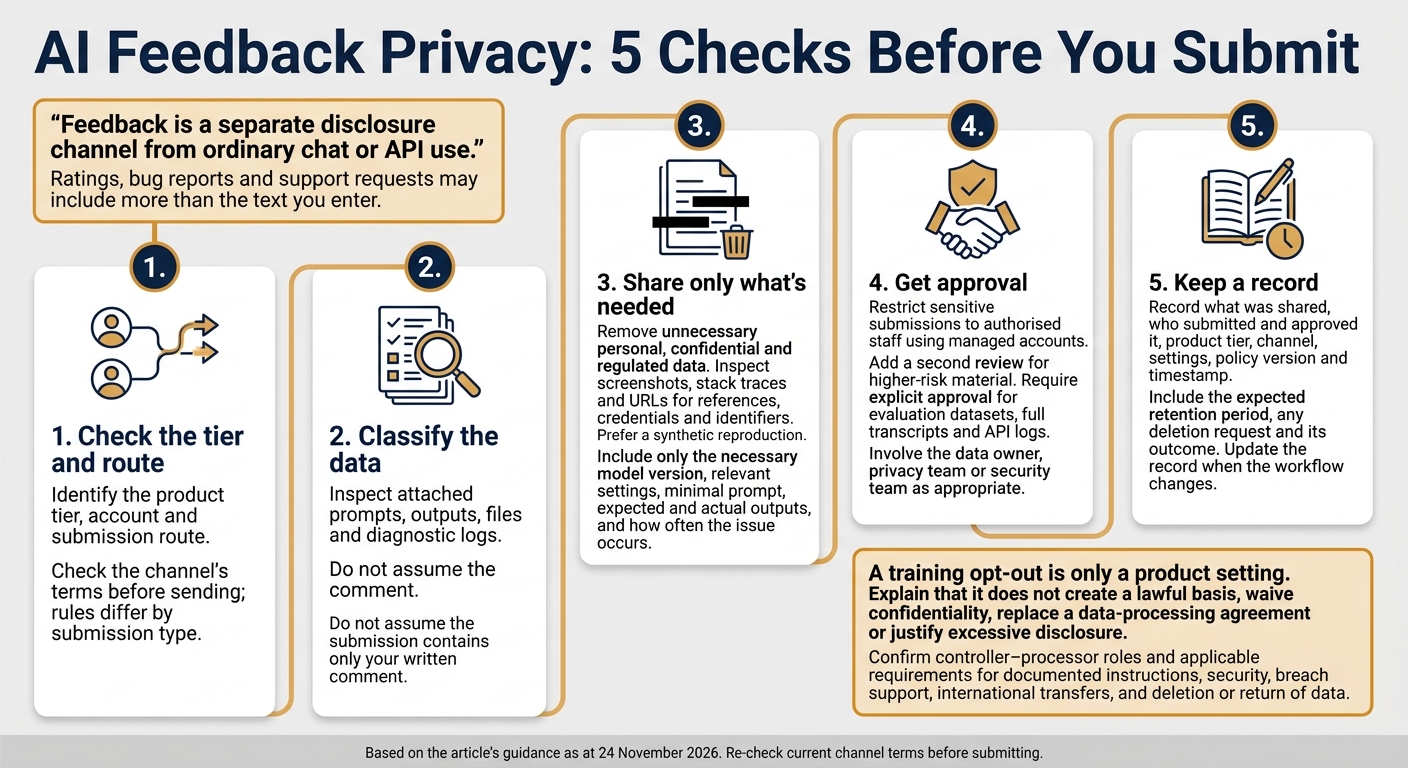 {AI Feedback Privacy: 5 Checks Before You Submit}
:::
Feedback is a separate disclosure channel from ordinary chat or API use. The rules above explain what each channel can expose. The controls below help you reduce that exposure before sending anything.
- Check the tier and route: Identify the product tier, account and submission route. Terms can differ by submission type, so check the channel’s terms before you send anything.[62][64]
- Classify the data: Ratings, bug reports and support requests may include more than the text you enter. Check for attached prompts, outputs, files and diagnostic logs.
- Share only what’s needed: Remove unnecessary personal, confidential and regulated data. Check screenshots, stack traces and URLs for references, credentials and identifiers. Use a synthetic reproduction that includes the model version, relevant settings, minimal prompt, expected and actual outputs, and how often the issue occurs.
- Get approval: Restrict sensitive submissions to authorised staff using managed accounts. Add a second review for higher-risk material. Require explicit approval for evaluation datasets, full transcripts and API logs, with review by the data owner, privacy team or security team as appropriate.
- Keep a record: Log what was shared, who submitted and approved it, the product tier, channel, settings, policy version and timestamp. Include the expected retention period, any deletion request and its outcome. Update the record when the workflow changes.[63][67]
A training opt-out is only a product setting. It does not create a lawful basis, waive confidentiality, replace a data-processing agreement or justify excessive disclosure. Before submitting a rating, report or support ticket, confirm controller–processor roles and the applicable contractual requirements for documented instructions, security, breach support, international transfers, and deletion or return of data.[65][66][68]
Conclusion: Check the Channel Before Sharing
The channel matters more than the brand name. Consumer chats may be used to improve models. Business and API channels exclude training by default unless you opt in.[69][33][62] Use a business workspace or API channel when you need organisational control.
Feedback has its own rules, separate from ordinary use, and these vary by product and channel. Gemini Apps can collect feedback data even with history off. Workspace feedback is not used to train Workspace models.[70][56]
No training does not mean no human access or data retention.[23] Treat ratings, bug reports and support requests as separate disclosure channels. If their terms are unclear, get written confirmation before sending sensitive material.
FAQs
How can I check what an AI feedback submission includes?
Review records submitted through your organisation’s reporting route, such as a managed form or service desk queue. Check the task, date and time, output and expected result, along with the impact, any workarounds and whether anyone was affected. Note the input type without copying personal data [1].
Track each submission in your evidence log, noting whether it is accepted, deferred, rejected or needs further evidence [1].
Can I withdraw feedback containing confidential data?
Whether you can withdraw feedback depends on your service contract’s retention and deletion policies. Check what triggers retention for support requests and how deletion works to see what can be removed. Logs, caches or support copies may remain, so don’t assume you can verify complete removal.
Never include personal or confidential information in feedback. Record the task, date and time instead, without copying any of that information.
Do I need approval before sharing work chats with AI support?
Yes, you’ll generally need internal approval, as work chats may contain proprietary or sensitive data. Use your organisation’s reporting routes, such as designated service desk queues or managed forms, rather than copying raw data into open fields.
Include enough context to explain the task and expected output, but leave out personal or confidential information. Follow internal data protection policies, and make sure any disclosure is logged and approved by the appropriate authority.