
I plan AI messages in three stages: before the pilot, during testing and at rollout. For every message, I name an owner and approver, identify who needs it, and separate the publication date from the date the change takes effect.
Here’s what I cover:
- Before testing: why we’re testing AI, who can use it, permitted tasks, data rules, human checks and start conditions.
- During testing: results, limits, incidents and feedback. I get approval before changing scope and stop affected use if controls are at risk.
- At rollout: the decision to scale, change, extend or stop, followed by team instructions, training and support.
I keep instructions in one version-controlled source, leave time for questions and any required consultation, and check results 30, 60 or 90 days after each group starts.
My rule: access follows readiness, not just a date. A launch announcement is one step, not the whole plan.
::: @figure 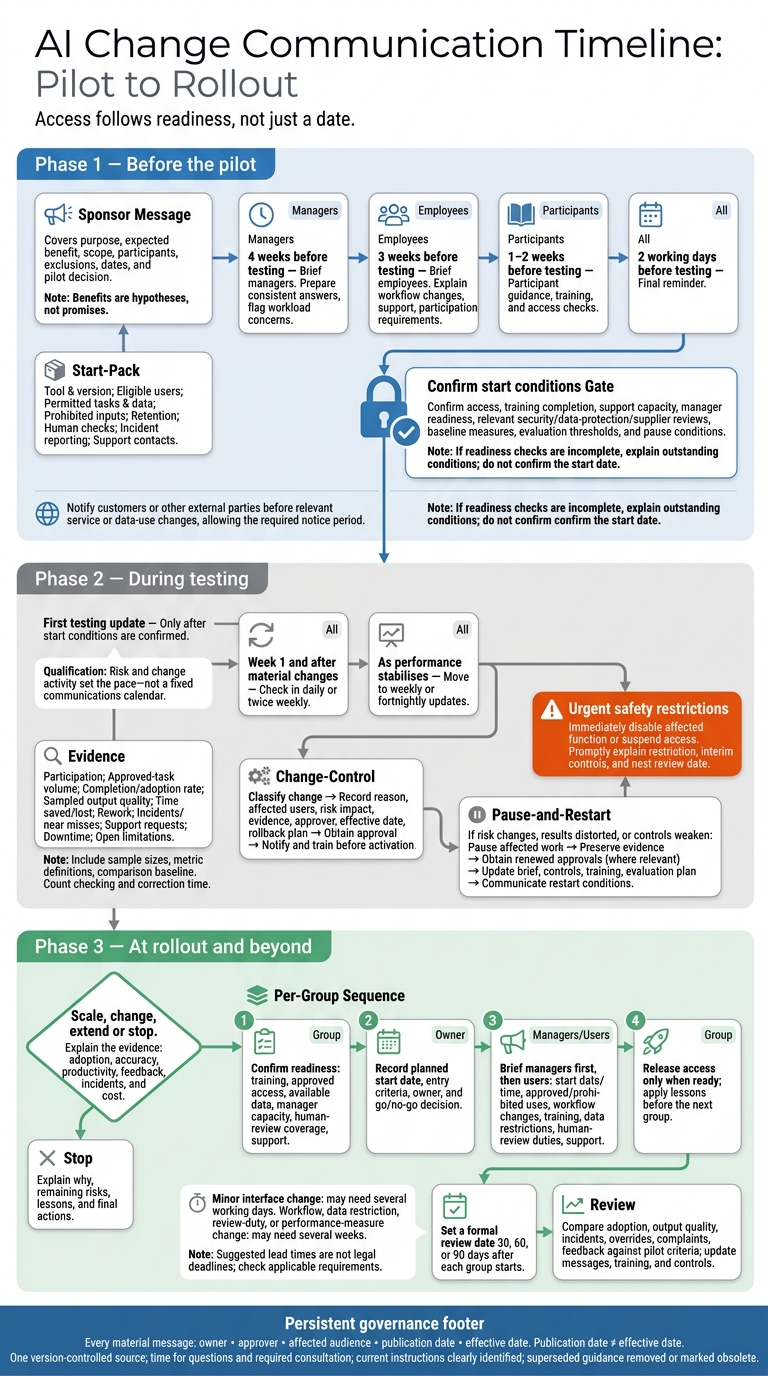 {AI Change Communication Timeline: Pilot to Rollout}
:::
{AI Change Communication Timeline: Pilot to Rollout}
:::
Communication First: How a CHRO Leads Through AI and Organizational Change with Lorna Hagen
Before the Pilot: Explain Purpose, Scope and Readiness
The sponsor announcement should set out the problem, expected benefit, scope, participants, exclusions and dates, plus the decision the pilot will inform. Present benefits as hypotheses, not promises. The pilot tests whether the expected outcomes happen. It does not guarantee savings, full deployment or job outcomes. Explain who decides whether to scale, change or stop, and which thresholds, risk limits and feedback will guide that decision.
Match Messages to Each Audience
Once the sponsor message is approved, brief audiences in the order they need the information. Managers should hear before employees, with time to flag workload concerns and prepare consistent answers about monitoring, participation and job security.
Brief managers four weeks before testing and employees three weeks before. Follow with participant guidance, training and access checks one to two weeks before testing, then a final reminder two working days before.
Keep the core message consistent, but give each audience the detail they need:
- Leaders: investment requirements, risk limits and success measures. Employees: workflow changes, support and whether participation is required.
- Pilot users: permitted tasks, training and feedback duties. Technical teams: data flows, integrations and controls.
Notify customers or other external parties before any relevant service or data-use changes, allowing the required notice period.
Publish the Pilot Brief and Confirm Start Conditions
Use the approved pilot brief to define what must be in place before testing starts. Turn it into a start pack that names the tool and version, eligible users, permitted tasks and data, prohibited inputs, retention arrangements and support contacts.
Explain who reviews outputs, how checks are logged, who can reject outputs and where incidents should be reported. Human review must be meaningful: reviewers need the skills and authority to challenge outputs.[3][4]
Before confirming the start date, check access, training completion, support capacity and manager readiness. Also check the relevant security, data-protection and supplier reviews. Set baseline measures and agree evaluation thresholds, reporting dates and conditions for pausing the pilot. Training should cover the system’s scope before launch.[6]
Use UK date format and include the time zone where needed:
20 October 2026
If readiness checks are incomplete, explain which conditions remain outstanding rather than presenting the start date as confirmed.
During Testing: Share Results and Manage Scope
Send the first testing update only after start conditions are confirmed. In week 1 and after material changes, check in daily or twice weekly. Move to weekly or fortnightly updates as performance stabilises. Let risk and change activity set the pace - not a fixed communications calendar.[9][13] Feed every update into the same evidence set and decision log.
Report the same measures each time: participation, approved-task volume, completion or adoption rate, sampled output quality, time saved or lost, rework, incidents, near misses, support requests, downtime and open limitations. The pilot lead should include sample sizes, metric definitions and the comparison baseline. Count checking and correction time, not just generation speed. Report evidence rather than claims of success, and record results and incidents in the evidence log linked to the change register.[13][2]
Explain Tasks and Feedback Routes
Use one main reporting route, such as a managed form or service desk queue. Provide separate options for routine suggestions, suspected data breaches, harmful outputs, security concerns and near misses.[11][14]
Ask users to record the task, date and time, input type without copying personal data, output, expected result, impact, workaround and whether anyone was affected. Publish response targets and review dates, and log each decision. Mark requests as accepted, deferred, rejected or requiring further evidence. Give a brief reason without revealing personal or confidential details.[8][10]
Approve and Announce Changes Before They Take Effect
Classify each change before approving it. Record the reason, affected users, risk impact, testing evidence, approver, effective date and rollback plan.
The notice must explain what is changing, why, who is affected, when it starts, required actions, controls and where to ask questions. Allow time for training before activation. Urgent safety restrictions should take effect immediately: disable the affected function or suspend access for affected users. Then promptly explain the restriction, interim controls and next review date.[2][10]
| Change type | Owner | Review and approval | Notification timing |
|---|---|---|---|
| Routine configuration within approved scope | Product owner | Technical lead; service owner under delegated authority | Include in the next update unless it affects instructions |
| Purpose or user group | Business owner | Senior accountable owner and relevant assurance leads | Before new use; allow briefing and training |
| Data source or integration | Product and data owners | Business, security, data-protection and service approval where relevant | Notify before access or data flows change |
| Human-review requirements | Risk owner | Business, security, data-protection and service approval where relevant | Before checks change; retrain affected users |
| Duration or success criteria | Pilot manager | Business owner and original approval forum | Before extension or revised evaluation; explain the effect on comparisons |
Pause Affected Testing for Scope Reviews
Pause affected work first if a change alters risk, invalidates or distorts pilot results, or weakens controls. This includes controls for human oversight, privacy, security, safety or fairness.
Restrict or disable the relevant function, preserve evidence and tell users what they can still do. Obtain renewed business, security, data-protection and service approval where relevant. Where required, complete or update the DPIA before processing restarts.
Before restarting, revise the pilot brief, controls, training and evaluation plan. Then tell users the restart timetable and the conditions that would trigger another stop.[10][12]
At Rollout: Explain the Decision and Workflow Changes
Send pilot participants and affected stakeholders a clear decision: scale, change, extend or stop. Set out the evidence behind it, covering adoption, accuracy, productivity, feedback, incidents and cost. Explain what the pilot results led you to change.
If the pilot stops, explain why, which remaining risks need action, what you learnt and the final actions. Continue risk communication and response plans after deployment, including incident handling, recovery and change management.[1][15] Use the decision to begin a phased rollout based on team readiness.
Brief Each Rollout Group Before It Starts
Release access when teams are ready, not simply when a date arrives. Each team or workflow needs confirmed training, approved access, available data, manager capacity, human-review coverage and support arrangements. Record each group’s planned start date, entry criteria, owner and go/no-go decision. Apply what you learn from each group before giving access to the next.[5]
As each group becomes ready, brief managers first. Give them approved talking points, attendance and access lists, and escalation guidance. Then tell users the start date and time, approved and prohibited uses, workflow changes, training, data restrictions, human-review duties and support contacts.
Make the boundary clear: what may the AI recommend, and what must people decide, approve or verify? Keep the wording consistent across manager briefings, intranet pages, training and team meetings.[5]
Create a Communication Plan by Phase and Audience
Keep the rollout schedule, owners and approval points in one record. Distinguish advance notices from immediate alerts and recurring updates.
Set notice periods according to impact. A minor interface change may need several working days’ notice. A change to an approved workflow, data restriction, review duty or performance measure may need several weeks for consultation and training. These suggested lead times are not legal deadlines. Check the employment, data protection, contractual and sector-specific requirements that apply.[7]
Use the same schedule to time notices for each phase and audience.
| Phase and message | Audience and purpose | Owner | Channel | Approvers | Timing and action |
|---|---|---|---|---|---|
| Pre-pilot: advance notice | Pilot users and managers: explain purpose, scope, risks and readiness requirements | Pilot lead | Briefing, email and intranet | Business owner; privacy, security and legal leads where relevant | Before access is granted |
| Testing: recurring update | Testers and managers: report results, defects, feedback and scope decisions | Product or delivery lead | Weekly update, workshops and issue tracker | Product owner and risk owner | Weekly or at agreed test gates; log evidence and unresolved risks |
| Rollout: advance notice | Each implementation group: confirm workflow, controls, training and start date | Change lead and team manager | Team briefing, learning platform and intranet | Business owner and control owners | Notice based on impact; complete training and confirm readiness |
| Any phase: immediate alert | Affected users: communicate urgent incidents or unsafe behaviour | Incident owner | Alert, service banner and direct notice | Incident manager and relevant control owner | Immediately; stop affected use and follow the workaround |
| Post-rollout: recurring update | Users, managers and sponsors: share adoption, incidents, performance and next steps | Service owner | Release notes, dashboard and review meeting | Governance forum or delegated approver | At scheduled reviews and after material changes; provide feedback and adopt revised guidance |
Keep Guidance Current After Launch
After launch, keep guidance in line with the approved rollout plan and live support needs. Publish versioned release notes for planned changes to configuration, integrations, models, access or policies. Include the affected workflows and users, effective dates, reason for the change, expected gains, known limitations, revised controls, training impact, support contact and rollback or pause procedure.
Set a formal review date 30, 60 or 90 days after each group starts. Compare adoption, output quality, incidents, overrides, complaints and feedback against the pilot criteria.[1][2]
Assign responsibility for support, monitoring, communications and future scope decisions. Keep the same named message owners and approval process. Use the findings to update messages, training and controls. Remove superseded instructions or mark them as obsolete, and direct readers to the current version.[1][2]
Conclusion: Check Owners, Approvals and Notice
Keep the steps in order: assign an owner and approver, brief pilot audiences, share test results, approve scope changes before they take effect, and brief each rollout group before it starts. Treat these communications as governance controls, not admin.[1]
Before publishing any material change, check five fields: owner, approver, affected audience, publication date and effective date. Leave time for questions and training, and record who was notified in the change record.[7]
If the scope or delivery decision is still unclear, Hokstad Consulting can help define it before you publish.
FAQs
How do we address fears about AI replacing jobs?
AI supports your team’s expertise - it doesn’t replace it. By automating routine tasks, it gives people more time for planning, solving complex problems and work that needs human judgement.
Its recommendations should inform decisions, not make them for you. Set clear guidelines for when staff can use AI suggestions, when they must check them and when a person needs to review or approve a decision.
Build trust by explaining how you protect data and meet compliance requirements. Be open about the security measures in place, who can access information and where AI has limits. Show how you’ll use AI to improve service quality and team satisfaction, with staff feedback helping to shape its use.
How can we tell if our AI messages are understood?
Set up clear feedback loops and measurable indicators. Track engagement, information shared without prompting, shorter escalation times and fewer interruptions. Run regular team surveys to check satisfaction and whether people understand AI’s roles and recommendations.
During the pilot, let AI suggest actions without automating them. Check whether the team’s responses follow your guidance. Hold regular retrospectives to review feedback and check that people interpret messages as intended.
What if stakeholders disagree on an AI scope change?
Take the disagreement to the named owner in your ownership charter: process disputes go to the business owner, funding disagreements to the executive sponsor, and risk objections to the designated risk approver.
Set these escalation routes before delivery starts, and record who can approve scope changes. Clear accountability helps prevent delays and keeps changes in line with your original business goals and safety requirements.