
I judge an AI agent by verified results - not how many tool calls it makes. To catch stalls, I set a progress measure, a checking window and a minimum gain before the run starts. For example, reducing failing tests from 10 to 9 is a 10% improvement; rewriting code without passing more checks may achieve nothing.
My approach is to:
- Measure checked results, keeping incomplete work separate from verified completion.
- Compare gains across a fixed window, with failed checks kept separate from checks that could not run.
- Enforce time, token and £ limits before every call, including retries.
- Stop stalled work, save the best checked result and allow only bounded recovery - or hand over to a named person.
- Test the controls against slow gains, regressions and missing verification, then tune them using run logs.
Activity alone is not progress. The stop decision must block further calls, not just appear in a log.
::: @figure 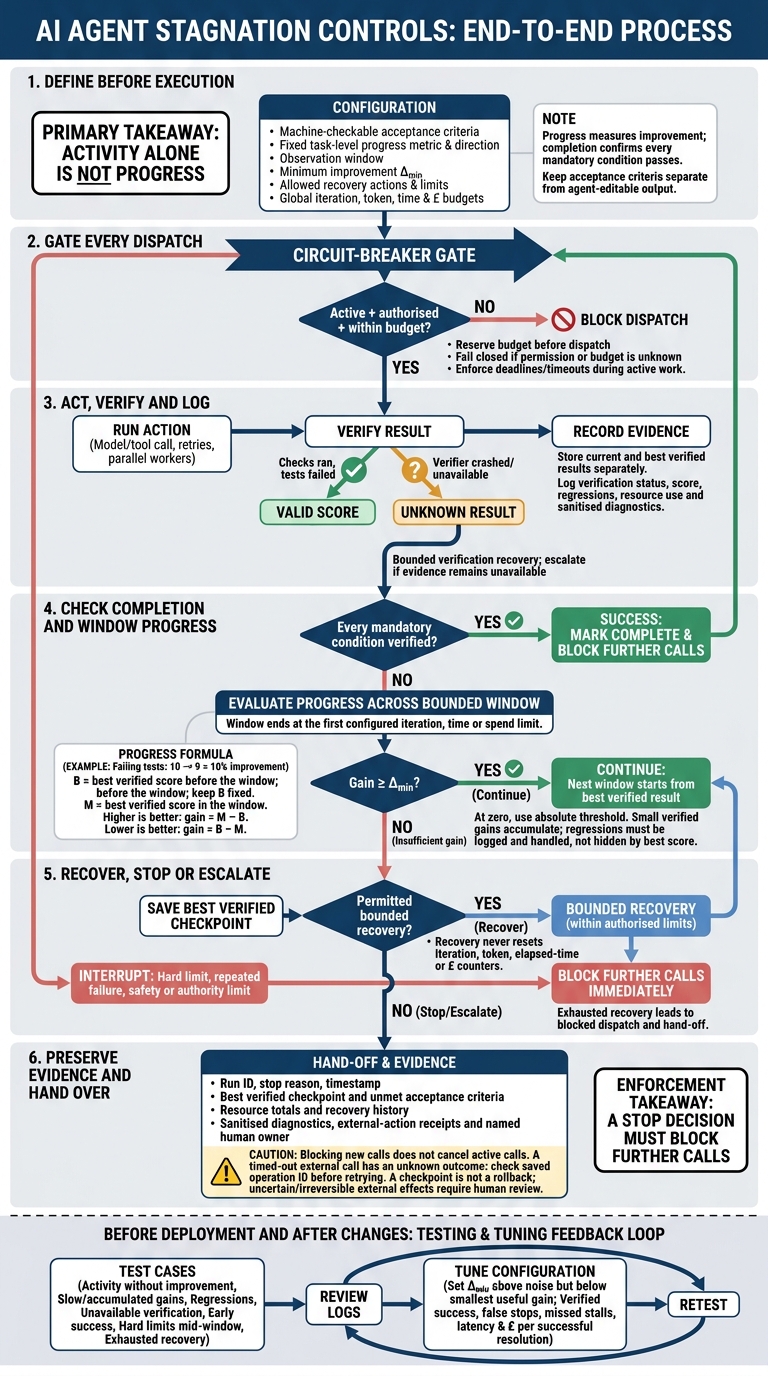 {AI Agent Progress Checks: Continue, Recover or Stop}
:::
{AI Agent Progress Checks: Continue, Recover or Stop}
:::
What is: Agentic Looping?
1. Define Progress Before the Agent Starts
Use the verified-result definition above to express progress in numbers the orchestrator can compare.
Measure Verified Results, Not Activity
Before execution, record a baseline for each task-level measure. Keep those measures fixed throughout the run, and specify whether higher or lower values mean progress. Treat time and £ limits as resource caps, not signs of progress.
Calculate progress using test reports, validated records or other machine-checkable evidence - not the agent’s claim that it has finished. The orchestrator can then compare later results against the fixed baseline.
Define Machine-Checkable Completion Conditions
Before execution, record machine-checkable completion conditions: the required tests must pass, and all mandatory constraints must be met. Changing code alone doesn’t count as completion.
Keep acceptance criteria and required checks separate from output the agent can edit. An agent may improve some measures without finishing the task. Progress measures improvement; completion confirms that every mandatory condition passes. If a check cannot run, mark it unverified.
The next step is to check whether progress continues over time.
2. Check Progress Over an Observation Window
Once progress is defined, check whether it continues across a bounded window. Review several iterations together and compare the best verified result in that window, rather than stopping after a single unsuccessful attempt.
Log Results and Resource Use
After each iteration, record a structured event so the orchestrator can track improvement. Include the timestamp, task ID, iteration, action, tool, sanitised inputs, output summary, verification status, score and failure reason. Also record elapsed time, token/resource use, retries and cumulative cost (£).
Store current and best verified results separately, alongside their artefacts and evidence. Redact API keys, credentials, personal data and unnecessary prompt content. Apply retention limits while keeping the diagnostic records needed for review.[2][5]
Set the Window and Improvement Threshold
Limit each window by iterations, time or spend, and end it when the first limit is reached. At the start, set the baseline B to the best verified score so far. At the end, compare it with the window’s best score, M:
- For higher-is-better measures, improvement is
M − B. - For lower-is-better measures, improvement is
B − M.
Keep B fixed throughout the window so small gains can accumulate towards Δ_min.
An absolute threshold can require one fewer failing test or one additional passing check. A relative threshold, such as a 10% error reduction, scales with task size.
At zero, use an absolute threshold rather than dividing. Near zero, absolute thresholds are usually clearer too. For fixed-point scoring, use integer units, such as hundredths, so floating-point rounding cannot decide whether a threshold passes. Track partial progress separately from the completion gate.
Add Progress Checks to the Orchestrator
Run the progress check after verification. A test run that completes and reports failures still provides a score. A verifier that crashes or is unavailable leaves the result unknown. These are different outcomes and need different handling.
Allow a bounded number of verification recovery attempts, then escalate if evidence is still unavailable. Log regressions even when keeping the best score, and retain the artefact that produced that score.[1][3][4]
The orchestrator should apply these checks before scheduling its next action.
baseline = best_verified_score_before_window()
if baseline is unknown:
    return RECOVER_OR_ESCALATE

best = baseline
current = baseline

for iteration in window:
    result = run_next_action()
    verification = verify(result)

    # "failed" means verifier execution failed, not that task tests failed.
    if verification.status == "unknown" or verification.status == "failed":
        log(iteration, result, verification, score=None)
        if recovery_limit_reached():
            return RECOVER_OR_ESCALATE
        continue

    current = score(verification)
    best = better(current, best)          # max or min, depending on metric
    log(iteration, result, verification, current, best)

    if meets_completion_condition(verification):
        return SUCCESS

if improves_by(best, baseline, delta_min, direction):
    baseline = best                       # next window starts here
    return CONTINUE

return RECOVER_OR_ESCALATE
3. Stop, Recover or Escalate
When a window shows no further improvement, the orchestrator must stop, recover or escalate before the next dispatch. Continued output does not prove progress. Progress checks must detect stalls even while the agent keeps producing results.
Set Stop Conditions and Recovery Limits
An iteration cap limits activity, not progress. Pair it with task-level stop conditions and budgets for tokens, time and cost in £. Check hard limits before every model or tool call. During long-running work, enforce them through deadlines or watchdogs.
| Stop condition | Signal | Action |
|---|---|---|
| Success | Every acceptance criterion is verified | Mark complete and block further calls to prevent unnecessary work |
| Stagnation | No meaningful improvement within the observation window | Save the best checkpoint, then attempt an allowed recovery or stop |
| Repeated failure | The same verification failure occurs on consecutive attempts | Stop the current approach and allow only a bounded alternative |
| Iteration limit | Maximum number of iterations reached | Stop and report the best verified result |
| Token limit | Allocated input/output token budget reached | Stop before another model call |
| Time limit | Wall-clock deadline reached | Cancel or time out active work and record partial state |
| Cost limit | Accumulated spend reaches the £ budget | Block paid model and tool calls and escalate if needed |
| Escalation | Authority, safety or recovery limit is exceeded | Hand off with diagnostic context for a human decision |
Once a stop condition fires, allow only a bounded recovery attempt or an immediate hand-off. Give each recovery action a fixed allowance, and log every strategy change with its rationale. Changing only the prompt does not count as a new strategy.
Recovery must never reset the global counters for iterations, tokens, elapsed time or £ cost. Retry only faults that may be temporary, using bounded back-off. Once recovery is exhausted, stop or escalate.
Block Further Calls and Record the Hand-Off
Stop rules work only if they block dispatch at execution. Place a circuit breaker before every model or tool dispatch, including queued retries. Reject calls unless the run is active, authorised and within budget.
Manage the circuit breaker’s state centrally so parallel workers cannot bypass it. Reserve budget before dispatch to prevent workers from spending the same allowance twice. If permission or remaining budget cannot be confirmed, fail closed.
Blocking new calls does not cancel calls already in progress. Use separate cancellation signals and per-call timeouts. A timed-out external call has an unknown outcome; it has not necessarily failed. Check its status using the saved operation ID before considering a retry.
A saved checkpoint is not a rollback. It cannot undo an email, payment or deployment. Require human review whenever an external effect remains uncertain or cannot be safely reversed.
When the agent cannot continue safely, save the evidence in a durable hand-off record. Include the run ID, stop reason, timestamp, best verified checkpoint, unmet acceptance criteria, resource totals and recovery history. Attach sanitised diagnostics and external-action receipts.
Record the status as completed, retryable, blocked, failed or awaiting human review. Specify the next decision, and name the human owner for unrecoverable failures or actions beyond the agent’s authority.
4. Test and Tune Progress Checks
Once you’ve defined stop rules, test them against stalled runs before rollout - even when agents still appear active.
Test Stalls, Slow Progress and Regressions
Build a labelled pre-deployment test set. Give each case an expected decision - continue, stop, recover or escalate - along with the relevant window and Δ_min.
Include changing actions without improvement, repeated underlying failures, slow progress, accumulated small gains and regression. New actions don’t count as progress unless they improve the task-level measure. The same root error must not reset the stall counter, while small, verified gains should accumulate across the window.
Regression should trigger recovery, rollback or escalation, not disappear behind an earlier high score. Exploration that advances a milestone should not count as stagnation.
Test unavailable verification, early success and hard limits reached mid-window. Check that unknown verification stays distinct from failure, verified completion is accepted immediately and resource limits take effect immediately.
Also test exhausted recovery attempts. At that point, block further dispatch and record the current verified state, unresolved work and hand-off reason.
Use these cases to tune thresholds and recovery limits before deployment.
Tune Settings Using Execution Logs
Group traces by task type and milestone. Record verified gains, verification status, error category, recovery outcomes, model/prompt/tool versions and the final decision.
Compare premature stops with missed stalls. Lengthen windows when useful milestones arrive after the cut-off; shorten them when calls consume resources without improving results. Base recovery limits on observed recovery success and escalation outcomes, rather than applying one retry count to every task.
Set Δ_min above normal measurement noise but below the smallest operationally useful gain. When scores fluctuate, use repeated verification, independent checks or multiple milestone signals - not a longer window.
Re-run the same cases after any prompt, model, tool, verifier or orchestration change. Track verified success, false stops, missed stalls, latency and cost in £ per successful resolution. Turn anonymised production failures into regression tests.
Conclusion: Progress Check Implementation Checklist
Before deployment, check that the task settings include verifiable acceptance criteria, a task-level progress metric, an observation window and a minimum improvement threshold. Track repeated failed outcomes - not surface changes.
Define which recovery actions are allowed and when the agent must stop, all within hard budgets. A change in strategy must not reset the budget.
Place a circuit breaker at the dispatch boundary so a stop decision blocks further calls. Record what triggered the stop and the supporting evidence, then pass the hand-off to a named human owner.
Hokstad Consulting helps define and implement these controls through AI strategy and custom agent implementation.
FAQs
How can I measure progress on open-ended tasks?
Set clear acceptance criteria and track metrics for each task. Use a stable task ID to record total spend and token use, including retries and child-agent work.
Track completion rates, escalation frequency and cost per successful task: total delivery cost in £ divided by the number of accepted tasks. Use LLM-as-a-judge evaluation to score outputs against baselines. Set stopping thresholds for when results stop improving or when iteration, token or time limits are reached.
How do I distinguish useful exploration from a stall?
Track both technical metrics and task-level progress. Work should move towards an outcome. A stall means no measurable improvement, even if the run never repeats an identical state. Assess progress over set observation windows, using defined thresholds.
Set iteration caps based on median and 95th-percentile iteration counts from successful traces. Track first-pass success, retries and cost per successful task to check whether those caps are too tight. Pause unresolved runs when they reach the cap so a person can review them.
How should I set thresholds when progress is unpredictable?
Use 60–90 days of production metrics as your baseline. Calculate the median and 95th-percentile iteration counts for successful tasks, then set the cap slightly above the 95th percentile using a fixed buffer.
Track completion rates and faithfulness. If an agent stalls, stop the run, save completed outputs and log why it failed. Adjust thresholds regularly as performance improves, keeping roughly 50% headroom to avoid false positives while still catching regressions.