
Time saved is not money saved. To measure AI agent ROI, compare at least two weeks of pre-agent workflow data with like-for-like results after deployment. Check whether spending fell or extra paid work generated income, then subtract setup, running, review and error-correction costs.
Keep three results separate:
- Cash savings: lower contractor bills, overtime or other payments.
- Cost avoidance: approved future spending, such as a planned hire, that is no longer needed.
- Released capacity: staff time available for other work - not a cash saving by itself.
Count each gain and cost only once. Calculate monthly and first-year ROI, include setup spending when checking payback, and review spending, adoption and quality each month. Expand only when net returns stay positive and work meets the agreed standard.
::: @figure 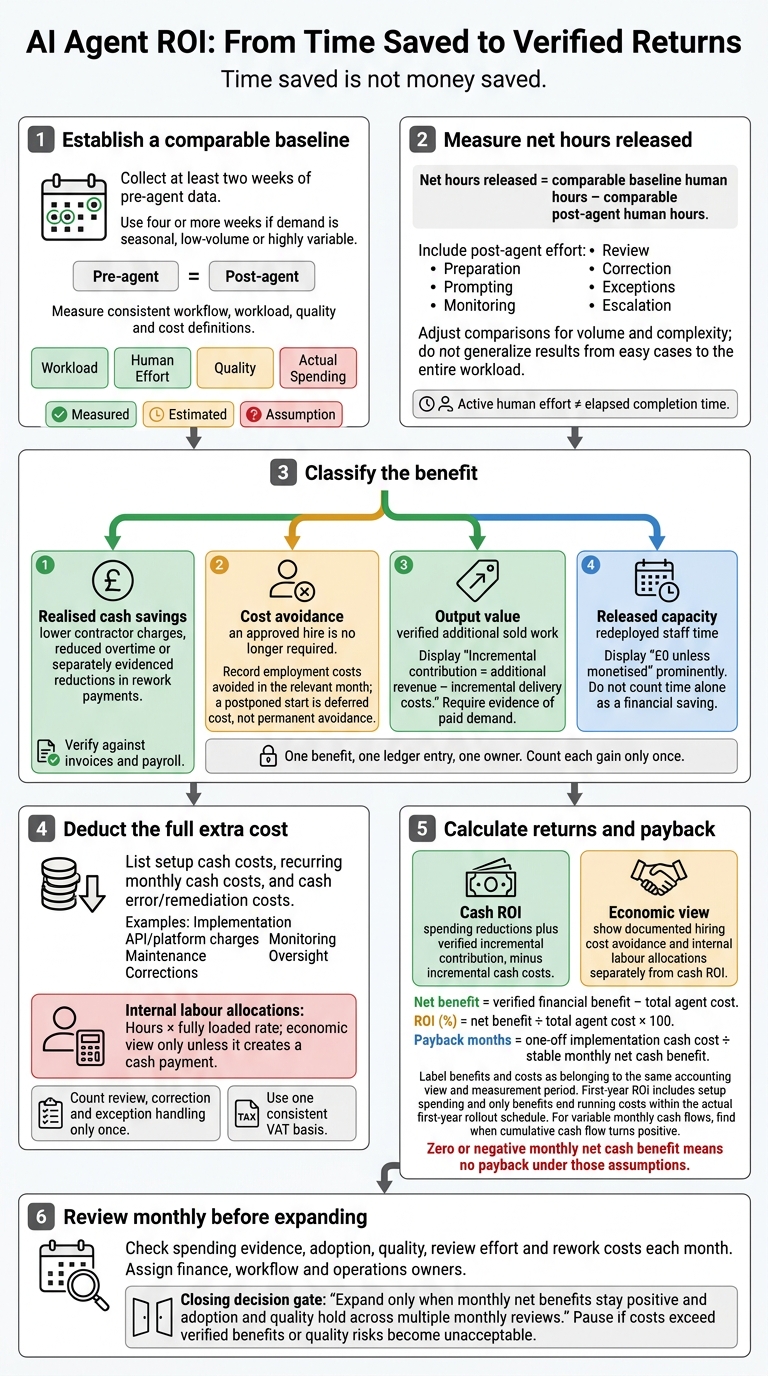 {AI Agent ROI: From Time Saved to Verified Returns}
:::
How to Measure the ROI of AI Agents
Set a baseline for one repeatable workflow
Choose one repeatable workflow with a clear start and finish, such as IT ticket triage or order enquiry resolution.
Agree the steps, inputs, outputs, exception paths and quality standard with the team and the workflow’s internal customer.[2][3] Collect at least two weeks of pre-agent data. Use four or more weeks if demand is seasonal, low-volume or highly variable.
Once deployment has stabilised, measure the same workflow using the same workload, quality and cost definitions. Record dates, staffing levels, policy changes and unusual events separately. This baseline gives you a reference for proving cash savings, avoided costs and spare capacity.
Record workload, staff time, quality and spending
Record completed tasks and time spent on handling, preparation, checking, corrections, hand-offs and escalations. Track errors, reopened cases and missed deadlines, using the same quality checks before and after deployment. Keep contractor invoices, temporary-staff costs, overtime and approved hiring plans alongside these records.
Track labour hours separately from cash spend. Hours saved alone do not prove a financial return. Label each completed value Measured, Estimated or Assumption, and include its source, owner and measurement date. Keep loaded labour costs - including employer National Insurance, pensions and relevant overheads - separate from spending that could actually fall.
Use this template to collect the inputs needed for ROI, not to forecast results.
| Workflow | Volume | Staff time | External spend | Error rate | Monthly cash spend |
|---|---|---|---|---|---|
| IT ticket triage | Measured tickets/month | Measured preparation, triage and checking hours | Measured contractor invoices | Measured misroutes and corrections | Measured cash spend; labour cost allocated separately |
| E-commerce order enquiries | Measured enquiries/month | Measured handling, review and exception hours | Measured outsourced support fees | Measured incorrect answers and reopens | Measured cash spend; labour cost allocated separately |
| Invoice processing | Measured invoices/month | Measured entry, checking and correction hours | Measured outsourced processing fees | Measured coding or payment errors | Measured cash spend; labour cost allocated separately |
Calculate net hours saved on comparable work
Net hours released = comparable baseline human hours − comparable post-agent human hours.
Include prompting, input preparation, monitoring, review, correction, exceptions and escalation in the post-agent total. Measure active human effort separately from elapsed completion time: a shorter queue does not necessarily mean fewer staff hours.
Before subtracting, adjust for volume and complexity. Multiply baseline time per task by post-agent volume, calculating standard and exception work separately. Record staffing changes, training, revised policies and seasonal peaks alongside the result.
If the agent handled only easy cases, do not apply that time saving to the entire workload. Use the adjusted figure in the benefit ledger that follows.
Verify financial benefits without double-counting
Check contractor savings, overtime cuts and avoided hiring
Use net hours saved to check whether the agent cut actual spending. Time saved counts as a financial saving only when it changes a bill, payroll line or approved budget.
Match contractor reductions to invoices and contract terms. Check overtime cuts against payroll and approved overtime records. Adjust for workload and other factors before attributing reductions to the agent. Count savings only when lower spending is invoiced or paid, after notice periods and minimum commitments have ended. Deduct cancellation charges and retained support costs.
For avoided hiring, retain the approved role, budget, planned start date and workload trigger. Show that the agent handled the work that justified recruitment. Count only employment costs avoided that month, including relevant employer on-costs. Treat a postponed start as deferred cost, not permanent hiring avoidance.
After checking spend reductions, test whether any released capacity also produced paid output.
Value extra output only when there is demand
Extra output has financial value only when demand is verified. Link orders, delivery records and invoices to the capacity released by the agent. Calculate incremental contribution: additional revenue minus incremental delivery costs, including extra labour, infrastructure and subcontracting.
Do not count spare capacity as revenue unless it serves paid demand. Training, internal improvements and backlog clearance remain released capacity unless they produce a verified financial gain.
Create a benefit ledger by category
Enter each verified benefit in a single monthly ledger before including it in ROI. Use one row per benefit, per month, with one owner. Record only evidenced £ values, along with the calculation, evidence location and finance approval.
| Benefit | Supporting records | Monthly value to record in £ | Classification |
|---|---|---|---|
| Lower contractor charges | Invoices, contract terms and workload records | Comparable baseline charges minus actual charges and any cancellation costs | Realised cash saving |
| Reduced overtime | Payroll and approved overtime records | Comparable baseline employer cost minus actual cost | Realised cash saving |
| Approved hire not required | Recruitment approval, budget and cancellation record | Employment cost avoided in the month | Cost avoidance |
| Additional sold work | Orders, invoices and delivery costs | Attributable revenue minus incremental delivery costs | Output value |
| Avoided rework spending | Error records and payment evidence | Verified reduction not included elsewhere | Realised saving or cost avoidance |
| Redeployed staff time | Time records and completed work | £0 | Released capacity |
Gross financial benefit = contractor savings + overtime savings + approved hiring avoidance + verified output value + separately evidenced rework savings.
Exclude unmonetised capacity and anything already counted in another category, including rework savings. Keep agent costs separate for the net ROI calculation.
Calculate total agent costs and account for quality
Include setup, usage and oversight costs
Subtract the full extra cost of a reliable result, not just agent fees. Keep cash payments separate from internal labour. Salaried review time uses staff capacity; it only saves cash if it avoids overtime, contractors or other payments. To turn gross benefits into net ROI, deduct implementation, running and quality costs.
Use one VAT basis throughout: exclude recoverable VAT and include irrecoverable VAT.
| Cost | What to record | ROI treatment |
|---|---|---|
| One-off cash costs | Process discovery, solution design, development, integration, data cleansing and preparation, testing, security assessment, compliance approval, training, change management and launch | Include in setup cash cost |
| Recurring monthly cash costs | Model/API usage, platform licences, hosting, storage, connected services, monitoring, evaluation, maintenance, prompt or workflow updates, support, governance reviews and security checks | Deduct from monthly cash benefits |
| Internal labour allocations | Implementation, data preparation, training, approvals, quality assurance, reviewing outputs, correcting errors, handling exceptions and supporting users | Hours × fully loaded rate; economic view only unless it creates a cash payment |
| Error and remediation costs | Incident response, rework and corrective changes; allocate once, split cash and internal labour | Deduct cash payments in cash ROI; include internal labour in the economic view |
Assign each activity to one category, and count review, correction and exception handling only once. Use the same workflow boundary before and after deployment. If net hours already account for remaining human effort, do not deduct that effort again.
Cost per acceptable outcome = total workflow cost ÷ acceptable completed outputs.[4][5][6]
Then account for quality issues that reduce realised savings, without counting costs twice.
Account for errors, review time and adoption
Track the same eligible workload before and after deployment. Split it by task type where error patterns differ. Record eligible volume, actual agent-handled volume and outputs accepted without material correction. Also record review minutes, correction hours, escalations and error severity for each task type.
Use comparable periods and completion standards. A faster draft is not a faster completed task.[7][8]
| Measure | Before deployment | After deployment |
|---|---|---|
| Volume | Eligible tasks completed | Eligible tasks processed by the agent and completed acceptably |
| Completion time | End-to-end time per task | End-to-end time, including review and fallback |
| Review time | Checking minutes per task | Reviewer minutes per agent-handled task |
| Error rate | Material errors ÷ completed tasks | Same definition, split by severity |
| Rework cost | Correction labour and downstream payments | Same scope, separating internal allocation from cash |
| Escalation rate | Escalated tasks ÷ eligible tasks | Same denominator, including human fallback |
Realised error cost = material errors × average correction and downstream cost per error.
Separate minor corrections from severe incidents. Keep probability-weighted exposure outside realised cash ROI. Never count the same missed sale as both lost revenue and lost contribution margin.
Calculate monthly ROI, first-year ROI and payback
Once you have classified benefits and costs, use monthly cash flow to calculate net benefit and payback.
Net benefit = verified financial benefit − total agent cost.
ROI (%) = net benefit ÷ total agent cost × 100.[4][5][8]
For cash ROI, show spending reductions and incremental contribution separately, then deduct incremental cash costs. Keep documented hiring cost avoidance and internal labour allocations in a separate economic view. Leave released capacity at £0 unless it has been monetised.
First-year ROI must include setup spending, plus only the benefits and running costs that fall within that year’s actual rollout schedule.
Build an assumptions table around workload, adoption and quality - not arbitrary ROI percentages. Base the expected case on measured pilot results. The conservative case should allow for lower adoption, more review effort and higher error costs. Use the upside case only when evidence supports higher demand and quality.
Assumption Conservative Expected Upside Eligible monthly volume 800 1,000 1,200 Adoption rate 50% 70% 85% Accepted without material correction 70% 85% 93% Review and exception cost per task £1.80 £1.20 £0.90 Monthly verified cash benefit £2,000 £4,000 £6,000 Monthly recurring agent cost £2,000 £1,700 £1,600 One-off implementation cost £18,000 £18,000 £18,000 Monthly net cash benefit £0 £2,300 £4,400 Payback No payback About 7.8 months About 4.1 months
Review assumptions monthly. Expand deployment only when the expected case stays positive after actual agent fees, oversight and rework costs.
Payback months = one-off implementation cash cost ÷ stable monthly net cash benefit.
If rollout, usage or benefits vary by month, use monthly cash flows to find when cumulative cash flow turns positive. A zero or negative monthly net cash benefit means no payback under those assumptions.[4][9]
Conclusion: Check savings and review ROI monthly
After calculating monthly ROI, use the pilot baseline in the monthly finance review to check net benefits against invoices and payroll records.[10][1]
Report realised cash savings, cost avoidance and extra output separately.[10][11]
Assign owners and expand only after checking results
Give each benefit an owner and a measurement period. Finance checks spending changes; the workflow owner checks adoption, quality and review effort; operations checks whether changes in demand, staffing or contractors explain the result.[1][12]
If review effort eats into returns, adjust the workflow. Pause deployment if costs exceed verified benefits or quality risks become unacceptable. Expand only when monthly net benefits stay positive and adoption and quality hold across multiple monthly reviews.
FAQs
How can I isolate savings caused by an AI agent?
Compare four to eight weeks of pre-deployment data with post-launch results. Use a matched comparison group or phased rollout to distinguish the agent’s impact from other changes. Without a control group, report gains as linked to deployment - not proof that the agent caused them.
Keep time saved separate from spending cuts or approved hires that were no longer needed. Deduct AI and human review costs, then check savings each month against payroll, invoices and reconciled operating records.
How do I prove an AI agent avoided a hire?
Keep the approved hiring plan or recruitment requisition, plus a formal record confirming that the role was cancelled or deferred because the agent handles the work. Include task-level evidence showing that the agent meets the required volume and quality without human intervention, measured against a like-for-like baseline.
Report this as an avoided cost, separate from realised cash savings or redeployed capacity. Don’t count freed-up hours as both cash savings and capacity gains.
How do I allocate shared AI costs across workflows?
Group costs with key-value tags such as project, team or environment. For complex inference workloads, use Virtual Tags or identity-based attribution to track spending automatically by user or project.
For shared infrastructure, track cost per agent task or per 1,000 inferences to align budgets. Keep model, tool and infrastructure costs separate so you can see how much each contributes to total spending in £. If you can’t measure costs directly, document how you allocate them.