
An AI agent’s plan should not run until all 7 validation checks pass. Check that the work is possible, permitted and within agreed limits - not just that the steps sound logical.
Before execution, confirm:
- Goals and completion criteria: Define the outcome and how success will be checked.
- Prerequisites and dependencies: Verify required inputs, system states and earlier steps.
- Tool access and permissions: Check that approved tools can perform each action within set access limits.
- Task order and consistency: Check for missing steps, conflicts and duplicate actions.
- Resource and cost limits: Set enforced caps on spend, tool calls, retries and parallel work.
- Deadlines and time windows: Allow time for delays, recovery and approvals.
- Approval and escalation rules: Name who can approve, pause or stop the work.
Record one decision against the exact plan version: Proceed, Revise, Escalate or Reject. Only Proceed permits execution. After approval, track results and usage, keep audit logs outside the agent’s control, and pause for revalidation when the plan changes.
::: @figure 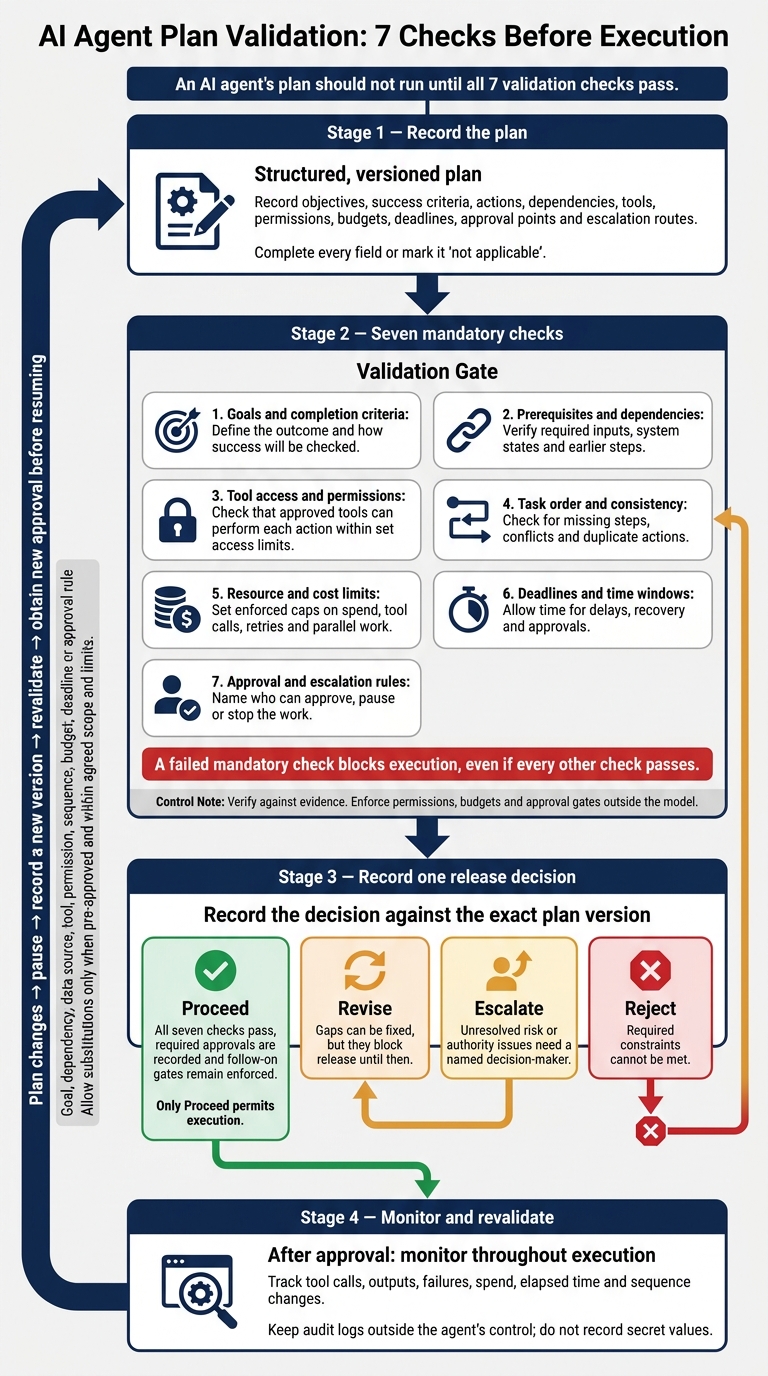 {AI Agent Plan Validation: 7 Checks Before Execution}
:::
Validate the Plan Before Execution
Put a validation gate in place before checking individual items. It must block execution until the plan is confirmed as feasible and permitted. The gate decides whether work can begin - it doesn’t just record a checklist result.
Record the plan in a structured, versioned format to support the seven checks. Include the objective, success criteria, ordered actions, inputs, dependencies, tools, permissions, budgets, deadlines, operating windows, approval points and escalation routes. Complete every field or mark it ‘not applicable’.
Then check the plan against evidence: available inputs, reachable tools and systems, current permissions, and applicable security, privacy and approval policies. Keep automated checks separate from human decisions so teams can see whether the plan is both workable and authorised. Save the results and link approval to the exact plan version. A changed plan must not inherit outdated approval.
Validation happens before execution; monitoring continues throughout. After approval, track tool calls, outputs, failures, spend, elapsed time and sequence changes against the approved plan. Keep audit logs outside the agent’s control, and don’t record secret values. A successful tool response alone doesn’t prove that the business goal was achieved.
Define revalidation triggers before work begins. A new data source, tool or permission - or a change to the budget or deadline - must pause execution. Record the change, revalidate the plan and obtain new approval before resuming. Allow substitutions only when they’re pre-approved and remain within the agreed scope and limits. These checks prevent approval drift as the plan changes.
1. Confirm Goals and Completion Criteria
Start with the goal: if success is unclear, the plan cannot be validated.
Evidence required
The original request or signed-off specification must name the authorised requester, intended outcome, scope and accountable owner. Completion criteria must define the deliverable, acceptance test, quality standard and required evidence. Keep the outcome separate from the method: completing every planned step does not prove that the goal has been met.[5][6][4][8]
Pass condition
Pass this check only when success can be independently verified and every action supports the deliverable, evidence or risk control. Remove unrelated actions and scope drift. Record prohibited outcomes alongside the success criteria, and link each to a test or control. The owner must verify the result using evidence, not the agent’s claim.[7][9][10]
Blocking conditions
Block execution if authority is missing, goals conflict, quality standards are undefined or completion rests on claims that cannot be verified. Ambiguity must also block execution when different interpretations could affect finances, people’s rights or irreversible actions. Delegate choices with no material impact; escalate those with material effects.
Failure response
Mark vague wording or missing thresholds as Revise. Escalate when an authorised owner must choose between materially different outcomes. Reject goals that lack authorisation or are prohibited. Record the unresolved question, who must answer it and what evidence will resolve it. Do not let the agent choose an arbitrary interpretation.
Once the goal is clear, test the dependencies that must be in place before execution.
2. Verify Prerequisites and Dependencies
Evidence required
Require a dependency checklist or plan manifest for every action. Include the data, records, credentials, system states and approvals it needs. For each dependency, record its owner, source, expected format, freshness rule and verification method. Make clear which inputs are available and which must come from earlier steps. Require authentication before data access, using a dedicated agent identity with unexpired, scoped credentials.[1][2]
Pass condition
Map dependencies as a graph, giving each action a valid starting point and clear predecessors. Every prerequisite must be verified or covered by an enforced gate. Allow an action only when its inputs are valid and its predecessors have succeeded. Recheck conditions that may change immediately before execution. Downstream systems must enforce authorisation rather than trust the agent’s claim.[11]
Blocking conditions
Block dependencies that are missing, expired, contradictory, unauthorised or unverified. Also block circular or impossible dependencies: no action should rely on an output that cannot be produced. Missing approvals must block execution unless an enforced gate prevents the affected action from starting. An instruction to “wait for approval” is not enough.
Failure response
Pause the affected action path. Record the blocked action, failed prerequisite, expected evidence and responsible owner. Mark missing inputs, expired credentials or incomplete approvals as Revise; Escalate conflicting records or access decisions; Reject prohibited dependencies. Retry only verification steps, within defined limits. Never substitute unverified data, widen permissions or bypass a failed gate.[12]
3. Check Tool Access and Permissions
Having the inputs isn’t enough. The tool must also be able to carry out the exact action safely.
Evidence required
Map each action to one approved tool. Record its name, permitted action, inputs, data source, expected output, owner and approval status. Attach the tool’s input schema and permission manifest, and link each call to both the agent identity and the requesting user.
Pass condition
Proceed only when every action has an approved, available tool. Limit access to the operations and records needed, and ensure each action can be traced to the agent identity.
Before every call, validate fields, data types, allowed values and target identifiers. Test both allowed and denied requests outside production. Enforce restrictions outside the model, log decisions and tie approval gates to the exact high-impact action.
Blocking conditions
Block unapproved tools, unclear data boundaries, unnecessary write or delete rights, malformed inputs and any capability that lets the agent extend its own permissions.
The database or API must enforce read-only restrictions. Prompts alone aren’t enough. Check each approval flag against the approver, the exact action and the approval’s validity.
Failure response
Return a failure record that names the tool, operation, affected records, denied permission and owner. Mark scope or schema issues that can be corrected as Revise. Escalate disputed access to security or the data owner. Reject capabilities that cannot be approved safely.
Resume only after the corrected configuration passes validation. Don’t bypass validation through a personal account. Once the tools are authorised, check whether the task order still holds.
4. Check Task Order and Consistency
After tools and permissions are approved, check that the plan’s steps still work in the right order.
Evidence required
Require a JSON or YAML plan with a distinct ID for each step, plus dependencies, inputs, outputs, tools, validation criteria, durations and failure actions.[14] Check the dependency graph for missing steps, cycles and unreachable steps.[15] Record the approved version and its owner.[3][17]
Pass condition
Proceed only when the full sequence can run as written. Each preceding step must finish successfully. Its output must meet the next step’s rules for format, completeness and how recent the data must be. Parallel steps must not conflict over shared records. Waiting periods and safety rules must remain in force throughout execution.[13][14]
Blocking conditions
Block skipped prerequisites, contradictory instructions, invalid hand-offs and duplicate side effects. Compare each step’s purpose, inputs and outputs to spot duplicates. Before any irreversible action, confirm that earlier results still match the current state. If a tool returns incomplete or stale data, pause and replan rather than carry on using outdated context.[13][15][16]
Failure response
If the sequence breaks, stop the affected path and preserve verified work already completed. Record the failed check, affected step IDs and plan version. Revise sequencing errors that can be fixed, Escalate conflicts that need human judgement, and Reject unsafe or infeasible sequences. Every change creates a new version that must be revalidated, including its downstream dependencies.[3][17][18]
Once the sequence is valid, set resource and cost limits before execution.
5. Set Resource and Cost Limits
Even a valid sequence fails if it cannot run within budget. This check determines whether work can proceed without overspending, runaway retries or unchecked parallel work.
Evidence required
Record hard caps for model turns, tool calls, retries, subtasks, replanning cycles, input and output tokens, compute time, wall-clock time and external API spend. Specify whether each cap applies per task, record, run, user or day.
Include pricing assumptions, expected workload, provider rate limits and the budget owner. The runtime must enforce these limits, with parallel workers, retries and replanning all drawing from one shared budget.[20][23]
Pass condition
Approve only when the plan fits the budget and leaves enough room to stop safely. Estimates must cover the expected path, the worst-case valid path and a shutdown reserve.
Reserve budget before each metered request, then reconcile actual charges afterwards. Set warning and pause thresholds below the hard cap. Require test evidence that the workflow can finish within its limits.[20][21][24]
Blocking conditions
Block plans with missing ceilings, unpriced work, unbounded subtask creation or parallel workers that could overspend the shared budget.
Calls that change external state need stable idempotency keys or an action ledger. If a call times out without a clear success signal, check whether the action succeeded before retrying. Otherwise, the retry could duplicate it.[19][22]
Failure response
Stop new work before the next call would exceed a limit. Preserve checkpoints and evidence, mark the run as blocked or incomplete, and report completed, pending and uncertain actions alongside usage totals.
Never claim success or automatically restart with a new allowance. Additional budget requires explicit approval.[22][23]
Budget alone is not enough; the plan must also fit the available time window.
6. Verify Deadlines and Time Windows
Evidence required
Require a dated critical path that shows task durations, dependencies, queue time, rate limits, retries and a safety buffer. Base estimates on historical runtimes, current queue lengths and confirmed availability. Record when data and approvals expire, along with system operating windows.
State the deadline precisely: 21 November 2026, 17:00 GMT (UTC+00:00). Store it in UTC and display local time separately.[25][26][27]
Pass condition
Proceed only if the full critical path fits before the deadline, with a buffer suited to the risk. Data and approvals must still be valid when used. Systems and approvers must also be available.
Calculate the latest safe start and pass the remaining time allowance to child tasks. Do not start work unless enough time remains to finish.[28][29]
Blocking conditions
Block plans with unclear time zones, unconfirmed dependencies, missing retry allowances or queues without a reliable completion estimate. Also block plans that depend on expired data, lapsed approvals or unavailable operating windows.
An average runtime that fits is not enough. The schedule must allow for plausible delays and recovery.[28][29]
Failure response
Define authorised fallbacks before starting: pause, reduce scope, request an extension or defer to the next valid window.
Revalidate after any material delay, including rate limiting, dependency failure or a changed approval. Recalculate the remaining critical path. If there is no longer room for the buffer, stop new work, cancel affected child tasks, save progress and escalate to the named owner. Do not submit late.[28][29]
7. Confirm Approval and Escalation Rules
If the plan still fits the window and is feasible, approval is the final gate. Check who can authorise each risky step before work begins.
Evidence required
List every action that needs approval: payments, record changes, production deployments, access control changes, external communications and customer-impacting changes. Name one approver for each action. Keep duties separate: the requester must not be the approver.
Include the exact action, affected systems or people, risks, value, data, dependencies, rollback method, execution time and any uncertainty or conflicting evidence. For payments, also include the supplier, invoice number, amount in pounds sterling, bank details, budget code and duplicate-payment checks.
Pass condition
Block every approval-dependent step until approval is recorded. Approval applies ONLY to the exact plan version, scope and parameters. Give each step a review deadline and an escalation route. Without approval, allow only bounded, lower-risk work that can be reversed.
Store every approval or rejection in a tamper-evident audit trail. Record the plan identifier and version, action details, evidence reviewed, approver’s identity and role, decision, timestamp, conditions, override reason and resulting changes. Any change that alters risk - such as a different amount, recipient, deployment package or affected users - needs a new version and reapproval.
Blocking conditions
Block execution if approval is missing, expired, contradictory, given without authority or tied to an earlier plan version. Also block actions that exceed an approved limit, target an unapproved customer group or environment, use changed bank details, lack a rollback method or conflict with the approval request. The agent must not self-approve, split actions to bypass thresholds or find a way around the block.
Failure response
Pause the affected work and preserve logs. Notify the named owner responsible for the work, stating the blocked action, evidence, risk, deadline and decision needed. Revise approval requests where errors can be corrected. If no authorised reviewer responds within the agreed window, pause or reject the request. If harm is suspected, suspend the relevant tool access and invoke the incident process.
Escalate to the relevant owner. For urgent or material cases, also escalate to finance, security, legal, data protection or the senior incident/risk owner, as appropriate.
Emergency overrides need a predefined trigger, a named senior approver, tight scope, an expiry time and a post-action review. They must preserve logging and prohibit unrelated actions.
Conclusion: Proceed, Revise, Escalate or Reject
Validation is a release gate, not a suggestion. A failed mandatory check blocks execution, even if every other check passes.
Use this table to turn each check into a release decision.
| Check | Pass condition | Failure response | Execution status |
|---|---|---|---|
| Goals and completion criteria | The intended outcome, success measures and authorised scope are clear | Clarify goals or escalate conflicts | Proceed; Revise or Escalate if failed |
| Prerequisites and dependencies | Required data, systems, inputs and preceding tasks are available and verified | Resolve dependencies or reject | Proceed; Revise or Reject if failed |
| Tool access and permissions | Required tools work, with access limited to the minimum needed | Correct access or escalate unsafe authority | Proceed; Revise, Escalate or Reject if failed |
| Task order and consistency | Steps follow a logical order, work together and contain no contradictions | Reorder steps or escalate conflicts | Proceed; Revise or Escalate if failed |
| Resource and cost limits | Limits for compute, API usage, spend, data and operations are defined and feasible | Re-estimate, reduce scope or reject | Proceed; Revise or Reject if failed |
| Deadlines and time windows | The deadline, operating window and expected duration are realistic | Adjust timing, reduce scope or escalate | Proceed; Revise, Escalate or Reject if failed |
| Approval and escalation rules | Approvers, stop conditions, escalation paths and later approval gates are recorded | Obtain approval or add missing controls | Proceed; Revise or Escalate if failed |
Choose one of four outcomes:
- Proceed is the only decision that permits release. All seven checks must pass, required approvals must be recorded and follow-on gates must remain enforced.
- Revise means gaps can be fixed, but they block release until then.
- Escalate means unresolved risk or authority issues need a named decision-maker.
- Reject means required constraints cannot be met.
Record the outcome against the exact plan version. A passed row alone never authorises execution.
If an approved goal, dependency, tool, permission, sequence, budget, deadline or approval rule changes, revalidate before continuing.
Hokstad Consulting helps teams build these checks into AI agent workflows.
FAQs
Which plan validation checks can I automate?
Automate checks in your execution layer before agent plans run:
- Dependencies: Map inputs to outputs to spot cycles, missing references and type errors.
- Technical constraints: Check schemas, rate limits, resource locks, worker capacity and authentication.
- Business rules: Check allowlists, spending or quantity thresholds, and duplicate payments.
- Testing and security: Run performance tests, security scans and data-loss prevention checks to ensure consistency before actions proceed.
How can I validate plans without slowing delivery?
Keep plan approval separate from execution, and automate validation checks. Use dependency graphs to reject cycles and invalid references. Queue tasks until their prerequisites are met and their inputs pass validation.
Use attempt IDs so retries can run safely. Recheck authorisation and resource limits just before execution. Test failure paths with deterministic fixtures, and send only uncertain outcomes or validation errors for human review.
How should I set limits for unfamiliar agent tasks?
Set clear input limits, allowed fields, output schemas and acceptance checks. Judge risk by financial impact, reversibility and data sensitivity - not model confidence.
During execution, enforce least-privilege access and allowlisted destinations. Set limits on spending, quantity, rate and time. Require human approval before taking high-risk or unfamiliar paths.
Pilot the workflow with strict retry limits, timeouts and escalation triggers before rolling it out more broadly.