
Before an audit, I check that every production AI agent has records I can trace - not just a folder of documents. I start with a fixed audit period, a list of agents and named record owners, then work through seven checks:
- Identity: Can I match each agent to its owner and production deployment?
- Policies: Can I show which rules and instructions actually ran?
- Access: Do approved permissions match what the agent could access and did use?
- Logs: Can I trace actions from request to outcome?
- Approvals: Did the right person approve the exact release or action before it ran?
- Tests: Do results show that controls worked, including after changes?
- Incidents: Were problems recorded, fixes tested and closure approved?
I record gaps, assign owners and due dates, and freeze the linked records for review. Missing or conflicting records keep the affected checks open.
These checks assess record completeness - not legal compliance. Even a complete audit pack does not, by itself, prove that UK GDPR or other applicable duties have been met.
::: @figure 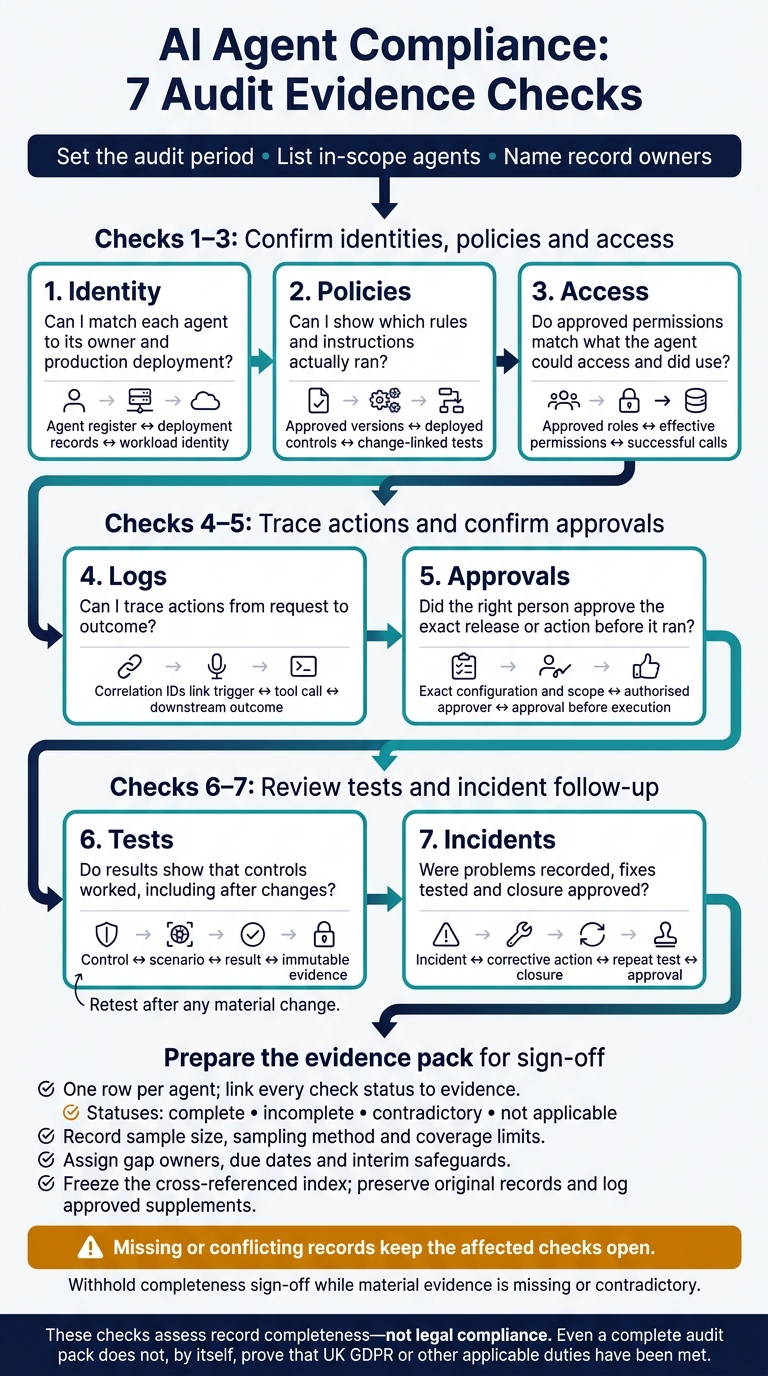 {AI Agent Compliance: 7 Audit Evidence Checks}
:::
Checks 1–3: Confirm identities, policies and access
These checks establish who the agent is, which rules applied to it and what it could access.
Check 1: Match agent identities to production records
Cross-check deployment manifests, identity-provider exports, runtime telemetry and tool inventories using deployment IDs, service-account IDs and repository commits. Include retired agents and unexpected redeployments. Each agent needs its own non-human identity, with an approved purpose, owner, support contact, environment, location, version and lifecycle dates. Record the principal it represents, along with linked models, tools, APIs and orchestration components.[3]
Enter one verification date per row.
| Required field | Authoritative source | Verified on | Owner | Exception status |
|---|---|---|---|---|
| Agent ID, purpose and lifecycle dates | Agent register and approval records | - | Business owner | Flag unregistered or inactive agents |
| Version, environment and location | Deployment manifests and runtime telemetry | - | Platform engineering | Flag unexpected deployments |
| Workload identity and the principal it represents | Identity-provider and cloud IAM exports | - | Security engineering | Flag duplicate, inactive or ownerless identities |
| Owner, support contact and connected components | Agent register, tool inventory and orchestration configuration | - | Service owner | Flag missing owners or endpoints |
Once you’ve confirmed the identity, map policies to that agent record.
Check 2: Match policy versions to running agents
Match each deployment’s control references to what actually ran, not just what was approved. Cover AI governance, security, data protection and acceptable-use policies, as well as prompts, instructions, tool allow-lists, prohibited actions, escalation thresholds, approval rules and stop procedures. Retain each version’s effective date, approver, retirement date and reason for change. Keep superseded controls to show which rules applied throughout the audit period.
Define material changes before testing. A new model, broader access, altered instructions or a changed approval threshold should trigger re-testing. Link each change ticket to its risk assessment, approved control version, deployed control version and test results.
A new version number proves nothing. Re-test affected scenarios, including unauthorised tool use, personal-data exposure, refusal of prohibited actions, escalation failures and emergency stop behaviour.
Use the control set that was both approved and run as the baseline for the access review.
Check 3: Compare approved and actual access
Compare approved roles with effective permissions and observed use across identity, orchestration and downstream systems. Trace inherited roles, delegated authority and service accounts using timestamps and correlation IDs. Check dedicated identities, named owners, resource scopes, data classes, credential issuance, rotation and expiry, privileged approvals and temporary privilege elevation. Document why authorised but unused access is still needed. A denied request does not count as successful access.[4][5]
| Access area | Approved access | Observed access | Business justification and expiry | Exception check |
|---|---|---|---|---|
| Tools and data | Approved roles, operations and resource scopes | Effective grants and successful calls | Approved purpose and expiry | Excessive scope or unexplained use |
| Inherited or delegated rights | Approved delegation chain | Orchestrator and downstream permissions | Named approver and end time | Unapproved inherited privileges |
| Temporary elevation | Approved privilege and duration | Actual grant and removal times | Change reason and expiry | Expired or undocumented elevation |
| Retired identities | Revocation requirements | Disabled credentials and subsequent events | Any approved retention of access | Successful access after retirement |
Retain access reviews, denied requests, revocation records and emergency-disablement test results. Escalate shared human credentials, unrestricted administrator rights, missing rotation evidence and failed disablement tests. Every access exception needs an owner, justification, approver, expiry, compensating control and closure evidence.
Use this access baseline to review action logs and tie each event to the correct identity and permission set.
Checks 4–5: Trace actions and confirm approvals
Check 4: Trace actions from trigger to outcome
Once identity and access are confirmed, trace what each agent actually did. Use correlation IDs to connect each trigger, tool call and outcome. Log the agent ID and version, caller identity, timestamps with time zone, instruction, model and policy versions, tool or API used, inputs, target resource, result, data written or updated, and approval or exception status. A timestamp alone proves neither authority nor completion. Check both against the permission snapshot, approval record and downstream system record.[7][1]
Define a risk-based sample before extracting records. Cover every production agent, high-impact workflow, privileged tool, recent release and unusual outcome across normal, peak and incident periods. For each sample, select individual correlation IDs and independently reconstruct the path across the agent log, identity provider, workflow system, tool or API log, target application and approval record. Record the percentage of sampled actions reconstructed end to end, missing fields, contradictory timestamps, inaccessible records and the median time needed to reproduce each path.
Keep logs searchable by agent ID, user, date, correlation ID, tool, resource and approval or incident reference. Redact unnecessary personal or confidential content, restrict access, and protect log integrity with append-only storage and integrity checks. Create a retention matrix by agent and action type that records the duty, retention period, responsible role and legal-hold process. Carry any mismatches into the release-to-approval check below.
Check 5: Match approvals to releases and changes
Compare each deployed agent with the approval register using a release-to-approval matrix. Match approvals to the exact runtime configuration and action scope - not just the release ticket title. Record the decision, scope, exact configuration or version, authorised approver, decision date, conditions and expiry or review date. Check use-case and risk approvals first, followed by owner, security, privacy/DPIA, access, privilege and oversight approvals. Include model, prompt, policy and workflow changes, along with evidence that temporary exceptions were closed.
Cross-check sampled high-impact actions. Flag missing, expired or mismatched approvals, wrong approvers, insufficient scope, changed configurations, bypassed human gates and undocumented emergency overrides. Where approval is required, verify that it came before execution and covered the exact action, parameters and resources. Do not rely on the agent’s own confirmation flag. The execution layer should validate a separate, integrity-protected approval and block changed or expired requests. Check that human reviewers could reject or override the action, and record their reasons.[6][8][9]
Checks 6–7: Review tests and incident follow-up
Check 6: Link controls to test results
Once approvals are matched, show that the controls worked during testing and live use. Build a control-to-test register covering pre-deployment testing and live monitoring. Approval alone does not prove a control worked.
For each control, record its objective, test type, owner, version, configuration, environment, scenario ID, date, expected and actual results, limitations, pass/fail status, residual risk and release decision. Cover performance, security, privacy, access-control, unsafe-tool-use, resilience and regression tests. Include tests of refusal, escalation, human monitoring, interpretation, override and safe stop. NIST’s AI Risk Management Framework supports testing before deployment and regularly during use - not just at launch.[2][10][12]
Map every control to at least one test. Mark each mapping as tested, partially tested, untested, failed or not applicable, and justify any “not applicable” decision. Link to immutable outputs, logs, screenshots or reports, rather than summary claims. Retest after any material change. A failed mandatory control must block release until a repeat test confirms the fix. Other gaps require an explicit release decision and risk acceptance.[12][13]
| Control | Test | Expected result | Actual result | Evidence location | Residual risk |
|---|---|---|---|---|---|
| Unsafe tool-use prevention | Attempt a prohibited tool action | Request blocked without downstream change | Refusal and downstream state unchanged | Test output and tool trace | Record tools or scenarios not covered |
| Human oversight | Test escalation, reviewer interpretation and override | Reviewer receives enough context to intervene | Reviewer decision and intervention outcome recorded | Scenario record and review log | Record coverage and availability limits |
| Safe stop | Disable the agent during execution | Further actions stop safely | Tool calls stop and the run stops safely | Disablement log and downstream checks | Record incomplete or irreversible actions |
| Regression | Repeat affected scenarios after a material change | Critical controls still meet agreed thresholds | Record failures and release disposition | Change-linked regression report | Record remaining failures and restrictions |
Use the same IDs and time windows when reconciling incidents against these test records.
Check 7: Link incidents to corrective actions
Link each incident to the agent, version and action log. Give every incident and near miss its own ID. Record event and detection timestamps in UK format, the agent and environment, trigger, actions taken, impact, affected parties and detection source. Keep the response timeline, containment measures, human intervention, disablement or rollback, root cause, corrective and preventive actions, notification or escalation decisions, closure approval and residual risk. Review blocked harmful actions even when no harm occurred.[2][10]
Reconcile the incident register against action logs, alerts, tickets, complaints and override or rollback records for the audit period. Match records using stable identifiers and time windows. Investigate exceptions: alerts without incident IDs, incidents without agent or environment links, tickets closed without corrective action, repeated near misses with the same trigger, overdue actions and cases marked closed without approval.
Keep a reconciliation report showing each source checked, record count, matches and exceptions, explanation, owner and resolution date. A “no incidents” conclusion needs supporting evidence: reporting channels were available, source systems were checked and the search method could have found relevant events.[2][10]
Give every corrective action an owner, due date and measurable effectiveness criterion. Before approving closure, retain implementation evidence, a repeat test and post-change monitoring.
Examples include a permission change verified by an access review, a prompt or policy fix verified through regression tests, a tool restriction verified by blocked-call traces, a monitoring rule verified by a controlled alert, or staff training verified through completion records and scenario testing.
If a fix fails to meet its criterion, reopen the incident or record a new linked issue.[2][10]
Treat unresolved, overdue or recurring cases as evidence gaps, not general risk notes. Classify each gap by severity, affected control, audit impact, owner, due date, interim safeguard and closure status. Escalate critical cases where the agent can continue causing harm, bypass controls or operate without reliable human oversight. Possible actions include suspending the agent, revoking permissions, disabling a tool, increasing human review or restricting the environment. The evidence pack should document both the failure and the organisation’s response.[2][11]
Conclusion: Prepare the evidence pack for sign-off
Run the final completeness check
After checks 1–7, export the authoritative list of in-scope agents, evidence owners and locations. Reconcile identity, deployment, policy, access, actions, tests and incidents. A folder structure alone does not prove completeness.
Use the table below to record the final sign-off view, with one row per agent. Mark each check complete, incomplete, contradictory or not applicable. Link every status to evidence and explain any gaps or exclusions.
Record the sample size, sampling method and coverage limits. Check retention, timestamp consistency, version history, tamper protection and reviewer access.
| Agent ID | Identity | Policy versions | Access rights | Action logs | Approvals | Test results | Incident records | Evidence owner | Verification date | Gap severity | Remediation status |
|---|---|---|---|---|---|---|---|---|---|---|---|
| Enter actual ID | Status + link | Status + link | Status + link | Status + link | Status + link | Status + link | Status + link | Named owner | DD/MM/YYYY | Assessed severity | Action, owner and due date |
Record exceptions and freeze the evidence index
Report material gaps to senior management. Include their impact, interim safeguards, named owners and remediation dates. Obtain explicit senior sign-off only for unresolved exceptions. This sign-off is not corrective action or a waiver of statutory duties. Keep affected checks open and withhold completeness sign-off while material evidence is missing or contradictory.[2][14]
Freeze the cross-referenced index with a distinct pack ID, preparation date, version, owner and sign-off status. Preserve the signed snapshot and original records, restrict write access, and log later changes as approved supplements. Keep the status table and exception register alongside the index.
FAQs
How can I automate evidence collection across all seven checks?
Build structured logging and event-driven orchestration into your DevOps workflows. Use durable workflows to retain state during pauses, and record evidence as machine-readable JSON with persistent correlation IDs.
Keep logs in tamper-evident, write-once-read-many (WORM) storage, and check their integrity with cryptographic hash chains. Run automated CI tests, including policy-as-code validation, to check that records are complete and flag non-compliance before release.
Give independent auditors read-only dashboards so they can review the evidence without changing it.
How do I choose a representative audit sample?
Map your agent’s actions to risk tiers based on financial impact, data sensitivity and regulatory exposure. Prioritise high-risk actions. Before changing approval thresholds, review a sample of previously approved actions for signs of rushed decisions or consistently low rejection rates.
For performance or telemetry checks, document the minimum sample sizes needed to confirm flow, timing and health. Record your sampling rules and explain your retention logic so auditors can see what you checked and what you kept.
How can I make audit logs useful without exposing personal data?
Redact and minimise data before logs leave the application. Replace sensitive information with stable identifiers or hashes, and remove secrets, tokens and personal data from prompts, inputs and outputs.
Store required metadata - agent IDs, timestamps, policy versions and task outcomes - in tamper-resistant storage with access controls. Use correlation IDs to trace workflows without retaining sensitive payloads.
Align these controls with UK GDPR and the Data Protection Act 2018. Use local clusters to meet data residency requirements.