
I treat agent monitoring as ready only when a responder can reconstruct a test run from stored records. Before release, I check the run from two entry points, test failure paths and confirm that alerts reach the right people. A working dashboard alone is not enough.
My release checks cover five areas:
- Baseline: Linked identifiers, versions, named owners, tested access and retention rules.
- Logs: Structured records of requests, decisions, tool calls, errors and costs - with secrets removed and no private chain-of-thought.
- Traces: Connected steps across services, including retries and background work, with clear sampling limits.
- Alerts: Tested thresholds for failures, delays, spending, security and missing telemetry.
- Incident response: Protected records that let responders investigate, contain and safely reconstruct what happened.
My rule is simple: a failed must-have check blocks release. I require a fix and a repeat test - not just a plan to address it later.
::: @figure 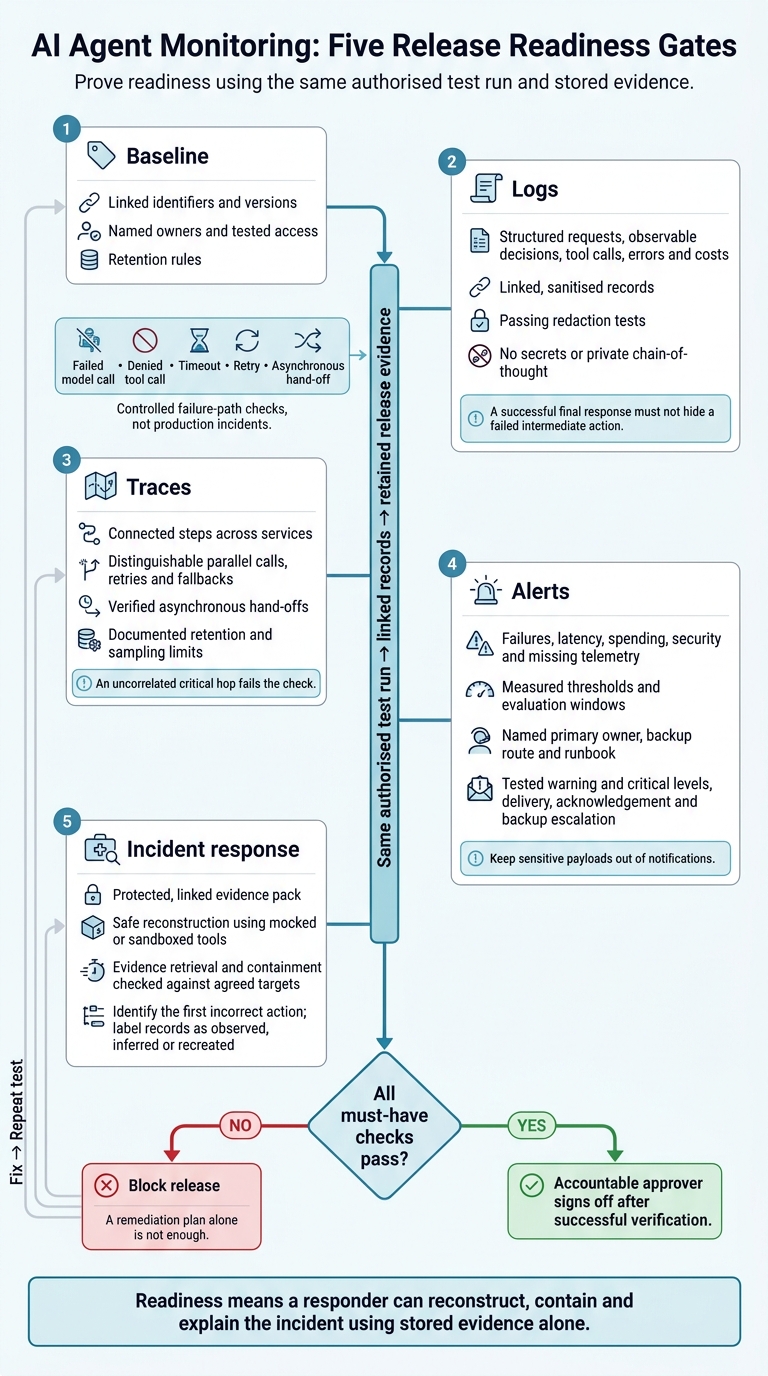 {AI Agent Monitoring: Five Release Readiness Gates}
:::
{AI Agent Monitoring: Five Release Readiness Gates}
:::
2. Check structured logs and redaction
Log requests and observable decisions
Start with fields that make each run searchable, auditable and clear on costs.
Request records: Use JSON with a validated schema. Record the UTC timestamp, request ID, session ID, run or trace ID, tenant or service identifier, pseudonymous user identifier, agent and workflow version, prompt and policy version, model/provider, deployment environment, configuration version, token counts, estimated and reported cost, and outcome. Identify the requester separately from the service account. Keep a linked, sanitised sample for review.
Decision records: Log routing, approvals, refusals, escalations and policy outcomes, along with reason codes and evidence references. Include approval references and expiry where relevant. For retrieval, record redacted queries, document IDs, source names and ranking metadata - not whole documents. Do not log private chain-of-thought reasoning. Record human intervention, challenges and decision changes.
Log tool calls, errors and security events
Tool records: Record the tool name and version, call order, intended operation, filtered arguments, permission scope, authorisation result, start and end times, latency and result status. Store output summaries or protected references rather than full results.
Test a denied operation. The evidence must show the initiating request, permissions, retries or fallbacks, tool response and final outcome. Confirm that the protected system rejected the action.
Error and security records: Log exception classes, validation failures, rate limits, timeouts, retry counts and fallback paths. Keep authentication failures, policy violations, safety filter outcomes and unusual access separately searchable, with severity and remediation status. Check that expected records exist and link correctly. A successful final response must not hide a failed intermediate action.
Test redaction before release
- [ ] Redaction: Block credentials, tokens, cookies and private keys before logs leave the application. Mask or tokenise personal and confidential data, and keep re-identification keys under separate controls.
- [ ] Redaction tests: Test nested objects, arrays, attachments, extracted text, streamed outputs, tool results, stack traces and fallback logs. Include encoded and malformed payloads. Fail the build if synthetic secrets or canaries reach emitted logs.
- [ ] Prompt/completion capture: Allow capture only for a documented purpose. Require encryption, restricted access, access auditing and defined retention and deletion under UK data-protection law.
- [ ] Release evidence: Keep the log schema, data dictionary, field classification matrix, redaction rules, test fixtures and test results as release evidence. Rerun tests after any schema, tool, model or error-handler change.
Once logs are clean and linked, check the same run in end-to-end traces.
Deep Dive: How to Monitor AI Agents in Production
3. Verify end-to-end traces
Use the same authorised test run from the log check to confirm that traces connect across services.
Check spans and cross-service links
- [ ] Check the span tree: Require a parent request or run span, with child spans for orchestration, inference, retrieval, memory, policy checks, tools and downstream services. Compare the expected branches with the recorded execution. Follow the agreed span naming and attribute scheme. Record timings, status, error details, attempts, model/provider details and token usage.[3][8]
- [ ] Preserve relationships: Make parallel calls, retries and fallbacks distinguishable. Use linked records to verify tool order, filtered arguments, authorisation decisions and result metadata. Connect traces to logs, tickets and evidence artefacts.
- [ ] Test every boundary: Check context injection and extraction across HTTP, queues and workers. Where work belongs to another trace, use explicit span links and record correlation identifiers and the causal relationship. Test fan-out, fan-in, retries and dead-letter queues, including asynchronous paths.[4][6][7]
- [ ] Prove end-to-end correlation: Send an authorised synthetic request containing non-sensitive data through the complete workflow. Check every expected hop, parent or link, timestamp, outcome and evidence reference. Repeat with a failed model call, denied tool call, timeout, retry and asynchronous hand-off. Keep trace IDs and exported trace views or screenshots as release evidence. An uncorrelated critical hop fails the check.
Set trace retention and sampling rules
Once you can trace the path, define what to keep, what to sample and when to preserve full payloads for incident review and latency/cost analysis.
Coverage, payload recording and sampling are separate decisions. Tracing every run does not mean storing every prompt or tool payload. Minimal-metadata traces can cover every execution or selected runs.
| Trace approach | Investigation use | Storage and privacy | Suitable use |
|---|---|---|---|
| Complete | Best for high-severity incidents and authorised test runs | Highest storage, processing and potential exposure of prompts or tool data | Short retention, restricted access and approved diagnostic environments |
| Sampled | Useful for normal performance, latency and cost analysis | Lower volume, but sampling can miss rare failures | Routine production traffic with documented sampling rules and escalation paths |
| Minimal metadata | Confirms flow, timing and health with limited content | Lowest content exposure and storage | Privacy-sensitive, high-volume paths or systems where payloads remain elsewhere |
- [ ] Document collection and retention: Specify the default sampling rate, which services inherit the parent decision, retention triggers, retention period, storage region, access roles and deletion process. State whether each selection rule applies before collection, during processing or after export.[5]
- [ ] Test high-severity retention: Trigger controlled failures, policy violations, security alerts and high-cost runs. Check that required spans and links survive collection, sampling and export, with sensitive fields protected. Keep authorised test traces, exported trace views or screenshots, and evidence of customer-impacting failures for the agreed investigation period.
- [ ] Record the limits: Sampling cannot recover dropped spans. Document these gaps and provide a separate evidence path where the risk calls for one.
4. Set and test alert thresholds
Use the traced test run from the previous section to set thresholds based on actual failures, latency and cost patterns.
Monitor failures, latency and costs
Track failures and delays. Measure failed runs and failed tool calls separately, broken down by agent, model, tool and deployment. Record counts and totals. Monitor p50, p95 and p99 latency for runs and individual spans, alongside timeouts, retries, loops, unusually long runs, tool-call surges and fallback activation. Base critical alerts on user impact or hard limits - not every internal error.[9][12]
Track cost and usage. Aggregate tokens and costs per run, user, team and agent. Keep estimates separate from reconciled billing, and retain model rates, pricing-card versions, tool charges and currency-conversion assumptions. Set thresholds using measured workload behaviour, with separate limits for interactive and batch work.
Measure actual median, p95 and maximum costs before setting limits. Pair cost-per-run alerts with total spending and spend acceleration: higher costs per run and higher traffic call for different responses.
Monitor security, quality and telemetry gaps
Check security and quality. Monitor authentication failures, unauthorised tool or data access, policy violations and high-risk actions that succeed. Treat prompt-injection and jailbreak indicators as unconfirmed signals, not proof of compromise. Where reliable evaluation data exists, track task success, unsafe responses and output validity. Record minimum sample sizes and require human review when scores are uncertain.[10][11][13]
Check the monitoring itself. Compare exporter errors, ingestion delays, dropped records and trace-loss rates against expected collection and sampling settings. Compare application run counts with received telemetry, and use an independent heartbeat where possible. Missing telemetry should trigger investigation, not a healthy status. Check whether any gaps would prevent you from diagnosing an agent run.[14]
For every alert, record its severity, owner, backup route, runbook and containment action. Include the affected deployment, threshold, evaluation window, run or trace IDs, metric graph and links to redacted logs. Keep sensitive payloads out of notifications.[15][16]
Choose an alert threshold method
Match the threshold method to the signal and the response it needs.
| Method | Suitable signals | Weaknesses |
|---|---|---|
| Static threshold | Predictable limits: maximum run duration, hard spending caps, prohibited actions | Becomes stale as workloads change; count thresholds can create low-volume noise |
| Baseline deviation | Latency, cost per run, token use and fallback rates | Needs representative history; changing or low-volume workloads weaken the baseline |
| Rate of change | Sudden cost acceleration, retry storms and tool-call surges | Small starting values exaggerate changes; legitimate scaling can trigger alerts |
Use warning levels for investigation and critical levels for immediate action. For user-facing reliability, consider multi-window SLO error-budget burn rates. These measure budget consumption - not simply how fast a metric changes.[17]
Keep one worksheet per alert. Do not mark it ready until every field is complete.
| Worksheet fields | What to record |
|---|---|
| Metric and scope | Exact query, units, agent, model, tool, deployment and environment |
| Baseline and thresholds | Measured baseline period; warning and critical levels; estimated or reconciled cost status |
| Evaluation window and data rules | Window, aggregation, minimum event count and data-quality limits |
| Ownership and action | Named primary and backup, severity, channel, runbook, containment action and escalation deadline |
| Review and evidence | False-positive and missed-incident review dates; triggered alert, delivery confirmation and response records |
Test both alert levels. Use controlled failures, synthetic runs or replayed historical incidents. Confirm firing time, delivery, usable evidence links and acknowledgement. Test backup escalation when the primary responder does not acknowledge the alert. Retain investigation, mitigation and closure times.
Review after deployments. Check false positives, missed incidents and response times. Reassess thresholds after model or pricing changes and workload shifts. Record each change and the next review date.[11][13]
5. Test incident response and release readiness
After testing alerts, compile the evidence pack from the same run.
Build the incident evidence pack
- [ ] Preserve the investigative chain. Link the incident to its request, session, user, tenant, trace and span IDs. Record key versions, decisions, tool actions, errors, costs and downstream impact.[10][18][19]
- [ ] Secure the supporting evidence. Include the triggering alert record; relevant deployment, configuration and access changes; cost and resource impact; and a timeline of containment, remediation, communications and approvals. Store the pack with least-privilege access, audit logging, retention rules and tamper-evident hashes. Check that authorised responders can retrieve it within the required response time.[10][20]
Use this pack to replay the incident without touching live systems.
Apply the release pass/fail checks
- [ ] Reconstruct a simulated incident safely. Work from retained records using mocked or sandboxed tools. Build a chronological timeline and find the first incorrect action - don't assume the final error caused the incident. Separate model, prompt, tool and infrastructure failures only when the evidence supports that distinction. Label records as observed, inferred or recreated, and note missing evidence and uncertainty. Assess sensitive-data exposure, affected requests and financial impact without filling gaps with manually recreated records.[18][19]
- [ ] Block release if a must-have control fails. Require linked identifiers, cross-service traces, passing redaction tests, tested alerts, named owners, escalation routes, sufficient retention and safe reconstruction. Check evidence-retrieval and containment times against agreed targets. For each gap, record the risk, temporary mitigation, remediation owner, due date and verification date. The accountable approver signs off only after a repeat test confirms the fix.[10][19]
Conclusion: close monitoring gaps
Hokstad Consulting can help turn readiness findings into implementation priorities. This is not monitoring certification. Readiness means a responder can reconstruct, contain and explain the incident using stored evidence alone, backed by a successful drill and safe response.
FAQs
How can I trace agent decisions without storing sensitive data?
Redact data before storing logs or traces, and keep only what you need. Replace raw personal data with stable identifiers or hashes. Remove secrets and personally identifiable information from prompts, inputs and outputs.
Store only the references and metadata you need - agent ID, timestamp, policy version and task outcomes - in tamper-resistant, access-controlled audit logs. Use correlation IDs and span links to trace complex workflows across services without storing sensitive payloads.
How do I set alert thresholds for a new agent?
Set thresholds around business risk and legal duties, not model confidence. For medium-risk tasks, track latency (e.g. p95 above 500 ms), error rates (e.g. above 1%) and budget usage (e.g. 70% and 90% of monthly limits in £).
Trigger alerts for unusual tool use, repeated denials, privilege changes and abnormal data access. Review thresholds after incidents, model updates or tool changes so they reflect current business requirements and operating tolerances.
What evidence do I need if a failed run was not sampled?
Reconstruct the incident using durable records stored outside the agent’s control [1][2]. Record the run ID, stop reason, timestamp, best verified checkpoint, unmet acceptance criteria, total resource usage and recovery history [1].
Attach sanitised diagnostics and receipts for external actions so investigators have the evidence they need [1].