
Move the agent’s configuration - not its credentials or access rights. Export reviewed instructions, workflows and secret names such as MODEL_API_KEY, then approve identity, permissions and secret access separately at the destination.
A safe move means checking more than whether API keys were removed:
- Inspect the whole package: scan and review prompts, tools, URLs, logs and nested files.
- Set destination access: replace old connection bindings, use separate runtime identities and limit permissions for each environment.
- Test before activation: check missing or revoked credentials, rotation, safe failure and rollback.
- Keep a clear audit trail: record approvals and access outcomes, never secret values.
A clean secret scan is not proof of safety. Access checks and runtime tests must pass before the agent goes live.
::: @figure 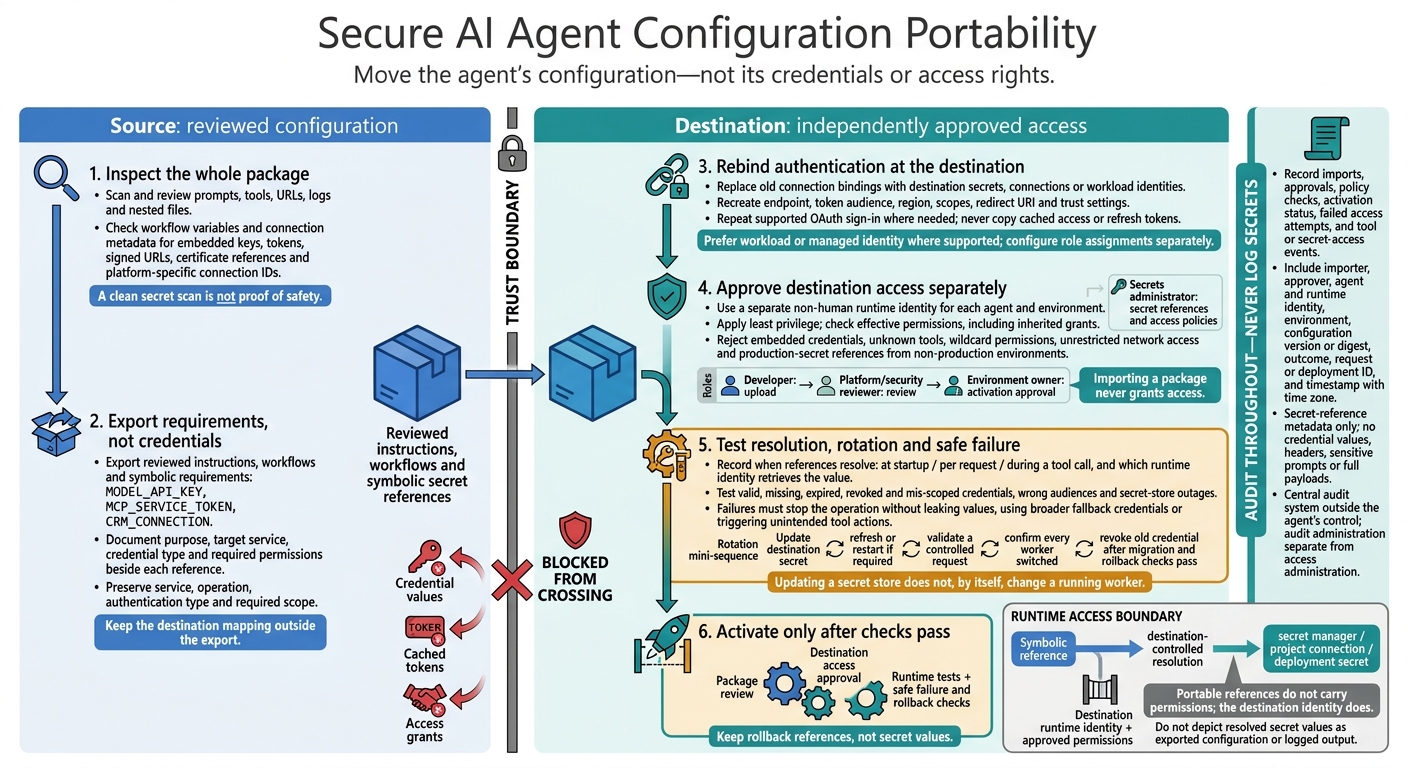 {Secure AI Agent Configuration Portability}
:::
How secret references resolve at runtime
After export, the destination still controls when and how each reference resolves through a secret manager, project connection or deployment secret. Record when resolution happens - at startup, per request or during a tool call - and which runtime identity retrieves the value. A valid reference does not guarantee retrieval will succeed. Portable references do not carry permissions; the destination identity does.
Secret names without secret values
Names such as
MODEL_API_KEYandMCP_SERVICE_TOKENmark requirements, not credentials; record each name’s purpose, target service, credential type and permissions beside it.
Keep resolved values out of logs, dumps and shell traces.
Microsoft Foundry documents
valueRef.secretReffor a Key Vault-backed credential in hosted agents; the selected project identity needs the Key Vault Secrets User role at the relevant vault or secret scope. Treat this as a Foundry-specific pattern, not a universal schema, and check preview availability before use.[3]
If credentials are exposed as environment variables, restrict access to process inspection and crash dumps. Disable shell tracing, and keep environment dumps and authentication headers out of logs. Resolved values remain secrets.[1][2]
This runtime mapping sets the boundaries for access, rotation and revocation. Keep scope, identity and rotation separate.
Credential scope and rotation
Use separate credentials for development, test, production and unrelated tools. Limit each credential to the actions and resources its tool needs, and document those permissions beside the reference. Where supported, use a workload or managed identity instead of a stored key. Keep the reference stable when replacing the credential behind it, so rotation does not require another configuration export.
Resolution and refresh are separate behaviours. Before rotation, check whether running workers cache the value and whether they need a restart, connection refresh or new deployment revision. Where supported, let old and new credentials overlap briefly. Update the destination secret, validate a controlled request under the runtime identity, then revoke the old credential. Confirm that every worker has switched to the replacement.[4] Updating a secret store does not, by itself, change a running worker.
Who approves imports and destination access
Keep upload, review, activation and secret administration separate. Importing a package never grants access. Portable references remain portable, but the destination controls access approval. A developer may upload a package, a platform or security reviewer checks it, the environment owner approves activation, and a secrets administrator manages secret references and access policies.[10]
This makes the runtime identity - not the export package - the access control point.
Import permissions and runtime identities
Give each agent its own non-human runtime identity rather than using the importer’s user session. Before activation, check the agent’s instructions, tools, network paths, callbacks, data access and requested secret references against destination policy.
Reject embedded credentials, unknown tools, wildcard permissions, unrestricted network access and production-secret references from non-production environments. Enforce approved operations through tool permissions and network controls. Configuration instructions alone do not form an access boundary. Require independent review for sensitive or high-risk access.[5][6][7]
Environment boundaries and approval roles
Keep the same division of approval roles in every environment. The same imported configuration may resolve differently in development, staging and production because runtime identities and approval paths differ.
Governance example
Environment Configuration owner Secret scope Runtime identity Approval responsibility Development Product or engineering team Development-only secrets; no production access Per-agent development identity Team lead signs off on security checks Staging Platform engineering Staging secrets and approved test data only Separate staging identity Platform owner and security reviewer approve Production Production service owner Production secrets limited to required services Dedicated production identity with minimal permissions Service owner approves activation; security or risk owner reviews high-risk access
Before activation, check effective permissions, including inherited grants and which scope takes precedence. A broader organisation- or project-level grant must not silently override an environment restriction. Test that non-production identities cannot retrieve production secrets, even when reference names match. Also verify repository access against documented destination controls.[6][9]
Audit logs without secrets
Record imports, approvals, policy checks, activation status, failed access attempts, and tool or secret-access events. Include the importing user or service, approver, agent and runtime identity, environment, configuration version or digest, outcome, request or deployment ID, and timestamp with its time zone, such as 2026-04-15T14:32:10Z.
Log secret-reference metadata only. Never log credential values, headers, sensitive prompts or full payloads.[5][8][10] These records should show which identity received access, not what the secret contained.
Send records to a central system outside the agent’s control. Use dedicated audit roles to restrict who can read, alter or delete them, and set retention periods to meet legal and operational requirements. Name an incident owner to investigate unexpected access, suspend the runtime identity and revoke affected credentials. Keep audit administration separate from access administration so one person cannot both grant access and conceal it.[10][11][12][13]
How to replace vendor-specific authentication
Once runtime resolution is defined, replace source-specific authentication at the destination. Preserve access requirements, not the old credential. Export the service, operation, authentication type and required scope, then bind them to destination secrets, connections or workload identities.
Replace credentials and connection bindings
Check configuration, workflow variables and connection metadata for embedded keys, tokens, signed URLs, certificate references and platform-specific connection IDs. Replace these with symbolic requirements such as MODEL_API_KEY, MCP_SERVICE_TOKEN or CRM_CONNECTION. Keep the destination mapping outside the export.
Recreate the endpoint, token audience, region, scopes, redirect URI and trust settings. Repeat the supported OAuth sign-in where needed; never copy cached access or refresh tokens. If the destination supports managed identities, use them and configure the required role assignments separately.[14][15]
After rewriting the mapping, test how each path handles failure.
Test imports, rotation and safe failure
Test in isolation using least-privileged credentials. Cover valid, missing, expired, revoked and mis-scoped credentials, as well as wrong audiences and secret-store outages. Failures must stop the operation without exposing values, using broader fallback credentials or triggering unintended tool actions. For MCP, validate the token audience and use separately authorised upstream credentials. Never forward the client token directly.[16][17][18]
Use a migration checklist to verify destination mappings, translated settings and schema versions. Track substitution records and rollback checks too.
Rotate the destination credential, check whether the runtime reloads it or needs a restart, and record the propagation time. Retain rollback references, not secret values. Revoke obsolete credentials only after migration and rollback checks pass, and keep these records with the destination approval pack.
Conclusion: export references, approve access separately
Export only reviewed behaviour and symbolic secret references. Keep approval and access as separate controls at the destination. Inspect the full package, bind authentication to destination controls, and get sign-off from both the configuration owner and the destination access owner.
Check that access follows least privilege, use separate runtime identities for each environment, and rotate credentials independently. Record who approved access, the runtime identity and the access outcome - never secret values. Activate only after tests confirm safe failure and rollback.
FAQs
What if my exported configuration contains a leaked secret?
Rotate the affected credentials immediately to neutralise the risk. Then block the compromised accounts and check access logs for any activity carried out without permission.
To stop this happening again, update your pipeline configurations so secrets are never stored in plain text. Use dedicated secrets management tools to inject credentials at runtime. Exported manifests should contain only secure references, not sensitive values.
How can I detect hidden destination permissions?
Test access controls in a sandbox, rather than relying on model instructions. Map network and resource boundaries, including permitted endpoints, DNS, protocols and ports. Then attempt connections to destinations that aren’t approved. Check that infrastructure controls block them and that logs record each denied request.
Audit the tool allow-list and resource-level policies to confirm that only explicitly permitted destinations are accessible. Model-based refusals alone don’t secure agentic AI.
What if the destination uses a different authentication method?
Keep credentials out of the exported package. Move sensitive settings into environment-specific configuration or use references to a secure secrets store.
During deployment, replace vendor-specific authentication settings with those required by the destination. Supply credentials through the runtime environment or use workload identity. Never store vendor-specific authentication settings in source code or configuration files. Where needed, use a managed secrets provider to handle differences between environments.