
I would not deploy an AI agent until 100% of mandatory security tests pass and no critical findings remain unresolved. That means testing what it can access, what it can change and whether you can stop it - not relying on model instructions.
For UK cloud security teams, I would build training around these checks:
- Define the scope: map threats, data flows and trust boundaries; approve permitted actions and assign named owners.
- Limit access: separate agent, user and tool identities; test permission denials, cross-tenant blocking and credential revocation.
- Contain tools: keep secrets outside model context; enforce network, filesystem and resource limits; test shutdown during active tasks.
- Require human approval: bind approval to the exact high-impact action and block changed requests, expired approvals and reuse.
- Prepare for incidents: protect logs, apply UK privacy rules and practise detection, suspension and reconstruction.
My release rule is simple: test the controls, not the agent’s promises. Keep the test records and retest after material changes to models, tools or permissions.
::: @figure 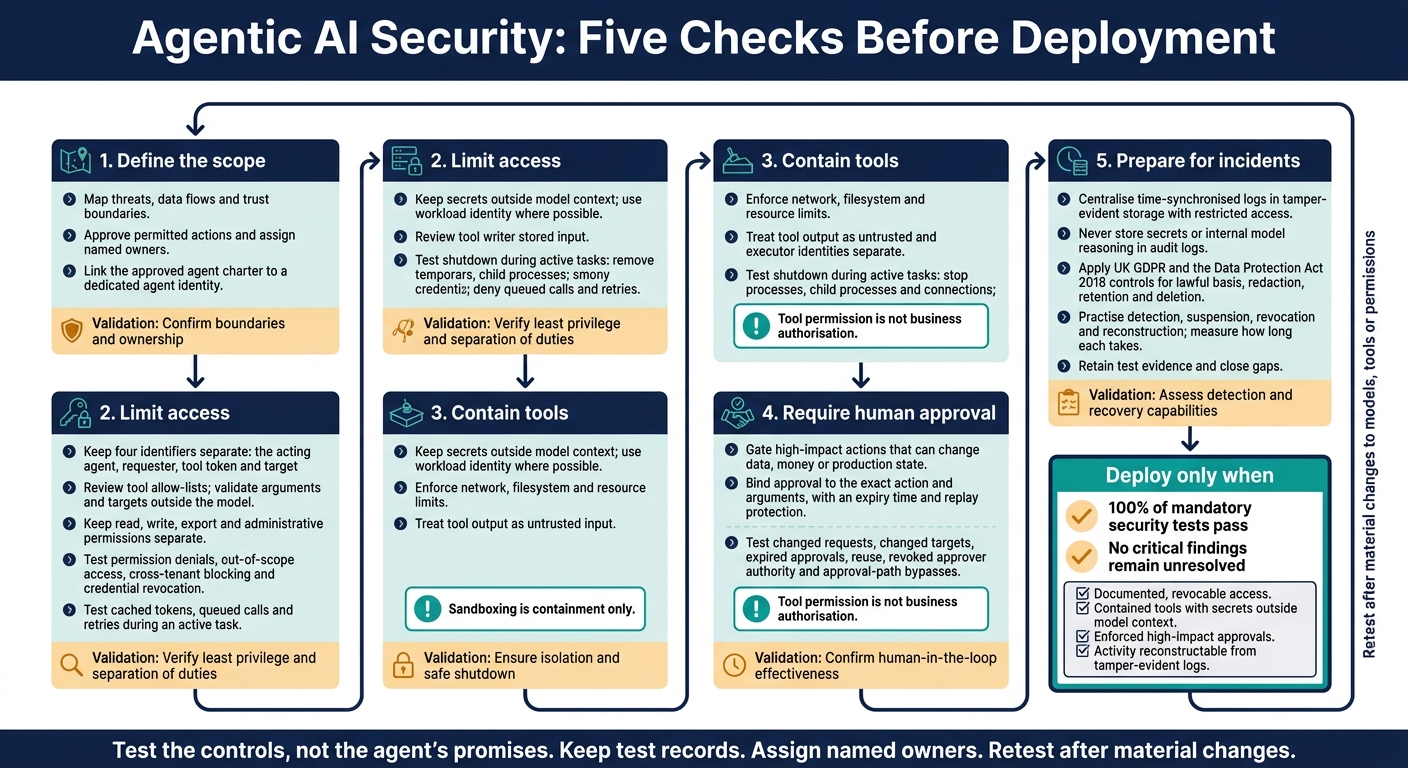 {Agentic AI Security: Five Checks Before Deployment}
:::
{Agentic AI Security: Five Checks Before Deployment}
:::
Agentic AI Security Certification: Certified Agentic AI Security Expert (CAASE)
Control Tool Access and Agent Identities
Once scope is approved, tie it to a dedicated agent identity and a reviewed tool allow-list. Then test least privilege and access revocation.
Separate Agent, User and Tool Identities
Give each production agent its own non-human identity. Never use a developer’s account, a shared service account or the requester’s session. Link the approved agent charter to that identity, specifying a named owner, permitted tools, token lifetime and revocation path. Keep four identifiers separate in every invocation: the acting agent, requester, tool token and target resource.[6][7]
Check effective permissions across the orchestrator, connectors and downstream services, including inherited roles. Delegated access must stay within both the agent’s scope and the requester’s authority. Passing work to another agent must not expand either party’s authority. Enforce these limits at the tool gateway and downstream service - not through model instructions.[4][9]
Approve Tools and Limit Permissions
Maintain a reviewed tool allow-list. For each permitted operation, document its input schema, accessible resources and revocation method. Validate tool arguments and targets outside the model.
Keep read, write, export and administrative permissions separate. Where supported, issue short-lived, task-scoped tokens. A model user_confirmed flag is not proof of approval. The enforcement component must verify approval for the exact invocation and prevent its reuse.[3][6][8]
| Control boundary | Security objective | Implementation method | Validation test |
|---|---|---|---|
| Identity | Attribute actions correctly | Dedicated agent identity; separate requester and tool claims | Reject missing or mismatched identity claims |
| Tool | Block unreviewed capabilities | Tool and version allow-list; schema validation | Deny an unknown tool, altered schema or unapproved endpoint |
| Resource | Restrict accessible assets | Resource-level policies and scope checks | Deny access to an unapproved resource |
| Tenant | Prevent cross-tenant access | Tenant-bound credentials and gateway checks | Reject a valid request carrying another tenant ID |
| Data | Control access and movement | Classification-aware policies; approved export destinations | Block restricted data sent to an unauthorised destination |
| Operation | Separate read-only from state-changing actions | Task-specific roles and approval gates | Deny writes, exports and administration with a read-only token |
Test Least Privilege and Access Revocation
Least privilege only works if access fails cleanly during an active task.
In the training environment, replace management access with read-only access to a defined resource group. Remove create, update, delete, networking, IAM and policy-management permissions. Check that permitted reads succeed, while modifications, out-of-scope reads and role-assignment requests fail.[3]
Test suspension, role removal and credential revocation separately during an active task. Try cached tokens, queued calls and retries, and measure how long access remains usable. Emergency controls must block new execution, cancel queued calls and stop replacement credentials being issued. Record what happens to actions already running.
Retain policy versions, token identifiers - not token values - gateway decision logs, downstream authorisation logs, denied-call tests, revocation results and timestamped test results. These records provide evidence that effective access matches the approved scope.[5][6]
Protect Secrets and Isolate Tool Execution
After identity and least privilege, put runtime controls in place: secrets handling, sandboxing and shutdown.
Keep Secrets Out of Prompts and Logs
Use workload identity where possible so tools can authenticate without stored keys. If credentials are unavoidable, fetch them at runtime from an approved secrets store. Inject them only into the trusted runtime - never into prompts, source code, project files, or model inputs and outputs.
Scope credentials to one tool or task, give them short lifetimes and rotate them where supported. The model must not be able to read the process environment or secret files.
Pass secret references, not secret values. Prevent tools from echoing authentication headers, and redact sensitive fields before outputs, errors and traces reach the model or logs. Log secret access separately and revoke credentials when an integration is retired.
Test both direct disclosure requests and encoded leakage. Masking a recognisable key alone is not enough.
Restrict Networks, Filesystems and Resources
Record each tool’s permitted destinations, working directories and resource limits in its deployment manifest. Keep low-trust retrieval and code-execution tools separate from tools that handle production data. Use different workloads, identities and storage, and treat all tool output as untrusted input.
Sandboxing is containment only.
Use this table to test each control boundary.
| Control method | Risk reduced | Required configuration | Failure condition |
|---|---|---|---|
| Secrets isolation | Credential theft and disclosure | Workload identity or short-lived vault-issued credentials; no secrets in prompts, files or model inputs; redaction before logging | A recoverable secret reaches model context, output or logs |
| Network segmentation | Exfiltration and lateral movement | Default-deny ingress and egress; approved endpoints, DNS, ports and protocols; block unnecessary metadata and internal access | An unapproved destination is reachable |
| Workload isolation | Host access and cross-task compromise | Ephemeral runtime; read-only base filesystem; permitted workspace only; no host sockets or sensitive mounts | A task accesses the host or another workload |
| Resource limits | Runaway execution and excessive spend | Hard CPU, memory, storage, runtime, process, output-size and concurrency quotas | A limit is exceeded without enforcement and a recorded event |
| Policy lock-down | Privilege escalation and control bypass | Separate administration identity; immutable security configuration; restrict shell, package and operating-system access; deny execution when required policy checks are unavailable | A tool changes credentials, IAM, network or sandbox controls, or executes without required policy checks |
Test Sandbox Limits and Task Termination
Deploy a locked-down tool in the training environment. Try unapproved outbound connections, metadata access, filesystem traversal, access to protected directories, reading environment variables or credential files, and package installation. Also test breaches of CPU, memory, storage, concurrency and timeout limits, including attempts driven by manipulated instructions and hostile tool responses.
Confirm that infrastructure controls - not model refusal - stop each attempt. Record the task, enforcement layer and enforcement decision without exposing secrets.
Activate a kill switch during a live task. Check that the process, child processes and connections stop, temporary files are removed, and credentials are revoked. Verify that queued calls and retries are denied.
Make termination and new-call blocking mandatory deployment checks after any tool, identity, network or infrastructure change.
Enforce Approvals and Log Agent Activity
Require Approval for High-Impact Actions
Once scope, identity and sandboxing are in place, gate only actions that can change data, money or production state. Tool permission is not business authorisation. Enforce approvals outside the model, above tool permissions. Check policy before sensitive calls, require human approval based on risk and recheck current authorisation when the action executes.
Cover external communications, production changes, sensitive-data exports, deletion, permission grants, financial commitments and spending. Show exactly what needs approval: the action, target, scope, arguments, data classification, expected effect, reversibility and estimated cost. Replace generic tool calls with explicit approval records.
Keep requester, agent, approver and executor identities separate. Bind each approval to the exact action and arguments in an integrity-protected record, with an expiry time and replay protection. Where needed, grant narrowly scoped, time-limited elevation.
Test altered arguments, changed targets, replay attempts, revoked approver authority, approval-path bypasses and emergency suspension. Each test should block execution, including queued actions.
Record Decisions and Practise Incident Response
Every approved action needs an audit trail that teams can use to reconstruct who approved what, when and why. Record the agent identity and version, requester, tool/API, scope, target, data classification, action, policy version, decision, approver, timestamp, result, errors, downstream state changes and correlation ID. Include changes to policies, credentials and configuration.
Centralise time-synchronised logs in tamper-evident storage with restricted access. Keep only necessary, access-controlled references to prompts, inputs and outputs. Never store secrets or internal model reasoning in audit logs.
Set redaction, lawful basis, retention and deletion controls appropriate to UK GDPR and the Data Protection Act 2018. Set alerts for unusual tool use, repeated denials, privilege changes, unexpected data access, abnormal volume and attempts to bypass approval.
Practise reconstructing incidents from logs and alerts. Measure how long it takes to detect, suspend, revoke and reconstruct. Retain evidence from these exercises and close any gaps.
Check Readiness for Production
Require four conditions before production: documented, revocable access; contained tools with secrets outside model context; enforced high-impact approvals; and activity that can be reconstructed from tamper-evident logs. Assign named owners to these conditions and retest after material changes to models, tools or permissions.
FAQs
How should we prioritise AI agent security training?
Match your risk-based approach to your technology stack and workflows. Assess security gaps in CI/CD, then focus training on high-risk areas, such as production configuration changes and access to regulated data.
Train internal champions and tailor sessions to developers, operations teams and management. Use simulated breaches and red team exercises to build practical skills. Include AI-powered security tools so teams learn where they help - and where they fall short.
How do we decide which actions need approval?
Use a risk-based routing policy to group actions by their impact and how easily they can be reversed. High-risk actions - such as financial transactions, production configuration changes or access to regulated data - require human approval. Any regulated action or action that’s hard to reverse needs explicit authorisation.
Low-risk tasks, such as log rotation or non-production shutdowns, can run autonomously. A central Policy Decision Point should assess each request in real time, allowing only verified, low-risk actions to proceed without manual intervention.
How long should we retain agent audit logs?
For UK organisations, retention periods must reflect your regulatory obligations and align with GDPR requirements and data residency rules [1]. Keep immutable logs to support compliance [1].
Include audit trails for each task and request. Frameworks such as the EU AI Act, NIS2 and DORA increasingly mandate these records [2]. Store logs in UK-based clusters to meet local data residency requirements [1].