
Hybrid cloud setups are powerful but bring security challenges. VPNs solve this by encrypting data and securing connections between on-premises systems, cloud platforms, and remote users. Here’s what you need to know:
- What VPNs Do: VPNs protect data as it travels across networks, prevent interception, and restrict access to authenticated devices.
- Types of VPNs: Site-to-Site VPNs connect entire networks, while Remote Access VPNs secure individual users.
- Integration with AWS & Azure: AWS uses Virtual Private Gateways and Transit Gateways; Azure relies on VPN Gateways and Virtual WAN for secure connections.
- Key Security Measures: Use IPsec with AES-256 encryption, certificates for authentication, and dynamic routing with BGP for failover.
- UK Regulations: Compliance with GDPR and NCSC guidelines is critical, including forced VPN configurations for monitoring.
- Cost Management: Minimise expenses by deactivating unused tunnels, consolidating regions, and leveraging built-in tools to track data transfer fees.
VPNs are essential for securing hybrid cloud environments, especially for organisations balancing legacy systems and modern cloud infrastructure.
Hybrid Cloud with AWS VPN and AWS Direct Connect (AWS DX)

VPN Types and How They Work in Hybrid Clouds
::: @figure 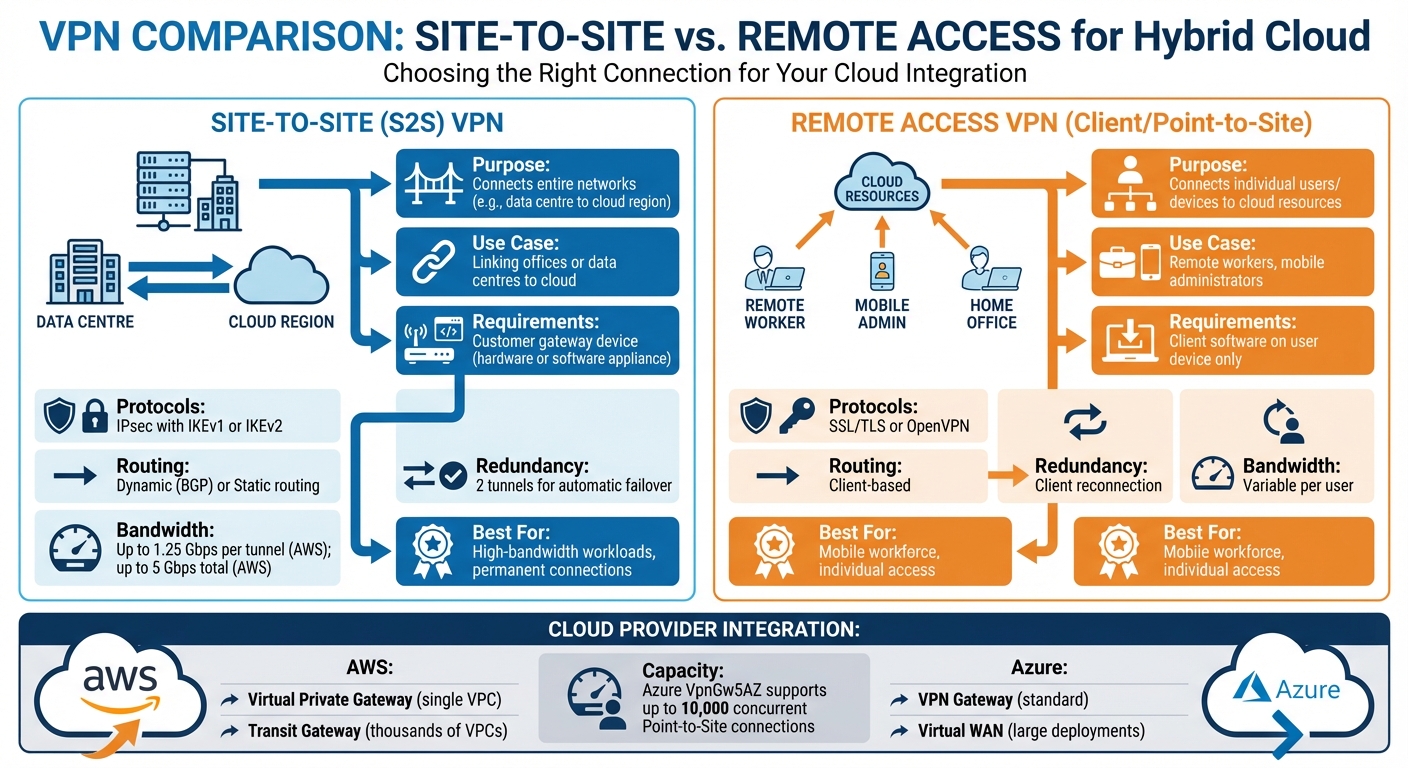 {VPN Types for Hybrid Cloud: Site-to-Site vs Remote Access Comparison}
:::
{VPN Types for Hybrid Cloud: Site-to-Site vs Remote Access Comparison}
:::
Site-to-Site and Remote Access VPNs
Site-to-Site (S2S) VPNs are designed to connect entire networks, such as linking a data centre in Manchester to an AWS region in London. This setup creates a continuous, reliable connection between locations. To make it work, you’ll need a customer gateway device - this can be either physical hardware or a software appliance - on your premises to handle the IPsec tunnels [6]. These VPNs typically use IPsec with IKEv1 or IKEv2 and can manage traffic through dynamic routing with Border Gateway Protocol (BGP) or static routing [3]. AWS Site-to-Site VPN connections include two tunnels to ensure automatic failover and high availability [3].
Remote Access VPNs, also called Client VPNs or Point-to-Site VPNs, are more suited for individual users or devices connecting to cloud resources. For instance, a remote worker in Edinburgh accessing an Azure network would use this type of VPN. Unlike S2S VPNs, these only require client software on the user’s device and typically operate using SSL/TLS or OpenVPN protocols [7].
In short, Site-to-Site VPNs are ideal for linking entire offices or data centres to the cloud, while Remote Access VPNs are better for supporting mobile workers or remote administrators. For workloads requiring high bandwidth and strong encryption, you might also consider running a Site-to-Site VPN over an AWS Direct Connect private connection [9]. Now, let’s look at how AWS and Azure integrate these VPN types.
VPN Setup on AWS and Azure

AWS integration involves three key components: a Customer Gateway (representing your on-premises hardware), and a gateway on AWS’s side. Depending on your needs, you can use a Virtual Private Gateway (VGW) for single VPC connections or a Transit Gateway (TGW) for larger, more complex deployments [6]. A Transit Gateway can connect thousands of VPCs through just one pair of VPN tunnels and supports Equal Cost Multipath (ECMP) for load balancing and optimising bandwidth [3]. AWS Site-to-Site VPN connections can handle tunnel bandwidths of up to 5 Gbps [8].
Azure uses a VPN Gateway, which is a virtual network gateway, to securely transfer encrypted traffic between an Azure virtual network and your on-premises setup over the public internet. It offers an active-active mode where two gateway instances create separate tunnels to the same on-premises VPN device, boosting both reliability and throughput [10]. For larger deployments, Azure Virtual WAN serves as a central hub to manage extensive site-to-site and point-to-site connections [11].
Both AWS and Azure charge based on VPN connection hours and data transfer, with AWS Transit Gateway deployments incurring extra fees for VPN attachments [3]. To simplify routing, enable route propagation in VPC route tables, which automatically updates paths when the VPN is active [8]. For latency-sensitive applications on AWS, you might consider Accelerated Site-to-Site VPN, which uses AWS Global Accelerator to route traffic via the nearest AWS edge location [3]. With these VPN setups in place, effective routing and IP address management become vital for smooth hybrid operations.
Routing and IP Address Management
Dynamic routing with BGP is often recommended for hybrid setups as it allows automatic route updates and failover [3]. On the other hand, static routing requires manually entering IP prefixes and making updates whenever your network changes [12]. BGP advertisements can help prioritise routes and define policies to manage traffic flow [12].
One crucial step in planning is to avoid overlapping IP address spaces. Duplicate IP ranges between your cloud and on-premises networks can disrupt traffic routing [13]. For Azure, when setting up a VPN Gateway, allocate a dedicated GatewaySubnet of at least /27 or /26 to ensure enough IP addresses for the gateway’s operations. Make sure not to apply Network Security Groups (NSGs) to this subnet, as they could interfere with the gateway’s functionality [13].
For AWS, ensure that the Autonomous System Number (ASN) used in the cloud differs from the one assigned to your on-premises customer gateway [8]. By default, AWS virtual private gateways use ASN 64512 unless specified otherwise [6]. If your customer gateway is behind a NAT device, enable NAT-T and use the NAT device’s public IP for configuration [8]. Additionally, if you need IPv6 support, opt for a Transit Gateway instead of a Virtual Private Gateway, as the latter doesn’t support IPv6 for Site-to-Site VPN connections [6].
This breakdown of VPN types, cloud integration methods, and routing essentials provides a solid starting point for designing a reliable VPN architecture.
Planning Your VPN Architecture
Choosing a VPN Topology
For most UK organisations, a hub-and-spoke topology is the go-to choice. It centralises management and simplifies operations, making it suitable for scaling up to thousands of VPCs or VNets through a single pair of VPN tunnels [14]. However, if your setup requires direct connections between on-premises locations without routing traffic through a central cloud hub, a full-mesh or multi-site topology might be a better fit [10][14].
The UK National Cyber Security Centre (NCSC) suggests a hybrid approach for organisations with extensive legacy systems. This combines a traditional walled garden
model - where firewalls separate network layers - with Zero Trust principles [1]. For protocol standards, IPsec is often the preferred option due to its interoperability and built-in support across operating systems. Alternatively, TLS VPNs can be used if managing proprietary third-party clients is feasible [2]. Once you've chosen a topology, the next step is to focus on redundancy to ensure uninterrupted connectivity.
Building in Redundancy and Failover
To achieve high availability, managed VPN services typically provide two VPN tunnels per connection, with each tunnel terminating in a different Availability Zone [3][16]. To avoid a single point of failure, ensure these tunnels terminate on separate physical devices within your on-premises data centre [3]. For added resilience, consider active-active mode, which allows both tunnels to handle traffic simultaneously, boosting overall throughput [10].
Dynamic routing, particularly with Border Gateway Protocol (BGP), is crucial for automatic failover. If one tunnel fails, BGP quickly updates routing tables to redirect traffic through the operational tunnel without manual intervention [3]. For more advanced setups, AWS Transit Gateway supports Equal-Cost Multi-Path (ECMP) routing, which distributes traffic across multiple VPN tunnels. This not only enhances redundancy but also increases bandwidth beyond the 1.25 Gbps limit per tunnel [3][14].
Zone-redundant gateways add another layer of protection by spreading gateway instances across different Availability Zones [16]. Many UK organisations also use Site-to-Site VPNs as a secure and cost-effective backup for dedicated private connections like Azure ExpressRoute or AWS Direct Connect [10][15]. With redundancy measures in place, effective IP planning and capacity forecasting are essential for maintaining optimal performance.
IP Planning and Capacity Forecasting
Avoiding overlapping IP address ranges between on-premises and cloud environments is crucial. Overlaps can limit available address space and disrupt traffic routing, directly affecting capacity planning [10]. When estimating throughput requirements, calculate peak traffic loads and consider using ECMP or active-active gateway configurations if you anticipate exceeding the 1.25 Gbps limit [10][14].
AWS Site-to-Site VPN tunnels support up to 1.25 Gbps each, while AWS Transit Gateway's ECMP can aggregate tunnels to achieve higher throughput [3][14]. You’ll also need to decide between a full-device VPN, which routes all traffic, and split tunnelling, which routes only specific internal IP ranges. While split tunnelling reduces the load on corporate infrastructure by allowing high-bandwidth internet traffic to bypass the VPN [2], the NCSC generally recommends forced VPN configurations to ensure all device traffic is monitored internally [2].
To minimise latency, consider using AWS Global Accelerator (sometimes called Accelerated VPN), which routes traffic to the nearest edge location [3]. For stable performance, configure peer VPN gateways with a single cipher to prevent fluctuations in the Maximum Transmission Unit (MTU) during key rotations [5]. Finally, set up proactive monitoring through cloud dashboards to track tunnel health and performance metrics. This helps identify capacity issues before they escalate into outages [5].
Need help optimizing your cloud costs?
Get expert advice on how to reduce your cloud expenses without sacrificing performance.
Securing Your VPN Connections
Encryption and Key Management
When it comes to Site-to-Site hybrid connections, IPsec with IKEv2 is the gold standard. It ensures confidentiality, integrity, and authenticity through Encapsulating Security Payload (ESP) in tunnel mode [19]. IKEv2 is particularly reliable, supports multi-homing, and is resilient against DoS attacks. For encryption, AES-256 offers the highest level of security, while AES-128 provides a balanced option [3][16][19].
To further secure your connections, enable Perfect Forward Secrecy (PFS) using Diffie-Hellman groups. This ensures that even if one session key is compromised, other session keys remain protected [3]. For instance, AWS Site-to-Site VPN encrypts traffic using AES-128 or AES-256 and employs Diffie-Hellman groups to guarantee PFS [3]. For remote access, protocols like OpenVPN or SSTP are effective as they use TCP port 443, allowing them to bypass most firewall restrictions [17].
Key management is equally critical. Store pre-shared keys securely using tools like Azure Key Vault, and automate certificate management to maintain minimum key lengths of 2,048 bits [20]. Avoid relying on Basic
VPN SKUs for production environments, as they often lack IKEv2 support, have limited throughput, and are being deprecated by many cloud providers [17][18].
Once encryption is in place, the next crucial step is managing user access effectively.
User Authentication and Access Control
Centralising identity management is essential for consistent access control. Tools like Microsoft Entra ID (formerly Azure AD) or Google IAM can help streamline this process across hybrid environments [18]. Just as secure encryption protects data, strict access controls are key to safeguarding network entry. Enforcing multi-factor authentication (MFA) for all VPN users adds an extra layer of defence against credential theft [18][21].
To enhance security further, implement Conditional Access policies and Role-Based Access Control (RBAC). These measures allow you to restrict access based on factors such as location, device compliance, and user roles [18][21]. For Site-to-Site VPNs, firewall rules can limit which IP addresses are permitted to initiate connections, reducing the risk of unauthorised access [5]. Always use high-entropy pre-shared keys and store them securely - never share them via email or messaging apps [5][20].
For organisations with large remote workforces, Azure VPN Gateway's top-tier SKU (VpnGw5AZ) supports up to 10,000 concurrent Point-to-Site IKEv2 or OpenVPN connections, making it a robust choice for UK businesses [16]. Additionally, managed identities can simplify service-to-service authentication by removing the need for manual secret management [20].
Logging, Monitoring, and Incident Response
Effective monitoring and logging are indispensable for maintaining VPN security. Configure VPN logs to feed into a centralised system, such as a Log Analytics workspace or a storage account, to streamline security investigations [18]. Use dashboards to track tunnel health and detect anomalies quickly [5]. For a deeper understanding of issues, combine VPN tunnel logs with gateway logs to diagnose connection failures and identify potential security vulnerabilities [5]. Set up automated alerts based on performance metrics and log data to ensure swift responses to suspicious activity [19].
Using an optional VPN allows users to disable the VPN and evade protective monitoring and auditing services. This increases the risk of mobile devices being attacked over the network, and of users circumventing corporate policy restrictions[2].
Adopting Microsoft's Assume Breach
approach can further bolster your defences. Use analytics to monitor network traffic, identify threats, and strengthen your overall security posture [19]. For organisations leveraging Azure Bastion, individual remote sessions can be managed, and any unauthorised activity can be addressed immediately by forcing a disconnect [19]. Automated policies can also audit whether subnets are properly linked to Network Security Groups (NSGs) and ensure VPN gateways are configured with the required authentication methods [18]. This centralised approach enables the enforcement of detailed security policies and improves anomaly detection across hybrid environments [19].
Managing Performance and Costs
Monitoring and Improving Performance
To keep your VPN running smoothly, start by setting performance baselines. Measure key metrics like tunnel state and data ingress/egress under varying load conditions to spot any unusual behaviour early on [22].
Cloud-native tools can simplify this process. For example, Amazon CloudWatch offers metric-based alarms, AWS Health provides tunnel status updates, and Google Cloud includes ready-made dashboards for project-wide visibility [5][22]. These tools allow you to address issues before they impact users. If you're running a hybrid environment in the UK, the National Cyber Security Centre (NCSC) advises using the IPsec protocol. Its broad compatibility with most operating systems helps reduce maintenance hassles [2].
If bandwidth limits are holding you back, you can step things up using Border Gateway Protocol (BGP) combined with Equal-Cost Multipath (ECMP) routing. This method distributes traffic across multiple VPN tunnels, boosting total bandwidth. For example, while a standard AWS VPN tunnel supports up to 1.25 Gbps, using AWS Transit Gateway with BGP ECMP can double that to 2.5 Gbps per VPN attachment [23]. For workloads that demand high performance, consider Accelerated VPN services like AWS Global Accelerator, which reroute traffic through a private global network, cutting down on jitter and latency [23][3].
To keep throughput stable, configure both cloud and peer VPN gateways with a single strong cipher per role [5]. Once performance is fine-tuned, it’s time to turn attention to managing costs.
Reducing VPN Costs
VPN costs in the cloud usually boil down to two main factors: connection-hour charges and data transfer out (DTO) fees. For UK businesses, keeping an eye on these costs is essential, especially as egress fees often represent the largest hidden expense. In fact, unpredictable costs are one of the biggest challenges in cloud management, directly affecting return on investment (ROI) [24].
Tools like AWS VPC Flow Logs, Cost & Usage Reports, and Amazon Athena can help you track data flows. To avoid unnecessary charges, deactivate tunnels that aren’t in use - most cloud providers charge hourly for VPN connections, even if there’s no traffic.
When choosing a gateway, go with a Virtual Private Gateway (VGW) for smaller, simpler setups with fewer VPCs. On the other hand, Transit Gateway (TGW) can simplify managing multiple VPCs but comes with added hourly and data processing costs [3]. Start small by testing with internet-based VPNs for non-critical workloads, and only move to dedicated connections like AWS Direct Connect once you’ve established your baseline bandwidth needs.
To reduce egress fees, consider consolidating regions to keep compute and storage in the same place. Use Content Delivery Networks (CDNs) to cache data closer to users, and batch transfers to minimise costs. AWS, for instance, offers the first 100 GB of data transfer out to the internet for free each month (excluding China and GovCloud regions). Beyond that, fees range from £0.07 to £0.04 per GB, depending on the volume [25].
For tailored advice, Hokstad Consulting can help UK businesses cut cloud costs by up to 30–50% through architecture tweaks and usage analysis, all while ensuring security and performance remain intact.
But cost management and monitoring are just part of the equation. Regular maintenance ensures your VPN stays reliable and ready for growth.
Maintenance and Continuous Improvement
Dynamic BGP routing is a smart choice for simplifying maintenance and ensuring smooth failovers [5][4]. Periodically review your architecture to confirm it still aligns with your application needs as demand changes and new cloud features emerge [23].
Cloud-native dashboards are invaluable for tracking metrics like TunnelDataIn/Out and packet rates, helping you identify bottlenecks before they disrupt users [5][23]. High Availability (HA) VPN solutions often come with a 99.99% Service Level Agreement (SLA), whereas single-interface VPNs usually only guarantee 99.9% [26]. Regularly test failure scenarios to confirm that backup systems can handle the full production load without compromising performance [23].
Following guidance from the NCSC, UK organisations are encouraged to use full-device VPNs. This ensures all traffic is monitored for security and helps prevent data leaks [2]. Additionally, keep an eye on CloudWatch metrics and apply Quality of Service (QoS) settings to on-premises devices to prioritise critical traffic. By doing so, you can keep your VPN both secure and efficient.
Conclusion
Securing hybrid cloud environments with VPNs requires thoughtful planning, ongoing monitoring, and adherence to UK regulatory standards. By following NCSC guidelines, such as prioritising IPsec as the main protocol and employing certificate-based authentication backed by hardware-protected storage like a TPM or TEE, you can create a security framework that is both reliable and compatible across systems [2][1].
To ensure high availability, deploy at least two VPN tunnels across different availability zones and use dynamic BGP routing for automatic failover [3][5]. This setup not only minimises the risk of outages but also scales to meet traffic demands. Additionally, enforcing VPN configurations to route all traffic through internal monitoring tools ensures compliance with UK regulations [2].
As the NCSC highlights:
Whether you require a VPN will depend on the network architecture you use. For example, there would be little benefit in using a VPN if you've fully adopted a zero-trust approach to networking[2].
For many UK organisations still reliant on legacy on-premises systems, a hybrid approach strikes the right balance. This involves combining traditional VPN setups to support existing infrastructure while progressively integrating Zero Trust principles for cloud-native services [1]. This approach not only enhances security but also helps manage costs effectively.
Speaking of cost, keeping expenses in check is critical. Take advantage of native cloud tools to monitor connection-hour charges and data transfer fees, deactivate idle tunnels, and consolidate regions where feasible. For UK businesses, Hokstad Consulting offers expertise in optimising cloud infrastructure, often achieving cost reductions of 30–50% through architectural improvements.
Beyond cost considerations, maintaining strong security practices is non-negotiable. Treat your VPN as part of your exposed attack surface: apply patches promptly, monitor tunnel health via cloud dashboards, and regularly test failover mechanisms. These measures will help you sustain a secure, scalable, and budget-friendly hybrid cloud environment [2][5].
FAQs
How do VPNs improve security in hybrid cloud environments?
VPNs play a crucial role in boosting security within hybrid cloud environments by establishing encrypted tunnels. These tunnels ensure that sensitive data stays protected as it moves between on-premises systems and cloud resources. Using advanced encryption standards like AES-128 or AES-256 and secure key exchange protocols, VPNs keep data private and shielded from tampering.
By isolating network traffic and preserving both confidentiality and integrity, VPNs provide a strong defence against unauthorised access and potential breaches. For organisations combining cloud and on-premises infrastructure, they are an indispensable tool for ensuring secure and compliant operations.
What’s the difference between Site-to-Site and Remote Access VPNs?
Site-to-Site VPNs create a safe, encrypted link between two entire networks, such as a company’s on-premises data centre and a cloud-based virtual network. These connections rely on IPsec tunnels, which terminate at a VPN gateway on both ends. Routing is typically managed using static routes or BGP, and redundancy is often built in by deploying multiple tunnel endpoints across different availability zones. This setup ensures that all devices within the connected networks can communicate securely.
Remote Access VPNs, however, are tailored for individual devices like laptops or smartphones. They enable users to securely connect to a corporate network from anywhere. Unlike Site-to-Site VPNs, these authenticate each user rather than an entire network. They commonly use SSL/TLS or IPsec protocols to establish secure, user-specific tunnels, giving authorised devices safe access to internal systems and resources, even when working remotely.
What are the best ways to manage VPN costs in a hybrid cloud environment?
To keep VPN costs under control in a hybrid cloud environment, start by tracking expenses using automated tagging for resources like gateways, tunnels, and IPsec traffic. Regular audits of your infrastructure can help spot and remove unused external IPs or underused tunnels, cutting unnecessary expenses. Additionally, combining tunnels where feasible can lead to noticeable savings.
Opting for lower-cost regions to host your VPN resources is another smart way to manage costs. Adopting a FinOps strategy can also make a big difference. This involves setting clear budgets, assigning cost responsibilities, and conducting regular reviews to identify waste and ensure spending stays efficient.